
Welcome Guest ( Log In | Register )

40 Pages  1 2 3 > » Bottom

Outline · [ Standard ] · Linear+

MacOS X OS X Yosemite - Every bit as powerful as it looks, 10.10.5 now available

views
     
TSTownshend
post Jun 1 2014, 03:05 PM, updated 11y ago

Regular
******
Senior Member
1,677 posts

Joined: Sep 2009
QUOTE
Attention: OS X Yosemite is now officially available. You can download it for free via the Mac App Store or by visiting this link

Note: Before you start, please check whether your Mac is supported and meet all the minimum requirements below. Also please backup your Mac using Time Machine before installing OS X Yosemite.

How to install OS X Yosemite (Upgrade, clean install or on a separate partition) Tutorial

List of supported Macs and requirements

» Click to show Spoiler - click again to hide... «

OS X 10.10

Apple officially unveiled the new OS X 10.10, known as Yosemite at the 25th annual Worldwide Developers Conference on 2 June 2014.

It is the upcoming eleventh major release of the Apple's operating system after Mavericks.

user posted image

Redesigned UI

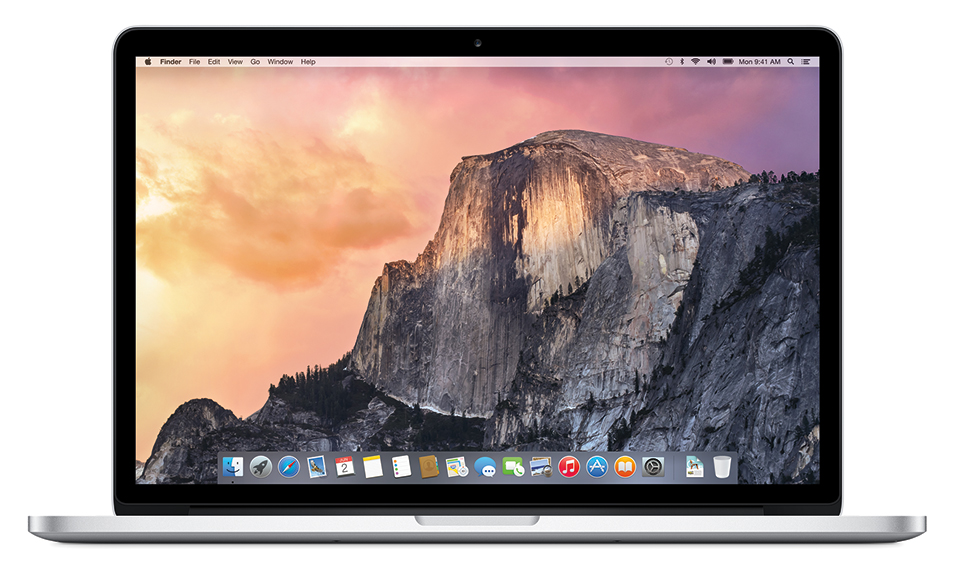
OS X Yosemite features new and revamped user interface, inspired by iOS 7.

Of course, it still has the generic and familiar look of the previous OS X, such as the iconic dock and the menu bar, but with much flatter and modern visual appearance.

Other major visual changes in OS X Yosemite are the 2D dock, translucency, new icons, Dark Mode and Helvetica Neue as the new default system font.
user posted image

user posted image


Other visual changes :

Safari - Safari 8 features a new UI.

Boot Screen - New iOS-inspired Boot Screen.

Login Screen - New login screen background.

Launchpad - Revamped Launchpad UI.

Game Center - iOS 7-like Game Center UI.

QuickTime - Flatter QuickTime UI.

Time Machine - New Time Machine UI.

New Features

Yosemite has a bunch of new features and many of them focus on the theme of Continuity.

Continuity is a set of new features that allows iPhone, iPad, and Mac to remain true to their form-factors while still working seamlessly together.

With Continuity, users now have better and seamless integration between their Mac and iOS 8 Devices.

Moving on, here is a list of some of the notable new/improved features that are included in OS X Yosemite.

1) AirDrop: AirDrop now works between iOS and OS X.

user posted image

2) Handoff: Handoff lets your devices communicate with each other to help you work on the same project across multiple Apple devices.

user posted image

3) Improved Spotlight: Spotlight now appears in center of screen. You can type in a few characters to find news, Wikipedia info, maps, docs, movie times nearby, or see media you can buy from Apple that’s related to that topic.

user posted image

4) iCloud Drive: iCloud Drive lets you access docs in the cloud, and they can be synced across all your Mac products.

user posted image

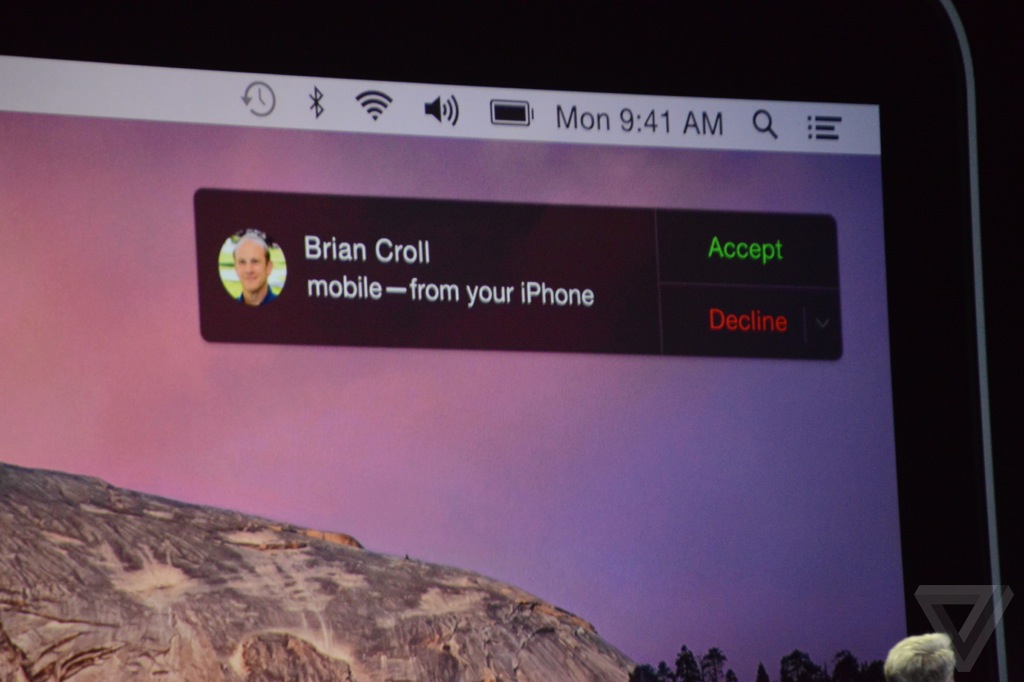
5) Phone Integration: Your Mac now acts as a caller ID when you get a call on your iPhone. You can also use your Mac as a speaker phone, or call a number you see on webpage. Not only that, you will be able to send and receive SMS/MMS right on your Mac as well.
user posted image

6) Instant Hotspot: With OS X Yosemite, your Mac can automatically use the personal hotspot on your iDevice when they are within the range of each other. Your Mac even displays the signal strength and battery life of your iDevice.

user posted image


Other features/changes:

Safari - OS X Yosemite includes the new and more energy efficient Safari 8 along with an improved Nitro JavaScript engine, making it faster than ever. The new Safari also features new tabbed browsing.

iCloud everywhere - Yosemite now lets users log into their Mac using their iCloud password instead of user account password.

Currency conversion - Currency conversion in Spotlight.

Spotlight search - Bing now replaces Google as Spotlight search engine.

Batch rename - Yosemite's Finder brings you the ability to rename multiple selected items using right-click.

Near networking - Apple's move to open Multipeer Connectivity means Macs and iOS devices will be far easier to network together over Wi-Fi or Bluetooth.

Cloud control - Yosemite allows you to remotely close pages that you have open on all your devices using iCloud Tabs.

New sounds - Apple has added new alert tones to Messages.

File location - Click on a file and hold the command key and you'll still see where that file is located at the bottom of the window.

Launchpad - Extra row and add pages in Launchpad Folders.

Dictation - OS X Yosemite includes 24 new dictation languages.

Record - You can plug in an iOS 8 device and record audio and video in QuickTime.

Video encoding - You can encode video files by right-clicking on the video file and selecting the encode file option.

Mission Control - Improved Mission Control.

Mail - Updated Mail App with Markup feature.

Release date

OS X Yosemite was released on 16 October 2014 right after the Apple October event. Like the previous OS X Mavericks, OS X Yosemite is available as a free upgrade and it can be downloaded through the Mac App Store.

This post has been edited by Townshend: Aug 15 2015, 10:45 AM
TSTownshend
post Jun 1 2014, 03:05 PM

Regular
******
Senior Member
1,677 posts

Joined: Sep 2009
Before installing OS X Yosemite

Before you install OS X Yosemite, I strongly recommend you to:

1) Backup using Time Machine.

In case something goes wrong or if you are not happy with the new OS, you can revert to the previous OS easily and still have all your data.

2) Make a Mavericks bootable drive.

Download the Mavericks installer from Mac App Store and make a bootable drive. Once you installed Yosemite (on your main partition), you will not be able to download Mavericks anymore. So, it is a good idea to download the installer so you can reinstall Mavericks anytime.

How to make a Mavericks bootable drive:

» Click to show Spoiler - click again to hide... «


3) Upgrade, clean install or install on a separate partition

Basically, you have the option to either upgrade or perform a clean install. If you have no problem with your previous OS, you can just save your time and proceed with the upgrade method. Upgrading is the easiest and fastest way to install the new OS on your machine.

How to upgrade:

» Click to show Spoiler - click again to hide... «


However, if you have problems with current OS, or want to make sure that your Mac get the best performance, I recommend you to do a clean install instead. A clean install is able to eliminate the bugs and errors on a previously installed OS that may still present if you choose the upgrade option.

How to do clean install:

» Click to show Spoiler - click again to hide... «


If you would like to keep your previous OS on your machine due to some reasons, you can install OS X Yosemite on a separate partition of your drive. You can do that by following the guide below.

How to create a partition:

» Click to show Spoiler - click again to hide... «


How to install OS X Yosemite on different partition

1) Download OS X Yosemite via the Mac App Store.

2) After Yosemite has finished downloading, quit when it prompts you to install because you may want to copy the installer somewhere else in case you need it again (trust me, you do not want to waste your time to download it again). The installer is located in the Application folder.

3) To install the OS on different partition, just open the installer, and when it asks for install location, click on Show All Disks and choose a partition that you created earlier (you can skip this step if you want to upgrade your current OS).

4) After the installation, you can press and hold Option during startup to choose between your previous OS or OS X Yosemite. To select Startup Disk, go to System Preferences > Startup Disk > Choose what OS you want to use during startup.

Help, my Mac is slow after Yosemite update

Your Mac might be slow because of Spotlight indexing. But if it is still slow after a few hours or days, try the following

1) If FileVault is enabled, try disabling it and see if it fixes the issue.

2) Reduce the Transparency and disable Dashboard in System Preferences. This seems to solve the issue for some people.

3) Use Disk Utility to repair your disk. To do so, go to Applications > Utilities > Disk Utility. Then choose Yosemite partition and click Verify Disk Permissions, then Repair Disk Permissions. Next, click Verify Disk and then Repair Disk.

4) Reset the SMC and PRAM.

5) Do a clean install if you did an upgrade.

How to revert to previous OS after you have installed Yosemite

1) Via Time Machine (recommended).

-Make sure Time Machine drive is connected.
-During startup, press and hold Command-R (works for OS X Lion and later).
-Choose Restore From Time Machine Backup and follow the instructions.

*You will still have all your data and settings and your Mac will be in the same state as it was on the date of the backup.

2) Via bootable installer (clean install).

-Make sure the bootable installer is connected, then press option during startup.
-In OS X Utilities screen, choose Disk Utility and erase your main hard drive.
-After it is done, go back to OS X Utilities screen and choose Install OS X and then follow the instructions.

*You will lose all your data, but you will have the option to restore files from Time Machine after the process (provided that you have Time Machine backup).

This post has been edited by Townshend: Mar 3 2015, 07:32 PM
tamiyasaka12
post Jun 1 2014, 04:04 PM

Getting Started
**
Junior Member
195 posts

Joined: Nov 2013
Gooding maa
Bonchi
post Jun 1 2014, 06:08 PM

KittehPowah
******
Senior Member
1,649 posts

Joined: Sep 2008
i personally dont like how the mock up design looks like.. luckily it's not the real thing but what people think it will look like. (i hope the real thing don't look like that sad.gif )
quadcube
post Jun 1 2014, 06:16 PM

Regular
******
Senior Member
1,924 posts

Joined: May 2009
From: Yokohama, JP


yuck,ugly doh.gif
blueblood619
post Jun 1 2014, 10:20 PM

Getting Started
**
Junior Member
111 posts

Joined: Sep 2012
it sux..
Anonymous34
post Jun 2 2014, 12:39 AM

Look at all my stars!!
*******
Senior Member
3,176 posts

Joined: May 2013
From: Petaling Jaya


Hope they can put more translucency to the UI!
I don't want flatter designs, rather old designs with less reflection and shadow.
kopiPeng
post Jun 2 2014, 09:48 AM

★ Xiaomi VIP ★
*******
Senior Member
2,548 posts

Joined: Aug 2008
The new Finder UI is nice!!

But the Dock is ugly... prefer the old one thou... sad.gif
Xefron
post Jun 2 2014, 09:58 AM

Look at all my stars!!
*******
Senior Member
2,507 posts

Joined: Jan 2003


ahhh craps.

btw Apple really did this ? facepalm.

QUOTE
Also, Apple appears to have quietly filed for trademarks on a number of California-themed names which probably will be used for future OS X names.

The names include: Yosemite, Redwood, Mammoth,California, Big Sur, Pacific, Diablo, Miramar, Rincon, El Cap, Redtail, Condor, Grizzly, Farallon,Tiburon, Monterey, Skyline, Shasta, Sierra, Mojave, Sequoia, Ventura, and Sonoma.

mudkipryan94
post Jun 2 2014, 10:37 AM

someone need a sarcasm meter?
********
All Stars
12,000 posts

Joined: Feb 2010
From: Banting, Puchong, KL


-Finder UI nice thou... but for other mmg.. [woii APA BENDO niii vmad.gif]
pengleong
post Jun 2 2014, 10:56 AM

New Member
*
Junior Member
35 posts

Joined: Jun 2014


SYRAH?


islamic inspire?
TSTownshend
post Jun 2 2014, 11:27 AM

Regular
******
Senior Member
1,677 posts

Joined: Sep 2009
QUOTE(kopiPeng @ Jun 2 2014, 09:48 AM)
The new Finder UI is nice!!

But the Dock is ugly... prefer the old one thou... sad.gif
*
Those are just mockups based on rumours. The new OS is said to have a flat and minimalistic look.

QUOTE(pengleong @ Jun 2 2014, 10:56 AM)
SYRAH?
islamic inspire?
*
No, Syrah is a wine grape.
kopiPeng
post Jun 2 2014, 11:57 AM

★ Xiaomi VIP ★
*******
Senior Member
2,548 posts

Joined: Aug 2008
QUOTE(Townshend @ Jun 2 2014, 11:27 AM)
Those are just mockups based on rumours. The new OS is said to have a flat and minimalistic look.
No, Syrah is a wine grape.
*
The Keynote is 3 days right??

Do u know which day they will talk about OSX? thinking to watch live stream about OSX... hmm.gif
JeremyLord
post Jun 2 2014, 01:07 PM

Casual
***
Junior Member
321 posts

Joined: Nov 2012
From: Planet Earth

Damn. Hope that that flat design is not happening.
TSTownshend
post Jun 2 2014, 04:15 PM

Regular
******
Senior Member
1,677 posts

Joined: Sep 2009
QUOTE(kopiPeng @ Jun 2 2014, 11:57 AM)
The Keynote is 3 days right??

Do u know which day they will talk about OSX? thinking to watch live stream about OSX...  hmm.gif
*
The keynote is on 2 June, so everything they want us to know will be announced on that day.

https://developer.apple.com/wwdc/schedule/events/

The rest (3/4/5/6 June events) are just for developers.

BTW, the two hours live stream starts at 1.00 AM, 3 June - Malaysia time

https://www.apple.com/apple-events/june-2014/

Fortunately, I'm still on holiday, so I can watch that live stream lol.
kopiPeng
post Jun 2 2014, 04:18 PM

★ Xiaomi VIP ★
*******
Senior Member
2,548 posts

Joined: Aug 2008
QUOTE(Townshend @ Jun 2 2014, 04:15 PM)
The keynote is on 2 June, so everything they want us to know will be announced on that day.

https://developer.apple.com/wwdc/schedule/events/

The rest (3/4/5/6 June events) are just for developers.

BTW, the two hours live stream starts at 1.00 AM, 3 June - Malaysia time

https://www.apple.com/apple-events/june-2014/

Fortunately, I'm still on holiday, so I can watch that live stream lol.
*
Okay! Thanks alot for your info bro!

Lucky u! I still have to work tomorrow.. now thinking whether want to watch tonight anot.. after watch tomorrow fishing during work ady.. sad.gif

Dont know still can watch replay tomorrow morning ady... laugh.gif

This post has been edited by kopiPeng: Jun 2 2014, 04:19 PM
TSTownshend
post Jun 2 2014, 04:31 PM

Regular
******
Senior Member
1,677 posts

Joined: Sep 2009
The 24 March leaked OS X 10.10 photos doesn't seem to show much redesign though.

user posted image

user posted image

user posted image

http://www.iphonehacks.com/2014/06/leaked-...creenshots.html

This post has been edited by Townshend: Jun 2 2014, 04:31 PM
McFazo
post Jun 3 2014, 12:31 AM

New Member
*
Junior Member
49 posts

Joined: Jul 2013
uh.

i dunno how i feel about this. some of it do look nice, i just dont like the new dock look. the 3d plate is gone
ahaksz28
post Jun 3 2014, 03:10 AM

Getting Started
**
Junior Member
174 posts

Joined: Dec 2008


Quite awesome this new OS! I like that we can make and accept calls using Mac now.
adurian
post Jun 3 2014, 03:26 AM

Getting Started
**
Junior Member
151 posts

Joined: Sep 2011
Is it free?

40 Pages  1 2 3 > » Top
 

Change to:
| Lo-Fi Version
0.0311sec    0.29    6 queries    GZIP Disabled
Time is now: 21st December 2025 - 07:32 PM