Outline ·
[ Standard ] ·
Linear+
♠The Nexus 5 Official Thread V7♠, 4.4.3 (KTU84M) launched :D
|
xxdesire
|
 Apr 22 2014, 11:09 AM Apr 22 2014, 11:09 AM
|

|
QUOTE(bearbear @ Apr 22 2014, 11:04 AM) when u say sdcard you mean i have to create a new folder named sdcard -> zooperwidget -> template? or just place under Nexus 5 -> zooperwidget -> template Just navigate to your /sdcard. Default storage is called /sdcard. Download any file explorer off play store. Install zooperwidget then you can see the /sdcard/zooperwidget/template folder. |
|
|
|
|
|
bearbear
|
Apr 22 2014, 11:18 AM
|
|
|
ok bear with me a little bit on this.
As soon as i add widget to screen (4x4), I will have the area "resize or tap to start"
It will then prompt ZW v2.46 with some widgets like "Empty", "Illuminated", "LeftWIcons" etc.
|
|
|
|
|
|
xxdesire
|
Apr 22 2014, 11:20 AM
|
|
|
QUOTE(bearbear @ Apr 22 2014, 11:18 AM) ok bear with me a little bit on this. As soon as i add widget to screen (4x4), I will have the area "resize or tap to start" It will then prompt ZW v2.46 with some widgets like "Empty", "Illuminated", "LeftWIcons" etc. Yeap. Then you choose the template that you put inside your /sdcard folder. |
|
|
|
|
|
kukukakikukaku
|
Apr 22 2014, 11:21 AM
|
Getting Started

|
QUOTE(bearbear @ Apr 22 2014, 11:18 AM) ok bear with me a little bit on this. As soon as i add widget to screen (4x4), I will have the area "resize or tap to start" It will then prompt ZW v2.46 with some widgets like "Empty", "Illuminated", "LeftWIcons" etc. Bear with the bearbear. Haha. But I also have the same problem with you. Could use some help too. Copied the .zw file into the Templates folder but it doesnt appear anywhere.  |
|
|
|
|
|
stevensteady
|
Apr 22 2014, 11:24 AM
|
|
|
-make sure ur nova launcher is well setup 1st ( 7x10 homescreen, 0 margins)
after u add 4x4 u will have the area "resize or tap to start", jus tap it and resize it (pull along untill it filled up ur screen) and then tap again u will browse into zooper settings, den choose sd card
|
|
|
|
|
|
bearbear
|
Apr 22 2014, 11:24 AM
|
|
|
yup...can't find any of the 4 templates available for choosing  |
|
|
|
|
|
stevensteady
|
Apr 22 2014, 11:27 AM
|
|
|
Choose SD card 
Then this 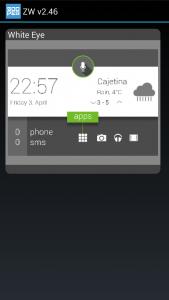 This post has been edited by stevensteady: Apr 22 2014, 11:29 AM
 |
|
|
|
|
|
kukukakikukaku
|
Apr 22 2014, 11:31 AM
|
Getting Started
|
Okay now I get it. The SD card function will only appear on Zooper Pro version.
|
|
|
|
|
|
bearbear
|
Apr 22 2014, 11:31 AM
|
|
|
lol so either root or pay thanks for the helps guys, the free version of zooper has different interface and doesn't have the SD option.  This post has been edited by bearbear: Apr 22 2014, 11:33 AM This post has been edited by bearbear: Apr 22 2014, 11:33 AM |
|
|
|
|
|
kukukakikukaku
|
Apr 22 2014, 11:35 AM
|
Getting Started
|
Even if your phone is rooted, it won't appear. Have to buy the Pro version which is RM8++.
|
|
|
|
|
|
bearbear
|
Apr 22 2014, 11:36 AM
|
|
|
QUOTE(kukukakikukaku @ Apr 22 2014, 11:35 AM) Even if your phone is rooted, it won't appear. Have to buy the Pro version which is RM8++. oo so u purchased and it works?  |
|
|
|
|
|
xxdesire
|
Apr 22 2014, 11:39 AM
|
|
|
QUOTE(bearbear @ Apr 22 2014, 11:31 AM) lol so either root or pay thanks for the helps guys, the free version of zooper has different interface and doesn't have the SD option. QUOTE(kukukakikukaku @ Apr 22 2014, 11:35 AM) Even if your phone is rooted, it won't appear. Have to buy the Pro version which is RM8++. Oh thought you got the pro version  To load template must have the pro version. |
|
|
|
|
|
kukukakikukaku
|
Apr 22 2014, 11:39 AM
|
Getting Started
|
QUOTE(bearbear @ Apr 22 2014, 11:36 AM) oo so u purchased and it works? Yes. After I saw stevensteady's screenshot, I realize the blue icon is the Pro version while the orange one is Free version. |
|
|
|
|
|
bearbear
|
Apr 22 2014, 12:05 PM
|
|
|
Bottom row still show the stock option with access the application in the middle. Nova also need to buy? This post has been edited by bearbear: Apr 22 2014, 12:19 PM |
|
|
|
|
|
man3
|
Apr 22 2014, 12:32 PM
|
Getting Started
|
go find apk for free la...if feel want to contribute to developer then buy the apps
|
|
|
|
|
|
tzershi
|
Apr 22 2014, 01:42 PM
|
|
|
Planning to buy Nexus 5, any good suggestion?
seven mobile or directd? Thnaks.
|
|
|
|
|
|
bearbear
|
Apr 22 2014, 01:51 PM
|
|
|
whichever nearer to you
|
|
|
|
|
|
cybersim2
|
Apr 22 2014, 02:14 PM
|
|
|
Anyone here install G2 Knockon feature on N5 ?
Pls comment
|
|
|
|
|
|
xxdesire
|
Apr 22 2014, 02:23 PM
|
|
|
QUOTE(cybersim2 @ Apr 22 2014, 02:14 PM) Anyone here install G2 Knockon feature on N5 ? Pls comment We have kernel features like DT2W (double tap 2 wake). so no need for that. |
|
|
|
|
|
wajahebat
|
Apr 22 2014, 03:13 PM
|
|
|
QUOTE(man3 @ Apr 22 2014, 12:32 PM) go find apk for free la...if feel want to contribute to developer then buy the apps That is not the recommended way  |
|
|
|
|



 Quote
Quote


 0.0994sec
 0.56
0.56
 6 queries
 GZIP Disabled