Welcome Guest ( Log In | Register )

29 Pages « < 16 17 18 19 20 > » Bottom

Outline · [ Standard ] · Linear+

Unifi HyppTV EC6106V5 [UniFi/Streamyx]

views
     
renz.corpuz
post Jun 28 2015, 06:13 AM

New Member
*
Junior Member
11 posts

Joined: Jun 2015
QUOTE(lifeisjustgreat @ Jan 31 2015, 01:12 PM)
ENABLE UNKNOWN SOURCE APK & INSTALL APK TO HYPPTV WITHOUT ROOT!!!

Hi all,

I just got my HyppTV 3 days ago and was shock that it can't install APK file (at least not with the help of this thread)!

I follow the creator of this thread, akifrabbani, to get around, rooted my box and able to install APK as user app (install at /data). Note that most app failed to work if you install them as system app.

However, I find it troublesome to always need to key in Linux command just to install an APK. Thus I created a small app - HyppAPK to install APK as user app.

Steps:
0) MAKE SURE YOUR POWER SUPPLY IS ON FOR THE WHOLE PROCESS OR ELSE WILL SPOIL YOUR TV BOX
1) Copy the attached HyppTV-APK-Installer.zip [attachmentid=4324643] to your USB drive.
2) Plug USB drive into your HyppTV box.
3) Power off your HyppTV box by plug out power cable.
4) Press your remote control RED power ON button and hold it till step 6.
5) Plug in power cable into your HyppTV Box and press the power button behind the box.
6) When you see white HyppTV welcome screem, you can release remote control RED power ON button.
7) You will see a black screen with a Android robot.
8) Use remote control UP/DOWN to navigate to "Apply update from external storage" and press OK button.
9) Choose HyppTV-APK-Installer.zip and press OK.
10) Wait for system to reboot and when start just run HyppAPK.

This little app will try to enable "Unknown source" apk installation, if set successful, it will fire up a simple file explorer for you to install APK. This app MUST be install as a system app for it to work (follow the 10 step above). As far as I know, no root is require.

Thanks akifrabbani for doing a great job to start all this! Without him, I will be so disappointed with HyppTV Box which cannot install APK!

DISCLAIMER: I will not be responsible if your warranty is void, your STB exploded or your dog died by using this exploit.
[attachmentid=4324643]
*
I forgot to ask, does this work on the new Hypptv STB? the small white box i mean...

http://img01.taobaocdn.com/bao/uploaded/i1...;0-item_pic.jpg
bain1511
post Jun 28 2015, 02:18 PM

New Member
*
Newbie
1 posts

Joined: Jun 2015
QUOTE(qaliff @ Jun 17 2015, 03:06 PM)
wasap me 0192141216

1 bln 30
3 bln 90
6 bln 150
1 thn 280
*
bayar dulu ke bri passwd dlu... kalau byr dulu xbrani .... kalau bri passwd dlu berani la.. sbb admin bleh remove akaun user bila2 masa aje

This post has been edited by bain1511: Jun 28 2015, 02:19 PM
linkinstreet
post Jun 29 2015, 08:32 AM

Red Bull Addict
Group Icon
Moderator
9,275 posts

Joined: Jan 2005
From: KL. Best place in Malaysia. Nuff said

are there any way to configure a spare PC to view the IPTV instead of using the STB?
would getting the IP from the STB, and either use XMBC or Media Centre to browse the UDP broadcast work? Or does TM lock down the encryption so that the IPTV data is only viewable from the STB?
KL_menJERIT
post Jun 30 2015, 03:18 PM

Casual
***
Junior Member
340 posts

Joined: Mar 2007
From: Malaysia


im successfull install MX Player 1.7.40 on stb EC6106V5

make sure u install HyppTV-APK-Installer first

download apk file
1. datafilehost.com/d/783aa2b8
2. datafilehost.com/d/383a14e8

install the apk

after that install the Mx Player custom codec from xda forum. if u not install custom codec u cannot hear audio with DTS format

now u can play movie from ur pendrive,external hd

Enjoy

This post has been edited by KL_menJERIT: Jun 30 2015, 03:30 PM
salimbest83
post Jul 1 2015, 05:21 PM

♥PMS on certain day♥
*******
Senior Member
8,639 posts

Joined: Feb 2006
From: Jelutong Penang


Parking 1st
sofycinta
post Jul 4 2015, 06:43 PM

New Member
*
Newbie
0 posts

Joined: Feb 2013


Hi, macamne nak bagi speed laju bila guna my iptv sama macam guna hypptv, sebab bila guna myiptv melalui wlan sedang hypptn dedicated Lan. Macamana nak guna hyptv and myiptm pada LAN yang sama.
syaheed86
post Jul 5 2015, 11:01 PM

New Member
*
Junior Member
5 posts

Joined: Jul 2011
From: Somewhere


anyone tried installing Iflix?

mytoyagain
post Jul 10 2015, 10:14 AM

New Member
*
Junior Member
23 posts

Joined: Nov 2011
QUOTE(azwandy @ Feb 27 2015, 08:41 AM)
Forget youtube download using playstore.. as this akif's google apps exploit got busted by tm.. therefore, they won't allow for the google sign in, or google account, which needed for you to install the playstore.. now i will suggest that you do a factory reset to remove that buggy update, but before that make sure you copy out all info (hypptv username, password, etc) before you do factory reset..

my advice, go thru this thread slowly, and u can find in my previous post as well..

just need to install these 2 updates, which u can also find in this thread :

1. Install the hyppapk installer (which will enable the stb to install outsource/non-market app)
2. Install the aptoide (your replacement for Google Playstore)

As for the youtube, no choice but you have to use yotube alternative.. such as youtube for tv (available in aptoide), or other app such as viral popup

good luck!!!
*
Bro, Good Morning,
need your and everyone opinion,
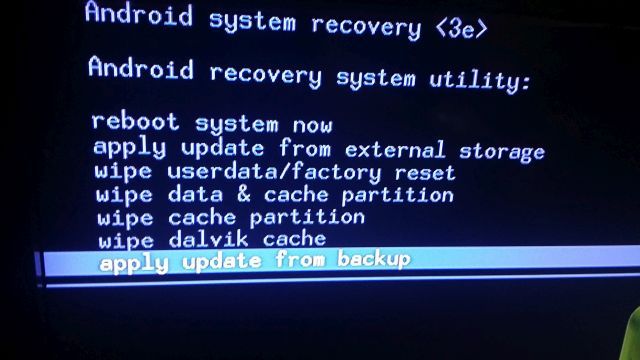
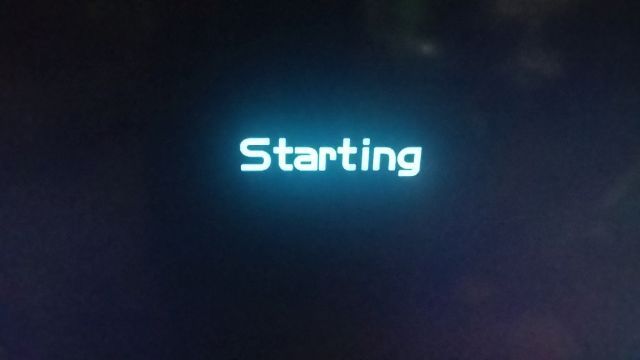
wonder how to restore STB EC6106V5 back to original setting after ran the "Apply update from backup" and then it keep on repeating "Starting" on the screen can't get into the system...

user posted image

user posted image


Attached thumbnail(s)
Attached Image Attached Image
lung85
post Jul 10 2015, 10:23 AM

Casual
***
Junior Member
426 posts

Joined: Sep 2010
QUOTE(mytoyagain @ Jul 10 2015, 10:14 AM)
Bro, Good Morning,
need your and everyone opinion,
wonder how to restore STB EC6106V5 back to original setting after ran the "Apply update from backup" and then it keep on repeating "Starting" on the screen can't get into the system...

user posted image

user posted image
*
i try this be4, u hav to wait very long cos i juz like load new firmware, starting screen will take very long, and u must connect to internet with LAN if u wan setup ur email later, juz like android phone 1st time setup.

after u manage to go in hypptv, u need to perform update to latest firmware then u will c hypptv instead of TVOS.

btw if u wan go to setting page u need to key the password, try 8288, nt sure cos i very long no touch sinces i bought a mi box
mytoyagain
post Jul 10 2015, 10:39 AM

New Member
*
Junior Member
23 posts

Joined: Nov 2011
QUOTE(lung85 @ Jul 10 2015, 10:23 AM)
i try this be4, u hav to wait very long cos i juz like load new firmware, starting screen will take very long, and u must connect to internet with LAN if u wan setup ur email later, juz like android phone 1st time setup.

after u manage to go in hypptv, u need to perform update to latest firmware then u will c hypptv instead of TVOS.

btw if u wan go to setting page u need to key the password, try 8288, nt sure cos i very long no touch sinces i bought a mi box
*
Bro, its take how long to wait?? i waited for 20min last night and just shut down .... may be try again 2nite
what else shall i do?? run the "apply update from backup" once again??

This post has been edited by mytoyagain: Jul 10 2015, 10:54 AM
lung85
post Jul 10 2015, 08:47 PM

Casual
***
Junior Member
426 posts

Joined: Sep 2010
QUOTE(mytoyagain @ Jul 10 2015, 10:39 AM)
Bro, its take how long to wait??  i waited for 20min last night and just shut down  ....  may be try again 2nite
what else shall i do??  run the "apply update from backup" once again??
*
u connected to tv o monitor? i found monitor screen auto off very fast, u try connect to LAN and mouse/keyboard and c try c if can go to setup page o nt
mytoyagain
post Jul 10 2015, 10:08 PM

New Member
*
Junior Member
23 posts

Joined: Nov 2011
QUOTE(lung85 @ Jul 10 2015, 08:47 PM)
u connected to tv o monitor? i found monitor screen auto off very fast, u try connect to LAN and mouse/keyboard and c try c if can go to setup page o nt
*
i connected to TV and tried to "apply update from backup" once again since 7.10pm, till now its still "Starting" doh.gif
lung85
post Jul 10 2015, 11:20 PM

Casual
***
Junior Member
426 posts

Joined: Sep 2010
QUOTE(mytoyagain @ Jul 10 2015, 10:08 PM)
i connected to TV and tried to "apply update from backup" once again since 7.10pm, till now its still "Starting"  doh.gif
*
hw about connect it to a LAN cable?
silent_cry
post Jul 11 2015, 04:31 PM

New Member
*
Junior Member
22 posts

Joined: Jan 2005
anyone try this Huawei EC6106V5-TM on normal gradpack 4mbps streamyx account (w/o subscribe to hypptv service) ? plan to buy a 2nd hand stb. thanks
xarmx
post Jul 11 2015, 10:02 PM

Look at all my sta........
****
Senior Member
559 posts

Joined: Mar 2009
Anyone can give me the server address for unifi hypptv system upgrade? Urgent. I screwed up and resetted the box, now its back to streamyx firmware.
mytoyagain
post Jul 12 2015, 06:28 PM

New Member
*
Junior Member
23 posts

Joined: Nov 2011
QUOTE(lung85 @ Jul 10 2015, 11:20 PM)
hw about connect it to a LAN cable?
*
sorry bro,
what u mean connect to LAN? would u please show step by step... blush.gif
lung85
post Jul 12 2015, 09:45 PM

Casual
***
Junior Member
426 posts

Joined: Sep 2010
QUOTE(silent_cry @ Jul 11 2015, 04:31 PM)
anyone try this Huawei EC6106V5-TM on normal gradpack 4mbps streamyx account (w/o subscribe to hypptv service) ? plan to buy a 2nd hand stb. thanks
*
last time i use 4mb combo package and my friend giv me the hypptv box, so far no issue if ur connection is stable, if lag i juz restart my modem then ok.


8686
post Jul 12 2015, 10:00 PM

Getting Started
**
Validating
55 posts

Joined: Jan 2014
i just have one simple question, how to get this browser works on this stb? currently subscribe the unifi version. my friends old stb got embedded youtube. but this new version got no youtube apps but i do notice it got browser , so i guess i can surf net and watch youtube by surfing net.

i don't plan to make it very complicated by rooting it or install anything. is it possible by adjust any setting on the stb?
lung85
post Jul 12 2015, 11:36 PM

Casual
***
Junior Member
426 posts

Joined: Sep 2010
QUOTE(8686 @ Jul 12 2015, 10:00 PM)
i just have one simple question, how to get this browser works on this stb? currently subscribe the unifi version. my friends old stb got embedded youtube. but this new version got no youtube apps but i do notice it got browser , so i guess i can surf net and watch youtube by surfing net.

i don't plan to make it very complicated by rooting it or install anything. is it possible by adjust any setting on the stb?
*
juz use a mouse and keyboard o a mouse would do, to make things easy to select rather than using remote, so far use browser with youtube has no issue
lung85
post Jul 12 2015, 11:40 PM

Casual
***
Junior Member
426 posts

Joined: Sep 2010
QUOTE(mytoyagain @ Jul 12 2015, 06:28 PM)
sorry bro,
what u mean connect to LAN?  would u please show step by step...  blush.gif
*
LAN is local area network. mean plug in a netowrk cable to ur box. from ur modem direct to the box.

i connect my hdmi to my monitor and LAN cable to modem, i facing starting very long at tv, and i connect to modem and monitor, but dono how long i start to go to setup page, then u can plug a mouse and configure ur gmail setting like android

29 Pages « < 16 17 18 19 20 > » Top
 

Change to:
| Lo-Fi Version
0.0588sec    0.17    6 queries    GZIP Disabled
Time is now: 2nd December 2025 - 03:37 AM