Outline ·
[ Standard ] ·
Linear+
Show Off Your Unigine Heaven Benchmark Scores, Unigine Heaven 4.0
|
TSYagami5159
|
 Apr 12 2014, 11:14 AM Apr 12 2014, 11:14 AM
|

|
Sorry double post :/ QUOTE(llk @ Apr 12 2014, 12:14 PM) Yeah, according to some members in OCN it need better thermal pad (eg Fujipoly) to replace the EK stock therma lpad in order to improve the temp. But to be honest, 66'C is ain't half bad as long it doesn't reach 90'C  But all and all, nice score for watercooled. This post has been edited by Yagami5159: Apr 12 2014, 11:20 AM |
|
|
|
|
|
llk
|
Apr 12 2014, 11:25 AM
|
|
|
QUOTE(Yagami5159 @ Apr 12 2014, 11:14 AM) Sorry double post :/ But to be honest, 66'C is ain't half bad as long it doesn't reach 90'C But all and all, nice score for watercooled. Normal gaming without OC the temp won't be that high actually, therefore i also don't bother to replace the thermal pad  |
|
|
|
|
|
TSYagami5159
|
Apr 12 2014, 11:36 AM
|
|
|
QUOTE(llk @ Apr 12 2014, 12:25 PM) Normal gaming without OC the temp won't be that high actually, therefore i also don't bother to replace the thermal pad Hey by the way, does the 14.4 driver have throttle issue? I heard all of the 14.x currently have that problem. |
|
|
|
|
|
llk
|
Apr 12 2014, 11:49 AM
|
|
|
QUOTE(Yagami5159 @ Apr 12 2014, 11:36 AM) Hey by the way, does the 14.4 driver have throttle issue? I heard all of the 14.x currently have that problem. I'm not really sure, didn't monitor properly, btw, other forum said it has been solved. |
|
|
|
|
|
TSYagami5159
|
Apr 12 2014, 11:52 AM
|
|
|
QUOTE(llk @ Apr 12 2014, 12:49 PM) I'm not really sure, didn't monitor properly, btw, other forum said it has been solved.  I think I better stay at 13.12 for now, for whatever reasons beta drivers have always been a bad luck for me. Anyway, do you noticed your GPU-Z Bus interface are running on x1 instead of x16? I have the same thing too! what gives?! |
|
|
|
|
|
Acid_RuleZz
|
Apr 12 2014, 12:01 PM
|
|
|
many reported 14.4 fixed sticky clock and powertune issue.
|
|
|
|
|
|
llk
|
Apr 12 2014, 12:15 PM
|
|
|
QUOTE(Yagami5159 @ Apr 12 2014, 11:52 AM) I think I better stay at 13.12 for now, for whatever reasons beta drivers have always been a bad luck for me. Anyway, do you noticed your GPU-Z Bus interface are running on x1 instead of x16? I have the same thing too! what gives?! Eh, mine is showing x16 wo Attached thumbnail(s)
|
|
|
|
|
|
TSYagami5159
|
Apr 12 2014, 12:22 PM
|
|
|
QUOTE(llk @ Apr 12 2014, 01:15 PM) Eh, mine is showing x16 wo You hover your mouse to that section, there'll be a balloon poping out stating what you're currently running on. Take a look on Unseen83 GPU-Z on page 56, notice that his GPU-Z Bus interface reporting PCI-E x16 @ x16 1.1, while ours were PCI-E x16 @ x1 1.1 This post has been edited by Yagami5159: Apr 12 2014, 12:28 PM |
|
|
|
|
|
Acid_RuleZz
|
Apr 12 2014, 12:39 PM
|
|
|
QUOTE(llk @ Apr 12 2014, 12:15 PM) Eh, mine is showing x16 wo QUOTE(Yagami5159 @ Apr 12 2014, 12:22 PM) You hover your mouse to that section, there'll be a balloon poping out stating what you're currently running on. Take a look on Unseen83 GPU-Z on page 56, notice that his GPU-Z Bus interface reporting PCI-E x16 @ x16 1.1, while ours were PCI-E x16 @ x1 1.1 Zero Core enabled? Click '?' sign and run the 3D application. |
|
|
|
|
|
TSYagami5159
|
Apr 12 2014, 12:48 PM
|
|
|
QUOTE(Acid_RuleZz @ Apr 12 2014, 01:39 PM) Zero Core enabled? Click '?' sign and run the 3D application. Well that worked. Now it's showing PCI-E x16 @ x16 2.0 Thank you~ |
|
|
|
|
|
llk
|
Apr 12 2014, 12:52 PM
|
|
|
QUOTE(Acid_RuleZz @ Apr 12 2014, 12:39 PM) Zero Core enabled? Click '?' sign and run the 3D application. When running the test it show x16 3.0, but when the test stop it back to x1 1.1, is it normal? This post has been edited by llk: Apr 12 2014, 12:54 PM Attached thumbnail(s)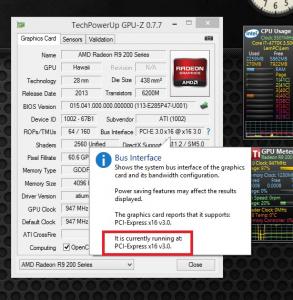
|
|
|
|
|
|
terradrive
|
Apr 12 2014, 01:48 PM
|
|
|
QUOTE(llk @ Apr 12 2014, 10:52 AM) Test with latest beta (14.4) driver Wah, score so close to mine, nasib I still safe  |
|
|
|
|
|
Desprado
|
Apr 12 2014, 01:48 PM
|
Getting Started

|
QUOTE(Yagami5159 @ Apr 12 2014, 12:28 AM) R9 290 Tri-X quite a beast i must say~ Yes you're doing right, nice score you got there~ Anyway, im currently facing screamyx issues so im not able to update the leaderboards, but will update ASAP once it's back online. Sorry for the inconvinience caused and welcome aboard! Its because that no one actually tried tri-sli R9 290, so please keep your "lansi" attitude to yourself please. Please be reminded that trolling in my thread is not welcome. Cheers  Are u serious? 2 or 3 have tried.U can go look back.Nvm i am not lansi but u are the one who is lansi.If u have time u can read my post again maybe u can now what meant by that post. This post has been edited by Desprado: Apr 12 2014, 01:53 PM |
|
|
|
|
|
terradrive
|
Apr 12 2014, 01:51 PM
|
|
|
QUOTE(Desprado @ Apr 12 2014, 01:48 PM) Are u serious? 2 or 3 have tried.U can go look back. It's a pity AMD drivers have problem of crossfire in this benchmark |
|
|
|
|
|
llk
|
Apr 12 2014, 01:51 PM
|
|
|
QUOTE(terradrive @ Apr 12 2014, 01:48 PM) Wah, score so close to mine, nasib I still safe Lol...mine is reference card using Elpida ram, cant reach 1600mhz, run the benchmark for while screen will become black |
|
|
|
|
|
terradrive
|
Apr 12 2014, 01:53 PM
|
|
|
QUOTE(llk @ Apr 12 2014, 01:51 PM) Lol...mine is reference card using Elpida ram, cant reach 1600mhz, run the benchmark for while screen will become black Quite amazing for elpida ram to reach 1500Mhz. Very rare to see ones that can go over 1400Mhz. |
|
|
|
|
|
llk
|
Apr 12 2014, 01:57 PM
|
|
|
QUOTE(terradrive @ Apr 12 2014, 01:53 PM) Quite amazing for elpida ram to reach 1500Mhz. Very rare to see ones that can go over 1400Mhz. Old Elpida i heard not good for OC but new batch which using by R9 290(x) i heard have been improve a lot. Btw i saw your score, do u increase your voltage? What is your setting? I have to increase the voltage to +150 in order to run 1230mhz without artifacts. This post has been edited by llk: Apr 12 2014, 02:01 PM |
|
|
|
|
|
terradrive
|
Apr 12 2014, 02:04 PM
|
|
|
QUOTE(llk @ Apr 12 2014, 01:57 PM) Old Elpida i heard not good for OC but new batch which using by R9 290(x) i heard have been improve a lot. Btw i saw your scare, do u increase your voltage? What is your setting? I have to increase the voltage to +150 in order to run 1230mhz without artifacts. Voltage +200mV Powertune +20% Temp= 93C LOL, casing problem I have artifacts if I run 1230Mhz on +150mV. Probably leaking problem because the GPU core is near 88C already. Your watercooled GPU core is cooler and thus doesn't cause artifacts at 1230Mhz. From what I saw on reviews making the GPU core temp go down from 80/90C to 50-60C nets power savings about 20W. This post has been edited by terradrive: Apr 12 2014, 02:05 PM |
|
|
|
|
|
Acid_RuleZz
|
Apr 12 2014, 02:06 PM
|
|
|
QUOTE(llk @ Apr 12 2014, 12:52 PM) When running the test it show x16 3.0, but when the test stop it back to x1 1.1, is it normal? Power saving feature, totally normal. |
|
|
|
|
|
llk
|
Apr 12 2014, 02:10 PM
|
|
|
QUOTE(terradrive @ Apr 12 2014, 02:04 PM) Voltage +200mV Powertune +20% Temp= 93C LOL, casing problem I have artifacts if I run 1230Mhz on +150mV. Probably leaking problem because the GPU core is near 88C already. Your watercooled GPU core is cooler and thus doesn't cause artifacts at 1230Mhz. From what I saw on reviews making the GPU core temp go down from 80/90C to 50-60C nets power savings about 20W. Ya you are right, on reference stock cooler my card can't even run more than 1150mhz (Voltage +50, powerlimit +20), not dare to increase voltage furthermore because the core temp almost reach 90 degree  |
|
|
|
|



 Quote
Quote


 0.0293sec
 0.55
0.55
 6 queries
 GZIP Disabled