Welcome Guest ( Log In | Register )

205 Pages « < 109 110 111 112 113 > » Bottom

Outline · [ Standard ] · Linear+

 Your Home Theater Setup.. v2, Let's share..

views
     
jamesleetech
post Feb 11 2017, 06:42 PM

On my way
****
Senior Member
684 posts

Joined: Apr 2010


QUOTE(saitong09 @ Feb 11 2017, 06:02 PM)
If the player do not have setting to turn off the hdr, your TV setting should handle this. Some ppl may prefer HDR off
*
This does not explain the funny behaviour of Dickong's 4K HDR TV.

Okay... IF player cannot switch off HDR... sent signal out to TV. Then TV detect and HDR auto Switch On. Now, if I don't want TV to use HDR, then use TV setting to set HDR Off... This is supposed to be happening on the TV side.

When the TV detected HDR, it should be auto Switch On BUT.... why have to change TV HDR setting to OFF so that got HDR ?? Does not make sense.

I agree that its good to have option to switch off HDR on the TV side BUT its the opposite... Switch HDR Off on TV in order to get HDR? Switch the TV HDR On and then got colour problem !! IF TV HDR On or Off both still got HDR, then why put HDR On/Off setting in the TV?

When TV auto detected HDR, it should auto Switch On and when this happens, got yellowish colour problem !! I thought it should be some compatibility issues or bug which need to be fixed in a future firmware update. So this should explain why got colour problem when TV auto HDR On. BUT... Dickong said he had to set his TV HDR to Off so that HDR works !! TV HDR set to Off and then got HDR. Really confusing to me loh.

Is TV HDR On used to make "emulated (false) HDR" for receiving signal that is Non-HDR? Is "emulated HDR" possible? Setting TV HDR to Off to make HDR to work is the thing I do not understand here. Its not about whether the TV have HDR On/Off setting is useful or not for people who don't want HDR.

NOTE : Yellowish tint when TV HDR set to On
I think the best way to get answers on whether this is the actual behaviour or TV have problem/issue is to contact Samsung service centre and ask them about this. If possible, talk to a Samsung technician for advice or explanation and see whether any further checking is needed or not. I know very very little on HDR.

This post has been edited by jamesleetech: Feb 12 2017, 01:42 PM
jamesleetech
post Feb 12 2017, 03:50 PM

On my way
****
Senior Member
684 posts

Joined: Apr 2010


@Dickong,

If have done, then just ignore below. If haven't, then try this below...

Since you are using a Samsung 4K TV, it should be similar.

Before you do this, switch off both the TV and 4K Player (not standby), then unplug HDMI cable from 4K Player. Then switch on both TV and Player.

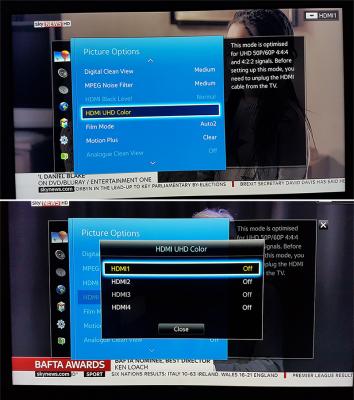
Go to "Picture" >> "Picture Options". Refer to attached photo. If you connect 4K Player to TV HDMI 1, then change TV HDMU UHD Color to "ON"

After the change, switch off both TV and player. Plug HDMI cable back again from player to TV. Switch both TV and player on.

Done. And test play 4K HDR Bluray with TV HDR set to On.

Reference Links...

HDMI UHD Color
» Click to show Spoiler - click again to hide... «

Turn On or Off HDMI UHD color setting. What is it
What is HDMI UHD Color and should I turn_it_on

Dickong
post Feb 12 2017, 07:59 PM

Regular
******
Senior Member
1,689 posts

Joined: Jan 2003
QUOTE(jamesleetech @ Feb 12 2017, 03:50 PM)
@Dickong,

If have done, then just ignore below. If haven't, then try this below...

Since you are using a Samsung 4K TV, it should be similar.

Before you do this, switch off both the TV and 4K Player (not standby), then unplug HDMI cable from 4K Player. Then switch on both TV and Player.

Go to "Picture" >> "Picture Options". Refer to attached photo. If you connect 4K Player to TV HDMI 1, then change TV HDMU UHD Color to "ON"

After the change, switch off both TV and player. Plug HDMI cable back again from player to TV. Switch both TV and player on.

Done. And test play 4K HDR Bluray with TV HDR set to On.

Reference Links...

HDMI UHD Color
» Click to show Spoiler - click again to hide... «

Turn On or Off HDMI UHD color setting. What is it
What is HDMI UHD Color and should I turn_it_on
*
Thanks bro.i will try it tomorrow bcos now not at home.
jamesleetech
post Feb 13 2017, 03:24 PM

On my way
****
Senior Member
684 posts

Joined: Apr 2010


QUOTE(Dickong @ Feb 12 2017, 07:59 PM)
Thanks bro.i will try it tomorrow bcos now not at home.
*
Hope this works to get the correct colour, not yellowish screen.

My previous post did not add in "attached photo". Forgot.

Here it is...
Attached Image
Dickong
post Feb 13 2017, 03:35 PM

Regular
******
Senior Member
1,689 posts

Joined: Jan 2003
QUOTE(jamesleetech @ Feb 13 2017, 03:24 PM)
Hope this works to get the correct colour, not yellowish screen.

My previous post did not add in "attached photo". Forgot.

Here it is...
Attached Image
*
Bro.same when on hdr at tv the color a bit yellowish. I notice when hdr is being detect at tv it seem the picture mode change the setting to dyanamic
jamesleetech
post Feb 13 2017, 08:56 PM

On my way
****
Senior Member
684 posts

Joined: Apr 2010


QUOTE(Dickong @ Feb 13 2017, 03:35 PM)
Bro.same when on hdr at tv the color a bit yellowish. I notice when hdr is being detect at tv it seem the picture mode change the setting to dyanamic
*
Too bad. I think its better to contact Samsung Service Centre for their comment on the colour problem and find out what caused this issue. I don't know but ask them whether you need any proper calibration done to the TV for HDR. Once HDR is detected, your TV changed to Dynamic automatically so you cannot change it back to "Standard" ??

» Click to show Spoiler - click again to hide... «


I believe that you have tested with different HDMI cables but if not, then test with other cables. Test Oppo 203 HDMI Out to AVR and then AVR HDMI Out to TV. Also test with Oppo 203 HDMI 1 direct to TV and then HDMI 2 direct to TV.

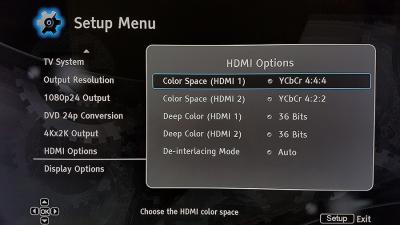
I don't have Oppo 203 but I think should have similar "HDMI Options". Try changing from "Auto" to YCbCr 4:4:4 or 4:2:2. Refer to attached photo.

Attached Image
Dickong
post Feb 14 2017, 05:08 PM

Regular
******
Senior Member
1,689 posts

Joined: Jan 2003
QUOTE(jamesleetech @ Feb 13 2017, 08:56 PM)
Too bad. I think its better to contact Samsung Service Centre for their comment on the colour problem and find out what caused this issue. I don't know but ask them whether you need any proper calibration done to the TV for HDR. Once HDR is detected, your TV changed to Dynamic automatically so you cannot change it back to "Standard" ??

» Click to show Spoiler - click again to hide... «


I believe that you have tested with different HDMI cables but if not, then test with other cables. Test Oppo 203 HDMI Out to AVR and then AVR HDMI Out to TV. Also test with Oppo 203 HDMI 1 direct to TV and then HDMI 2 direct to TV.

I don't have Oppo 203 but I think should have similar "HDMI Options". Try changing from "Auto" to YCbCr 4:4:4 or 4:2:2. Refer to attached photo.

Attached Image
*
HDMI from player to avr totally no hdr detect but tv can on hdr but still.yellowish color n hdmi 1 to tv straight can detect hdr but on hdr from tv also color yellowish. By the way i think my avr cant detect hdr ( yammy A2040 )

sonerin
post Feb 14 2017, 09:20 PM

Look at all my stars!!
*******
Senior Member
8,739 posts

Joined: Aug 2009
QUOTE(Dickong @ Feb 14 2017, 05:08 PM)
HDMI from player to avr totally no hdr detect but tv can on hdr but still.yellowish color n hdmi 1 to tv straight can detect hdr but on hdr from tv also color yellowish. By the way i think my avr cant detect hdr ( yammy A2040 )
*
After so many different setting, maybe is the colour profile on your TV does not support or not load with HDR ? Not sure if this the issue.
Dickong
post Feb 17 2017, 12:43 PM

Regular
******
Senior Member
1,689 posts

Joined: Jan 2003
QUOTE(sonerin @ Feb 14 2017, 09:20 PM)
After so many different setting, maybe is the colour profile on your TV does not support or not load with HDR ? Not sure if this the issue.
*
As said earlier this tv definately support hdr its only when player set to hdr but the tv must not ON hdr. It seems it auto detect hdr from tv so when u on hdr from tv its like ON hdr twice. But from player hdr to tv i can really see a lot different in pq n color depth.
saitong09
post Feb 19 2017, 02:26 PM

10k Club
********
All Stars
10,820 posts

Joined: Jan 2010
From: KL/PJ


QUOTE(Dickong @ Feb 17 2017, 12:43 PM)
As said earlier this tv definately support hdr its only when player set to hdr but the tv must not ON hdr. It seems it auto detect hdr from tv so when u on hdr from tv its like ON hdr twice. But from player hdr to tv i can really see a lot different in pq n color depth.
*
Had you reported to Samsung?
Dickong
post Feb 20 2017, 10:27 AM

Regular
******
Senior Member
1,689 posts

Joined: Jan 2003
QUOTE(saitong09 @ Feb 19 2017, 02:26 PM)
Had you reported to Samsung?
*
Not yet but i having been thinking that nothing is wrong since it can detect hdr direct except some setting n wait later they might come up with firmware to verify it
Kent3888
post Feb 21 2017, 02:28 AM

:+: ҜễЙΨ ™ © :+:
******
Senior Member
1,333 posts

Joined: May 2009
From: Denai Alam | Kota Damansara |TTDI


Which is a better option overall? Area to cover is 580sqft would say around 5,800cubft. Mostly for Movies, Fronts alrdy using Klipsch, not planning to play super loud to wake neighbour or tear down the wall. . Taking sealed subs into consideration, hence SB16 came into the picture

2x Klipsch R115SW or 1x SVS SB16 Ultra

Klipsch R-115SW
The Reference R-115SW subwoofer is the perfect combination of power, sophisticated and heart-pounding bass. Packing a serious punch, the R-115SW will not only wake your neighbors, it'll piss them off. The way only Klipsch can.

Features:
15" spun-copper Cerametallic woofer
All-digital amplifier delivers 800 watts of dynamic power
Front-firing slot port with exclusive internal flare technology.
L/R line-level/LFE RCA inputs for compatibility with most receivers
For a simple wireless connection, add an optional Klipsch WA-2 Wireless Subwoofer Kit
Dimensions: 21.5" H x 19.5" W x 22.3" D
Brushed black polymer veneer cabinet with satin painted plinth


SVS SB-16ULTRA

An unrelenting passion for awesome bass performance and engineering perfection guided every aspect of the SB16-Ultra subwoofer’s design. Groundbreaking technology, rigorous design and extreme testing in real world and laboratory environments allowed SVS to achieve massive output levels, extreme low frequency extension, near-perfect frequency response accuracy, and pinpoint transient response. The culmination of all SVS design advancements, SB16-Ultra represents the greatest leap forward in performance and innovation since the inception of subwoofers.

QUICK SPECS
16"DRIVER
1500 watts RMS (5000+ watts peak)AMPLIFIER
16-460Hz ±3 dBFREQ. RESPONSE
20" (H) 19.5" (W) 20.1" (D)DIMENSION
122 lbsWEIGHT

This post has been edited by Kent3888: Feb 22 2017, 12:36 AM
sonerin
post Feb 21 2017, 06:59 AM

Look at all my stars!!
*******
Senior Member
8,739 posts

Joined: Aug 2009
Dual SVS
GuyM
post Feb 21 2017, 10:40 AM

Regular
******
Senior Member
1,787 posts

Joined: Jul 2007
QUOTE(jamesleetech @ Jan 21 2017, 05:08 PM)
Reminder
SSJBen
post Feb 21 2017, 06:22 PM

Stars deez nuts.
*******
Senior Member
4,522 posts

Joined: Apr 2006


QUOTE(Kent3888 @ Feb 21 2017, 02:28 AM)
Which is a better option overall? Area to cover is 580sqft would say around 5,800cubft. Mostly for Movies, Fronts alrdy using Klipsch, not planning to play super loud to wake neighbour or tear down the wall. . Taking sealed subs into consideration, hence SB16 came into the picture

2x Klipsch R115SW or 1x SVS SB16 Ultra

Klipsch R-115SW
The Reference R-115SW subwoofer is the perfect combination of power, sophisticated and heart-pounding bass. Packing a serious punch, the R-115SW will not only wake your neighbors, it'll piss them off. The way only Klipsch can.

Features:
15" spun-copper Cerametallic woofer
All-digital amplifier delivers 800 watts of dynamic power
Front-firing slot port with exclusive internal flare technology.
L/R line-level/LFE RCA inputs for compatibility with most receivers
For a simple wireless connection, add an optional Klipsch WA-2 Wireless Subwoofer Kit
Dimensions: 21.5" H x 19.5" W x 22.3" D
Brushed black polymer veneer cabinet with satin painted plinth
SVS PB-16ULTRA

An unrelenting passion for awesome bass performance and engineering perfection guided every aspect of the SB16-Ultra subwoofer’s design. Groundbreaking technology, rigorous design and extreme testing in real world and laboratory environments allowed SVS to achieve massive output levels, extreme low frequency extension, near-perfect frequency response accuracy, and pinpoint transient response. The culmination of all SVS design advancements, SB16-Ultra represents the greatest leap forward in performance and innovation since the inception of subwoofers.

QUICK SPECS
16"DRIVER
1500 watts RMS (5000+ watts peak)AMPLIFIER
16-460Hz ±3 dBFREQ. RESPONSE
20" (H) 19.5" (W) 20.1" (D)DIMENSION
122 lbsWEIGHT
*
Err... how is 580 sq. ft = 5800cu. ft? You cannot directly relate them since cubic feet has 1 extra layer dimension (height). So which is which?

To answer your question, the PB16 Ultra is undeniably the better sub. It has a lot more output below 25hz than the R115. Even if you couple 2xR115 in the same area for maximum amount of gain (+6db~), the PB16 Ultra will still beat them below 16hz with ease. Of course, place them (R115) well and they'll sound smoother than a single sub. You have to decide which is more important to you, smoother response over more seats or more output for 1 (or 2) seats.

Now since your room dimensions isn't clear and I presume that 580 sq. ft is your floor space only, then both subs should (in theory) should cover the space quite well with relative headroom to spare. It's really all down to how big your bank account is.

Personally I'd say buy 1 PB-16U now, then buy another PB-16U later on when you have the funds. Buy once, enjoy forever.

paskal
post Feb 21 2017, 07:17 PM

armchair commando couch potato
*******
Senior Member
2,801 posts

Joined: Jan 2003
From: Darul Aman
QUOTE(SSJBen @ Feb 21 2017, 06:22 PM)
Err... how is 580 sq. ft = 5800cu. ft? You cannot directly relate them since cubic feet has 1 extra layer dimension (height). So which is which?

To answer your question, the PB16 Ultra is undeniably the better sub. It has a lot more output below 25hz than the R115. Even if you couple 2xR115 in the same area for maximum amount of gain (+6db~), the PB16 Ultra will still beat them below 16hz with ease. Of course, place them (R115) well and they'll sound smoother than a single sub. You have to decide which is more important to you, smoother response over more seats or more output for 1 (or 2) seats.

Now since your room dimensions isn't clear and I presume that 580 sq. ft is your floor space only, then both subs should (in theory) should cover the space quite well with relative headroom to spare. It's really all down to how big your bank account is.

Personally I'd say buy 1 PB-16U now, then buy another PB-16U later on when you have the funds. Buy once, enjoy forever.
*
580sqft with 10' ceiling. hence 5800 cuft.

but damn.
that's like 20x30. need quad pb16 for that size laugh.gif
Kent3888
post Feb 22 2017, 12:35 AM

:+: ҜễЙΨ ™ © :+:
******
Senior Member
1,333 posts

Joined: May 2009
From: Denai Alam | Kota Damansara |TTDI


QUOTE(SSJBen @ Feb 21 2017, 06:22 PM)
Err... how is 580 sq. ft = 5800cu. ft? You cannot directly relate them since cubic feet has 1 extra layer dimension (height). So which is which?

To answer your question, the PB16 Ultra is undeniably the better sub. It has a lot more output below 25hz than the R115. Even if you couple 2xR115 in the same area for maximum amount of gain (+6db~), the PB16 Ultra will still beat them below 16hz with ease. Of course, place them (R115) well and they'll sound smoother than a single sub. You have to decide which is more important to you, smoother response over more seats or more output for 1 (or 2) seats.

Now since your room dimensions isn't clear and I presume that 580 sq. ft is your floor space only, then both subs should (in theory) should cover the space quite well with relative headroom to spare. It's really all down to how big your bank account is.

Personally I'd say buy 1 PB-16U now, then buy another PB-16U later on when you have the funds. Buy once, enjoy forever.
*
I'm running single R115 now, considering whether to get another R115 or, sell it off to get SB16U. Fund wise, 2xR115 or 2xPB2000 is somewhere close to a single SB16U. Sorry for the typo, supposed to be SB not PB, as PB seems too big and bulky in the living, and there is also a price leap from SB16U.


QUOTE(paskal @ Feb 21 2017, 07:17 PM)
580sqft with 10' ceiling. hence 5800 cuft.

but damn.
that's like 20x30. need quad pb16 for that size  laugh.gif
*
That's how I assume 5800 cuft, 580sqft x 10ft ceiling

This post has been edited by Kent3888: Feb 22 2017, 12:37 AM
sonerin
post Feb 22 2017, 07:50 AM

Look at all my stars!!
*******
Senior Member
8,739 posts

Joined: Aug 2009
QUOTE(Kent3888 @ Feb 22 2017, 12:35 AM)
I'm running single R115 now, considering whether to get another R115 or, sell it off to get SB16U. Fund wise, 2xR115 or 2xPB2000 is somewhere close to a single SB16U. Sorry for the typo, supposed to be SB not PB, as PB seems too big and bulky in the living, and there is also a price leap from SB16U.
That's how I assume 5800 cuft, 580sqft x 10ft ceiling
*
PB2000 x 2 is the way to go
-oc-gassa
post Feb 22 2017, 09:36 AM

Enthusiast
*****
Senior Member
967 posts

Joined: Jan 2003
From: setapak
SVS.. bought one without even hear in the 1st place...never look back
SSJBen
post Feb 22 2017, 07:51 PM

Stars deez nuts.
*******
Senior Member
4,522 posts

Joined: Apr 2006


QUOTE(Kent3888 @ Feb 22 2017, 12:35 AM)
I'm running single R115 now, considering whether to get another R115 or, sell it off to get SB16U. Fund wise, 2xR115 or 2xPB2000 is somewhere close to a single SB16U. Sorry for the typo, supposed to be SB not PB, as PB seems too big and bulky in the living, and there is also a price leap from SB16U.
That's how I assume 5800 cuft, 580sqft x 10ft ceiling
*
Alright, in that case... even dual PB-16Us aren't going to be enough. Since you said SB16U, that's even less output.

Dual PB2000s will get you more output than a single SB16u below 25hz though. How loud are you usually going to be playing your system btw?

205 Pages « < 109 110 111 112 113 > » Top
 

Change to:
| Lo-Fi Version
0.0446sec    0.92    6 queries    GZIP Disabled
Time is now: 4th December 2025 - 02:15 PM