Welcome Guest ( Log In | Register )

10 Pages < 1 2 3 4 > » Bottom

Outline · [ Standard ] · Linear+

 Your Home Theater Setup.. v2, Let's share..

views
     
jamesleetech
post Jul 12 2016, 08:56 PM

On my way
****
Senior Member
684 posts

Joined: Apr 2010


QUOTE(SSJBen @ Jul 12 2016, 08:13 PM)
^Well explained by jamesleetech

Another site to check out the metrics for projectors is - http://www.projectorcentral.com/projection...culator-pro.cfm
*
Thanks. Just trying to help but its difficult to choose which brand for some one who intends to use a projector because its just like choosing a LED/LCD HDTV... so many factors and so many brands that affect our choice.

For projectors, its even more complicated to choose. The Lamp bulb have a life span which lasts only for a few thousand hours and need to be replaced, maybe after a few years. Manufacturers usually state the lifespan for "Full Power" and for "Eco Power (Reduced Power Saving)". The higher the power (Ansi Lumens) the shorter the lifespan. For example... XX Brand : Full Power last from 2000 to 3000 hours and Eco Low Power last from 4000-5000 hours. Such lifespan should only be used as a rough guide only because its not really accurate.
jamesleetech
post Jul 13 2016, 08:47 PM

On my way
****
Senior Member
684 posts

Joined: Apr 2010


QUOTE(lionelzc @ Jul 13 2016, 01:06 PM)
Thanks for the reply. Never expected you to actually search in detail for the AVR model number.

Probably the amp is already discontinued by the company and it's a low end model so I doubt it would have any of the functions that you have mentioned above.

Anyway, here are the photos of the front panel.

» Click to show Spoiler - click again to hide... «
*
From your close-up photos, there's completely nothing to indicate audio change switch selection and nothing about 5 channel audio output too. The only thing that I can only guess is the round "Echo" knob which can be used to adjust the reverberation effects of the audio. This "Echo" knob probably indicate that this amp creates a virtual 5 channel (with echo) by default. Most of the time this should be working properly to 5 channels but an internal fault in the amp decoder causes the output to become only 2 channels intermittently. Anyway, this is my wild guess only.

Well... I am still at a loss on the actual reason so I will just stop here as I can no longer do anything further to help you to find out the actual reason. I did my best and sorry for that.

This post has been edited by jamesleetech: Jul 13 2016, 08:47 PM
jamesleetech
post Jul 13 2016, 09:18 PM

On my way
****
Senior Member
684 posts

Joined: Apr 2010


QUOTE(dexth @ Jul 13 2016, 01:43 PM)
Sharing my setup smile.gif

TV Model : LG 65EC9700 OLED
Amplifier : Denon X-6200
Front Speaker : KEF R500 + Atlantic Technology 44DA Atmos addon Module
Center Speaker : KEF R600c
Surround Speaker : Acoustic Energy Aego T
Subwoofer : SVS PC13 Ultra

» Click to show Spoiler - click again to hide... «

*
A clean uncluttered look with a great home theatre system that I am sure you have many many hours of HT and HiFi enjoyment.

That SVS sub is a GODZILLA not only for size, its a giant for bass that can actually create rumbles that closely imitate an earthquake!! I know... because my bro-in-law recently bought a used unit that really can rumble and shake everything in the room!

» Click to show Spoiler - click again to hide... «


I did not notice any source (media, bluray or DVD) player for your home theatre system. What I can see is that you have a Logitach wireless keyboard and mouse with an Intel I7 computer and a 6TB HDD so I assume you use this computer as the HTPC feed to your system. If I assumed correctly, which software do you use to bitstream bluray videos via HDMI to your Denon AVR? WinDVD Pro, PowerDVD Ultra, TotalMedia Theatre 6 or DVDFab Media Player. I do use genuine purchased TotalMedia Theatre 6 for my Windows 8 pc but unfortunately they have terminated it. When I upgraded to Windows 10 Pro, TotalMedia Theatre 6 is not compatible so I had to purchase DVDFab Media Player. Is that your computer (white and black) placed next to your SVS sub? I was using such HTPC setup previously but I found that the audio and video quality is somehow much better through my Oppo BDP-105D so now I only use my pc to play other videos (4K YouTube, Netflix) on my 27 inch Dell 4K Monitor.

Oh.. almost forgot. I do use a separate mini Intel NUC computer specifically to just play DSD64 audio files to my DAC.

Since you have the Atmos speakers, I do wish to know your opinion on the overall effects of the speakers placed on top of the front main speakers? Such type of Atmos speakers fires to the ceiling and which reflects the top audio effects downwards. Are the Atmos/DTSX effects as good as you wish? I read many comments and reviews that says the Atmos effects is not good, can create cross-talk interference with other speakers and the effects can sound muddy. The good thing of placing on top of the main speakers is obviously no additional messy installation and not many people wants to touch a ceiling that already looks good and clean. Many times its also not possible to install Atmos ceiling speaker which directly fires downwards.

I intend to add a pair of Atmos speakers (ELAC A4) which can be used to place on top of the main speakers but I intend to hang it on my ceiling pointing the drivers directly downwards but this require more work to install them.

This post has been edited by jamesleetech: Jul 13 2016, 10:11 PM
jamesleetech
post Jul 13 2016, 10:06 PM

On my way
****
Senior Member
684 posts

Joined: Apr 2010


QUOTE(dexth @ Jul 13 2016, 02:52 PM)
thanks smile.gif

And here's my pc room setup. My wish one day there will be a 60" ultrawide OLED...haha.

TV Model : LG 34UC97 / LG 60" FHD Plasma (backup)
Amplifier : Denon AVR-1912
Front Speaker : KEF LS50
Center Speaker : KEF LS50
Surround Speaker : Acoustic Energy Aego T
Subwoofer : Rythmik F12
» Click to show Spoiler - click again to hide... «

*
Mmm... LG 60" FHD Plasma as "backup"? Wouldn't it be better to watch from a much bigger screen size?
jamesleetech
post Jul 14 2016, 06:33 PM

On my way
****
Senior Member
684 posts

Joined: Apr 2010


QUOTE(SSJBen @ Jul 14 2016, 12:59 AM)
@bolded
Errr... for video I can agree, because there are some subjective calls there in regards to image scaling (both up and down) as well as post processing. I personally use MadVR at the very max settings (requires a decent GPU indeed) and telling the difference between it and a hardware scaler is very difficult. Pretty much have to take a before and after photo to compare.

But audio? How would it sound better from the Oppo when it's just going to be bitstreamed to the receiver anyways? The audio wouldn't change at all, unless you're using the analog out portion of the 105D. But then that would be an entirely different discussion.
*
I seem to have created some pollution here and I want to clear the air first before I continue.

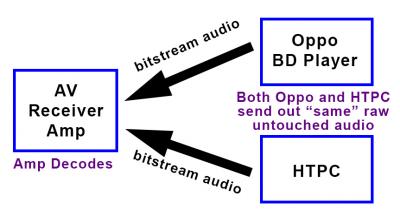
It is a FACT that the audio sent out by both the Oppo and HTPC is bitstream which is raw and untouched without any processing. All things being equal, when the same receiving AV amp processed the bitstream audio, the quality WILL always be exactly the same regardless of whether we use HTPC, Oppo 105D, Popcornhour, Dune Max, ACRyan or any media player. YES, I totally agree with your statement about this and do not dispute it. With that being said, I shall continue with my own personal opinion about the bitstream audio.

Please regard what I say after this as my fairy tale story which are based on nonsense so you will be right if you disagree with me... I will not make any rebuttals. Just continue to read and give it some thought.
Attached Image

Look at my drawn diagram above. As I mentioned earlier, when the AV Amp received the Bitstream Audio, it will be the same when "all things being equal". Unfortunately it is not equal in my own assessment after various tests done by me. Don't misunderstand me... I don't refute anything about the Bitstream Audio itself. Its about the "pollution" affecting the delivery of the same Bitstream Audio before it reaches the AV Amp to be processed.

There will always be the neverending discussions about the reasons for using an expensive HDMI Version 2.0 cable (RM 200++) when a cheapo one selling at RM 50 can do the job equally well because the digital signal will still be the same in 0's and 1's. I belong to the "cheapo" HDMI camp previously because I do agree that its a fact that the digital audio and video will not change no matter what cable we used except for the loss of signal when extremely long HDMI cable is used. One day, a friend of mine brought an HDMI 2.0 cable costing around RM 380 (2 metres) for me to test and compare with my no brand cheapo RM 55 one. I was a disbeliever but I was caught totally surprised when the audio and video quality did actually improve based on my own observation. I was wondering... what the hell is going on? Then I was told that a good quality HDMI cable with proper electromagnetic shielding and gold-plated contact with silver strand in the cable can "ease" and "speed up" the transfer of the signal to the receiving amp with less pollution, less resistance and interference. Its just like water (bitstream audio/video) flowing through 2 pipes where one is a clean pipe and the other is a dirty pipe... the water is the same but its quality drops when the delivery has problems.

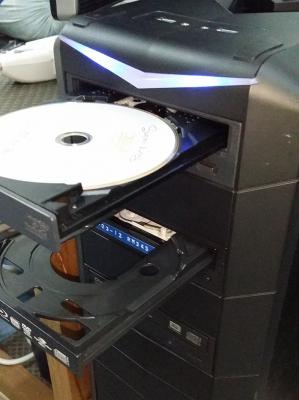
Ok... lets return to the HTPC versus the Oppo player. The computer is notorious for ground loop noise which are generated from various internal parts which can possibly pollute bitstream audio before it is sent out. PC Bluray drives can be very noisy without any effort done to dampen its internal mechanism and its build quality just cannot be compared to the drive in a good quality player such as the Oppo, Marantz, Primare.

» Click to show Spoiler - click again to hide... «


About 1 to 2 years ago, I tested using a bluray disc on these 4 different "players" using my previous Denon 4520 AV Receiver (sold recently)...
1) My Oppo BDP-105D media player.
2) My Intel NUC i5 mini PC.
3) My MSI 17 inch i7 Notebook.
4) My Desktop i7 PC with 3 bluray drives.

... where the result was (1) has the best audio and (4) is the worst.

Eventhough my Desktop PC is water cooled, it can be quite noisy with its 5 large internal casing fans and an NVidia graphics card that has 2 fans. Somehow I believe that my Desktop PC should have "polluted" the audio from the time that its read from the disc, goes to the PC RAM memory, travels along the motherboard to the graphics card and then out to the HDMI cable. Probably the path that the audio travels is more complicated when compared to the path used by the Oppo player. I believe why the Intel NUC is the second best is because there is no moving parts inside with M2 SSD harddisk and the power supply is external.

» Click to show Spoiler - click again to hide... «


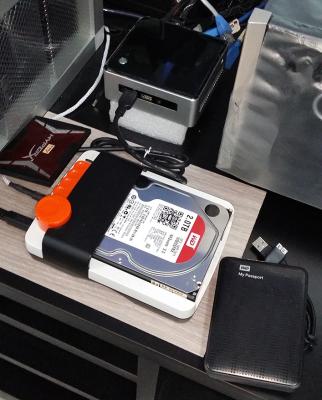
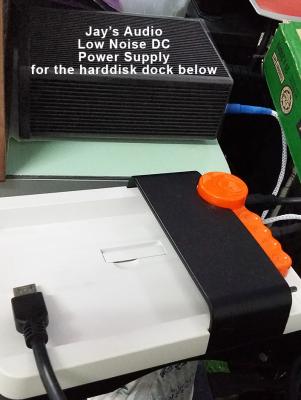
I even used a low noise power supply unit from Jay's Audio to power my harddisk dock to reduce the current noise affecting the reading of the data in the harddisk!! Very small improvement but an improvement nonetheless.

I also played DSD audio from my Intel NUC mini PC to my DAC and found out that the sound quality from a SSD harddisk is slightly better than a 3.5 inch harddisk connected the same USB harddisk dock!

» Click to show Spoiler - click again to hide... «


However, the audio from playing an actual bluray disc is better than from any harddisk. The bluray concert sounds much more lively and detailed.

And ALL using the same Bitstream Audio output! Anyone can call me stupid, call me crazy, say that I am talking rubbish and what I can reply is... I deserve the criticisms! Hehehe... no problem.

Video and Audio is both objective and subjective so its up to each person to choose what he/she thinks provides the best quality for the money spent. If anyone says that HTPC video quality with MadVR is much better than Oppo BDP-105D, then you are right not to buy Oppo. If anyone says Oppo is better, then that is also right too.

Sorry for my extremely long reply.

This post has been edited by jamesleetech: Jul 14 2016, 07:19 PM

jamesleetech
post Jul 14 2016, 07:13 PM

On my way
****
Senior Member
684 posts

Joined: Apr 2010


QUOTE(bad2928 @ Jul 14 2016, 09:06 AM)
agreed,with right configuration MadVR and capable hardware easily can beat oppo. tongue.gif
*
Ya, you are not wrong to say HTPC with MadVR can beat Oppo. I respect your views. In your case, its a waste of money to buy Oppo. For me, its a different story. In my opinion, its a case of "one man's meat is another man's poison".

However, you misunderstood SSJBen's main point when you generally agreed with what he said in his reply to me.

Have a look at the diagram below...

Attached Image

What SSJBen was saying is that the "Bitstream Audio" is 100% not touched/processed when it reaches the AV Amp. Because both HTPC and Oppo delivers the same bitstream audio, SSJBen believe that Oppo bitstream audio will NOT be better than HTPC.

Your comment on the MadVR refers to the Video part of the signal but this cannot be compared together in this situation because the video signal from HTPC and Oppo have been changed differently and are not the same when it reaches the AV Amp.

This post has been edited by jamesleetech: Jul 14 2016, 07:15 PM
jamesleetech
post Jul 14 2016, 09:33 PM

On my way
****
Senior Member
684 posts

Joined: Apr 2010


QUOTE(sonerin @ Jul 14 2016, 09:16 PM)
https://vimeo.com/174634186
Did a simple video today on my HT cum hifi
*
Attached Image

Hotel California, Eagles (1976).

Wow... I wish I have a room large enough to fit a large home theatre screen.

This post has been edited by jamesleetech: Jul 14 2016, 09:35 PM
jamesleetech
post Jul 14 2016, 09:44 PM

On my way
****
Senior Member
684 posts

Joined: Apr 2010


QUOTE(sonerin @ Jul 14 2016, 07:13 PM)
Well we are at this topic. I just learn something because of speaker keep having some humming sound which I could not figure out why. After some changing cables and connecting differently, than I realised the sound comes from my power adapter. Is a common power adapter we use for small electric item. I am using rapsberry pi2 as my music server. It is even more quiet than NUC and it use 5v electric supply. Min noise from electric. How knows the power adapter which can cause humming sound in the speaker. After changing the adapter problem solved. I believe the source of your audio or video will have pollution if is not properly setup. All this connection with cables is one big area where noise (pollution) goes into the system.

Now coming into this, we shall go into cable. I am in the same boat of thinking some cheap HDMI and expensive HDMI make no different until I had use 12 meter long HDMI which is super cheap compare to a 12 meter long HDMI which cost me 10x more. Straight can notice the picture quality different. OPPO has 2 HDMI output which is great to separate the audio and video. This makes it even better. I do use himedia player as well for some movies playback from HDD. It is iso BD files I am using for the media player. Even so the quality it comes out is not comparable with OPPO. Even speaker cable I had tried from cheap cable to thousand of ringgit cable. I can tell you the different is amazing. So believer or not, you can try and find out
*
@bold letters.

This is the point I was explaining on what I believe is the cause based on my own observation. Pollution was what I believe was causing my HTPC audio quality to lose to my Oppo BDP-105D and also my Oppo 95. Well... only my opinion so I may be wrong.

Bitstream Audio output is just the same common denominator for all the different sources such as HTPC, Oppo bd player, Denon bd player, etc.

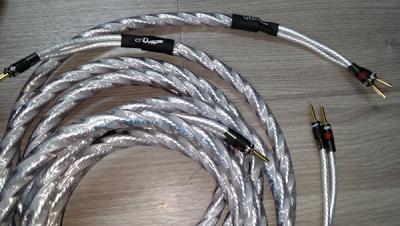
Was using a pair of QED Genesis Silver Spiral and found that its a bit too bright, less warm. Then I changed to DL Labs Q10 Speaker Cables (3.0M) at RM 2000+ per pair.... sweeter and more detailed.

» Click to show Spoiler - click again to hide... «


This post has been edited by jamesleetech: Jul 14 2016, 09:45 PM
jamesleetech
post Jul 14 2016, 09:58 PM

On my way
****
Senior Member
684 posts

Joined: Apr 2010


QUOTE(sonerin @ Jul 14 2016, 09:50 PM)
» Click to show Spoiler - click again to hide... «

Vermouth (black pearl) is magnificent cable but is pricy
*
Oh... you use NuPrime DAC with a pair of Musical Paradise USB DAC Power Supply.

How much is the Vermouth per metre and who is the dealer? What is the character of this cable? Suitable for vocals? Warm? Detailed?

This post has been edited by jamesleetech: Jul 14 2016, 09:58 PM
jamesleetech
post Jul 14 2016, 10:17 PM

On my way
****
Senior Member
684 posts

Joined: Apr 2010


QUOTE(sonerin @ Jul 14 2016, 10:01 PM)
I am also using jay audio psu for the musical paradise USB as it is battery power and require recharge. don't remember per meter but is 2.4meters in total. The price is about 4K. Hifi creations is the dealer
*
Ok, thanks. Will find out from HiFi Creations Audio Boutique at Persiaran Surian, Petaling Jaya. My Jay audio is AC powered.

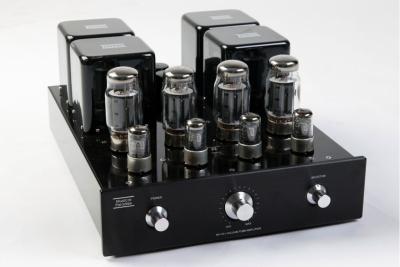
Your tube int amp is Musical Paradise MP-501 V4 KT120 KT150. And your sub is SVS PB13U.

» Click to show Spoiler - click again to hide... «


Let me guess... you bought your Oppo 103D and AV rack from Actsessory Shoppe?

This post has been edited by jamesleetech: Jul 14 2016, 10:18 PM
jamesleetech
post Jul 14 2016, 10:26 PM

On my way
****
Senior Member
684 posts

Joined: Apr 2010


QUOTE(saitong09 @ Jul 14 2016, 10:16 PM)
My new toy smile.gif
[attachmentid=7090899]
*
Wow... a single 12TB NAS harddisk. For use with HTPC and for Audio only or AV?
jamesleetech
post Jul 15 2016, 10:09 PM

On my way
****
Senior Member
684 posts

Joined: Apr 2010


QUOTE(dexth @ Jul 15 2016, 08:45 AM)
Just curious if you have your HTPC audio out to receiver set to at least 24bit 48000hz? Using Nvidia HDMI out for bitstream, it has a tendency to revert to 16bit and the SQ difference is pretty large.
*
As what SSJBen had replied to you earlier, such setting doesn't do anything for Bitstream Audio. When the pc software sets the NVidia graphics card HDMI to "bitstream out", it means the audio is completely not touched and sent out raw for the AV amplifier to decode.

I do not use my i7 Desktop PC as AV entertainment source anymore. Too much hassle for me to replace this Desktop PC PSU, change the BIOS settings, modified this and that and still got noise from the casing 4 large fans so I dedicated this PC for my IT work, web browsing and etc.

My MacBook Pro 13 inch notebook > USB to M2Tech Young DAC.
My Intel NUC mini PC > USB to my Oppo HA-1 DAC.

Previously I did use my Intel NUC mini PC to play bluray which are ripped to harddisk. Because this pc has no motor, no moving parts and external AC adapter, I believe this PC has the least noise pollution
compared to my Desktop PC. When connected to my DAC via USB and HDMI to my AV pre-amp, this PC has 3 audio devices available. I set the Windows 10 default sound playback to M2Tech DAC Audio and I set my software Bluray Player audio to output bitstream to Intel Display Audio (SAMSUNG). When I play DSD files using Foobar, My DAC will decode it and when I play using my software bluray player, my Pre-Amp will decode the bitstreamed audio. If I am not mistaken, I did set the M2Tech DAC Audio to 24bit 192000Hz but for me but I didn't check whether it reverted or not. However, this setting is not important as I use my DAC to decode DSD using Foobar (DoP/SACD decoder plugin with m2Tech Driver) and bluray was bitstreamed to my AV Pre-Amp. Now, this NUC PC HDMI out is connected directly to my 4K TV HDMI 4 input... change my TV to HDMI 4, I got PC 4K display... change my AV Pre-Amp to AUX to use XLR input (re-assigned) and I got audio from my DAC using XLR. I cannot plug this PC HDMI to AUX as the AV Pre-Amp will automatically choose HDMI audio, bypassing the assigned XLR.

In the end, I have various combinations to play with, so its just a matter of choice that I use my 2 Oppos to play blurays, PCs to DACs for DSD/FLAC audio, Rega CD Player for CD audio and Turntable for Analog LPs. Sometimes I can get confused which is which when I play with my toys. rclxub.gif
jamesleetech
post Jul 15 2016, 10:17 PM

On my way
****
Senior Member
684 posts

Joined: Apr 2010


QUOTE(SSJBen @ Jul 15 2016, 04:26 PM)
You know the funny thing is, microidiots actually had a very decent audio stack with Win XP? But they JUST have to decide to destroy everything with Vista, 7 and partly 8. 8.1 improved the audio stack in windows a little bit, 10 is more or less what 8.1 did but more streamlined but still isn't as robust as WinXP was.

And yes, the original fat PS3 that was launched (60GB and 20GB models) actually had decent audio playback with SACD support. laugh.gif
*
I missed those days before Win XP... DOS 6.11, Lotus 123r2.4, WordStar, WordPerfect, Windows 3.11, etc.

Correct me if I am wrong, an earlier firmware version allows ripping of SACD discs to ISOs too.
jamesleetech
post Jul 15 2016, 11:22 PM

On my way
****
Senior Member
684 posts

Joined: Apr 2010


QUOTE(skeelee @ Jul 15 2016, 10:43 PM)
My first PC was running DOS 2.1. I think the 5.25" floppies should still be lying around somewhere.
But then again, my first encounter with computer was using punch cards, coding in Fortran.
*
Mine initially started with Intel 80286 IBM compatible PC with DRDOS 5 and two 5.25 inch drives reading 1.2MB floppy discs! Creative SoundBlaster was just starting!
jamesleetech
post Jul 15 2016, 11:24 PM

On my way
****
Senior Member
684 posts

Joined: Apr 2010


QUOTE(saitong09 @ Jul 15 2016, 10:32 PM)
lol you had went through MS-DOS 6.11, so you born around 1970++ tongue.gif
*
Mmm... born before the Seventies.
jamesleetech
post Jul 15 2016, 11:55 PM

On my way
****
Senior Member
684 posts

Joined: Apr 2010


Sorry for going out of topic for this tread folks. Lets go back to the hobby that we all love here... Home Theater, hehehe.
jamesleetech
post Jul 18 2016, 03:23 PM

On my way
****
Senior Member
684 posts

Joined: Apr 2010


I don't know whether I am supposed to post this link here. I found this site and wish to share it here. Its not advertising, just a free, independent resource from a small volunteer group of audio lunatics with questions and answers from various users.

http://www.audioasylum.com/

This site also applies to Home Theatre too...

http://www.videoasylum.com/cgi/etv.mpl?forum=ht

Anyway, just enjoy reading.

To Lowyat.net Admin... please delete this post if not allowed.

jamesleetech
post Jul 19 2016, 05:33 PM

On my way
****
Senior Member
684 posts

Joined: Apr 2010


QUOTE(htkaki @ Jul 19 2016, 04:30 PM)
You will need DDRC-88A for your case. Not one but two since it is only 8 channels. So, in a 7.1.4, you need 2. It is basically a room correction device but with a more powerful equalisation as well as better flexibility in user setting. Having said that, sampling resolution is capped at 48kHz. Those with huge collection of hi-rez files may be disappointed.

Datasat uses Dirac Live.
*
What about playing blurays which have DTS Master Audio that supports a maximum of 24bit 192KHz. I think even DTSX support up to 24 bit 96 KHz. When you say that people with DSD64 384KHz audio files and 24bit 192KHz FLACs may be disappointed, then people who play blurays will also find the Dirac DDRC-88A not suitable. Have I got anything wrong here? Please correct me if I am wrong.

The Dirac specs page for DDRC-88A mentioned the internal processing and sampling rate at 32bit 48KHz BUT did not say anything about the Audio Input Connectivity, BUT both the nanoAVR HDA and nanoAVR stated the Audio Input Connectivity supported sample rate from 44.1k to 192kHz which is within the bluray audio specs.

Also, what about people who uses XLR connections from Pre-Amp/AV Processor to 7.1 channel Power Amp... so, will Dirac nanoAVR HDA or nanoAVR DL be better for Home Theatre using HDMI connections, without using RCA connections? Dirac nanoAVR HDA and nanoAVR DL have 2 HDMI inputs and 1 output.

https://www.minidsp.com/products/ht-series/nanoavr-dl

https://www.minidsp.com/products/ht-series/nanoavr-hda

Obviously SSJBen is giving the thumbs up thumbsup.gif to his Dirac DDRC-24 for his subs. I think the Dirac DSP products should be better than Audyssey or YPAO so what is the situation for people who wants to use the entire 7.1.2 channels (with Atmos/DTSX) with XLR connections to different power amps. Will nanoAVR HDA or nanoAVR be the one that is suitable in such cases? If it is and if it is better than Audyssey, Room Perfect or YPAO, then Dirac is a viable alternative for better room acoustics solution.

This is unfamiliar territory for me so I hope you or SSJBen will be able to clarify clearer for me.

This post has been edited by jamesleetech: Jul 19 2016, 05:45 PM
jamesleetech
post Jul 19 2016, 05:41 PM

On my way
****
Senior Member
684 posts

Joined: Apr 2010


QUOTE(SSJBen @ Jul 19 2016, 05:00 PM)
Sorry missed your post.
Basically think of it as an external room correction and DSP for your speakers, instead of one being built into a receiver or pre/pro.

It's no secret that DIRAC is a lot more advanced than YPAO or Audyssey (or MCACC). It's just more sophisticated, has a lot more manual control and since minidsp devices are compatible with REW out of the box, it gives pretty much everything you need to correct a room as best as possible (consumer wise).

That said, it's not a plug and play device. DIRAC has a learning curve as does REW (as you already know I'm sure).
*
I am blur blur here on Dirac. Is the unit attached permanently to the audio system to adjust the equalization curve based on the actual condition of the room acoustics? Does it use USB connection to the computer to make adjustments to the equalization? No microphone required?
jamesleetech
post Jul 19 2016, 06:59 PM

On my way
****
Senior Member
684 posts

Joined: Apr 2010


QUOTE(sonerin @ Jul 19 2016, 06:48 PM)
Is just another different type of auto correction like YPAO or mcacc
*
I believe I already know about this as an alternative method of audio calibration. What I am blur is how this works "without a microphone"? Using microphone to a computer with USB connected to the Dirac for calibration? If not require a microphone, how does it "detect" the room acoustics?

If Dirac does use a microphone, where is it attached to and what is the maximum microphone positions that can be used. Both Audyssey and YPAO uses a supplied microphone which is directly connected to the AV amp for detection. OR does the Dirac (connected between to the AV Processor/Pre-Amp and the Power amp) uses the "Audyssey" microphone that is connected to the AV Processor?

This post has been edited by jamesleetech: Jul 19 2016, 07:00 PM

10 Pages < 1 2 3 4 > » Top
 

Change to:
| Lo-Fi Version
0.1226sec    1.30    7 queries    GZIP Disabled
Time is now: 18th December 2025 - 04:05 PM