Welcome Guest ( Log In | Register )

Outline · [ Standard ] · Linear+

 Your Home Theater Setup.. v2, Let's share..

views
     
jamesleetech
post Feb 12 2017, 03:50 PM

On my way
****
Senior Member
684 posts

Joined: Apr 2010


@Dickong,

If have done, then just ignore below. If haven't, then try this below...

Since you are using a Samsung 4K TV, it should be similar.

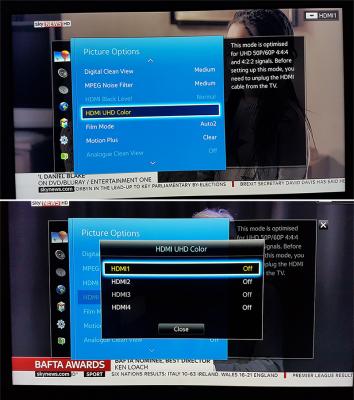
Before you do this, switch off both the TV and 4K Player (not standby), then unplug HDMI cable from 4K Player. Then switch on both TV and Player.

Go to "Picture" >> "Picture Options". Refer to attached photo. If you connect 4K Player to TV HDMI 1, then change TV HDMU UHD Color to "ON"

After the change, switch off both TV and player. Plug HDMI cable back again from player to TV. Switch both TV and player on.

Done. And test play 4K HDR Bluray with TV HDR set to On.

Reference Links...

HDMI UHD Color
» Click to show Spoiler - click again to hide... «

Turn On or Off HDMI UHD color setting. What is it
What is HDMI UHD Color and should I turn_it_on

jamesleetech
post Feb 13 2017, 03:24 PM

On my way
****
Senior Member
684 posts

Joined: Apr 2010


QUOTE(Dickong @ Feb 12 2017, 07:59 PM)
Thanks bro.i will try it tomorrow bcos now not at home.
*
Hope this works to get the correct colour, not yellowish screen.

My previous post did not add in "attached photo". Forgot.

Here it is...
Attached Image
jamesleetech
post Feb 13 2017, 08:56 PM

On my way
****
Senior Member
684 posts

Joined: Apr 2010


QUOTE(Dickong @ Feb 13 2017, 03:35 PM)
Bro.same when on hdr at tv the color a bit yellowish. I notice when hdr is being detect at tv it seem the picture mode change the setting to dyanamic
*
Too bad. I think its better to contact Samsung Service Centre for their comment on the colour problem and find out what caused this issue. I don't know but ask them whether you need any proper calibration done to the TV for HDR. Once HDR is detected, your TV changed to Dynamic automatically so you cannot change it back to "Standard" ??

» Click to show Spoiler - click again to hide... «


I believe that you have tested with different HDMI cables but if not, then test with other cables. Test Oppo 203 HDMI Out to AVR and then AVR HDMI Out to TV. Also test with Oppo 203 HDMI 1 direct to TV and then HDMI 2 direct to TV.

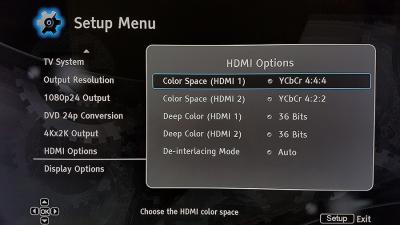
I don't have Oppo 203 but I think should have similar "HDMI Options". Try changing from "Auto" to YCbCr 4:4:4 or 4:2:2. Refer to attached photo.

Attached Image
jamesleetech
post Apr 6 2017, 09:11 PM

On my way
****
Senior Member
684 posts

Joined: Apr 2010


Attached Image
jamesleetech
post Apr 7 2017, 03:18 PM

On my way
****
Senior Member
684 posts

Joined: Apr 2010


QUOTE(sonerin @ Apr 7 2017, 01:46 PM)
Try oxygen cable.
*
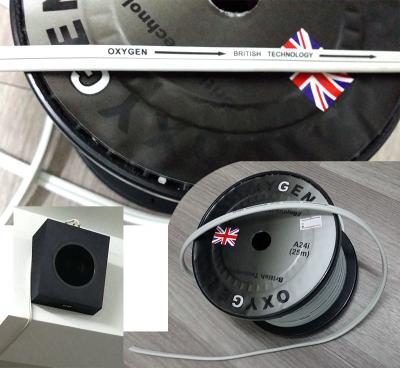
For my Atmos speakers, I bought Oxygen from Acoustique Systems (Amcorp Mall) in 2016. Can't remember exactly... around RM 10 to 12 per metre.

Attached Image
jamesleetech
post Apr 7 2017, 05:07 PM

On my way
****
Senior Member
684 posts

Joined: Apr 2010


I don't know if this post is suitable for this Home Theater Setup thread. Just sharing here because I see some relevance to Home Theater. Anyway, my apologies if out-of-topic in this thread.

Alan Parson was from the British progressive rock band "Alan Parson's Project" (1975 to 1990) who also engineered Pink Floyd's Dark Side of the Moon.

Here's what Alan Parson spoke about audiophiles....

"Audiophiles don't use their equipment to listen to your music. Audiophiles use your music to listen to their equipment."


Reference links...

http://boingboing.net/2012/02/10/alan-pars...udiophiles.html

https://www.facebook.com/Audient/posts/442271379158901

brows.gif shocking.gif

This post has been edited by jamesleetech: Apr 7 2017, 05:07 PM
jamesleetech
post Apr 8 2017, 03:11 PM

On my way
****
Senior Member
684 posts

Joined: Apr 2010


QUOTE(ktek @ Apr 8 2017, 11:29 AM)
james, can you tell me the conductor is tinned copper or not?
*
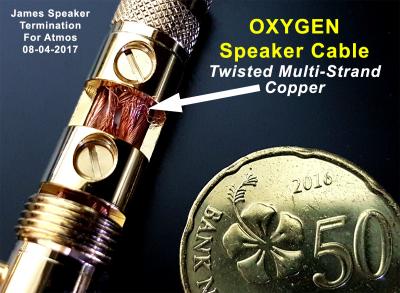
Hehe... a picture is worth a thousand words !

Attached Image
jamesleetech
post Apr 8 2017, 03:35 PM

On my way
****
Senior Member
684 posts

Joined: Apr 2010


There are sooo many materials to read regarding to "expensive vs cheapo" cables such as power cords, speakers cables, digital and analogue cables, etc, etc. My personal belief... Its a time immemorial ongoing debate ever since the word HiFi was invented.

Whichever is your camp, right or wrong... please try NOT to use profanity here. I want the kids to learn about the word "profanity" and how to avoid it but not on how to use them. I am sure people here don't use profanity, am I correct? sweat.gif I don't take any offense but its not necessary and needless in making any statement or opinion.

Here are 2 articles about speaker cables for people to "argue on" !! Oops.. sorry... "argue on" are the wrong words... "think about" would be more appropriate.

https://www.lifewire.com/speaker-cable-differences-3134603

http://www.telegraph.co.uk/technology/news...e-of-money.html

http://machinedesign.com/blog/5-myths-about-speaker-wire

Regards.

blink.gif shocking.gif blink.gif

This post has been edited by jamesleetech: Apr 8 2017, 05:02 PM
jamesleetech
post Apr 8 2017, 09:12 PM

On my way
****
Senior Member
684 posts

Joined: Apr 2010


QUOTE(jdgobio @ Apr 8 2017, 08:26 PM)
Is this the oxygen a24i in the earlier picture?  What is the gauge?
*
Yes, from the same A24i roll as shown in the previous picture which was taken in my place. The seller brought the cable roll when he came to install my Atmos Speakers.

I was told it is Gauge 14.

Size (including insulation) = around 4mm X 4mm for single polarity. +ve and -ve is 8mm X 4mm

Since my Atmos speakers (hung above in front) are not more than 20 feet (6.1 metres), AWG 20 would already be enough for my Atmos speaker (rated at nominal 6 ohms)... this Oxygen AWG 14 cable thickness is more than enough for me. Hehe... maybe too thick for me but no problem since its around RM10 per metre, not expensive loh.

More info about speaker (wire) gauges...

http://faq.yamaha.com/us/en/article/live_s...s_300/2521/7034

https://www.tedpella.com/company_html/wire-gauge-vs-dia.htm

This post has been edited by jamesleetech: Apr 8 2017, 09:32 PM
jamesleetech
post Apr 10 2017, 08:56 PM

On my way
****
Senior Member
684 posts

Joined: Apr 2010


QUOTE(@skyhawk@ @ Apr 10 2017, 08:20 PM)
owh really? wat i mean actually rm1k solely for home theater set(not including shelf)  sweat.gif  sweat.gif

for example y DAV-DZ650K 5.1 DVD Home Theater System
*
So you want an All-In-One Home Theatre system with "everything" that includes 5.1 speakers, player, AV amplifier.

No bluray ? Eventhough you don't play Bluray, its better to get one that can play bluray disc and it can also play DVD. Advisable to play bluray on a 65inch 4K TV because DVD will look mmm...you will know later.

Here's what I found in Lazada...

http://www.lazada.com.my/sony-bdv-e2100-bl...sat-746911.html

Do not mean get from Lazada... you can go to any AV shop to buy. Do compare prices.

It can play from USB. Support for AAC, DTS, LPCM, MP3, MPEG-2 AUDIO, WMA9.

Refer here for more info on Sony BDV-E2100 ...
http://www.sony.com.my/electronics/all-in-...stems/bdv-e2100

I cannot answer you whether Sony BDV-E2100 is good or not so don't make your decision just because I mention this one.

Remember... even the latest DVD also got Cinavia protection. When you play any *ah-hem" disc... sound muted after playing some time. Bluray also got cinavia. Not all discs have it so the problem only appear for those discs that they put in Cinavia. Of course, totally NO problem for genuine original discs.

This post has been edited by jamesleetech: Apr 10 2017, 08:58 PM
jamesleetech
post Apr 10 2017, 09:54 PM

On my way
****
Senior Member
684 posts

Joined: Apr 2010


QUOTE(sivanathan04 @ Apr 10 2017, 09:20 PM)
Bro if u ask me I will suggest u to save up your money to buy better sound system..if u can save up money for 65 inch 4k tv sure u can do the same for sound system..at least save up money till 2k plus..htib speakers just will make your tv sound bigger nothing will improve there...good speaker will last u for long time...one of my relative bought cheap htib speaker brand Philips within a year the player is gone just wasting money if u ask me...if really hard to increased your budget follow brother James advised..
*
When you replied "not possible" and suggested to increase his budget much more... his answer "owh really" made me guess that either he is not willing to "wait and save" or already decided not to spend much much more or have some other reason. I do actually know of friends who budget around RM 6K, then spent around RM 4.5 K on the 4K TV leaving around RM 1.5 K for the entire All-In-One HT system... even after my advice to increase budget.

I am very sure that 100% everyone who wants HT do dream of a full high end system but each person have his/her reasons for the budget. I think he already knows the quality that can be obtained with that low low budget so I avoided suggesting any reasonable quality system costing around RM 5K.

Well... maybe... he will change his decision and go for much much better budget. Only he can decide as its his money.

This post has been edited by jamesleetech: Apr 10 2017, 09:56 PM
jamesleetech
post Apr 12 2017, 03:31 PM

On my way
****
Senior Member
684 posts

Joined: Apr 2010


QUOTE(ktek @ Apr 12 2017, 10:52 AM)
didnt know about dvd cinavia. i know can bypass using other language
*
You did NOT know "about DVD Cinavia" which meant that you do not know that DVD also got Cinavia. And somehow... mmm... you know how to bypass it by changing the player setting to use a different "Language" ? AFAIK, changing this setting is only for Region Change of bluray for Oppo 103D/105D and maybe also the same for a few other brands of bluray player too.

» Click to show Spoiler - click again to hide... «


For DVD players, there are 7 Regions from Region 0 to 6... and Region 0 is the "unofficial region free code". For DVD players, you can actually set it to Region 0 making it region free by using Superdisk. Insert this disc into player and switch off... then switch on and wait... the player will try to play disc and complain "invalid disc" and eject it... Remove disc and DONE... player can play ANY DVD Region discs.

https://en.wikipedia.org/wiki/DVD_region_code

The Superdisk won't work for Bluray Region codes (A, B, C) so a different method is used such as "altering the player" firmware which is commonly called as "jailbreak firmware". For the method of "changing to other subtitle language", it can only be used for players with customised jailbreak firmware so (correct me if I am wrong) cannot be used on players with regular firmware.

I have been using DVD players since (more than 15 years ago) the time I had the Realmagic Hollywood Plus DVD PCI Card inserted into my computer and used software Region block. Then used Sony S360 and Panasonic (forgot Model) DVD players.. then bluray players... Denon DBP-2012UD, Pioneer BDP-450, Oppo BDP-93, Oppo BDP-95, Oppo 105D and Oppo UDP-203.

It actually happened to my nephew a few years ago when his friend lent him a DVD to play. He has the Samsung HD-E5550WK (All-in-One) Home Theatre system and called to ask me why got no sound when it showed "Audio outputs temporarily muted. Do not adjust the playback volume. The content being played is protected by Cinavia". He asked me about Cinavia. I explained to him that his DVD got Cinavia and what happened. Mmm... if I remember correctly, the DVD was "Wrath of the Titans".

By the way... people with older DVD or Bluray players manufactured before 2012 will not have Cinavia detection built into the player.

Here is a sample list of DVD's with Cinavia...

http://www.cinexhd2.com/cinavia-dvd-movies/

... so now you know, DVD also got Cinavia.

I am not sure but I do believe that Cinavia can only be "bypassed" in players with jailbreak firmware... using remote button combinations or changing player setting cannot be used for normal official firmwares. Even the Pioneer BDP-450 have to use HDSir (jailbreak) firmware to do it.

Cinavia is actually an audio watermark mixed into the audio track and the player will detect this. I think Jailbreak firmware will just disable the player from detecting cinavia, basically switching off such detection. Correct me if I am wrong in this, hehehe.

http://www.myce.com/article/cinavia-the-co...silenced-68001/

If you Google Search, you can actually find lots of info about Cinavia in DVDs.

More links which mention Cinavia in DVDs...

https://help.netflix.com/en/node/40876
Quote from link... "If you get a Cinavia error message when trying to play a DVD or Blu-ray disc you got from Netflix, it is typically due to the copyright protection on your DVD or Blu-ray player."

http://www.cinavia.com/languages/english/p...technology.html
Quote from link... "Movies that are released on Blu-ray Disc, DVD, or by authorized download services, can carry a different Cinavia code, indicating that these movies are intended for use by consumers, but with limitations regarding whether or how they can be copied."

Sorry for my long write-up.

Regards.

This post has been edited by jamesleetech: Apr 12 2017, 04:02 PM
jamesleetech
post Apr 12 2017, 03:47 PM

On my way
****
Senior Member
684 posts

Joined: Apr 2010


QUOTE(ktek @ Apr 12 2017, 03:34 PM)
good info james smile.gif
i read them all
*
Hehehe... I just hope I did not confuse you with too much blah, blah, blah which can be boring.
jamesleetech
post Apr 12 2017, 10:45 PM

On my way
****
Senior Member
684 posts

Joined: Apr 2010


QUOTE(SSJBen @ Apr 12 2017, 07:23 PM)
Great info James.
And that's why... I continue to use a HTPC. Double click on file > watch movie.

Cinavia can kiss my ass.
*
Which player software do you use in your HTPC? VLC, MPC-HC, PowerDVD, WinDVD, the outdated dead "ArcSoft TotalMedia Theatre 6 Platinum", DVDFab Media Player, etc etc? Which media type do you use to play? Files such as M2TS, MKV, MP4, AVI, etc? Or you play full bluray by selecting Playlist MPLS file? AFAIK, there are 2 ways to bitstream DTSMA, DTSX, Dolby TrueHD, Dolby Atmos, etc ... playing MKV containers with such audio or directly playing the bluray M2TS file. If the movie is broken into multiple files and mixed up in sequence numbers, then playing from the correct Playlist file is imperative.

The reason I asked is my curiosity got the better of me, hehehe.

I do use (rarely now) DVDFab Media Player 3 (genuine licensed purchase) to play bluray from computer so this player don't have Cinavia detection. Malaysia is bluray Region A so... if I want to play Region B or C discs, I need to use RedFox (previously Slysoft AnyDVD HYD) to prevent my pc bluray writer from locking at one particular region. I haven't tested but I think DVDFab player cannot bitstream Atmos/DTSX audio from MKV files. Anyway its irrelevant now as I don't use HTPC anymore. Already stopped doing some video editing work with HD and SD raw materials. Dah pencen loh. Hehe... where did I keep my ancient Pinnacle Studio PCI Video Encoder Card in my storeroom ?

I was mmm... lazy to test, so were your HT Amp able to identify Atmos/DTSX audio bitstreamed from HTPC for M2TS (or MKV) files ? Maybe some day I should test with my Intel NUC mini PC which I used primarily for DSD/FLAC audio playback to my external DAC.

I also have Netflix subscription and do video streaming from my PC and from my Samsung Smart TV with Netflix App but the quality is well below par with blurays.

» Click to show Spoiler - click again to hide... «

jamesleetech
post Apr 17 2017, 06:39 PM

On my way
****
Senior Member
684 posts

Joined: Apr 2010


QUOTE(SSJBen @ Apr 13 2017, 12:50 AM)
I'm using MPC-HC Black, with madvr + LAV filters. I focus on absolute quality, of which requires a pretty beefy GPU especially when upscaling 720p > 4k using madvr.

Most of my bluray discs, I remux them myself into .mkv container. I leave the lossless audio intact, deleting all the lossy ones and of course I do not touch the video portion at all. Also, since I remux - it is simple to just combine all separated .m2ts files into one file, so no playlist required. So far there's only one movie that has a minor issue being remuxed and that's Mad Max Fury Road, the black/white (chrome) edition.

As for 4k blu-ray discs, I still don't have a 4k blu-ray player yet as I'm waiting for the Oppo 203d - one with darbee. Right now, there exists ONE blu-ray 4k player for PC - but since HDCP 2.2 hasn't been cracked yet, it's difficult to rip and remux them. However, the scene releases are getting sort of close to breaking HDCP 2.2. Also, since madvr's next major release will support the proper passthrough of HDR10/HLG content, no issues on that front for me. Dolby Vision is another matter though but that's a problem to worry about like.. 2 years from now or something.

I'm not condoning piracy, but cinavia is stupid and region locking is idiotic. So ways of stripping off HDCP is a welcome thing in my book, even if it leads to piracy. At the end of the day, what's made by men can and will be broken by men. I don't know why both parties are running around in circles chasing their own tails.

Yeah, my receiver has no issues receiving Atmos/DTS:X bitstreamed from the HTPC with remux mkv files. All I need to do is right-click on the movie > audio > select Dolby TrueHD/Atmos/DTSMA/DTSX.
*
Yeah, the MADvr DirectShow video renderer plugin. I haven't fiddle with it for many years. Will MADvr be just moot point since the already excellent 4K quality with HDR don't necessarily need further tweaking and "enhancements"? I do agree that MADvr does make sense for 1080p and lower resolutions.

The "ONE blu-ray 4k player for PC" mentioned by you is... yes, you were referring to the internal Pioneer UHD Bluray Drive.

http://www.theverge.com/circuitbreaker/201...ray-drive-4k-pc

Just for ripping purposes, what must be cracked is not HDCP 2.2 but its the AACS 2.0 protection in the 4K discs. Unfortunately AACS 2.0 has not been cracked yet, maybe in the future.

Even when my bluray drive can read BD25/BD50 1080p bluray discs, I still need AACS Copy Protection to be removed by DVDFab or RedFox in order to be able to "rip or remux" it.

HDCP 2.2 output can already be "removed" by using HDFury hardware such as the "Linker 4K60 4:4:4 600MHz".

https://www.hdfury.com/shop/videoprocessors...k60-444-600mhz/

Ripping To PC Using Direct Video Streaming
Ya... its possible to "rip" 4K blurays to PC by using a combination of compatible 4K encoding HDMI card for PC and HDFury so the AV can actually be played by the 4K Bluray Player (Oppo UDP-203) and then streamed to the PC to be "recorded" as a single AV file. Removing HDCP 2.2 by HDFury enables recording. Ya, its time consuming to do such recordings.

Computer Internal/External 4K BLu-ray Drives
https://www.reddit.com/r/Piracy/comments/5q...r_future_or_do/
https://forum.redfox.bz/threads/anydvd-redf...-is-hope.68358/

It IS really ironic for Pioneer and any other companies to produce such drives that support playing 4K Bluray Discs. That's because PC hardware and software support for HDCP 2.2 and AACS 2.0 is not yet available or may not even be allowed. Also, PC ripping requires additional software such as RedFox to be able to remove AACS. A BDXL Bluray drive supporting reading of disc capacities above BD50 is just not enough. .

My old bluray drive bought around 2015 is marked BDXL in the front so it should support reading BD66, BD100 and BD200 discs. When I tried to insert my 4K bluray disc... cannot read and just ejects it !! Well... that soon-to-be released Pioneer drive is expected to read those discs.

» Click to show Spoiler - click again to hide... «


I can understand the purpose of implementing AACS, HDCP, Cinavia and Region Code but whatever the reasons, people who supported genuine are being punished for not being able to make a "legal" backup copy and have to endure the numerous bluray trailers and other "unnecessary features". I also do NOT condone piracy BUT I should be legally allowed to make a backup copy of my genuine discs. It happened once for one of my SACD disc which got scratched on the data layer when I took it out to test audition new speakers at a few showrooms. Furious because I could not make a backup copy. What happens when that disc is no longer available for sale? I don't have the old Sony Playstation (with old firmware) to rip it. I have learned from my lesson... use a CD backup copy for audition tests.

» Click to show Spoiler - click again to hide... «

» Click to show Spoiler - click again to hide... «


Therefore ...
AACS 2.0 Copy Protection needs to be cracked for ripping/remuxing.
For direct playback of 4K BD discs... PC software player & GPU must both support HDCP 2.2... and AACS 2.0

ADDITION
More interesting links...
https://www.hdfury.com/tag/hdcp-remove/
https://arstechnica.com/tech-policy/2016/01...-copy-4k-video/
https://www.tweaking4all.com/home-theatre/r...cp-hdmi-signal/

This post has been edited by jamesleetech: Apr 18 2017, 07:01 AM

jamesleetech
post Apr 27 2017, 03:33 PM

On my way
****
Senior Member
684 posts

Joined: Apr 2010


QUOTE(SSJBen @ Apr 21 2017, 04:43 PM)
Appreciate the comment James.

And yes +200000 on genuine buyers not being able to make a copy for themselves. It's freaking silly!
*
My pleasure.

Even the so-called "Digital HD Copy" found in various blurays are ridiculous in my opinion. Download the Digital HD Copy to the PC or a mobile device and its DRM LOCKED there, cannot copy it out to other device to play ! And the quality is obviously below the actual bluray. I think its just an "excuse" for them to increase the bluray price a bit more to "include" such additional "features" which is really pretty useless for me.

I wonder why they still include double discs into a 4K Bluray... where one is the "normal" 1080p Bluray? I don't know about others but for me... if I buy a 4K bluray, I don't need 1080p bluray and forced to pay "extra". When I can already watch 4K bluray, why should I still watch 1080p? If I just want the 1080p bluray, I would not buy the 4K bluray. Yes, there are 1 disc 4K bluray available BUT some are only available as double disc (4K and 1080p) so we end up paying extra. Well... its a business and consumers will always be taken advantage of, as long as there are people who are gullible enough to still buy so its a harsh fact.

3D HD/4K TV is no longer produced so will 3D blurays still continue to be released? When 3D bluray is dead, it means people with "older" 3D TVs will no longer have such blurays to play with.
jamesleetech
post Oct 3 2017, 10:29 PM

On my way
****
Senior Member
684 posts

Joined: Apr 2010


A bit tense here so try to stay cool. I believe its just a misunderstanding here.

I am not saying anyone is doing it in the wrong way. I just want to put it in a different way to avoid any tense feelings here.

Ok... let's put it this way...

When I need further info before I can give my full recommendation, I will just ask for the required info ...

1) by posting my answer that "I will give my full recommendation after you tell me whether you want to use in ceiling or height or up-firing speakers for Atmos/DTSX". If I can ask for more details on Room size and dimension and waited for Deion's reply, I can also wait for another reply too, before giving my recommendations.

OR

2) and by posting this way below...
* Denon x2300w AVR (RM2.8k)
* A simple Klipsch Setup:
* RP160m L/R (RM2.5k)
* RP250c Center (RM1.7k)
* RP240s Surrounds (RM2k)
* SVS PB2000 sub (RM4.5k)
* 1 pair... Atmos/DTSX... Upfiring R-14SA (RM ___) OR In ceiling ___ (RM ___) OR Height ___ (RM ___)

Please don't misunderstand, I am NOT saying anyone is wrong and NOT criticising anyone here. Eventhough SSJBen was answering to Deion, I do acknowledge SSJBen's efforts and appreciated his help to Deion.

All it needs is just a different way of "ask, wait and reply" so everyone here will feel good and people can continue to help whenever possible. Ya, I do have my frustrations too. A cold glass of apple juice helps me to cool down, hehe.

Cheers.

This post has been edited by jamesleetech: Oct 3 2017, 10:31 PM

10 Pages « < 8 9 10Top
 

Change to:
| Lo-Fi Version
0.2334sec    0.80    7 queries    GZIP Disabled
Time is now: 14th December 2025 - 11:18 AM