Welcome Guest ( Log In | Register )

10 Pages « < 7 8 9 10 >Bottom

Outline · [ Standard ] · Linear+

 Your Home Theater Setup.. v2, Let's share..

views
     
jamesleetech
post Dec 26 2016, 08:13 PM

On my way
****
Senior Member
684 posts

Joined: Apr 2010


QUOTE(Skylinestar @ Dec 26 2016, 06:32 PM)
what's your room size?
if your sitting distance is more than the screen width, you're still too far or the screen is still too small.
*
Due to various reasons at my sister's place, its not possible to expand my room size. Staying in KL due to health issues. If its my own room in my shophouse in Pahang... I do have lots of space, around 16 ft X 20 ft.

Distance between my sitting position on my bed and TV is around 8 ft.

Well... a picture is worth a thousand words.

» Click to show Spoiler - click again to hide... «


I couldn't locate my toys and TV at Wall A because the left front speaker will block the path to the left toilet/bathroom. Also have to relocate the door to the left (2 ft) to fit the cabinet on Wall B. I must have the 2 cabinets with drawers to put all my things including clothes, blurays, CDs, SACDs, LPs, etc etc. When I suggested to my sis to put my bed at Wall A but she told me its not good feng shui to face bed to door !! Alamak, feng shui some more. Anyway, will still face problems locating my 2 cabinets.

Have a look below to see why I cannot locate my TV at Wall A...

» Click to show Spoiler - click again to hide... «


This post has been edited by jamesleetech: Dec 26 2016, 08:24 PM
jamesleetech
post Dec 27 2016, 03:08 PM

On my way
****
Senior Member
684 posts

Joined: Apr 2010


QUOTE(SSJBen @ Dec 26 2016, 07:20 PM)
Eh, there are people who play games/watch movies at 3 ft. distance with a 65" screen. What matters is how deep your pockets are, just go for it! tongue.gif

CES 2017 is just a couple weeks away too, more poison inkambing.
*
Yes, playing games or using computer with 3840x2160p resolution will definitely be great at 3 ft away from 65 inch screen. The problem comes at 1080p or below resolution for Ass-teruk, Internet streaming videos or any lower resolution... at 3 ft away can notice the blur caused by pixelation, jaggies, etc. You may or may not notice when playing any console games in HD but will become very apparent for non 4K VIDEO sources. Hehehe... that will not do.

I do sit much nearer to my TV when connected to my computer which supports 4K resolution. But when watching NetFlix 4K movies (at very compressed and low bitrates), it looked terrible at 3 ft away! I do subscribe to Netflix with the so-called "4K videos" where 4 persons can watch at the same time. Unfortunately iFlix don't have HD so watching on a 55 inch LED TV is terrible... don't even think of sitting 3 ft away! Already reduced my Ass-teruk packs a lot and if deteriorates some more, may even terminate fully and change to NJOI. Very seldom watch any SD channels on Ass-teruk, only watched RTM1 and RTM2 for local news only.

Terrestrial Digital FTA TV is supposed to be officially launched nationwide soon or in a few years? So many news about this and that, limited location test here & there, Media Prima & MiTV news, etc... I don't know what to believe. Yawn, I am feeling sleepy. OR... is it going to be PTA (Pay-To-Air) just like Subscription-Based Satellite TV (As***)?

Also, if I were 30 years younger, no problem to strain my eyes. At my age now, its not advisable to watch at a "lightbulb" so close for around 10 hours daily ! Mmm... projector? No problem for 4K but will become blur for HD at 3 ft distance on a 80 to 90 inch screen size. Hehehehe... at so close distance, it will also hurt my neck when I turn my head left and right to watch a movie with 2.39:1 ratio. I still remember when I was at college in KL and watched the movie "Grease" shown at Cathay Cinema (Jalan Bukit Bintang) in the late Seventies... sitting at a cheap 2nd Class seat and my neck aches after watching! Cannot simply spend my parents money in those days. Oh... any smaller than 80 inch projector screen size... better don't use projector and return to LED or OLED TV!
jamesleetech
post Dec 29 2016, 06:07 PM

On my way
****
Senior Member
684 posts

Joined: Apr 2010


QUOTE(saitong09 @ Dec 29 2016, 03:45 PM)
Oppo UDP-203 arriving today  thumbup.gif
*
Wow! thumbup.gif drool.gif

I wait for UDP-205 next year, rumoured to come around March 2017 but may only be available much later. Upgrade from BDP-105D to UDP-205/205D.
jamesleetech
post Dec 31 2016, 03:10 PM

On my way
****
Senior Member
684 posts

Joined: Apr 2010


QUOTE(saitong09 @ Dec 30 2016, 11:27 PM)
You mean the Dune Solo 4K selling for rm1500? That was my plan but gave up due to not true 4K (hdmi 1.4 and 4k30p only) and don't support HDR and Dolby Vision. Sound quality I don't think on par to Oppo
DD so far ok
*
You said Dune Solo 4K do NOT support HDR and Dolby Vision. What is confusing for me is... the player support is needed.

A lot of things that I am saying now is blur blur and ignorant so please be patient with me. I can be wrong here.

I may have missed it but I have Googled everywhere and couldn't find any info on whether HDR and Dolby Vision need 4K bluray player to support it.

I do know that bitstreaming audio out to AVR do NOT need bluray player to support True-Hd/DTS/Atmos/DTSX/Auro-3D because the decoding is not done by the player. Only when player is not set to bitstream, then the player decodes the audio into PCM.

Here is what I believe... there is no player that decodes HDR and Dolby Vision because its not necessary. Such work is done by the visual display decoder, i.e TV/Projector.

What I also believe is that the HDR & Dolby Vision data in the 4K bluray is "merely" read and bitstreamed out to the TV to decode the HDR & DVision. What the player can probably do is either block (filter) out the HDR & DVision data or allow it to pass through. If true, I think such "On/Off" filter is needed because such "additional data" may cause Non-HDR/DVision TV to output incorrect dynamic range, colour, etc.

So, simply said... isn't HDR and Dolby Vision all about decoding support from the video device (TV/PRojector/Phone) and not about players?

Don't need source 4K Bluray/Media Player to support HDR & DVision as it just "passes" it out... OR is it like what you said... need the Player (Dune) to support it.

Probably the player support is needed because it need to be able to recognise it and if not, then such data will be "ignored" and lost when video is sent out. Is this the reason why support is needed?

blush.gif confused.gif rclxub.gif

If anyone knows a clear answer to this, PLEASE do chime in and correct me. I need to learn more here. Will certainly appreciate it.

This post has been edited by jamesleetech: Dec 31 2016, 03:12 PM
jamesleetech
post Jan 3 2017, 03:18 PM

On my way
****
Senior Member
684 posts

Joined: Apr 2010


QUOTE(SSJBen @ Dec 31 2016, 10:14 PM)
As long as the display is capable of receiving HDR10 metadata, then it can display it (keyword is receiving, whether the display can even do HDR properly or not is another topic). The receiver/player needs to be set to passthrough (or anything equivalent) and no processing can be done.

Dolby Vision is a little more complicated. The reason the majority of TVs and players don't support it is more down due to licensing fees. Why pay when you have free? Dolby Vision is better, no questions asked. But when you have 99% of the movie-buffs not even being able to tell the difference between an 8bit and 10bit panel, then what's the point in spending the effort for the speck of minority who cares?

There is "filter" needed. If a display has no capabilities of receiving HDR metadata, it simply won't display it. Plain and simple. No such issues as wrong color range.

I however, cannot answer why some players can passthrough HDR and some cannot. It's not exactly HDCP or HDMI related, as even something as old as the PS4 which consists of HDCP 1.2 and HDMI 1.4 can passthrough HDR without issues.
*
Thanks for your reply. Appreciated it.

You said "The receiver/player needs to be set to passthrough (or anything equivalent)". This is where I did understand much earlier. The metadata being "relayed out" without being touched by the AVR/Player so its the TV/Projector display that processes the HDR10 metadata. Yes, whether HDR can be properly processed or not is an ongoing debate. I should also say that I heard that the TV/Projector must also be calibrated (ISV?) properly and if not done properly, HDR can make it worse, not better.

My question was not about the complexity of Dolby Vision or possibly HDR. Its about the question on why any player must be compatible to just passthrough the HDR signal out to the display. I could not find the answer to this and you also cannot answer too when you replied "can't answer why some players can passthrough HDR and some can't" if player compatibility is not required.

IF, again IF, player compatibility is required, then it should also mean the same thing for the HT AVR/Pre-Amp when its connected to the player. Correct me if I am wrong... I haven't heard and did not find anywhere that says AVR/Pre-Amp needed to be compatible. If compatibility is needed then I believe the HDR logo should appear printed on the front body of the AVR/Pre-Amp (similar to Atmos logo) but I have not seen it.

Do correct me if I have misunderstood you... as you have said, non-HDR Ready TVs simply don't do anything to the "additional metadata" received so the picture will not be affected. If that being the case, why should Oppo put in the HDR "on and off" setting into 203 when the HDR metadata do not need to be filtered out to a Non-HDR TV/Projector? Having this HDR on or off did affect the picture as someone in Facebook have already tested. What did Oppo 203 do to the signal when its set to HDR On or HDR Off? By right, the Non-HDR TV/Projector just ignores the metadata so the HDR will not affect the picture... or am I wrong here?

This post has been edited by jamesleetech: Jan 3 2017, 03:35 PM
jamesleetech
post Jan 4 2017, 01:05 AM

On my way
****
Senior Member
684 posts

Joined: Apr 2010


QUOTE(SSJBen @ Jan 3 2017, 05:08 PM)
» Click to show Spoiler - click again to hide... «


As for the last question, I don't have an Oppo 203. So... not much comment about what you've said about the player have different results. By right, if the player is connected to a non-HDR capable TV, then the option should simply be greyed out entirely (which is what the PS4s/XboneS are doing).
Can you link me to that FB post where the person tested out HDR on a non-HDR capable display? Sounds to me like the processing is done on the player itself before being sent out to the display (basically like "bitstreaming" the entire video signal over after post-processing).

Good discussion though. thumbup.gif
*
The facebook link came from a closed group that require approval to a request to join.

Anyway, here is the link posted by the group member "El Hefe's HiFi Reviews"...
https://www.facebook.com/groups/HTnHiFiOfMa...77401388987647/

Just to show you the photos (phone quality) that he posted, I post it here below for your reference.

» Click to show Spoiler - click again to hide... «


I may have more things to discuss or explore in this area of HDR and Dolby Vision and also I may have further reply to you too. Anyway, I will just stop here. thumbsup.gif

This post has been edited by jamesleetech: Jan 4 2017, 01:50 AM
jamesleetech
post Jan 4 2017, 10:31 PM

On my way
****
Senior Member
684 posts

Joined: Apr 2010


QUOTE(teop @ Jan 3 2017, 04:27 PM)
Ahh, but the BFM ads actually tries to encourage people to read....

Anyway I have always enjoyed the details you put into your reply. Makes it so much better since not everyone can ask question properly or completely... otherwise this thread will become a rapid exchange of one line questions and answers.
*
Thanks for your kind reply. Appreciated it. It is already THE trend among everyone to express anything using the shortest possible sentence. I can understand why. Typing on the smartphone or the computer keyboard is tedious and time consuming.

Anyway, its okay for me when people used short sentence, one "liners", short forms, acronyms or whatever. The only problem here for me is to properly understand what the writer was trying to say. Hehehe, I can't read what is inside a person's mind.

I just "invent" an example... "Is my room big enough for HT? I have a HiFi system now." I think many of you DO know what additional info is needed to be mentioned after that question. Then, what happens next are back and forth replies which actually can be a bit time consuming loh. Use simple short sentences is absolutely okay but it should also have some common sense on what info must be mentioned too.

I am also guilty of giving wrong answers to a very simple and straight forward question. I did not use my common sense. A person asked... "which is better, Denon or Onkyo?" I answered Marantz. He clearly wants to know which of these two. He didn't ask people to suggest other brands. I should have replied Denon and should have given my personal reasons why. Hehehe... numerous people answered with Yamaha, Pioneer, etc making it even more confusing to the writer. Another thing is, there are people who simply answered this or that. Yes, just say its a personal opinion/preference and explain a bit on why that one is better. Example.... "Denon is my personal preference. Better vocals".... simple and short.

QUOTE(teop @ Jan 3 2017, 04:49 PM)
Isn't 3D TV on the way out? I did remember that a few manufacturer is on the exit. Maybe only for the very high-end? This will definitely hamper future 3D adoption by studios
*
More and more lower-end TVs/Projectors will not have 3D in the future?

Maybe you are right to say that, because of poor consumer acceptance or usage. With more and more TVs with 100+hz refresh rates and 60+ frames per second, I guess it may cost only a little extra to add in 3D so it may still appear in lower-end models. I am just assuming only. Similar question can also be asked about the TV Bluetooth feature. Do Bluetooth appear in only high-end models? How many of you actually do use your TV bluetooth? If many of us uses the TV Bluetooth, then such demand will ensure that this will continue to be included in the future, maybe more and more lower-end TVs will have it.

You said that less and less 3D TVs will hamper future 3D releases. Well... yes, I agree that we can't watch 3D blurays without 3D TV. I can also say "without 3D blurays", 3D becomes useless in 3D TV. Its just like a "chicken and egg" story, which comes first. I believe whether studios continue to produce 3Ds do not depend just on 3D TV or 3D blurays or 3D movies in cinemas... it depends solely on consumers continued support and without it, then 3D will be a past history. Even IF 3D totally disappears from the TV, I do suspect that it will still reappear again in the future.

Only time will tell whether lower-end TVs will not have 3D.

» Click to show Spoiler - click again to hide... «


Additional Reading Info...

http://nypost.com/2015/03/18/the-3-d-fad-i...dnt-be-happier/

https://entertainment-industry.knoji.com/th...s-of-the-1950s/

http://stereoscopynews.com/hotnews/history...ite-3d-channels

https://www.sky.com/help/articles/watch-sky-in-3d

This post has been edited by jamesleetech: Jan 4 2017, 10:58 PM

jamesleetech
post Jan 6 2017, 03:11 PM

On my way
****
Senior Member
684 posts

Joined: Apr 2010


QUOTE(SSJBen @ Jan 5 2017, 10:49 PM)
Doesn't work for my setup. Oppo players HDMI passthroughs adds quite a bit of input lag. I do play games, so that's a big no-no.

That said, HDMI 2.1 can be firmware patched into HDMI 2.0 hardwares provided the implementation was following the standard to begin with. So fingers crossed that my receiver gets it. But then again, companies want to milk their products and want to make money, so they probably might not even care.
*
I don't follow you. Highlighted as blue text in quote. Mmm... how do playing games cause Oppo players to have HDMI input lag? I don't have any input lag problems with my 105D HDMI 1 to TV and HDMI 2 to my Pre-Processor. You use Zone to stream to another room and play games using the same HT AVR? If I use PC HDMI to my HT Pre-Amp, I don't use my Oppo and vice versa... both are not switched on together.

confused.gif Am I right to assume that you have a complicated connection setup. Sorry for not being able to figure it out. blush.gif Please enlighten me.

This post has been edited by jamesleetech: Jan 6 2017, 03:14 PM
jamesleetech
post Jan 6 2017, 11:39 PM

On my way
****
Senior Member
684 posts

Joined: Apr 2010


QUOTE(SSJBen @ Jan 6 2017, 04:36 PM)
You're mistaken James.

» Click to show Spoiler - click again to hide... «


My current (and always have been) setup is of course the simplest most direct way - all sources to the receiver, then receiver out to the display. Inherently, receivers do add input lag as well. But turning off all the GUI/short message displays, disabling upscaling, all comes down to just under 5ms of additional input lag. So it's something that is mostly not noticeable versus plugging directly to the display.
*
Your reply makes it even more confusing for me. Sorry for being dumb so please bear with me here.

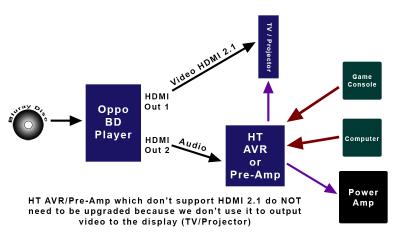
I will use a graphic to better illustrate what I did understand from Saitong99...

Attached Image

I am repeating here. What Saitong99 earlier said was that the AVR do not need to be updated or upgraded to support HDMI 2.1 since the AVR is used to process the audio only and don't need to be connected to the TV/Projector. Since the video portion from Oppo is directly output to the TV/Projector, all it needs is for the Oppo to be upgraded/replaced (firmware ?) to support HDMI 2.1.

Since you said that you used the simplest direct way of connection of all sources to the AVR, then is your actual connection the same as the graphic illustrated above?

IF its the same connection I described above, then by right your HTPC should have been off when you play the Oppo
since only one TV display is used. Lagging to either your HTPC or Oppo should not affect each other since one of them is off.

Am I missing something here? I don't think you somehow connected your Oppo HDMI 1 out directly to your HTPC which is connected to the TV, and then Oppo HDMI 2 out to your AVR? "IF" you only used your HTPC as HDMI output to your TV, then it will be a problem when HDMI 2.1 isn't supported.

Yes, I can believe that there will be some (unnoticeable) lag issues when both the Oppo two HDMI outs are used. Having your HTPC connected to the AVR should by right not cause Oppo to increase lag because your HTPC is off when Oppo is used.

What I can easily understand is for the Oppo player to be "upgraded" to support HDMI 2.1 without requiring the AVR to be upgraded or replaced.

If you say that both Oppo HDMI 1 and 2 Outputs will be disabled when it detected that either one is connected to a device that don't support HDMI 2.1, well, then I can understand. Example... Oppo HDMI 1 to 1st Device (HDMI 2.1 ready) and Oppo HDMI 2 to 2nd device (Not HDMI 2.1 ready)... then both Oppo HDMI will be disabled (black screen). I don't know so is this correct ?

I know that technology changes very fast but its still a bit early to talk about any HDMI 2.1 update or upgrade. Even if HDMI 2.1 support is completed, it should be a very long time to wait for 8K blurays to appear. We are just beginning to talk about 4K.


This post has been edited by jamesleetech: Jan 7 2017, 12:01 AM
jamesleetech
post Jan 16 2017, 04:02 PM

On my way
****
Senior Member
684 posts

Joined: Apr 2010


QUOTE(Dickong @ Jan 14 2017, 04:53 PM)
Hi guys, the oppo 203 come with HDR but presently without Dolby Vision but reading through some review some say can be upgrade with firmware later bcos its aldy have the hardware inside, but without the hardware it cannot be upgrade. Anyone here can verify
*
Same as what happened for my bro-in-law who have the Marantz 8802. It already has Dolby Atmos hardware board inside but did not support DTSX. He had to "upgrade" the board to support DTSX and the firmware. DTSX board upgrade is free but a "service" charge needed to change this board. Stupid... the Board Upgrade is definitely NOT free.

For Auro-3D, another hardware board needs to be replaced to support Auro-3D. Additional payment for the Auro-3D board replacement but my bro-in-law did not want it because Auro-3D is very very very rare at the present time.

The later model Marantz 8802A already have hardware support for Atmos and DTSX, but the board for Auro-3D also needs to be upgraded.

Back to your question.

Refer to this Oppo link below...
https://www.oppodigital.com/blu-ray-udp-203...3-Features.aspx

Here is a portion from that page...
Dolby Vision Upgradeable
Leveraging hardware designed to support Dolby Vision, customers can expect a firmware update in early 2017 that brings Dolby Vision support to the player.


Yes, UDP-203 hardware confirmed to support Dolby Vision. Just needed a firmware update only.

This post has been edited by jamesleetech: Jan 16 2017, 04:13 PM
jamesleetech
post Jan 17 2017, 01:31 AM

On my way
****
Senior Member
684 posts

Joined: Apr 2010


QUOTE(Dickong @ Jan 16 2017, 07:32 PM)
Thanks, another question later when we jailbreak can we still upgrade the firmware.tq
*
You are welcome.

I think the future jailbreak for UDP203 should be using the same method as BDP-103D.

The cracked jailbreak firmware in the USB flashdrive is used to "update" the firmware to this jailbreak one. Those smart people don't allow this USB flashdrive to be "shared" with other players so it is locked to the player Ethernet MAC address, just like the Astro smartcard. The USB flashdrive must be inserted when player is switched on.

I do know a person who updated online his BDP-103 and found out that he now cannot play his blurays in harddisk (BDMV and ISO)... his player no longer jailbreak one. Luckily he reverted back to the jailbreak one by updating again from the jailbreak firmware in the USB flashdrive. Another guy downloaded the official firmware from Oppo website and then copied it into that USB flashdrive and then used it to update !!! The jailbreak version have been replaced with a Non-jailbreak one in the USB. He had to return the USB for them to recopy the jailbreak one.

You cannot use the latest downloaded firmware from Oppo website because its not cracked jailbreak firmware. If you updated the player firmware direct from Oppo official one, the existing jailbreak firmware in the player will be replaced and will no longer work.

Whenever Oppo releases any new official or beta firmware, you have to wait for "them" to crack that version and then get it from "them".

They are now moving away from jailbreaking BDP-103D/105D so the 105D jailbreak version is an old one released in November 2015 (Version BDP10X-80-1031). Oppo had already released a few newer versions for 105D and the latest is the beta Version BDP10X-83-1226B... BUT.... unfortunately we can't use such uncracked versions. Forget about waiting for newer jailbreak firmwares for 105D. Paid for jailbreak and later only ONE additional jailbreak update. The current jailbreak version still don't support Dolby True-HD in MKV and the later Official firmware already fixed this.

When the UDP203 jailbreak version comes... just remember that they RARELY release updated jailbreak versions. After experiencing what happened for BDP-105D, I can expect that they will only come out with just one newer jailbreak version after Oppo have released a few later ones. Mmm... IF first jailbreak version release in June 2017, I will NOT be surprised that the next jailbreak one will come in... mmm.... June 2019 !!! After Oppo already released 3 or 4 newer ones. LOL.

Oh... the jailbreak also comes with Multi-Region for blurays (use player setup to change region manually) so if you get it only for BD Region, then its an expensive overpaid jailbreak. The good thing is, no need later jailbreak firmware for Multi-Region.

This post has been edited by jamesleetech: Jan 17 2017, 07:44 PM
jamesleetech
post Jan 21 2017, 02:47 AM

On my way
****
Senior Member
684 posts

Joined: Apr 2010


QUOTE(saitong09 @ Jan 20 2017, 10:45 PM)
jamesleetech
If unplug the JB USB, can the Oppo player update the latest official firmware?
*
Yes, you can unplug the payer to update with the latest "official firmware" BUT the firmware in the player now is NO LONGER jailbreak. DANGER... When you install any Official/Beta Firmware, you overwrite and replaced the existing jailbreak firmware in the player.

The jailbreak firmware file in the USB is only used once to "update" the player. After the player has been updated, the player now uses jailbreak firmware. The reason why the USB must always be inserted is because the jailbreak firmware in the player need to detect the "special" encrypted key file in the USB. Without this key file, the player jailbreak firmware will behave just like official firmware (enable Cinavia, not allow BD ISO play, etc). This encrypted key file is locked to the player MAC address so the USB can't be used on other players.

Once the player is installed with the jailbreak firmware, it already has all the jailbreak functions. When you remove the USB, the player jailbreak functions will fail to work because it did not detect the special key file.

After removing the USB, when you install the official firmware, the jailbreak firmware in the player have been replaced so ALL the jailbreak functions have been deleted and will not detect the key file in the USB.

CAUTION! Do NOT install any other firmware. Only the jailbreak firmware file in the USB can be used to install or reinstall firmware. When Oppo releases any newer official/beta firmware, NEVER use any of them. You have to wait for those jailbreak people to release newer jailbreak firmware... and then return your USB for them to copy the newer jailbreak firmware file.

A friend once did this. He unplugged the USB, connect the player online to update the firmware with the latest official version. He re-inserted the USB thinking that his latest firmware now uses the latest jailbreak.... he got a shock... no more jailbreak ! Luckily I told him to reinstall using the older firmware file in the USB and now the jailbreak worked. Another friend also very clever... he downloaded the latest official firmware file from Oppo website and copied (replaced) the jailbreak firmware file in the USB !! Then he used this "new" file in USB to update his player. Again... no more jailbreak BUT this time he had to return his USB to re-copy the older jailbreak file so that he can re-install. Hehehe.

Oppo UDP-203... new jailbreak firmware have now been released. I heard that it will cost RM 300+. I also heard that this player chip do NOT support Cover Art in BDMV folder so no jailbreak for this. I don't know whether embedded cover art in FLAC will be displayed or not because I don't have UDP203 to test.

This post has been edited by jamesleetech: Jan 21 2017, 02:58 AM
jamesleetech
post Jan 21 2017, 05:08 PM

On my way
****
Senior Member
684 posts

Joined: Apr 2010


QUOTE(Dickong @ Jan 21 2017, 02:41 PM)
So any advice about the jailbreak, jailbreak now or later.tq
*
Now or later is basically up to you to decide. It depends on whether you can wait and not be able to play blurays from your harddisks and also have Cinavia in MKVs, etc, etc.

One thing is for sure... if you get the jailbreak now, then you can immediately play without any "restrictions".

God knows when any newer jailbreaks will come because previous history with 103D/105D has shown that we should only get a newer jailbreak after... mmm... 30 months? Anyway, after paying for the jailbreak, we can get it FOC for future newer jailbreaks.

If you already have 103D/105D (with jailbreak) and decide to keep it just for playing blurays... then the newly bought UDP203 can be used to just play genuine 4K Bluray discs so no need to waste $$ on 203 jailbreak because there is no full 4K BD rips available yet. But if have those *ah-hem* 4K MKVs then 203 jailbreak is necessary. I have 105D and intend to keep it when I buy the future UDP205 or UDP205D.

Do remember that we can expect that our f@@king RM will still crash down further... so the price for jailbreak "MAY" be higher after one year. Guessing only.

RM 300+ is not cheap just for jailbreak firmware so if you only play direct from genuine discs, then its wasting $$ to get jailbreak. Paying for jailbreak just for Region Free only is also, well, too expensive. Remember... at the present time, AACS 2.0 in 4K Blurays have not yet been "cracked" so no full 4K Bluray rips. I have seen people who *ah-hem* downloaded so-called 4K movies in 30GB to 80 GB MKVs with Atmos/DTSX some more BUT the video quality cannot beat those actual 4K BDs with around 120GB to 200GB sizes AND have HDR too. I really do not know how those people managed to rip 4K BDs to smaller sized MKV files. Maybe they used HDFury (to bypass HDCP), play it and used a "recording/encoding box" to do TV video screen capture to record. The HDFury cannot disable AACS 2.0. I don't really know how they actually did it so I am guessing. Because of the huge size, I think they "reduced" the size and ripped to MKVs. IF they gave us full sized rips, can you imagine with an average 180GB size for a 4K BD, I can only store about TWELVE 4K BDs in a single 2TB harddisk !!

» Click to show Spoiler - click again to hide... «


I ripped all my genuine blurays as ISOs to play from my harddisks. This reduces wear and tear for my precious bluray collection, and also give me convenience without inserting and removing discs!

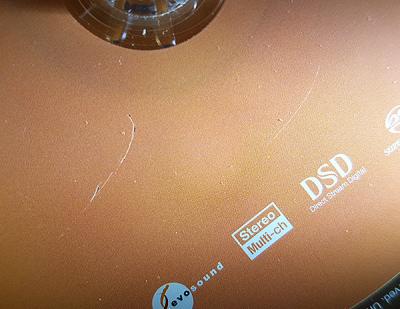
Of course I can wait without using jailbreak but it means that I need to use my original discs so there is wear and tear which I don't want. Once, when I took my genuine SACD disc out to play as my audition disc at different showrooms selling speakers. After using it at 4 different showrooms, damn, I found out that the disc is now scratched!! I will never take my discs out again and rip my own CDs to duplicate discs for auditioning.

» Click to show Spoiler - click again to hide... «


For people who don't have DTS/Dolby Bluray Demo discs and Other Samples, here are links to legally download trailers/clips...

Dolby 5.1/Dolby True-HS/Dolby Atmos Downloads

DTS/DTS HR/DTS-HD MA

IMAX Pre-Show Trailers

THX Trailers

Audio - Video Format Trailers

Audio Speaker Sound Check Tools

jamesleetech
post Jan 24 2017, 10:50 PM

On my way
****
Senior Member
684 posts

Joined: Apr 2010


QUOTE(saitong09 @ Jan 24 2017, 09:22 PM)
Too bad my Jailbreak cannot apply caused based on the version 29, My Oppo updated few days ago to the latest firmware which is ver 33 sad.gif
*
When you updated your Oppo to the latest official firmware, the jailbreak will not work anymore.

What did you do? IF you used your Oppo to go online to update then you can try downgrade back to the jailbreak version 29.

Insert back the jailbreak flashdrive and use your Oppo to manually update from USB again.

Setup >> Device Setup >> Firmware Upgrade >> Via USB.

IF you downloaded the new firmware, copy and replaced the original firmware file in your USB flashdrive, then the jailbreak firmware in the USB is gone. Bring the USB flashdrive back to the seller to copy the jailbreak firmware for you again.

By returning back to Version 29, at least you have jailbreak. Of course, no more new version.

I hope this work for you. I was told that the downgrade from USB should work but I have not try it myself. I NEVER update my Oppo. I only return my USB to the seller to copy the new jailbreak firmware when released.
jamesleetech
post Jan 26 2017, 02:55 PM

On my way
****
Senior Member
684 posts

Joined: Apr 2010


QUOTE(saitong09 @ Jan 24 2017, 11:27 PM)
Haven't got the USB, but the seller told me the JB is based on ver 29, so mine is ver 33 now so cannot use the JB.
*
Asked my friend and he told me that UDP203 do NOT use USB. Unfortunately you have to wait for them to release JB ver 33 ! Cannot downgrade back to JB ver 29.

What those people who made the JB firmware should have done is to inform all the sellers to tell the customers NOT to update direct from Oppo loh.

This post has been edited by jamesleetech: Jan 26 2017, 03:26 PM
jamesleetech
post Feb 1 2017, 07:02 PM

On my way
****
Senior Member
684 posts

Joined: Apr 2010


QUOTE(saitong09 @ Feb 1 2017, 05:09 PM)
They JB every official released?
*
I cannot answer your question because I don't know if they JB every official version or not. I may be wrong but I do believe those people are not so hardworking enough to JB every official version.

They get our $$ once and have less incentive to do JB for every version as it involve more work loh !! I will NOT be surprised if the UDP-203 only get maybe 1 or 2 JB (lucky if got 3) versions after you paid RM250-320 for the JB.

And then... when UDP203D released, the new JB won't work on UDP203. That's what happened when BDP-105D JB was released which cannot be used for BDP-105 because its not compatible !! I know because I bought the 105 demo unit at a very cheap price BUT found out that the new JB don't work properly so I had to return it and exchange it and pay extra for a new 105D !

I bought my 105D in January 2015. The "Darbee" model was released around 2014 and only got 1 JB version for the 105D when I bought mine in 2015. Then around December 2015, they release the SECOND JB !! My JB is out-of-date, behind a few versions of the Official Release.

I do believe that the JB firmware IS actually done by people inside Oppo itself but "done unofficially and secretly" because they don't want to lose their precious bluray license !! They were "forced" to put CInavia into their players when it becomes compulsory since 2013.

There's nothing we can do about it for people who wants Cinavia Free, Region Free, can play BDMV folders and BD ISOs for backup copies of own genuine discs. We can choose not to do backup rip and play direct from genuine discs BUT risk the wear and tear on the disc which can get spoilt. Any spoilt disc is not replaceable when its no longer sold later !!

Without JB, of course we can just copy the M2TS file to the harddisk to play with Oppo BUT not all blurays put the entire movie in 1 single file. Many blurays have the movie split up into many different M2TS files BUT may not be in the correct number order!! So we have to rip using the correct playlist to a single file and THAT involve a lot more work... many people don't even know how to do it too. I may not even know which is the correct Playlist file to use to join the "chapters" correctly into 1 file. Ripping to BD ISO is so so so much simpler!

Don't forget...whatever we do to "backup" our discs to harddisk such as MKV, MP4, M2TS, BD ISO, etc etc... the Cinavia virus still there without JB.
jamesleetech
post Feb 2 2017, 03:08 PM

On my way
****
Senior Member
684 posts

Joined: Apr 2010


QUOTE(saitong09 @ Feb 2 2017, 11:33 AM)
I thought the same firmware should be applicable to various model? refer below link
http://www.oppodigital.com/support/blu-ray...re-83-0715.aspx
*
Obviously you already know that the firmware for BDP-105D cannot be used on a different generation BDP-95. Same for the other generations. The same thing for JB firmware too.

The same Official Firmware for BDP-103D can also be used on BDP-103. This was what I thought to be the same thing for JB firmware. BUT... as I mentioned before, what REALLY actually happened to me previously was that the latest JB firmware released for BDP-105D (with Darbee) got problems for BDP-105. In December 2014, I bought a BDP-105 display unit offered to me from a dealer at very very good price + free JB ! At that time, the JB firmware for BDP-105D was released. Then... various problems appeared with the JB. A few SACDs was recognised only as CDs !! Sometimes DTSMA audio becomes DTS !! Sometimes Dolby Digital becomes PCM !! Cinavia still appeared for a few BD ISOs !! I thought maybe the display unit is spoilt so had it replaced with another display unit from another branch of the dealer. Then... the same thing happened except that no Cinavia problems ! Maybe later they have made the newer JB firmware compatible with both 105 and 105D... I really don't know. Because of such issues, I was forced to return the display 105 and bought the new 105D.

Anyway, I guess they will "make" the same JB to work for both UDP-203 and future UDP-205, and maybe also for the future UDP-203D/205D too. I really hope it works without any issues for both UDP-205 and UDP-205D !! I will only know the answer when the UDP-205D is released in the future. From what happened to me with BDP-105, it makes me not certain on whether to buy the UDP-205 immediately when released or wait till UDP-205D. IF the JB for UDP-205D also work for UDP-205, then I will not wait and immediately buy UDP-205 when released... because I prefer no Darbee.

Meddling with the firmware and jailbreaking it can have issues so if it is not done properly, then may cause problems to UDP-203 when newer JB for UDP-203D is released. Well... my opinion.

jamesleetech
post Feb 10 2017, 02:16 PM

On my way
****
Senior Member
684 posts

Joined: Apr 2010


Wow! Player detects HDR and auto switch it on... and when TV set HDR On, then picture goes awry!

Maybe a bug in this Sammy model that probably needs fixing from a future firmware update.

I may be wrong but I do think that your TV should auto detect HDR from the signal. HDR should auto Switched On when detected. I wonder why your TV need to have a setting to switch HDR On? What am I missing here? I know very little on HDR. I can understand why a player have the HDR on and off setting to output to Non-HDR TVs and people have explained about the HDR On/Off before but I still don't understand why its necessary to have On/Off or Enable/Disable for HDR TVs.

Read this link below....

There's a major problem with HDR on 4K TVs – and only one real solution.

... a portion from the above article (in Spoiler)...

» Click to show Spoiler - click again to hide... «


Note : Two major HDR formats in use today use metadata which rides along the video signal down an HDMI cable so this "extra data" should be auto-detected by HDR Players/TVs.

Lots of HDR info from Google Search.

http://www.digitaltrends.com/home-theater/...-tvs-explained/

This post has been edited by jamesleetech: Feb 10 2017, 03:18 PM
jamesleetech
post Feb 11 2017, 03:46 PM

On my way
****
Senior Member
684 posts

Joined: Apr 2010


Can understand why player got HDR On/Off setting.... Off for connecting to Non-HDR TV.

Since TV can auto-detect HDR, what's the purpose of putting HDR On/Off setting in TV? TV will detect HDR and switch on automatically BUT when you set it to Off, then it works !! Set to On and then colour go crazy?

What should happen to TV is this...
Player setting HDR On. TV detected HDR and auto switch HDR On, only when you don't want HDR on TV, then set the TV HDR Off. Instead... when TV HDR Off, then got HDR !!! LOL !

Well... what I can only say is... as long as you "solved" your colour problems with HDR Off and you like what you see, then what matters is that your problem is solved. Nothing wrong in that. Its not important whether I don't understand it here.
jamesleetech
post Feb 11 2017, 06:42 PM

On my way
****
Senior Member
684 posts

Joined: Apr 2010


QUOTE(saitong09 @ Feb 11 2017, 06:02 PM)
If the player do not have setting to turn off the hdr, your TV setting should handle this. Some ppl may prefer HDR off
*
This does not explain the funny behaviour of Dickong's 4K HDR TV.

Okay... IF player cannot switch off HDR... sent signal out to TV. Then TV detect and HDR auto Switch On. Now, if I don't want TV to use HDR, then use TV setting to set HDR Off... This is supposed to be happening on the TV side.

When the TV detected HDR, it should be auto Switch On BUT.... why have to change TV HDR setting to OFF so that got HDR ?? Does not make sense.

I agree that its good to have option to switch off HDR on the TV side BUT its the opposite... Switch HDR Off on TV in order to get HDR? Switch the TV HDR On and then got colour problem !! IF TV HDR On or Off both still got HDR, then why put HDR On/Off setting in the TV?

When TV auto detected HDR, it should auto Switch On and when this happens, got yellowish colour problem !! I thought it should be some compatibility issues or bug which need to be fixed in a future firmware update. So this should explain why got colour problem when TV auto HDR On. BUT... Dickong said he had to set his TV HDR to Off so that HDR works !! TV HDR set to Off and then got HDR. Really confusing to me loh.

Is TV HDR On used to make "emulated (false) HDR" for receiving signal that is Non-HDR? Is "emulated HDR" possible? Setting TV HDR to Off to make HDR to work is the thing I do not understand here. Its not about whether the TV have HDR On/Off setting is useful or not for people who don't want HDR.

NOTE : Yellowish tint when TV HDR set to On
I think the best way to get answers on whether this is the actual behaviour or TV have problem/issue is to contact Samsung service centre and ask them about this. If possible, talk to a Samsung technician for advice or explanation and see whether any further checking is needed or not. I know very very little on HDR.

This post has been edited by jamesleetech: Feb 12 2017, 01:42 PM

10 Pages « < 7 8 9 10 >Top
 

Change to:
| Lo-Fi Version
0.1158sec    0.42    7 queries    GZIP Disabled
Time is now: 15th December 2025 - 08:39 AM