Welcome Guest ( Log In | Register )

10 Pages « < 5 6 7 8 9 > » Bottom

Outline · [ Standard ] · Linear+

 Your Home Theater Setup.. v2, Let's share..

views
     
jamesleetech
post Dec 2 2016, 06:57 PM

On my way
****
Senior Member
684 posts

Joined: Apr 2010


QUOTE(saitong09 @ Nov 30 2016, 07:29 PM)
Count down for Oppo UDP-203..
*
Mmm... I will wait for Oppo UDP-205D which I believe will come soon after UDP-203.

UDP-203... next UDP-203D... next UDP-205 and then UDP-205D ?

For those who wants Darbee incorporated into the Oppo, then don't pull the trigger so fast. I believe Oppo will soon add in Darbee into their Oppo 4K Players.

http://www.darbeevision.com/4k-samples/

Normally Oppo doesn't increase the prices but maybe it will increase for their 4K Players. With our RM value drowning in the ocean, it will be more expensive for us and won't be easy for many just to buy UDP-203 !! Malaysia Boleh... "turun lagi teruk"

This post has been edited by jamesleetech: Dec 2 2016, 06:59 PM
jamesleetech
post Dec 2 2016, 09:16 PM

On my way
****
Senior Member
684 posts

Joined: Apr 2010


QUOTE(hushymushy @ Dec 2 2016, 06:59 PM)
actually just a generic question ah.....dont marah me ok

for Darbee setting...do you all use alot?

for me...after the projector calibration...the Darbee is used about 5%....

what about u guys?
*
A reasonable question so nothing to marah loh.

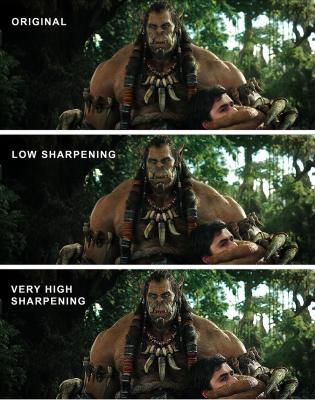
My personal opinion is to use Darbee set to as low as possible because using too high setting such as over 20% will not improve and will even make it worse !!

Just like a very blur photo, no matter how good I am in sharpening it using different tools in Photoshop, I just cannot retouch the tiny pixels to make it perfectly sharpened. What is worse is that distortion with black shadows and jagged edges will show at high settings. Even the video will appear very grainy too. Also, whenever any sharpening is done to the video, the picture will become a bit harsh and looses its smoothness. What Darbee can only do is reduce or minimise such bad effects due to the sharpening done to the video BUT, no matter how good is ANY such Video Processing tools, excessive sharpening will never be good.

The Oppo Darbee setting has a maximum of 120%. Using 5% is a reasonable amount of sharpening but this depend on your TV/Projector screen size. Just use the minimum that your eyes tell you that is the right amount of sharpening.

You should know that there ARE many many people that do NOT even want any sharpening done to the original video so most (maybe all) of us usually set the TV own internal "Sharpening" to ZERO. What is different for Darbee is that it uses its own proprietory method of "sharpening" that is far better than the TV own internal sharpening. Darbee can do a reasonable job of sharpening without causing grain appearing and reduced edge jaggies with minimal black shadow at the edges BUT.... even Darbee CAN cause problems if set too high.

My Oppo 105D have 3 settings for HDMI 1 which I can preset for use on different types of video sources. I didn't touch Setting 1 and 2 which have the Darbee set to OFF. My Setting 3 have Darbee set to 10%. I don't use Darbee at all for my bluray videos. I only use Darbee at 10% for watching HD MKV videos.

You may ask... I don't use Darbee so why did I buy Oppo 105D ? Two reasons... jailbreak don't work properly on Oppo 105, AND Oppo 105 is no longer sold at the time when I upgraded from Oppo 95.

Actually I did buy Oppo 105 display unit together with the jailbreak in USB flashdrive at a very special low price BUT... many of my SACD discs with Multichannel 5.1 become Stereo only. Cinavia still appeared on some bluray movies (ssh!!). Worse is when this player sometimes can hang on actual genuine 3D blurays. I returned it and exchanged it for the Oppo 105D... so far no problems loh.

When Oppo UDP-205 is released, I am actually interested to buy it without Darbee BUT I fear that any Jailbreak may again have problems so if that is the case, then I have no choice in getting UDP-205D loh.

If anyone is to ask me whether I will buy the external DarbeeVision DVP-5000 Darblet HDMI Video Processor... my answer is NO.

Anyway, I believe different people with Darbee will use different percentages. In my personal opinion, just set to the right small amount that you see is okay without causing the video to appear too artificial and without too much "bad effects". Oh... settings for me? I just turn Darbee off most of the time for blurays BUT.... I do set to 10% rarely. For HD MKV videos, its 10% always. My Dune Solo 4K media player don't have Darbee but I think it may not help for 4K videos which are already very sharp and detailed on my 55 inch TV.

As long as you feel that 5% is okay for your TV/Projector, then don't change it.

» Click to show Spoiler - click again to hide... «


This post has been edited by jamesleetech: Dec 2 2016, 09:23 PM
jamesleetech
post Dec 2 2016, 09:21 PM

On my way
****
Senior Member
684 posts

Joined: Apr 2010


QUOTE(saitong09 @ Dec 2 2016, 07:49 PM)
I guess UDP-203  --> UDP-205 --> UDP-203D --> UDP-205D
Heard the price for UDP-203 is about the same like UDP-103D
*
Remember... not for Bolehland... maybe you are right BUT it will be difficult for me to believe that the price will be the about the same here loh.
jamesleetech
post Dec 3 2016, 08:15 PM

On my way
****
Senior Member
684 posts

Joined: Apr 2010


QUOTE(saitong09 @ Dec 3 2016, 10:07 AM)
lol, let's wait for the official launch and price in Malaysia smile.gif
Lot of ppl waiting for their X'Mas gift tongue.gif
*
Enjoy....

Oppo UDP-203 4K UHD Blu-ray player YouTube Video

CEDIA 2016 Coverage - Oppo UDP-203 Ultra HD Blu-ray Player YouTube Video

This post has been edited by jamesleetech: Dec 3 2016, 08:15 PM
jamesleetech
post Dec 4 2016, 02:55 PM

On my way
****
Senior Member
684 posts

Joined: Apr 2010


QUOTE(saitong09 @ Dec 3 2016, 09:49 PM)
Today audition oppo BDP-103D for music, hdmi sound better than RCA.. Unbelievable
*
HDMI, AES, Co-Axial, Optical are Digital Connections.
RCA (Interconnect) and XLR are Analog Connections.

Remember, different DACs used for the decoding for the Oppo 103D and also for the AVR makes it even more difficult to compare whether HDMI or RCA sounds better. When set to "Bitstream", its the connected AVR DAC that decodes the audio. I am not sure whether the Oppo internal DAC decodes the audio when its Oppo Pre-Outs are used.

Try audition BDP-105D using XLR Stereo Output by playing CD or SACD and see whether you can get poisoned or not, hehehe.

For a more reliable comparison between HDMI and RCA, audition Oppo BDP-103D using these methods...

1) Bring your own CD and Blurays (preferably 1 Concert and 1 Movie Bluray) that you already know the character. Yes, you should also want to know Oppo 103D musicality by playing Stereo CD and Multi-channel Concert Bluray... and then find out how good is the Bluray movie sound experience. For this... each same discs, test with HDMI and 7 channel Pre-out from Oppo 103D to the same AVR Amplifier (which also have Multi-Channel Pre-In).

2) Audition using the same system... same speakers, same amplifiers, same player, etc. Just switch between HDMI and RCA. If they used Oppo 103D HDMI out to an AVR (example Denon X4000) and Oppo 103D RCA Pre-Out to ANOTHER Stereo Amplifier, then it will NOT be a good comparison.

3) Use all cable connections from the same brand and range. Example... DH Labs RCA and DH Labs XLR.

Then only will it be fairly equal to your own ears and its your own ears that decide. Therefore, I won't say which is better, HDMI or RCA because I don't have your ears !!

Many times I somehow always felt that different source recordings go with different connections. Concert blurays go with Digital HDMI, then Vinyl LPs go with analogue Turntable and then the DSD Audio files to DAC using XLR, etc

Of course, do bear in mind that different hardware used between HDMI and RCA will always have different sound quality so which is better just cannot be clearly defined. Example... for my Oppo 105D, I play a CD using HDMI to my AV Pre-Amp and then compare the same CD using XLR Stereo out to my external DAC... and you will change your opinion on whether HDMI or XLR or RCA is the best. I will just say that its difficult to say which connection is better... what I can only say is that each sounds "different" and suitable for different types of source, hehehe.

For comparison between Co-Axial and Optical connections.... looooong debates will never end.

This post has been edited by jamesleetech: Dec 4 2016, 03:26 PM
jamesleetech
post Dec 5 2016, 05:07 PM

On my way
****
Senior Member
684 posts

Joined: Apr 2010


QUOTE(SSJBen @ Dec 5 2016, 03:30 PM)
Will be a while before there will be a Darbee 4k implementation with Oppo.
*
For people who wants it, then yes, it will take a longer time to wait for Darbee 4K.

Actually, Darbee is not my priority and not important for me. What I would want is a jailbreak that works without problems. I believe when UDP-205D is released, any newer jailbreaks will not work for UDP-205 anymore and which is why I would prefer the UDP-205D.

As it is now, even for BDP-105D, the latest JB was for the November 2015 official firmware. No newer JB eventhough another new official firmware was released in August 2016 and another beta one in November 2016. Rumours says that newer JBs for 103D and 105D will no longer be released as the direction moves to the new UDP units.

Anyway, at the present time, all such talk on JB will only be an incomplete one because I believe that AACS 2.0 hasn't been broken yet. Hehehe... when I purchased any UHD blurays in the future, I can't even archive them as ISOs to my harddisk ! In that sense, JB to break such protection may never come so I guess its just my fantasy and no longer relevant for UHD blurays! Gosh... just think about huge disk space used for the UHD bluray that averages around 180GB per movie!

This post has been edited by jamesleetech: Dec 5 2016, 05:10 PM
jamesleetech
post Dec 6 2016, 06:11 PM

On my way
****
Senior Member
684 posts

Joined: Apr 2010


QUOTE(dirtrun @ Dec 6 2016, 04:56 PM)
IMO,

If there is any difference, its minimal..
But the ones l have seen are duplicated from a tru bd - dunno abt those dwnldd from the net ones..
*
Stilo10 was talking about (1) Dolby Atmos in 4K 3D Bluray and (2) DTS-HD MA in 3D Bluray. When anyone talk about 4K bluray, we don't need to ask about PQ because all of us obviously know that 4K with 1080p X 4 resolution and HDR wins! Since the PQ answer is already known by everyone, its now about the SQ between 4K bluray and regular Bluray. SQ ?... No difference loh. Read my answer to Stilo10 below about the SQ.

At the present time, ripping (duplicating) a 4K bluray is not possible because AACS 2.0 have not yet been cracked yet. Yes, you can "duplicate" from a actual genuine 3D bluray, NOT for 4K bluray. Actually I do have a question to ask you.... Have you personally watch 3D from an actual genuine 4K bluray (with HDR) ? Is the 3D more realistic and better colour rendition in 4K 3D blurays compared to the regular 3D Blurays? I have seen 4K blurays but not 4K 3D blurays. I am curious about this.

QUOTE(stilo10 @ Dec 6 2016, 03:09 PM)
I see, maybe some sifu here can share their experience whether there's any difference on sq & pq?

So these 4K, Bat vs Sp & Xm Apcly comes wt 3D BD? This Xm, Martian, ID4 RSG and mostly new movies under 20th Century Fox, 4K version titles comes with D. Atmos but normal version BD only in DTS MA! This makes me wanna get 4K versions but 4K gears are still very expensive now!
*
Any comparison between 4K Bluray and the 1080p Bluray is actually about the improvement on PQ only. Its not about SQ because both the 4K BD and the regular Bluray can both use DTSMA, DTSX, Dolby TrueHD, Dolby Atmos, Auro-3D and whatever. If they follow the same audio standard specified by DTS, Dolby and Auro, then no difference in SQ so its NOT because 4K Bluray audio being better than the regular Bluray loh.

Similar question can also be asked about comparing a movie (example Bat Vs Sp) SQ in a regular Bluray sold in Europe with DTSMA and the same movie in another Bluray sold in US with Dolby Atmos. Therefore, no one can give any definite answer on which SQ is better because each bluray audio recording and encoding is different.

Just for the sake of discussion, I assume that Dolby Labs came out with a "special" audio type called "Dolby 4K-Atmos" that will ONLY be used for 4K Blurays, and more superior and better to Dolby Atmos... then I can safely say that such SQ in 4K Bluray is better than the regular Bluray.

Obviously people want 4K blurays primarily because of the PQ with 2160p and HDR. Any comparison for SQ is not the reason for choosing 4K Blurays. IF... an audio type better than Atmos, DTSX and Auro-3D is released that is only used in 4K blurays, then its a huge bonus and only then that people buy 4K blurays for the PQ and SQ.

DVD audio only have PCM, DTS and Dolby Digital audio but ONLY Blurays have DTS-HD MA, DTSX, Dolby TrueHD, Dolby Atmos and Auro-3D. So obviously the Bluray SQ will be much better than DVD. IF, I say IF, DVD can use also the same audio type in blurays, then there is no difference loh. When BOTH 4K Bluray and Regular Bluray can have all the same audio types, we just cannot make any SQ comparison.
jamesleetech
post Dec 6 2016, 08:45 PM

On my way
****
Senior Member
684 posts

Joined: Apr 2010


QUOTE(stilo10 @ Dec 6 2016, 07:16 PM)
Tq Master James for your detail explanantion but my question was actually on comparing the difference between normal original BD (not 4K) and those dwnldd file like ISO & etc. around 50gb for sq & pq. Sorry if my question was unclear.
*
Hehe... when you said earlier "...share their experience whether there's any difference on sq & pq?" and then you wrote about 4K without saying anything about BD ISO, then this caused the confusion. Anyway, no problem.

Bluray ISO is a one-to-one 100% image copy of the actual bluray disc without any loss of data. Playing the BD ISO has no difference compared to playing than the actual bluray disc itself because the data read by the player is exactly the same.... BUT.... yes, there is a BUT here... somehow there is some difference for me... there are people who can hear the "subtle" difference and there are those that hears no difference! Why do I say that ?

In my personal opinion, eventhough BD ISO has the same data, playing the actual bluray disc sounds better !! Here are the possible reasons that I believe can cause such difference...

1) The longer the path from source played (bluray) to reach the AVR and TV, the more chance there will be that "interference" can interfere with the signal such as EMI. The BD ISO has to be stored in a harddisk which do have moving magnetic discs spinning by an internal motor which can cause interference... and then the USB cable to the player which can also be a problem too. Using a SSD harddisk with any motor will help. The player using laser light to read directly from the disc has the shortest path.

2) When additional hardware is used such as NAS Network Enclosure, Ethernet and WiFi Network is used to "stream" to the player, then quality should also be affected.

3) The desktop computer is BIG source of all sorts of "noise" so if a HTPC is used to play the BD ISO, then quality will also suffer!

4) When additional AC/DC Power Adapter is used, it can also cause interference too. Example... adapters for harddisk dock, External NAS Harddisk, NAS Enclosure, WiFi Router etc.

Knowing this, that is why there are people who uses Notebook SSD (Solid-State) harddisk, good quality USB cable, Low-Noise Power Adapter and so forth. I did all this BUT because the signal path (highway) is longer, I somehow still prefer playing the actual bluray disc. Its NOT because of any "lower quality" from the Bluray ISO itself.

Retouched And Remuxed Bluray
This is where the quality CAN suffer when the actual bluray disc data is changed!

A BD50 bluray disc can store a maximum of around 50GB. It doesn't mean that a movie used 50GB. If a movie is originally encoded to 23GB, then a BD25 disc is used so ripping this to 23GB ISO will have the same quality. But... if a movie used 43GB and it is ripped to a 23GB ISO or duplicated to another BD25 disc, then the quality will drop.

A remuxed bluray can mean these things...
(1) When the disc is ripped, all the bluray menus and all "Special Features" and Trailers are removed so that the bluray ISO (BDMV Folder) plays the movie instantly. If they did NOT touch anything to the actual bluray movie file, then the quality will be the same. Whenever the bitrate or filesize is reduced, then quality will drop.

(2) The bluray can be remuxed to a single file such as MKV, MP4, TS, etc. Again, if nothing is touched and transfered to the single file, then quality will be the same BUT most of the time there is shrinking done which also reduces quality. Examples... 35GB bluray remuxed to to 10GB MKV, DTS-HD MA becomes DTS, Video bitrate reduced.

The most important factor whether the "duplicate" has the same quality as the original is actually knowing whether its an "untouched" copy or any "touching" have been done to it. Whether quality will be the same depends on whether anything have be touched on the original... not about ISO itself.

This post has been edited by jamesleetech: Dec 7 2016, 03:48 PM
jamesleetech
post Dec 6 2016, 08:48 PM

On my way
****
Senior Member
684 posts

Joined: Apr 2010


QUOTE(saitong09 @ Dec 6 2016, 08:20 PM)
Speaking about the soft copy vs hard copy of the same source and same system, some one told me that SQ of a Bluray disc is better than streaming .iso from HDD. Is that true?
*
Hehe... yes, as far as I am concerned... I still prefer actual bluray SQ !

Refer to my reply to Stilo10 for my explanations.
jamesleetech
post Dec 6 2016, 09:23 PM

On my way
****
Senior Member
684 posts

Joined: Apr 2010


QUOTE(stilo10 @ Dec 6 2016, 09:06 PM)
Thanks again for your explanation!
*
You are welcome. Hehe... corrected my typo error....

(1) Using a SSD harddisk without any motor will help.

... changed from with to "without"


ADDITION
Yikes!! Just found out another big mistake!

Knowing this, that is why there are people who uses Notebook SSD (Solid-State) harddisk, good quality USB cable, Low-Noise Power Adapter and so forth. I did all this BUT because the signal path (highway) is longer, I somehow still prefer playing the actual bluray disc. Its NOT because of any "lower quality" from the Bluray ISO itself.

Not "actual harddisk"... corrected to... "actual bluray disc"

This post has been edited by jamesleetech: Dec 7 2016, 03:50 PM
jamesleetech
post Dec 6 2016, 10:23 PM

On my way
****
Senior Member
684 posts

Joined: Apr 2010


QUOTE(SSJBen @ Dec 6 2016, 08:13 PM)
Regarding 4k BD vs 1080p BD, picture quality wise... it really depends on how the movie is shot. Right now, the majority of 4k movies on BD were shot with 2k cameras, digitally.

Watching Mad Max Fury Road in 4k is actually a little worse than watching in 1080p, simply because CGI effects like the flames and storms look very cartoonish as it is artificially remastered into 4k from its 1080p source. Just a simple example.

But then we have movies like X-men Apocalypse which is MIND_BLOWING in 4k + HDR itself. Completely rapes the 1080p version in PQ twice over.
*
Its not a matter of different production standards or post-production remastering used per se. If I am not mistaken, we have discussed something similar to this quite some time ago. Well, doesn't matter.

Yes, I do agree with you regarding the CGI remastering issue but this should not detract from the great potential and improvements that 4K can bring to our visual entertainment. Just like what happened when they filmed in 2D and then used digital post-processing to create 3D. Having an actual 3D camera to film the movie will always be much better than a digitally generated 3D.

4K blurays and 4K TV broadcasts holds much promise and is already a reality albeit its an agonising slow wait in its implementation. 4K TV channels in Malaysia? I may not live long enough to see it! With greater resolution comes with more artifacts appearing that were otherwise not noticeable in lower resolutions. When CGI is done in actual 4K, not remastered, then quality will surely improve. The 4K hardware and tools are already here but what i believe happened to those 4K remastered movies is merely due to reducing production costs, nothing more and not because 4K don't deliver. Yes, I do know that you already knew that 4K does deliver as you have stated so clearly for X-Men Apocalypse 4K.

This is what I should have said in my reply about 4K blurays winning over 1080p blurays...
When full 4K production standards is used in producing the 4K bluray, the PQ will definitely be astounding! Much much better PQ than 1080p bluray. 4K does deliver... if only they do it properly and without any remastering or enhancement.

When James Cameron used actual 3D cameras to film Avatar, the 3D quality is much much better than those movies with Digitally Remastered 3D. Remember the time when HD TV broadcasts were first launched early in the Millenium when many of the materials were actually remastered from SD. When more and more actual HD materials were produced, HD TV took off in a huge way. However, its also undeniable that many HD TV channels today still churn out bad quality HD too. In the same respect, when more and more materials are produced in actual 4K covering all aspects of production (CGI included), then overall 4K bluray PQ will surely beat the 1080p blurays.

You are right that not all 4K blurays are better than 1080p blurays. I am merely talking about the general and overall 4K bluray PQ that are much much better than 1080p blurays. I believe that you do agree here. Its not about quantifying 4K blurays to any particular half-baked 4K productions (including 4K upscaling and remastering). The situation will improve but there will still be rogue productions that put a shame to 4K. As with everything else, the same applies when we want to compare DTS-HD Master Audio Vs DTS so... I am also right to say... it depends because even some bluray DTS sound better than DTS-HD MA. But then again... DTS-HD MA does win over DTS in "general" (subject to the quality of production used).

I know its a bit early... Wishing You and your family AND EVERYONE here A Happy And Joyous New Year as 2016 soon draws to a close and the new 2017 steps in. Also, Merry Christmas to all the Christians.
jamesleetech
post Dec 7 2016, 03:41 PM

On my way
****
Senior Member
684 posts

Joined: Apr 2010


QUOTE(dirtrun @ Dec 7 2016, 08:52 AM)
Hmmnn,

AFAIK.. de studios are not interested in implementing 3D for 4K.. hence why you dont see any ttls in 3d for 4k.. at the moment the best you can get for 3d is thru BD..
*
Mmm... I don't think that the studios are not interested. Its just not the right time yet to include 3D into 4K blurays because 4K bluray releases are still at the early stage so the consumer response is not yet clear.

As you already know, 3D do have 2 frames (for left and right eye) which does pose problems with additional bluray diskspace needed but technology did manage to "fit" the 3D movie into the BD50 bluray disc. I actually don't know how its done and if you inspect the 3D bluray disc in your computer, you will notice an extra SSIF folder with additional files that increases the diskspace used to over 50GB, more than the capacity of the BD50 disc! When I ripped such disc to my harddisk as BDMV folders, the total size can go up to 70 to 80 GB size! Of course the studios can split the movie into extra discs just to fit the 3D extra size but that would mean increased production costs. With that being said... I may be wrong but I do believe that it needs more time to change the 3D 4K processing methods involved which alters the way on how to fit extra 3D data into the UHD discs. I am talking about 4K with a much larger resolution AND a huge file size PLUS HDR that needs to include 3D and then "fit" into BD100, BD66, BD50 or BD25 discs. At the present time, the maximum single UHD disc capacity is BD100 for 100GB. Yes, maybe 3D data have already been done to fit into the UHD discs but I still believe that it needs time for them to be produced. Maybe at the present time, they are just concentrating on non-3D 4K blurays.

Therefore, I will not say that the studios are "not interested". I will just say that they are presently reluctant to release 3D 4K blurays because of the reasons that I have explained above. Probably, they are having a "wait and see" attitude to see how the 4K blurays sales pick up in the future.

For the cinemas, the history of 3D started in the Fifties (mmm... 1953?) and as the years move on, many critics said that 3D are just a gimmick that will not last. They were proven wrong as 3D movies in cinemas are still around (eventhough not many cinemas). When the blurays were initially released in small numbers, there were practically no 3D blurays. At that time, I would be wrong to say that the studios were not interested in releasing 3D blurays loh. At that time, it was not the right time yet and they also needed time to find a method to "fit" extra 3D data into the limited capacity bluray disc too. Ok... when 3D finally did arrived in blurays, initially there were actually very few such 3D blurays being released... as time goes by... now more and more 3D blurays appeared. Now there are many 3D blurays BUT it does NOT mean that 3D blurays are more than the 2D ones.

If anyone were to ask me whether 4K blurays will release a 3D version or totally NOT, then I will say that the same question were also asked when bluray movies were released in those early days. At that time, there were people who believed that very few 3D blurays would be released because there weren't many 3D TVs available at that time and it was very expensive too. Let's go forward to the present time and you do already know that there are many 3d blurays available, not just a few.

Yes, 3D 4K Bluray is not yet available at the present time. Will it come in the near future? Yes, I believe it will come... as long as 4K blurays don't die! Will many 4K blurays be released in 3D in the future? I don't have to answer this question... just look at what happened when more and more 3D blurays appeared.

This post has been edited by jamesleetech: Dec 7 2016, 04:20 PM
jamesleetech
post Dec 7 2016, 07:05 PM

On my way
****
Senior Member
684 posts

Joined: Apr 2010


QUOTE(SSJBen @ Dec 7 2016, 06:06 PM)
Oh no, don't be mistaken. I'm a big believer of 4k, I want 4k to be mainstream already. South Korea and Japan will be the first countries to broadcast 4k TV content as a mainstream next year, so exciting times ahead for those countries.

An early Happy new year to you too, joyous fellow. Here's hoping 2017 isn't as shit of a year as 2016, currency wise.
*
Hehehe... you and I and everyone else who have ever seen the quality of 4K will undeniably be mesmerised and got "hooked like a fish to a bait". Both of us belong to same 4K camp.

As far as 4K going mainstream... it will definitely be a fallacy to believe that we can even see the shadow of 4K TV broadcast in Bolehland in the near future. SD analogue TV broadcasts in Bolehland still continue to exist including Ass-teruk SD channels. Yea, yeah... terrestrial Digital TV broadcasts in HD are due to be officially launched in 2017, mmm... or so they say! Nationwide coverage? *cough* *cough*. As for Bolehland 4K TV broadcast... we can continue to dream until Wawasan 2020 and further. At least in the near future, the only way for us in Bolehland to fast forward in obtaining our enjoyment of 4K materials is through 4K Blurays.

My, oh my.... and what about 8K TVs? Are they for real? Not that I don't like it but don't do the celebratory jump too soon... let's take it one step at a time... Digital HD TV in Bolehland first... then abolishing SD channels... and 3D TV broadcast (Sky 3D channel?)... and the list goes on.

I don't expect 2017 to be any better, in fact... will only get worse. Around June 2016, I paid for my AV Pre-Amp and Power in USD for a total of around USD 16000 at the rate of RM 4.02 to USD 1. With today's rate of around RM 4.42, I would have paid an additional of RM 6400 because of the devalued difference of RM 0.40 ! And I thought then, that I was hit hard with the unhealthy currency situation. Now... in restrospect, I actually "saved" around RM 6K... is it a good thing or a bad thing? You tell me! The irony of it is that... IF we have the $$ to buy now, then buy now as I do expect that we can "save" by paying less at RM 4.42 and not wait until it reaches RM 5.10 !!! That... is a gloomy 2017 for us in Bolehland.

http://www.usatoday.com/story/tech/2016/01...-2016/78087454/

This post has been edited by jamesleetech: Dec 7 2016, 07:08 PM
jamesleetech
post Dec 7 2016, 11:05 PM

On my way
****
Senior Member
684 posts

Joined: Apr 2010


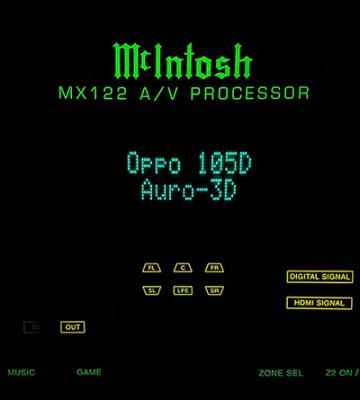
I have recently updated my MX122 AV Pre-Amp firmware to support DTSX and Auro-3D.

Its always risky to do the update yourself. I do know that there were people who failed during the update and had to send back to the service centre. You have been warned!!

» Click to show Spoiler - click again to hide... «


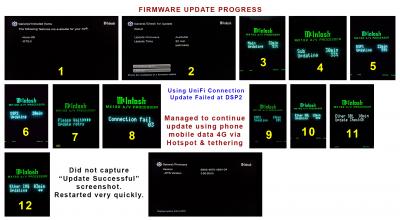
It DID actually happened to me when my update failed halfway with a "Connection Failed" shown on the AV Pre-amp display panel. Switched off... and when switched back on, it just tried to continue update but still failed after trying another 2 times and stopped with error and then it just freezed there, no longer function. Luckily I was prepared for this and did a full "factory reset" using 3 button presses on the unit itself. At least my AV Pre-amp can still be used and I can try to repeat update later. However, because the update failed halfway at "DSP2", DTSX was already displayed when playing bluray BUT NO SOUND !! Even DTS and DTS-HD MA no sound. All Dolby Digital, Dolby True-HD amd Dolby Atmos audio still worked correctly.

I continued to use my AV Pre-Amp for 2 days in a "half working" condition. Luckily there is a reset. If not reset, it would have remained "frozen" and need to be sent back to the service centre immediately.

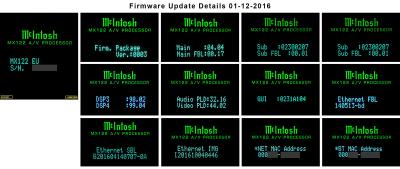
I was not going to give up and continue to think of what went wrong and how to continue the update. I even emailed to McIntosh support seeking help. On the third day, they replied and asked me to press some buttons and check the full firmware version of the various parts. He sent me the firmware version details and asked me to compare with that list. Then... on that same third day , I had a "brilliant" idea. Why not connect my AV Pre-Amp to my mobile phone data internet using hotspot and tethering? I did... and wow... the update continued until everything was done successfully. Phew... problem solved and checked the firmware details ... all version match the list exactly so I emailed reply to McIntosh about this and thanked them for the assistance. Crisis avoided! I still don't understand why UniFi connection failed eventhough internet was still connected.

» Click to show Spoiler - click again to hide... «

Here is what I would advise to people who want to personally try to update the firmware... if possible, DON'T do it yourself and just send back to the professionals at the Service Centre to do it.

After that advice and IF anyone STILL wants to take the risk then do these ...

1) Before starting, find out how to do a factory reset. Get the combination button on the front of the unit which need to be pressed together. Ask the Service Centre or your dealer.

2) Do NOT use a slow or unstable internet connection. My UniFi 30Mbps is fast and also stable. My entire update took me about 35 min. If your connection is a "slow" 4Mbps speed... forget about updating.

3) If failed to continue update... do the "factory reset" and then try a different internet connection. My update failed when using my UniFi connection so I used my Maxis Data connection. If still failed, try bringing it to a friend's place to try using the connection there.

4) After trying ALL the above and still FAILED, then BAD LUCK... return it to Service Centre. Just do NOT blame me... I have already stated my warning and did NOT recommend anyone to it.

That's all about my personal experience with my McIntosh MX122 firmware update for DTSX and Auro-3D.

Next, below are my "fun" details of my experience with Auro-3D which I also want to share here.

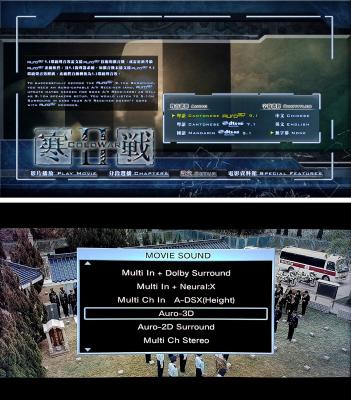
My system uses 5.1.2 speakers with two Front Top speakers. I managed to find only ONE bluray that has Auro-3D 9.1 which is "Cold War II 2D+3D Blu-Ray" so I tested it.

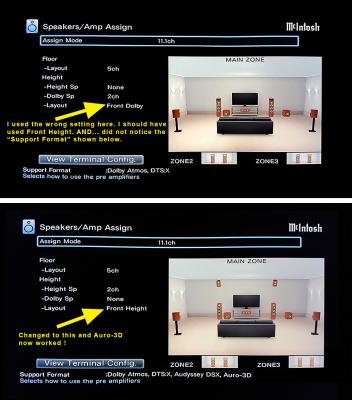
DAMN ! Only got "Multi Ch In", no Auro-3D. It should not be the new firmware so I wondered what I did wrong here. Then I sent email to McIntosh again showing pictures of my settings. Hehe... the reply was that cause can be TWO things... (1) Bitstream Output must be set at the bluray player and (2) Auro-3D uses various Height speakers so the Layout Setting cannnot use "Dolby Speakers". I got (1) correct and changed my MX122 setting to use "Front Height" speakers and ... WOW... Auro-3d now worked.

» Click to show Spoiler - click again to hide... «


Here is what McIntosh support guy told me...
"Dolby speaker" can be used in the settings BUT at least two "Front Height" speaker must be set. "2 Front Height + 2 Dolby Surround" can be used. Won't work if "Front Height" is completely NOT set.
Regardless of how many additional speakers, at least two must be set to "Front Height" and when done this way... then Auro-3D, DTSX, Dolby Atmos, DTSMA, Dolby TrueHD and others all work! If only Front Dolby is set, NO Front Height... then only Auro-3D don't work, and all others still ok.

Auro-3D Bluray

» Click to show Spoiler - click again to hide... «


So, how was the Auro-3D sound? I just cannot give an accurate answer on the experience. The reason is because of the Hong Kong bluray production. Most (maybe all) Hong Kong bluray recordings have audio that are excessively increased too much and altered too much until it really sounds "artificial" and annoying. Maybe many will disagree with me and loved such "effects" This is what I noticed from ALL of my Hong Kong bluray collection. What I can roughly say is that the Auro-3D sounds more wide and spacious and I can "feel" more from the top speakers which seemed to be a bit more lively. The Auro-3D bluray also have DTS-HD MA and I compared this. As far as this bluray is concerned, the overhead surround effects somehow sounded almost the same for Auro-3D and DTS MA.

What about blurays that don't have Auro-3D audio? I proceeded to test with a few using Concerts and then Movies. Whether it is Dolby Atmos or DTSX, these can be changed to emulate (false) Auro-3D. Mmm... here is my overall feeling. For bluray concerts with DTSMA/Dolby TrueHD, Auro-3D somehow sounded a bit better... better staging, more open and spacious with cleaner details but the vocals seemed to be less assertive. For movies, Auro-3D somehow elevates the low bass to cover more of the room space and the top height and surround sound effects such as thunder, gun fire, helicopter sounds, etc seemed to be more aggressive which sometimes can sound a bit overdone.

» Click to show Spoiler - click again to hide... «


I even tested Auro-3D on my Astro HD channels and CD Stereo music. With Astro set to "Dolby Digital 5.1", sound a bit improved but seemed a bit artificial too. When Astro is set to "Stereo Analogue" then Auro-3D sounds bad with sound effects all over the room and vocals too bright. Its similar situation for CD stereo too. Well... this is expected... Auro-3D/DTSX/Atmos don't work well for Stereo Audio sources.

Remember... what I have said here are only my personal views on my Auro-3D experience based on what my own ears tells me. Different people with different ears do have different opinions.

I may be wrong but I can say that Auro-3D bluray releases is rare! So far, I am lucky to only have one to test... miserable ONE! IF your AVR can be upgraded to support Auro-3D and need to pay for it, then I do NOT recommend to do it until more Auro-3D blurays are released. Of course, if its free... go ahead and upgrade! Well, only my personal opinion again

Regards.

This post has been edited by jamesleetech: Dec 7 2016, 11:15 PM

jamesleetech
post Dec 8 2016, 12:01 AM

On my way
****
Senior Member
684 posts

Joined: Apr 2010


QUOTE(herojack41 @ Dec 7 2016, 11:50 PM)
well it depends on what transmission protocol it use

UDP or TCP

if TCP is used....there will be no drop of "quality" like you say.
*
Yes, true, true.
jamesleetech
post Dec 8 2016, 06:37 PM

On my way
****
Senior Member
684 posts

Joined: Apr 2010


QUOTE(dirtrun @ Dec 8 2016, 09:13 AM)
No point arguing on whether 4K 3d will come to pass.. IMO its a no.. Big studios are not keen because of dwindling sales in 3d BD's so in their defence [ its a biznes aftr all ] .. all tat capital to mix or do up a ttl into 3 d n if theres no sales, then its pointless[ in the biznes sense ]
If it is in the pipeline.. meaning they are tinking abt it, they would hv announced it in the beginning...
Anyway.. time will tell..
*
Ya, ya... you are entitled to your opinion and either one of us can be right. I do agree with you that "only time will tell" which is exactly the same words I used many years ago when one of my friend told me that 3D bluray will only last a short while because its a gimmick and many people also got "headache" watching 3D blurays. Well... 3D blurays still continue to be released till today. So true that there are people who just can't watch 3D.

Yes, only time will also tell whether the regular 3D blurays vanish or not in the future due to serious drop in sales. The same situation applies for 4K 3D blurays which may never be released as you said.

Even for the IMAX version of blurays... too few were released but does it completely vanish in the future? I don't think so but ... again I do agree that only time will tell. smile.gif

You can be right too! Sometimes it difficult to know what will happen in the future. I remember the time when CD became popular and common so people were saying that Vinyl LPs and the turntable will lose popularity or may even disappear... but time tells a different story as its still going strong till today.
jamesleetech
post Dec 8 2016, 08:24 PM

On my way
****
Senior Member
684 posts

Joined: Apr 2010


QUOTE(mpyw @ Dec 8 2016, 11:00 AM)
YES! on the firmware upgrade part.
Do it at your own risk! I almost bricked my Denon when updating the DTS:X features and have to do a factory reset after searching high and low from the net what to do when the AVR stuck at "Retry Updating....."
I never have problem updating my other equipment like BD player and media player, it's only the Denon (or from the net, any D&M products) even with a stable wired connection!
However, after reset the AVR to factory default, all the intended updates are there for me to useĀ  sweat.gif
Scares me off courseĀ  sweat.gif
I think for D&M models, after updating (or while updating), it changes the network setting and could not find the original connection that doing the update and hence the "Connection Failure 04" error....
for novice, I think it's better to send in to service center for them to update for you.. flex.gif
*
So... did you send your Denon to the service center for the DTSX firmware update? Or you still using back the older firmware without DTSX support?

Its not just Denon, it can also happen to Onkyo and Marantz too. As you already know, it did happen to my McIntosh. Somehow I think "something" is wrong with the UniFi cable connection which I initially used for the update. Luckily, I thought of using my phone wireless Maxis Data connection to continue the update and was successful! I told my bro-in-law not to take the risk and send his Marantz 8802 back to the Marantz service center for the update. His unit returned a week later and everything worked and now support DTSX.

This post has been edited by jamesleetech: Dec 9 2016, 12:56 AM
jamesleetech
post Dec 9 2016, 04:49 PM

On my way
****
Senior Member
684 posts

Joined: Apr 2010


QUOTE(bad2928 @ Dec 9 2016, 01:26 PM)
normally i'm just pick the biggest file in stream folder(bdmv).thats actually size for the whole movie.the rest of 10-15gb is just an extra.
*
Its fine to use this method of picking just 1 file to play. However, there are many times when the entire move is broken up to numerous smaller files AND these files may not be numbered in the same order such as 00021.m2ts plays the first chapter and then 00016.m2ts plays the second chapter. This usually happens for most Lionsgate films WHEN they used "profuscation" (or is it proliferation) method to mess up the chapters with the wrong playlist being played by the bd media player so probably this is one way that they use to fight piracy. There is a downside to playing bluray folder/ISO with full menu too... sometimes ripping can go wrong and the wrong playlist are read.

Whenever the movie is broken into multiple files, the only way is to use computer to remux the bd movie using the correct playlist (xxxx.mpls). The playlist file contains intructions to play the the multiple files in the correct order/sequence. There are software that can auto choose the correct playlist BUT mistakes CAN happen when the wrong playlist are chosen... and the result is that you have to search manually (tough, tough) which playlist to use in remuxing to single MKV, M2TS, or MP4 file. Can you imagine searching through (example) 50+ mpls files?

As an example... the bd movie Allegiant (distributed by Lionsgate) do have 148 MPLS files and when ripped to harddisk as full ISO or BDMV folder, the movie played in the WRONG ORDER!! Even remuxing to a single untouched MKV file do NOT help. What I did find out is that "somehow" the player chose the wrong 00484.mpls file to play the ripped bd when the correct one is 00897.mpls. So, even if you have the genuine bd and wants to rip this to your harddisk as an archive to play... chapter sequence problems CAN happen! Bear in mind that its the computer software that can choose the wrong playlist for ripping. But... without the software, you cannot join all the multiple files as a single file to play and you cannot just select play in numerical order because the numbering is messed up.

Ok... coming back to your method of picking 1 single to play. Yes, its a good way to do it without ALL the hassle and the stupid "waiting" for the menu, trailers, titles, etc. BUT.... problems WILL appear when there are multiple files. Also... this method means "convenience" BUT remuxing to single file, searching for correct mpls file to use, etc etc is NOT convenient loh.

Anyway, I do agree with your method in general but there are problems that need to be fixed loh.

Note: Gods Of Egypt (2016) Blu-Ray is another one that needed to be fixed for the chapter skipping issues (have multiple files). No comment on "internet download" ones which may have been "fixed" or may still have problems. Sometimes the same movie for EU release don't have problems with just a single file but US release have such issues with multiple files. It depends on the Release version too.

QUOTE(SSJBen @ Dec 9 2016, 02:20 PM)
My preferred method too. I just extract the movie file from the stream folder, save it under a folder name for the movie and double click to play.

All this nonsense about loading the image onto a virtual drive, skipping through pointless piracy warnings, slow cumbersome menus.. Just a gigantic waste of pointless time. My God, makes me wonder sometimes why people still want to bother using physical discs to watch movies.
*
I do agree with your method of playing just the single file. Read my answer to bad2928 above for the problems that do appear.

I absolutely do agree with you about ALL the nonsense that we have to endure to watch a bluray!

What I am going to say next is my opinion based on own reasoning. You wondered why people still use physical discs to play but I think you may have missed something here.

The shorter the transmission path of playing the movie to the AVR and TV the better. Its not because the best steps have not been taken to reduce interference. As an example, no matter what is done, a much longer path from ripped movie in NAS harddisk to USB cable to bd media player can introduce signal interference that can reduce the PQ and SQ. Directly playing the physical disc from the player to the AVR and TV IS the shortest path and can (in my opinion) help to reduce interference such as EMI and whatever noise. Yes, I will not dispute with you if you say that we will not have ears that are so perfect to notice any minute difference especially when properly shielded cables are used, good AC adapters used for the NAS harddisks, good power conditioner/filters used and so forth. Be it as it may, there are people like me that are "naive" to believe a better SQ/PQ from playing physical discs. Whenever I listened to the physical discs, it somehow sounded more dynamic, better details, etc for my Concert blurays. Two of my friends who did not believe it was a believer after they listened to the comparisons. Of course the "minute difference" will be more apparent when normal (not LPS high quality) AC adapter used for the external harddisk, SATA harddisk used (with internal rotating discs) instead of SSD ones, poorly shielded USB cables used, etc etc. I believe (may be technically wrong) that using laser light to read can reduce interference that is otherwise caused by spinning magnetic discs or electrically-charged solid-state cells. Granted, I may NOT be totally right but the reason I am explaining this to you is to help you better understand the reason why.

Yes... "a gigantic waste of pointless time". You are not wrong since its just only once that we have to endure to take the time to "rip" each bluray from our personal collection. At least its still better than constantly enduring the "nonsense" every time the same bluray is played. Eventhough ripping is done once... some time IS also used. Yes, slowly done one by one immediately after each bluray purchase will not seem much time taken... however, if 100+ blurays are done together, its a headache. IF only everything is perfect... it will be a great hassle with much more time wasted in correcting chapter problems as I have stated earlier.

Just for the sake of argument... I don't know whether ripping my genuine blurays as a "copy" in my harddisk is illegal or not in Malaysia. Maybe legal as people says its a "fair copy" to protect the original from wear and tear. One to one duplicate as ISO or BDMV "may" be ok BUT altering to a MKV or MP4 is a big No No. I don't even dare to talk about any internet downloads which is easy and no hassle with a fast connection. Hehe, you already know why.

In retrospect, I don't dispute what you have said. I am merely clarifying to clear the air when you wondered why people chose physical discs. Generally you are right except for my difference of opinion on the "transmission path".

Talking about legal downloads.. yes, such as from Apple Store but the ugly DRM monster comes in too! And the quality from such movie downloads just cannot compare to the blurays. NetFlix now allows me to download for offline viewing but the quality is incomparable to blurays (with DTSMA and Dolby TrueHD). Even when I watch a Netflix 4K movie on my TV, the 4K quality cannot even beat the bluray PQ !

This post has been edited by jamesleetech: Dec 9 2016, 06:06 PM
jamesleetech
post Dec 9 2016, 05:42 PM

On my way
****
Senior Member
684 posts

Joined: Apr 2010


QUOTE(ktek @ Dec 9 2016, 09:49 AM)
so scary adventure. make me think twice triple to update my marantz streamer.

it working fine with ori functions so i just leave as it
*
QUOTE(fx20 @ Dec 9 2016, 10:14 AM)
If everything is working well, why bother?
Furthermore the firmware update method for D+M is not really foolproof.
*
Yes, the best way is to forget about doing any updates. Yes, I also know that both of you are talking about older models with hardware that don't support for Atmos/DTSX.

Just giving my two cents only.

But its not as easy to "just forget it". Why?

What about people who bought AVR recently which comes with Atmos support but NO DTSX. Update IS needed to include DTSX support. This is where the headache comes in.

Fine, I do believe that many of us will NOT touch any firmware updates especially when any old model such as the Denon 4520 do not have hardware to support Atmos/DTSX. Merely fixing bugs and changing/adding minor functions in newer firmware is not important for many people.

However, DTSX is an important "Feature" to be added to the AVR. When a person have Atmos, will that person just "forget" it when the time comes to add in DTSX? Under such situation, then "forgetting about the DTSX update" is certainly NOT the best way. Nobody will be satisfied to remain at the firmware that do not support DTSX.

People DO want to update the firmware to support DTSX but BIG problems only appeared when done at home when it should be taken to the Service Centre to do it.

Hehehe... when the AVR hardware support DTSX, people do want it so "forgetting" about the update and remain at Amos is not possible.
jamesleetech
post Dec 14 2016, 01:23 AM

On my way
****
Senior Member
684 posts

Joined: Apr 2010


QUOTE(saitong09 @ Dec 13 2016, 10:47 PM)
CMY Sungei Wang Plaza will be having a "Launch Party" on 15th December 2016 (11 am to 4 pm) for Oppo UDP-203 4K UHD Player AND Ben-Q W11000 4K UHD Projector. Received WhatsApp invitation message from John Yew. Mmm... may have a "look see look see" if I am able to make it.

10 Pages « < 5 6 7 8 9 > » Top
 

Change to:
| Lo-Fi Version
0.1278sec    0.96    7 queries    GZIP Disabled
Time is now: 17th December 2025 - 12:33 AM