Welcome Guest ( Log In | Register )

7 Pages « < 3 4 5 6 7 >Bottom

Outline · [ Standard ] · Linear+

Router Configuration Prolink 9300G (Billion 7402GL) Users' club, V5.53 (29th of January, 2008)

views
     
lokem
post Apr 9 2007, 06:47 PM

Getting Started
**
Junior Member
76 posts

Joined: Jan 2003
Hi folks,

I'm using the same router as well. Recently upgraded to 5.07 firmware. However, I've a very odd problem with my wireless connection at home which has been bugging me for a couple of weeks.

Everything works fine most of the time. But whenever I notice that there's another wifi signal that my notebook or desktop can pickup, my connection to my router is intermittent. Most of the time unconnectable even.

The strange thing here is that the signal quality is very good (in fact it's 90 when I do a iwlist eth1 scanning on my notebook). However, when I try to connect to the router via DHCP in Ubuntu, it just doesn't get connected. Using WinXP, even though it seems like it's connected, it times out when I do a ping to the router.

I've suspected that it could be wireless interference. I've changed my wifi channel to not clash with the rest, but it's still happening. I made sure the other APs are on different channels.

Anyone has any idea what's going on?

Any help is greatly appreciated.

scorps
post Apr 9 2007, 09:52 PM

Something you call love, but I call sex
*******
Senior Member
9,572 posts

Joined: Jun 2005
From: Terengganu Darul Iman


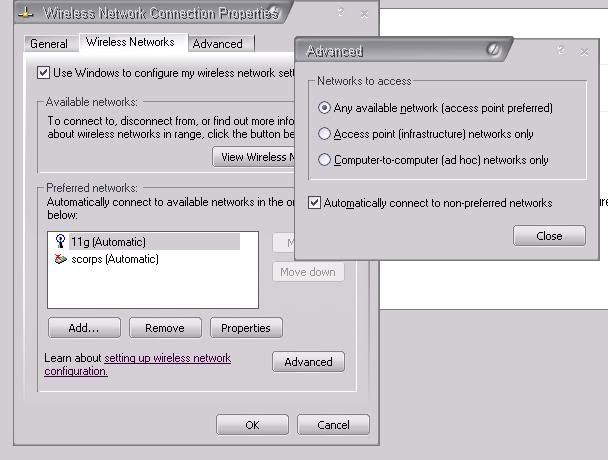
maybe u can set your notebook to just connected to your wifi router,
user posted image
lokem
post Apr 9 2007, 09:57 PM

Getting Started
**
Junior Member
76 posts

Joined: Jan 2003
Tried that, doesn't work smile.gif
BrotherLuc
post Apr 19 2007, 09:53 AM

New Member
*
Junior Member
7 posts

Joined: Apr 2005
From: Kuching


Okay...

Something is wrong with my PC, so after i reformat, plugged in the modem to PC, switched on, and my PC detected LAN... BUT i can't open any webpage at all.

The manual open my browswer and go to 192.168.1.254 but when i tried to key in the address in the URL bar, my browser can't connect to the router.

Am i missing something? Please help as i just reformatted my PC and i believe that there's a workaround here.
scorps
post Apr 19 2007, 10:16 AM

Something you call love, but I call sex
*******
Senior Member
9,572 posts

Joined: Jun 2005
From: Terengganu Darul Iman


QUOTE(BrotherLuc @ Apr 19 2007, 10:53 AM)
Okay...

Something is wrong with my PC, so after i reformat, plugged in the modem to PC, switched on, and my PC detected LAN... BUT i can't open any webpage at all.

The manual open my browswer and go to 192.168.1.254 but when i tried to key in the address in the URL bar, my browser can't connect to the router.

Am i missing something? Please help as i just reformatted my PC and i believe that there's a workaround here.
*
u are using router separate with modem ??
BrotherLuc
post Apr 19 2007, 10:24 AM

New Member
*
Junior Member
7 posts

Joined: Apr 2005
From: Kuching


QUOTE(scorps @ Apr 19 2007, 10:16 AM)
u are using router separate with modem ??
*
Umm... sorry, i mean plugged in my router to my PC.
I can't access the config page as instructed by the manual.

I haven't yet try to reset factory setting. Is there any other way?
I'm not that good in 'networking' stuffs, so please advise.
scorps
post Apr 19 2007, 11:20 AM

Something you call love, but I call sex
*******
Senior Member
9,572 posts

Joined: Jun 2005
From: Terengganu Darul Iman


please check in ipconfig
open command prompt
and type ipconfig
then take the number of gateway shown by ipconfig,
and try that number
BrotherLuc
post Apr 19 2007, 11:29 AM

New Member
*
Junior Member
7 posts

Joined: Apr 2005
From: Kuching


QUOTE(scorps @ Apr 19 2007, 11:20 AM)
please check in ipconfig
open command prompt
and type ipconfig
then take the number of gateway shown by ipconfig,
and try that number
*
Uh... can't really understand what you instructed, but i'll try it tonight as i'm in office now and i'll get back as soon as possible. Thanks!


Added on April 20, 2007, 11:25 am
QUOTE(scorps @ Apr 19 2007, 11:20 AM)
please check in ipconfig
open command prompt
and type ipconfig
then take the number of gateway shown by ipconfig,
and try that number
*
I can finally connect!
Seems like i can't follow what the instruction in the manual said.
It said set 'Obtain IP Automatically'. The fact is, i have to set the IP to my router's IP range, subnet mask as usual 255.255.255.0 and have to put the router's exact adress in the 'default gateway'.

Learnt it from my IT manager. Heh... I'm happy just like when i first got my router as all the settings and configurations are still intact in the router.

Sorry for the trouble. rclxub.gif

This post has been edited by BrotherLuc: Apr 20 2007, 11:25 AM
Espionage
post May 23 2007, 08:10 AM

On my way
****
Senior Member
539 posts

Joined: Jan 2003
From: South Port


Why need to update firmware if it serve well now with old version?
scorps
post May 23 2007, 08:16 AM

Something you call love, but I call sex
*******
Senior Member
9,572 posts

Joined: Jun 2005
From: Terengganu Darul Iman


QUOTE(Espionage @ May 23 2007, 09:10 AM)
Why need to update firmware if it serve well now with old version?
*
maybe for some new features or additional function,
Espionage
post May 23 2007, 09:15 AM

On my way
****
Senior Member
539 posts

Joined: Jan 2003
From: South Port


what is the additional function in billion firmware compared to prolink?
alfie
post May 23 2007, 09:26 AM

Getting Started
**
Junior Member
177 posts

Joined: Nov 2005
From: KL


QUOTE(Espionage @ May 23 2007, 09:15 AM)
what is the additional function in billion firmware compared to prolink?
*
well, one extra feature on the Billion firmware is that u can adjust the strenght of the wireless signal from the user interface. for more features, read the release notes in earlier posts
Espionage
post May 23 2007, 09:44 AM

On my way
****
Senior Member
539 posts

Joined: Jan 2003
From: South Port


ok thanks..........
soon..prolink will release another version same like what you guys r using it...

alfie
post May 23 2007, 09:49 AM

Getting Started
**
Junior Member
177 posts

Joined: Nov 2005
From: KL


QUOTE(Espionage @ May 23 2007, 09:44 AM)
ok thanks..........
soon..prolink will release another version same like what you guys r using it...
*
really? cool! for those who's router still under warranty and want to maintain the warranty, this is good news! rclxms.gif

for those like me who have switched to billion firmware (warranty expired or void by billion firmware), maybe thr's no point in changing if thr's no improvements
Moogle Stiltzkin
post May 23 2007, 01:33 PM

Look at all my stars!!
*******
Senior Member
4,475 posts

Joined: Jan 2003
bruce.gif

This post has been edited by Moogle Stiltzkin: Jul 14 2017, 02:41 PM
rootlinux
post May 24 2007, 01:22 AM

Enthusiast
*****
Senior Member
898 posts

Joined: Jan 2003
From: ph/sbj/slgr
how much is this Prolink 9300G in the market?
scorps
post May 25 2007, 07:38 AM

Something you call love, but I call sex
*******
Senior Member
9,572 posts

Joined: Jun 2005
From: Terengganu Darul Iman


mugenz
post May 27 2007, 07:12 PM

hmmmm..
******
Senior Member
1,300 posts

Joined: Oct 2006
From: Pee Jay


hmmm.. i tried reseting the settings via the config page.. after that i cant seem to login back to the page.. supposing to be id:admin pass:admin rite..?
but cant connect in.. any idea???
TSyangxi
post May 28 2007, 10:16 PM

Violinist ^.^ 囧 囧
*******
Senior Member
4,189 posts

Joined: Jan 2003
From: Age Quod Agis


recheck your ip address, make sure your gateway address is 192.168.1.254.

Espionage
post Jun 7 2007, 09:43 AM

On my way
****
Senior Member
539 posts

Joined: Jan 2003
From: South Port


I got the latest version

Prolink_H9300G_552f.afw

pls pm me with ur email for this version

7 Pages « < 3 4 5 6 7 >Top
 

Change to:
| Lo-Fi Version
0.0424sec    0.25    6 queries    GZIP Disabled
Time is now: 21st December 2025 - 10:18 AM