

Noted. I am seeking non hi link E3276 to pair with my tplink mr3420. Hope this model help to improve my signal. Using E173 with umobile really headache during night time.
Home Networking TP-Link 3G Routers Owner Club V3, MR3420
Home Networking TP-Link 3G Routers Owner Club V3, MR3420
|
|
 Jan 17 2016, 12:56 PM Jan 17 2016, 12:56 PM
|
 
Junior Member
330 posts Joined: May 2012 
|
Noted. I am seeking non hi link E3276 to pair with my tplink mr3420. Hope this model help to improve my signal. Using E173 with umobile really headache during night time.
|
|
|
|
|
|
Jan 31 2016, 12:15 AM
|
|
Junior Member
330 posts Joined: May 2012
|
QUOTE(blacktubi @ Jan 14 2016, 10:39 AM) Non HiLink version works well. Just got my E3276 today. Detect only after upgrading to 140912. By the way it have difficulty to connect Umobile network. Tried Celcom seem ok. Appreciate if you can advise. Thks. |
|
|
Jan 31 2016, 11:41 AM
|
 
Elite
8,416 posts Joined: Jul 2008 
|
QUOTE(Elvin7 @ Jan 31 2016, 12:15 AM) Just got my E3276 today. Detect only after upgrading to 140912. By the way it have difficulty to connect Umobile network. Tried Celcom seem ok. Appreciate if you can advise. Thks. Have you enabled roaming as Umobile roam on Maxis 3G if I am not mistaken. |
|
|
Jan 31 2016, 12:18 PM
|
|
Junior Member
330 posts Joined: May 2012
|
QUOTE(blacktubi @ Jan 31 2016, 11:41 AM) Have you enabled roaming as Umobile roam on Maxis 3G if I am not mistaken. May i know how to set roaming? I did not find any setting at the router. Bwtween, is the latest firmware better? I actually upgraded 150319 but then i downgraded to 140912 because i notice it hard to identify E3276. My problem is the router able to identified the modem but failed when it connecting. So it keep continue identify and connect  |
|
|
Jan 31 2016, 12:55 PM
|

Junior Member
318 posts Joined: Jan 2003 
|
In Network--> 3G/4G--> Mobile ISP: ever tried selecting Maxis_unet or Maxis_bb instead of Umobile? Once saved, reboot the router and see if it works.
|
|
|
Jan 31 2016, 01:54 PM
|
|
Junior Member
330 posts Joined: May 2012
|
Thanks for the advise. I tried set to 3G only and the issue solved, original is Auto. Not really understand the actual root cause, but at least it can online now. Maybe due to no 4G coverage at my place.
 |
|
|
|
|
|
Jan 31 2016, 02:15 PM
|
|
Junior Member
318 posts Joined: Jan 2003
|
Great, yupp most probably out of Umobile 4G coverage.
|
|
|
Jan 31 2016, 05:05 PM
|
|
Elite
8,416 posts Joined: Jul 2008
|
QUOTE(Elvin7 @ Jan 31 2016, 01:54 PM) Thanks for the advise. I tried set to 3G only and the issue solved, original is Auto. Not really understand the actual root cause, but at least it can online now. Maybe due to no 4G coverage at my place. Guess that is what triggered the modem to roam at Maxis network. |
|
|
Jan 31 2016, 05:12 PM
|
|
Junior Member
330 posts Joined: May 2012
|
I used with tplink mifi no issue at all.... Just plug and play
|
|
|
Feb 6 2016, 05:17 PM
|
|
Junior Member
330 posts Joined: May 2012
|
Recently notice there is tplink mr200 seem better thn mr3420. Modem integrated.
|
|
|
Feb 6 2016, 05:48 PM
|

Elite
6,931 posts Joined: Apr 2011 From: Bolehland for sure ^_^
|
QUOTE(Elvin7 @ Feb 6 2016, 05:17 PM) Recently notice there is tplink mr200 seem better thn mr3420. Modem integrated. yeah it is an upgrade for the wifi dual band with along Cat 4 LTE chipset,.. |
|
|
Feb 8 2016, 06:47 PM
|
|
Junior Member
330 posts Joined: May 2012
|
QUOTE(chuahcs79 @ Feb 6 2016, 05:48 PM) yeah it is an upgrade for the wifi dual band with along Cat 4 LTE chipset,.. Any1 already using tplink Mr200 can share your experience? |
|
|
Feb 11 2016, 05:30 PM
Show posts by this member only | IPv6 | Post
#893
|
|
Senior Member
1,681 posts Joined: Jan 2003
|
bro, i guess 3420 isnt support unifi 30mbps
any other good router recommended? |
|
|
|
|
|
Feb 11 2016, 07:23 PM
|

Senior Member
558 posts Joined: Jun 2006 From: Lowyat.Net 
|
QUOTE(kitkat @ Feb 11 2016, 05:30 PM) bro, i guess 3420 isnt support unifi 30mbps MR-3420 DOES support Unifi. I'm using it now with Unifi 50Mbps any other good router recommended?  Here is what I've done Here is what I've done1) Flash Multiweb 3.18 2) Setup vlan according to this tutorial Good Luck! |
|
|
Feb 11 2016, 07:47 PM
|
|
Senior Member
1,681 posts Joined: Jan 2003
|
QUOTE(ibnuasad @ Feb 11 2016, 07:23 PM) MR-3420 DOES support Unifi. I'm using it now with Unifi 50Mbps sure? Here is what I've done1) Flash Multiweb 3.18 2) Setup vlan according to this tutorial Good Luck! all my friend now try to poison me to buy this https://klseet.com/index.php/236-tm-unifi/u...asus-rt-ac55uhp |
|
|
Feb 11 2016, 07:54 PM
|
|
Elite
8,416 posts Joined: Jul 2008
|
QUOTE(kitkat @ Feb 11 2016, 07:47 PM) sure? If you have RM500 to fork out for a router, RT-AC55UHP is great. all my friend now try to poison me to buy this https://klseet.com/index.php/236-tm-unifi/u...asus-rt-ac55uhp MR3420 is able to work with Unifi with OpenWRT as what ibnuasad mention.  |
|
|
Feb 11 2016, 08:01 PM
Show posts by this member only | IPv6 | Post
#897
|
|
Senior Member
1,681 posts Joined: Jan 2003
|
QUOTE(blacktubi @ Feb 11 2016, 07:54 PM) If you have RM500 to fork out for a router, RT-AC55UHP is great. well that OpenWRT thing looks complicated to me.......MR3420 is able to work with Unifi with OpenWRT as what ibnuasad mention. |
|
|
Feb 11 2016, 11:12 PM
|
|
Elite
6,931 posts Joined: Apr 2011 From: Bolehland for sure ^_^
|
QUOTE(kitkat @ Feb 11 2016, 08:01 PM) well that OpenWRT thing looks complicated to me....... it is quite easy,. just follow tightly |
|
|
Feb 13 2016, 05:18 PM
Show posts by this member only | IPv6 | Post
#899
|
|
Senior Member
1,681 posts Joined: Jan 2003
|
bro, need your professional advice.
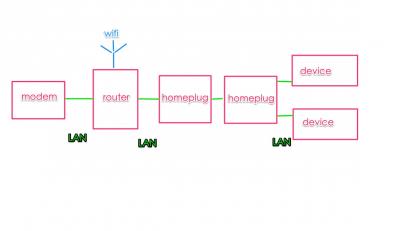

both setup, which option is better? and my Aztech homeplug support 200Mbps, is that enough for unifi 30? thanks |
|
|
Mar 10 2016, 02:18 PM
|
|
Junior Member
77 posts Joined: May 2008
|
QUOTE(Elvin7 @ Feb 8 2016, 06:47 PM) Any1 already using tplink Mr200 can share your experience? This reply is a bit late but I have both MR3420v1 and MR200. Personal opinion as follows:MR200 Pros Fast to get internet connection up. From power to connect is approx 30 secs to 1min, vs 3min of MR3420 Can view SMS directly, vs needing to plug modem into computer for the 3420. 5GhZ network for less interference More stable wifi. For some reason my MR3420's wifi behaves very weirdly when streaming videos. If i close a video halfway, the wifi on the device goes dead, still connected but no data gets transferred. Not sure if its issue with device or the wifi but disconnecting and reconnecting is the only way to solve it. More functions, i.e setting the wifi to turn off and on a schedule Better wifi coverage. The MR200 has almost the same coverage as my MR3420 with an upgraded 8dbi antenna MR200 Cons Expensive:( Cat 4 LTE modem + MR3420 is half the price of the MR200. Weaker signal strength. Currently, my panel antenna cant be connected to the MR200 due to different antenna plugs. Not sure if can get an adapter to solve this. Limited use for wireless AC. Malaysia broadband speeds cant even fully maximize the transfer rates that wireless N is capable of so the real benefit here is the signal shaping to provide better coverage P/S At least in my experience, uMobile 4g needs to be activated. Despite what their website says about trying to connect to the 4g network will automatically activate after 24 hours, if you dont do the SMS activation, it wont work at all. Luckily the sms is free This post has been edited by Erehwon: Mar 10 2016, 02:33 PM |
| Change to: |  0.0331sec 0.0331sec
 0.34 0.34
 6 queries 6 queries
 GZIP Disabled GZIP Disabled
Time is now: 14th December 2025 - 08:11 PM |
 Quote
Quote