

Awesome..! Finally P780 official thread.!
Thanks to TS.
Lenovo P780 V2, King of Endurance / Epic Battery Life
Lenovo P780 V2, King of Endurance / Epic Battery Life
|
|
 Nov 11 2013, 10:22 PM Nov 11 2013, 10:22 PM
Return to original view | Post
#1
|
 
Senior Member
507 posts Joined: Apr 2006 From: Kuala Lumpur  
|
Awesome..! Finally P780 official thread.!
Thanks to TS. |
|
|
|
|
|
Nov 12 2013, 11:10 AM
Return to original view | Post
#2
|
|
Senior Member
507 posts Joined: Apr 2006 From: Kuala Lumpur
|
This phone got 2 Sim so why settle only 1 whatsapp?
So far I know only 2 methods to obtain 2 whatsapp onto 1 phone. 1. Root > create another profile in TB pro. 2. Root > install 2Lines for Whatsapp from Playstore. I used 2Lines for Whatsapp and its working Great! With this app, switching whatsapp account easily done with simple click on its widget. Link : 2LinesWhatsapp @PlayStore Video : Youtube Maybe TS could consider sharing this info on main post. |
|
|
Nov 13 2013, 03:31 AM
Return to original view | Post
#3
|
|
Senior Member
507 posts Joined: Apr 2006 From: Kuala Lumpur
|
My P780 is d 4GB model. Flashtool to S116 then updated to S119 now. Thanks to xMika for sharing and uploading the rom. Then Rooted and repartition successfully using method shared by ZeroHunter & Garytanyh with a little twist tho I'm sure steps listed by them works nevertheless. Diff only on driver installation and twrp.
Repartition using method shared by garytanyh was favored because I believed its the best way to utilize maximum built-in memory. Just make sure u use fast and reliable SdCard or else performance will suffer. I also like to suggest that u don't simply flash rom from ur recovery, instead use Flashtool provided. Substitute kernel might cause unwarranted problem so use caution. Always take time to read whatever instructions provided and if not sure, ask. Will share more relevant info if needed and when I have time or when I can't sleep like 2nite. King of Endurance but many still unbelievers. I do feel sorry for them.. Ha.ha. |
|
|
Nov 17 2013, 03:16 PM
Return to original view | Post
#4
|
|
Senior Member
507 posts Joined: Apr 2006 From: Kuala Lumpur
|
QUOTE(michael9413 @ Nov 16 2013, 09:55 AM) If wanna try the repartition if u can meet up and help... Ha.ha.. meet belanja makan? As I Don want yo brick my phone... I tried SP Tools but it seems cannot detect me phone....   I promise wont brick ur phone but make it wood maybe.. I promise wont brick ur phone but make it wood maybe..  Just to let u know, my loc is around Ampang / Cheras laa.. Hey Mike, its really not hard. If I can do, I think most here can also... Highly likely no one here will brick their phone, unless really2 gilaaa experimenting something shouldnt. I belajar already not to Over experimenting until I get another nice backup phone if things goes wrong. Btw, I think ur usb drivers not properly installed. DL these USB Drivers I uploaded > Lenovo USB Drivers When SP Tools fail to detect, open device manager on PC, Right click on MT65xx Preloader (got exclamation mark) and choose Update driver; direct it to the downloaded Lenovo USB Drivers folder and choose the Windows version and proceed update. I think this should solve ur phone detection issue. Like this? - 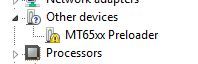 QUOTE(king_lover23 @ Nov 17 2013, 10:36 AM) hi matshadow... I am also using P780 4GB version.. I really cant tell since I did few other tweaks soon after upgrading S119. Still on stock rom but now my P780 is envied by most..Jk. Hint.. Zeppelinrox V6 SuperCharger!!!after u update to S119,any improvement compared to S115(my current version)? Repartition I use garyganyh method. Diff only my recovery is TWRP. After repart.. I dont think I need getting the 8gigs model  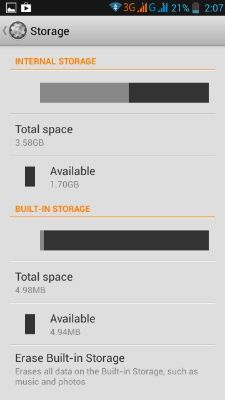 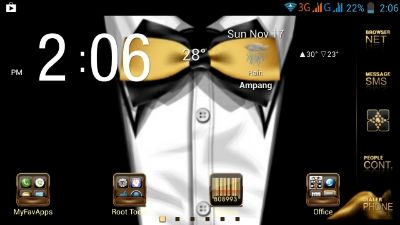 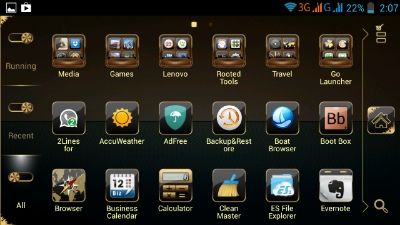  Nanti malam if got time I try do simple step-by-step Rooting > Repart (tho I have no idea how to make simpler guide than those excellent guide done by xMika, Garytanyh, Zerohunter, and few others before me  ) )Can cut paste, arr? Now thumb type isnt fun. This post has been edited by MatShadow: Nov 17 2013, 03:20 PM |
|
|
Nov 17 2013, 04:04 PM
Return to original view | Post
#5
|
|
Senior Member
507 posts Joined: Apr 2006 From: Kuala Lumpur
|
QUOTE(king_lover23 @ Nov 17 2013, 03:41 PM) » Click to show Spoiler - click again to hide... « thx man for ur detail reply. Just another 1 more question, If i dun wan to flash to S116, and maintain my S115, but I want to do repartition, can I do it? Download TWRP image & Life aroma repart. Save on root sdcard, easier. Flash CWM or TWRP recovery. I use Mobileuncle to flash TWRP. Use TWRP or CWM to flash Life aroma repart. Done.. |
|
|
Nov 17 2013, 04:55 PM
Return to original view | Post
#6
|
|
Senior Member
507 posts Joined: Apr 2006 From: Kuala Lumpur
|
QUOTE(ahpingko @ Nov 17 2013, 04:27 PM) guy..i just flashed to twrpp..and trying to install miui on it...tapi after flash, i got the boot loop..adui...how? Q : U try flash via TWRP recovery or Flashtool?From what i gathered, MUI rom need flashtool. |
|
|
|
|
|
Nov 17 2013, 05:05 PM
Return to original view | Post
#7
|
|
Senior Member
507 posts Joined: Apr 2006 From: Kuala Lumpur
|
QUOTE(king_lover23 @ Nov 17 2013, 04:11 PM) sorry.. where to download TWRP image? i din see any link provided. Duno why vid not shown.. also,I had downloaded life aroma repart.. and I saw 1 russian video teaching on how to repart... is it correct? they using mobile uncle tools..  Link to TWRP..? errr... i cant remember but I have it in my laptop. Later 2nite I upload if u still need it.  Im not sure if repart Life aroma could be done using mobileuncle. If vid shown it can be done than probably easier since u dont have to install custom recovery. |
|
|
Nov 17 2013, 05:12 PM
Return to original view | Post
#8
|
|
Senior Member
507 posts Joined: Apr 2006 From: Kuala Lumpur
|
QUOTE(ahpingko @ Nov 17 2013, 05:01 PM) via twrp...hmmmmm..really need flashtool? do i need to extract the zip content of the ROM? From where u downloaded the rom surely got instructions ma..Anyway.. normally they pkg files into zip or rar and u need extract contents. In pkg usually incl. tools, scatter.txt etc needed to flash correctly. Do note, this is MTK phones not like main stream phones where flashing could easily be done via recovery. |
|
|
Nov 17 2013, 05:21 PM
Return to original view | Post
#9
|
|
Senior Member
507 posts Joined: Apr 2006 From: Kuala Lumpur
|
Jus sharing infos...
Just found a gud vid guide [How To] Install/Run V6 SUpercharger + Basics. UTube link > How to Install/Run V6 Supercharger!! How I wish the vid above was found earlier that could have prevented me from 'pening kepala' reading THIS..!!! No regret installing this, tho  |
|
|
Nov 17 2013, 10:00 PM
Return to original view | Post
#10
|
|
Senior Member
507 posts Joined: Apr 2006 From: Kuala Lumpur
|
QUOTE(king_lover23 @ Nov 17 2013, 08:04 PM) sorry.. I need help urgently... U need to flash back stock rom using flashtool in order to recover from bootloop.Whenever I plug in my phone into my laptop, it will turn on and stuck at lenovo logo there.. but I cannot install the driver.. anyone mind to guide me? xMika did provide link to down load S116. Its (HERE) U may also refer to my prev post (HERE) on how to install drivers correctly. Stay cool and do step by step as guide given by xMika. |
|
|
Nov 17 2013, 10:13 PM
Return to original view | Post
#11
|
|
Senior Member
507 posts Joined: Apr 2006 From: Kuala Lumpur
|
QUOTE(king_lover23 @ Nov 17 2013, 04:11 PM) sorry.. where to download TWRP image? i din see any link provided. Now only can view the video u mention after zerohunter fixed link.also,I had downloaded life aroma repart.. and I saw 1 russian video teaching on how to repart... is it correct? they using mobile uncle tools.. That guy didnt flash aroma via Mobileuncle. He use Mobileuncle to flash CWM recovery and soon using CWM to flash aroma repart. My advice, dont rush2 wanting to flash. Read instruction, repeat reading if necessary and if still X faham than ask kawan2 here. Rush2 w/o knowing exactly what should be done will be bad for ur health. TS ady put all relevant infos & how-to guide on page 1. Pls refer there. This post has been edited by MatShadow: Nov 17 2013, 10:18 PM |
|
|
Nov 17 2013, 10:20 PM
Return to original view | Post
#12
|
|
Senior Member
507 posts Joined: Apr 2006 From: Kuala Lumpur
|
List here Step by step ur flashing procedure.
Maybe from it I can figure out what u did wrong and guide you. |
|
|
Nov 17 2013, 10:38 PM
Return to original view | Post
#13
|
|
Senior Member
507 posts Joined: Apr 2006 From: Kuala Lumpur
|
As expected..
Open Device Manager during Flashtool trying to connect. Right click the MT65xx PreLoader and choose update drivers. Goto the usb folder u downloaded earlier. Update drivers. Then Flashtool will continue its operation. |
|
|
|
|
|
Nov 17 2013, 11:45 PM
Return to original view | Post
#14
|
|
Senior Member
507 posts Joined: Apr 2006 From: Kuala Lumpur
|
QUOTE(king_lover23 @ Nov 17 2013, 11:43 PM) thx man!!! I need to belanja u makan already.. U save my phone... Glad to know u solved it. U point out all those little steps I missed out... when connect to pc, I need to use a pen to press the red button, once plug in usb, only release, then only update the drivers.. b4 tht, I only hear the sound... >< thx again...  |
|
|
Nov 18 2013, 05:57 AM
Return to original view | Post
#15
|
|
Senior Member
507 posts Joined: Apr 2006 From: Kuala Lumpur
|
QUOTE(king_lover23 @ Nov 18 2013, 12:09 AM) read.. but not so detail... To repartition ur 4gig model, below is the link to step-by-step instruction in DETAILS. Not mine but was written by Garytanyh and can be found on page 1 of this thread.I wan step by step.. btw.. I found 1 indonesia forum is very good... http://www.kaskus.co.id/thread/5272a51abcc...-not-an-option/ u guys can always refer to here... very details.. Download link > HERE |
|
|
Nov 18 2013, 10:47 AM
Return to original view | Post
#16
|
|
Senior Member
507 posts Joined: Apr 2006 From: Kuala Lumpur
|
QUOTE(blur_goofy @ Nov 18 2013, 09:41 AM) mine is more severe... even turning on and off the data doesnt help.. i need to restart the phone. anyone might have a permanent solution? Have u tried using other Sim possibly diff telco?For data, I'm on UMobile and w/o issue. |
|
|
Nov 18 2013, 11:49 AM
Return to original view | Post
#17
|
|
Senior Member
507 posts Joined: Apr 2006 From: Kuala Lumpur
|
QUOTE(vios88 @ Nov 18 2013, 11:36 AM) original lenovo cover. quality very good. active flip works perfectly. I'm currently using this also.just a problem. no holder for the top cover. so when put on table, will open a little and screen on. Ya, just like u said, everything perfect except it will easily on/off with slight cover open since no clip to hold it tight. Tip.. Use cheap rubber band... |
|
|
Nov 18 2013, 07:49 PM
Return to original view | Post
#18
|
|
Senior Member
507 posts Joined: Apr 2006 From: Kuala Lumpur
|
QUOTE(fitzhex @ Nov 18 2013, 07:37 PM) pure aosp rom ported from micromax A116. Awesome share..! for those who hate using lenovo ui. white. euuu. Thread (in bm)-http://lepakspot.com/forum/index.php?topic=592.0 DOWNLOAD LINK flash using cwm. any bugs leave in the thread or here  Will try it out hopefully this weekend. Thanks so much for sharing. |
|
|
Nov 18 2013, 08:16 PM
Return to original view | Post
#19
|
|
Senior Member
507 posts Joined: Apr 2006 From: Kuala Lumpur
|
Bro Fitzhex, my request if later got KitKat version, don't forget to share here. I'm for sure willing jadi 'tikus makmal'.
Again, thanks for d share. |
|
|
Nov 18 2013, 08:46 PM
Return to original view | Post
#20
|
|
Senior Member
507 posts Joined: Apr 2006 From: Kuala Lumpur
|
Having Knock to light & Shake to lock features into P780 will surely make me go naked.. I mean my phone. Now using active on off case.
|
|
Topic ClosedOptions
|
| Change to: |  0.0340sec 0.0340sec
 0.62 0.62
 7 queries 7 queries
 GZIP Disabled GZIP Disabled
Time is now: 15th December 2025 - 09:42 AM |
 Quote
Quote