Welcome Guest ( Log In | Register )

Bump Topic Topic Closed RSS Feed
4 Pages < 1 2 3 4 >Bottom

Outline · [ Standard ] · Linear+

 ** Google Nexus 4 Official Thread V12 **, The Heritage of Nexus.

views
     
cowithgun
post Nov 15 2013, 01:24 PM

A cow that can play notebook & phone
*******
Senior Member
2,248 posts

Joined: Sep 2010
QUOTE(nightwalkertzs @ Nov 15 2013, 01:14 PM)
nice works!!! Thanks for sharing. will try it on
*
Ya, another thing, the "OK, google" only works in Homescreen, so, I think the battery will not be effected much by it.

But if want to turn it off, just go to Google Now (Swipe from left), scroll all the way down, see the three dots, click that option, Setting, Voice, turn off "Hotword detection".
cowithgun
post Nov 15 2013, 02:30 PM

A cow that can play notebook & phone
*******
Senior Member
2,248 posts

Joined: Sep 2010
QUOTE(chonkit @ Nov 15 2013, 02:04 PM)
haha..i tried that Google Experience Launcher , but the icon abit big for me when in app drawer.yours same also? i prefer current look..hehe
*
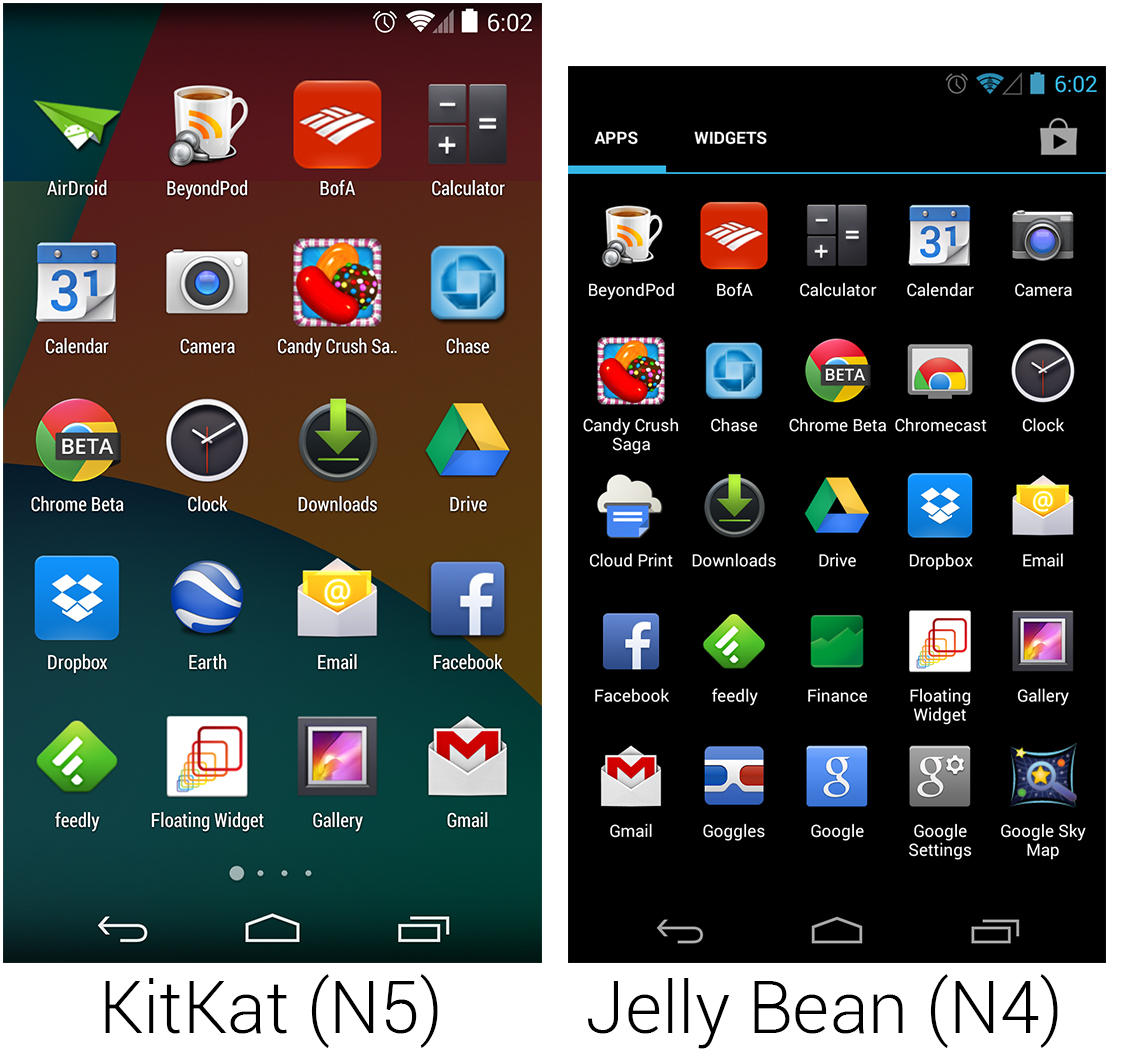
ya... that's the new design from kitkat... all icon bigger, easier to access with 1 hand operation for me.. the layout is now 4x5 instead of 5x5 in jellybean. it's the same even in high res phone (1080p) in N5.

user posted image
cowithgun
post Nov 15 2013, 02:50 PM

A cow that can play notebook & phone
*******
Senior Member
2,248 posts

Joined: Sep 2010
QUOTE(NightFelix @ Nov 15 2013, 02:46 PM)
I'm on Custom Rom/Kernel(which is still using 4.2.2) so if I follow that above guide you use, will work flawless is it?
*
yup. doesn't matter if you on Custom ROM/Kernel. should work.
cowithgun
post Nov 15 2013, 03:07 PM

A cow that can play notebook & phone
*******
Senior Member
2,248 posts

Joined: Sep 2010
QUOTE(zaidi @ Nov 15 2013, 02:58 PM)
silly google, asked us to download 100MB of null tongue.gif
can you share the apk? too lazy to download and extract from Nex5 image.

Thanks!!!
*
QUOTE(nightwalkertzs @ Nov 15 2013, 03:00 PM)
i think there is lots of article attache with the download link.

This is 1 of that:
http://www.androidpolice.com/2013/11/13/ho...e-apk-download/

Cheers..
*
ya, there is already link in the Android Police. my md5sum from n5 firmware:

MD5: 9d2a84831bf537a48fc630b8a219fbf4

if it's the same, i should be safe.
cowithgun
post Nov 15 2013, 04:06 PM

A cow that can play notebook & phone
*******
Senior Member
2,248 posts

Joined: Sep 2010
QUOTE(Ashhh @ Nov 15 2013, 03:47 PM)
Forever stuck at this.

And my Nexus 4 only goes up 'till Start splash screen of bootloader.
*
after i executed "adb reboot bootloader" you should see android bootloader like this:

user posted image

then only u can execute the rest of the commands...


cowithgun
post Nov 15 2013, 04:27 PM

A cow that can play notebook & phone
*******
Senior Member
2,248 posts

Joined: Sep 2010
QUOTE(Ashhh @ Nov 15 2013, 04:19 PM)
Is it right?

Now I'm at this window after launching flash-all script.

And my screen is shown 'Downloading...'

It's been like this for 10 minutes already.
*
flash-all will delete your app/data, u sure u wanna do that??!!!

from what i can tell, it's working biggrin.gif

but if you use flash-all.bat, your image-occam-krt16o.zip must be in the same folder.
cowithgun
post Nov 15 2013, 04:46 PM

A cow that can play notebook & phone
*******
Senior Member
2,248 posts

Joined: Sep 2010
QUOTE(Ashhh @ Nov 15 2013, 04:35 PM)
How long does it take for you guys to finish flash all of it?
*
should not take more than 10 minutes.

after every reboot, you should see that same android "Start" bootloader screen in your phone. if still not working, capture your "fastboot" folder, just wanna check what kind of files you have in that folder.
cowithgun
post Nov 15 2013, 04:58 PM

A cow that can play notebook & phone
*******
Senior Member
2,248 posts

Joined: Sep 2010
QUOTE(Ashhh @ Nov 15 2013, 04:48 PM)
Here's a snapshot of my folder. It's been over 10 minutes already.
*
is your phone showing that Android bootloader image? if not, you need to boot into boot loader. to do so, just reboot the phone. and re-run this:

"adb reboot bootloader"

cowithgun
post Nov 17 2013, 06:42 PM

A cow that can play notebook & phone
*******
Senior Member
2,248 posts

Joined: Sep 2010
QUOTE(RacingTech @ Nov 17 2013, 02:38 PM)
Do u guys facing problem after installing the new launcher where the ringtones always go to silent mode, every time when u click the home button it will ask whether u wanna use the default or new launcher?
*
QUOTE(super_evil_alien @ Nov 17 2013, 03:25 PM)
Yes, I do have the same bug.I think this issue is caused by the Google Search app latest update.
Actually I had the same issue with 4.3 after the search app update.

I partially solved the bug by disabling my other launchers.
*
funny i don't have those problem...

This post has been edited by cowithgun: Nov 17 2013, 06:42 PM
cowithgun
post Nov 17 2013, 07:31 PM

A cow that can play notebook & phone
*******
Senior Member
2,248 posts

Joined: Sep 2010
QUOTE(super_evil_alien @ Nov 17 2013, 07:05 PM)
Which launchers are you using?

I haven't try GEL yet but it setting it as default launcher doesn't trigger the default launcher picker then something strange is happening.
*
Stock ROM / launcher... then install GoogleHome.apk. nothing else. i thought your guys talking about that. sorry. tongue.gif
cowithgun
post Nov 18 2013, 12:31 AM

A cow that can play notebook & phone
*******
Senior Member
2,248 posts

Joined: Sep 2010
QUOTE(NightFelix @ Nov 18 2013, 12:16 AM)
I got some important stuff haven't backup, but I do have one Nandroid inside my phone. Now my phone stuck at bootloop. How to fix? sweat.gif
*
boot into Custom Recovery. use adb to backup anything you need.
cowithgun
post Nov 18 2013, 01:02 AM

A cow that can play notebook & phone
*******
Senior Member
2,248 posts

Joined: Sep 2010
QUOTE(NightFelix @ Nov 18 2013, 12:37 AM)
Can spoonfeed me the link with those guide/command how to do that? I have android sdk installed on my pc... now all I need to know is what step to proceed further... sweat.gif
*
Boot into recovery:

1. Power off your smartphone completely.
2. Press and hold Volume Up, Volume Down and Power buttons simultaneously.
3. Release the buttons when the Bootloader / Fastboot mode menu appears.
4. You will the Start button listed on this screen, press Volume Down or Up until the ‘start’ text changes to Recovery Mode.
5. Press Power to confirm that you wish to boot into Recovery Mode.

Once in your custom recovery, chose Nadroid to recovery your phone (boot and system).

Or, to backup stuff, connect to PC, use "adb" command:

CODE
adb pull <file>


For example, to get everything from /data/data (which contains all your save files, etc)

CODE
adb pull /sdcard


That will copy everything in your phone's /sdcard into your PC.

ps: to backup APK, copy stuff from /data/apk, to backup APK's data or saved files, copy from /data/data

This post has been edited by cowithgun: Nov 18 2013, 01:05 AM
cowithgun
post Nov 18 2013, 11:08 AM

A cow that can play notebook & phone
*******
Senior Member
2,248 posts

Joined: Sep 2010
QUOTE(NightFelix @ Nov 18 2013, 10:08 AM)
Too bad I'm still using TB Free version. Maybe wait the Dev slash some price only buy the Pro version. sweat.gif

cowithgun
Last night, I have successfully pull all the Data from my phone.

Now I have Clean re-flash the whole ROM, so now how am I going to push back into my device? hmm.gif
*
Personally, I don't recommend using any version of Titanium Backup. Many problems I've seen are result of user using the tool to backup/restore their app.

I always just use backups from CWM / TWRP. Has everything I want. You can always open those backup files (IMG) using some tools to find what you need; app, data, etc.

Alternatively, Android has it's own backup solution: https://forum.lowyat.net/index.php?showtopi...&#entry60202371

How to put those data you pull from adb?

If apk, you can re-install the apk then, copy the data back to it's /data/data/ folder. Remember to "chmod" the UID of that folder and everything inside to the new UID of the APK.

If data, just copy it back.

For SMS, restore this file:

/data/data/com.android.providers.telephony/databases

*WARNING* a lot of things may go wrong, especially if you are not careful when restoring it by hand (like this). After this, I hope you remember to use custom recovery to backup before your flash anything. cool.gif
cowithgun
post Nov 18 2013, 11:48 AM

A cow that can play notebook & phone
*******
Senior Member
2,248 posts

Joined: Sep 2010
QUOTE(olygopoly @ Nov 18 2013, 11:11 AM)
Now knows why not getting good signal. Seems like even though I already set only prefered 3G in not getting 3G that much unlike custom ROM. Only after forcing 3G thru *#*#4636#*#*  then select WCDMA only, Im now getting the 3G always.
*
you mean to say Custom ROM can get better signal?

i think even developers of that custom ROM themselves will tell you that you are hallucinating .. laugh.gif
cowithgun
post Nov 18 2013, 12:58 PM

A cow that can play notebook & phone
*******
Senior Member
2,248 posts

Joined: Sep 2010
QUOTE(NightFelix @ Nov 18 2013, 12:50 PM)
The real question is, since I pull out from /data/data using adb. Right now, manually hand copy back to /data/data.
But how exactly we able to access to /data/data? sweat.gif  sweat.gif

Which apps should we use to copy?
*
to copy data back to phone, use "adb push <source> <destination on phone>", i.e.:

CODE
adb push /data /data


but unfortunately, things in /data/data are mainly used by Application. so, by simply copying everything back will not restore the setting in your app such as game progress, saved files, SMS, settings.

so, you need to restore them 1 by 1 and chmod their folder respectively as per my previous post.

This post has been edited by cowithgun: Nov 18 2013, 12:59 PM
cowithgun
post Nov 18 2013, 05:02 PM

A cow that can play notebook & phone
*******
Senior Member
2,248 posts

Joined: Sep 2010
QUOTE(NightFelix @ Nov 18 2013, 04:36 PM)
Alright I test it tonight when I reach home.

I just found that the Cynogenmod File Manager able to access the /data/data file and all file inside are visible too. blink.gif

by the way, what is chmod those what? sweat.gif  Google found answer but not quite understand. hmm.gif
*
with root access, any file manager (or ADB) can access /data/data

chmod - a command to change the access control of files / folder.

basically, /data/data contains all your stored preferences, saved game, data from various APP in your phone. for example, say you have an App i.e. GoogleHome.apk. When you install the App, the APK will be copy to /data/app/com.google.android.launcher-0.9.6.886092.apk

Each App in Android will be assigned an UID. To find out about that UID, just do "ls -l /data/app/"

Once you get it's UID, to restored it's preferences, saved files, etc. Copy the /data/data/com.google.android.launcher-0.9.6.886092 back to the phone. Then, you need to change the owner and permission of that folder and everything insider.

"chmod -R" allow you change the permission of that folder to the UID of that App and all it's folders inside. You may also need to use "chown" to change the owner. These are standard Unix command.

Alternatively, file browser such as Root Explorer allow you to change permission and owner via GUI without these commands.

cowithgun
post Nov 18 2013, 08:23 PM

A cow that can play notebook & phone
*******
Senior Member
2,248 posts

Joined: Sep 2010
Tested the built-in screen record function of Kitkat. Now, recording gameplay could not been easier biggrin.gif

Another thing that give me a pleasant surprise... for those who use Terminal / adb a lot will be delighted to know the shell now support auto completion! Thanks heaven!


cowithgun
post Nov 18 2013, 10:43 PM

A cow that can play notebook & phone
*******
Senior Member
2,248 posts

Joined: Sep 2010
QUOTE(olygopoly @ Nov 18 2013, 10:38 PM)
Just wondering how do we delete extra panel in the home screen of the new GEL
*
remove all icon in that screen... and voila! it's gone... sweat.gif
cowithgun
post Nov 19 2013, 12:44 AM

A cow that can play notebook & phone
*******
Senior Member
2,248 posts

Joined: Sep 2010
QUOTE(olygopoly @ Nov 18 2013, 11:49 PM)
mine already remove all but it's still there
*
shakehead.gif
cowithgun
post Nov 19 2013, 01:04 AM

A cow that can play notebook & phone
*******
Senior Member
2,248 posts

Joined: Sep 2010
QUOTE(s30ckf @ Nov 19 2013, 12:48 AM)
I am curious, Nexus 4 with stock ROM + Kernel already pretty damn smooth and stable, what is the advantages (beside more features and customization) to flash custom ROM + kernel ?
*
fixed. i m a happy stock ROM user. for kernel, i like to under volt it for tiny bit of better battery life and over clock it for performance when i need it. i also like to tweak the color to my liking.

4 Pages < 1 2 3 4 >Top
Topic ClosedOptions
 

Change to:
| Lo-Fi Version
0.0403sec    0.21    7 queries    GZIP Disabled
Time is now: 14th December 2025 - 11:24 PM