Outline ·
[ Standard ] ·
Linear+
** Google Nexus 4 Official Thread V12 **, The Heritage of Nexus.
|
TSpolarzbearz
|
 Oct 9 2013, 08:31 PM Oct 9 2013, 08:31 PM
|

|
 Nexus 4 Unleashed Nexus 4 UnleashedDon't like stock feels? Want to have it your way? Unleash your Nexus 4 starting with basic bootloader unlocking & rooting and flashing custom ROMs / files / etcs as you wish! Warning: If you don't know what you're doing, have no clue, or don't like to take risks, avoid this section at all cost as it is not for faint-hearted ones. Unlocking & Rooting may void your warranty so if you are not an advanced users, avoid it at all cost!  Additionally, it is recommended for you to learn and do these using manual way via adb / fastboot so that you can learn the underlying processes / procedures before using Toolkits or Softwares which does it for you. With this way, you will have at least basic understanding on how it works which may help you in the future such as when you encounter problems; these basic understanding may come in handy.[CLICK HERE TO VIEW THE FULL SIMPLIFIED GUIDE TO UNLOCK / ROOT YOUR DEVICE!]A. GETTING STARTED WITH BASIC KNOWLEDGEAll answers here are obtained from http://forum.xda-developers.com/showthread.php?t=2010338 in order to benefit the community here. Credit goes to the original author. Head on to the link to read the full version as those that are listed here are only the important/main points. Some additional points which are not available on the original thread are added, tho. Additionally, it is recommended for you to learn and do these using manual way via adb / fastboot so that you can learn the underlying processes / procedures before using Toolkits or Softwares which does it for you. With this way, you will have at least basic understanding on how it works which may help you in the future such as when you encounter problems; these basic understanding may come in handy.[CLICK HERE TO VIEW THE FULL SIMPLIFIED GUIDE TO UNLOCK / ROOT YOUR DEVICE!]A. GETTING STARTED WITH BASIC KNOWLEDGEAll answers here are obtained from http://forum.xda-developers.com/showthread.php?t=2010338 in order to benefit the community here. Credit goes to the original author. Head on to the link to read the full version as those that are listed here are only the important/main points. Some additional points which are not available on the original thread are added, tho.- A1. What is a "bootloader"?
» Click to show Spoiler - click again to hide... « Without getting into too many technicalities, the bootloader is essentially the program that gets loaded first when starting your device, and it is responsible for booting the Android kernel. Think of the bootloader as the BIOS of a computer.
- A2. What does it mean if my bootloader is locked/unlocked?
» Click to show Spoiler - click again to hide... « Most (if not all) devices are shipped from the manufacturer with locked bootloaders. This is for security reasons. A locked bootloader does not allow easy flashing of images, which means that it is difficult to change or modify the operating system. Unlocking a bootloader (using fastboot) on most Nexus devices results in a complete loss of all personal data from the device. Having a locked or unlocked bootloader has no bearing on the functioning of the device. Unlocking it gives you more options to play around with the OS. Additionally, an unlocked bootloader means that you can easily root your device no matter what -- unlike most non-Nexus devices, if you lose root, it is trivial to get it back.
- A3. What is “root”?
» Click to show Spoiler - click again to hide... « Root essentially means that you have root (or superuser) access to the file system on Android. It is similar to being “administrator” on a Windows PC. It has nothing to do with your device or the bootloader, it has to do with the Android OS (i.e., you cannot “root” your device – you root the Andoid build that you are running). To have root, you need to be booted into the Android OS that you have rooted. If you are in fastboot mode, root is irrelevant. In order to perform root, you will most likely have to unlock your bootloader first (see above)
- A4. What is "recovery"?
» Click to show Spoiler - click again to hide... « Recovery is like a mini OS, which allows you to perform various functions, usually related to flashing files to your device, or updating files, or backing things up, etc. The stock image has a recovery included, but its functionality is very limited. There are a number of custom recoveries available, but the two most popular for the Nexus 4 are CWM and TWRP. There are various versions of each. More details to come in this section.
- A5. What is a "ROM"?
» Click to show Spoiler - click again to hide... « A ROM is slang for an mobile OS build.
- A6. What is the difference between a "stock ROM" and a "custom ROM"?
» Click to show Spoiler - click again to hide... « A stock ROM is a ROM that is built by Google and is signed by Google’s platform keys. Everything else is a custom ROM.
- A7. If I unlock my bootloader, is that the same as root?
» Click to show Spoiler - click again to hide... « No, as was mentioned above, unlocking the bootloader allows you to (among a few other things) flash images easily to the device when not booted into the Android OS. Root allows you access to manipulate the files WITHIN the Android OS.
- A8. If I want to root, do I have to unlock my bootloader?
» Click to show Spoiler - click again to hide... « Yes. Because you will have to flash custom recovery in order to flash a file which grants you root access. For more information on rooting, refer to following points in spoilers within this post.
- A9. If I unlock my bootloader, does that mean that I have to root?
» Click to show Spoiler - click again to hide... « No.
- A10. If I unlock my bootloader, do I have to flash a custom ROM?
» Click to show Spoiler - click again to hide... « No.
- A11. Do I need to root to flash a ROM?
» Click to show Spoiler - click again to hide... « No, but it is recommended as some custom ROMs will have additional features which require root access.
- A12. Custom kernels? Stock kernels? What are these? Any differences?
» Click to show Spoiler - click again to hide... «
B. FREQUENTLY ASKED QUESTIONS - UNLEASHED EDITION- B1. What is the process flow in general for unleashing my Nexus 4?
» Click to show Spoiler - click again to hide... « While these steps might not be definite; these are however common approaches used by fellow owners.
1. Unlocking the bootloader
2. Flashing Custom Recovery (Either temporary or permanently)
3. Rooting (via Recovery)
4. Flashing Custom Kernel
5. Flashing Custom ROM
As shown above, the common process flow for unleashing our device. Step 1 is easily reversible via fastboot commands (or BootUnlocker apps via PlayStore which requires Root); whereby Step 2 - 4 can be reversed by flashing stock images via fastboot.
- B2. I want to go back to stock ROM for warranty purposes / OTA / dislike custom ROM / any other reasons
» Click to show Spoiler - click again to hide... « Head over to this link to read on what steps are required to revert to stock: http://forum.xda-developers.com/showthread.php?t=2010312
- B3. ADB couldn't detect my devices / detected in normal conditions, but not in bootloader / etc
» Click to show Spoiler - click again to hide... « Ensure that you install Universal Naked Drivers instead of the default LG / Nexus drivers. Head over to the link above to download the drivers, and then use google's instructions to install the driver and browse for the folder extracted from the .zip file you downloaded (instead of Google's driver). Read section C > Manual ways of doing it for a detailed instructions / guides
- B4. Alright so I have heard that there are different CPU binnings like slow, nominal, fast or faster. How do I check?
» Click to show Spoiler - click again to hide... « In order to check your CPU bins, you must be rooted and have Android Terminal Emulator installed, then follow the steps below: 1. Launch the 'Terminal Emulator' application. 2. Type ' su' and hit Enter. 3. If there are any pop-up prompts requesting for SuperUser access, GRANT it.3. Type ' dmesg | grep PVS' and hit Enter. 4. It should return a line and show you whether if yours are SLOW, NOMINAL, FAST or FASTER. If it does not return these values, try rebooting your device and try again. Note: This might not work on custom kernels as kernel developers might have changed the return value.Credits to XDA Community for the original thread.
- B5. I have seem some ROMs or Kernels offering Krait Optimization or Bionic Optimisation. What are these?
» Click to show Spoiler - click again to hide... « (Originally posted by cowithgun)Kraits and bionic optimization speed up 2 things in your phone: 1. string / memory operation. these operation including string copy, memory copy, compare, etc. even a simply file copy uses these operation. all these implemented in a library known as bionic library in android. it's similar to libc in pc. this is the bionic optimization. 2. after Qualcomm introduce krait core (since S4), they release new code that allow you to use extended instructions that can only be found in Krait core to do some math operation. by implementing these new code, some math function such as sin(), cos(), etc will be faster. Many heavy graphic app uses math functions. What custom ROM/kernel developer do is to get these code from Code Aurora, and implement in their ROM/kernel then recompile it. You may not notice performance improvement if you just swipe homescreen, etc but if you do benchmark, you will see a huge improvement. For example, before any optimization, most N4 getting like 17k Antutu score. After Bionic optimization around you will get around 19k. You should see huge improvement in the RAM score, in this case 3274. Also check out the CPU floating point score, 2139, in this case, not optimized yet. 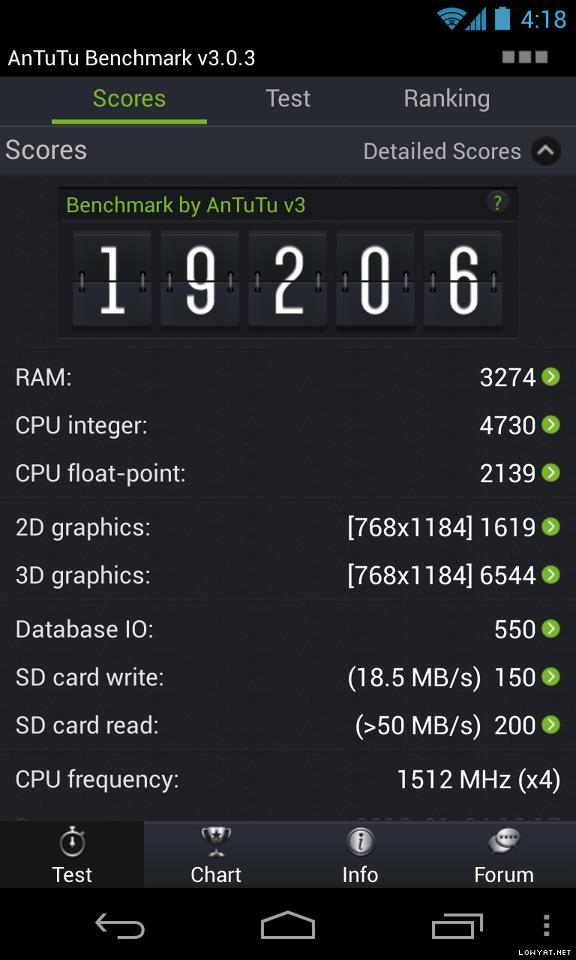 Now, if you optimize the math library with Krais extended instruction, you should see huge improvement in CPU floating point score, in this case 4182. With both optimized, you see a jump from 17k Antutu score to 21k, around 30% improvement at the same CPU speed.
- B6. Can I compile my own kernel?
» Click to show Spoiler - click again to hide... « (Originally posted by cowithgun)WARNING: A word of caution, proceed only if you're clear of what you are doing. No one should be held responsible for any mishaps that happened for following this tutorial.1) Download and install VMware player (or any VM you like) - http://www.vmware.com/products/player/2) Install Ubuntu 12/13 as long as it is 64 bit. To compile JellyBean you need 64 bit OS. - http://www.ubuntu.com/3) Setup the VM - http://source.android.com/source/initializing.html4) Download the source - http://source.android.com/source/downloading.html- get mako-kernel android-4.2.2_r1.2 (latest, newer than OTA 4.2.2) - leave it overnight 5) Build it. - make -j4 - leave it for an hour or so - If you wanna use Linaro compiler, get this: http://www.linaro.org/6) You will get a working zImage if compiled without error 7) Unpack the ori boot.img using this: http://forum.xda-developers.com/showthread.php?t=9158088) Replace the zImage and pack it back. 9) Make sure you have backup your phone 10) Flash into your phone: dd if=newboot.422.oc.img of=/dev/block/platform/msm_sdcc.1/by-name/boot 11) reboot, voila! 12) Once you successfully compiled your own kernel, make the appropriate changes, depending on feature you want: - To calibrate the color, change file /arch/arm/mach-msm/lge/devices_lge.c accordingly: https://github.com/franciscofranco/mako/com...0f931085952bfd2- To overclock/undervolt, change file /msm/arch/arm/mach-msm/acpuclock-8064.c My freq table: http://forum.lowyat.net/index.php?showtopi...&#entry59139540Note that, i have "Faster" CPU binding. 13) Bionic / Krait optimization required you to recompile libc.so and libmath.so using code from Code Aurora. 14) Linaro gcc optimization, change make file to use -O3 and you need to fix a few compiler errors. It's do-able, not rocket science and the experience will make you know your phone even more. Good luck! ps: standard disclaimer; i m not responsible for sh1t...
C. UNLEASHING HANDS-ON, TUTORIALS & GUIDES- C1. Easy Way to Unlock bootloader & Root with toolkit
» Click to show Spoiler - click again to hide... « Wug's Nexus Root Toolkit http://forum.xda-developers.com/showthread.php?t=2015469Video tutorial: » Click to show Spoiler - click again to hide... « OR.. mskip's Nexus 4 Toolkit http://forum.xda-developers.com/showthread.php?t=1995688
- C2. Manual Way to Unlock bootloader & Root Recommended!!!!
Instead of relying on toolkits; Why not learn new things whilst doing it?
» Click to show Spoiler - click again to hide... « View simplified / summarised guide written by polarzbearz here. For original guide on XDA, refer to this link: here
- C3. Okay. Now I'm rooted & unlocked; where can I get custom ROMs / custom kernels to flash?
» Click to show Spoiler - click again to hide... « Head over to Nexus 4 @ XDA-Developers and have glimpse at all the available custom ROMs, kernels, customisations, themes, applications and etc.
- C4. Index to more guides available in XDA forum
» Click to show Spoiler - click again to hide... «
|
|
|
|
|
|
TSpolarzbearz
|
Oct 9 2013, 08:31 PM
|
|
|
Nexus 4 Accessories- Casings/Covers/Bumpers
» Click to show Spoiler - click again to hide... « Ultra light protection & ultra sleek design- Rearth Ringke Google Nexus 4 SLIM Case
- Poetic Borderline Bumper Case
- SGP Ultra Thin Air
Medium protection & sleek design- Diztronic Matte Back Black Flexible TPU Case (use code "XDA" or "repeatbuyer" to get 10% discount, thanks ckh93!)
- Cruzerlite TPU Case
- Nillkin Frosted Super Shield/Tree-Texture Leather Case
Heavy duty protection & thick design
- Wireless Chargers
» Click to show Spoiler - click again to hide... « Google Nexus Wireless Charger
LG WCP300 Wireless Charger
- Screen protectors
» Click to show Spoiler - click again to hide... « - SGP Stenheil Ultra Oleophobic/Crystal/Crystal DUAL (Dry application) > Only Crystal DUAL includes front & back » Click to show Spoiler - click again to hide... « SGP Ultra Oleophobic 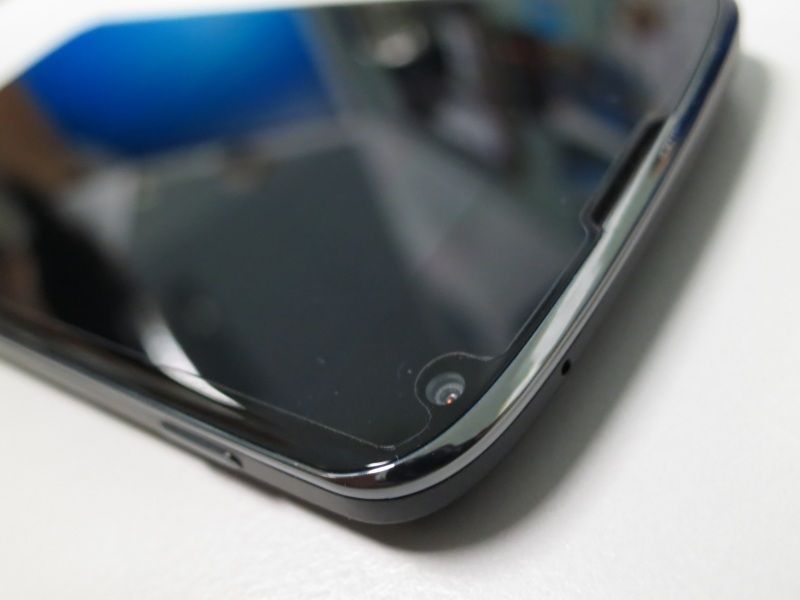 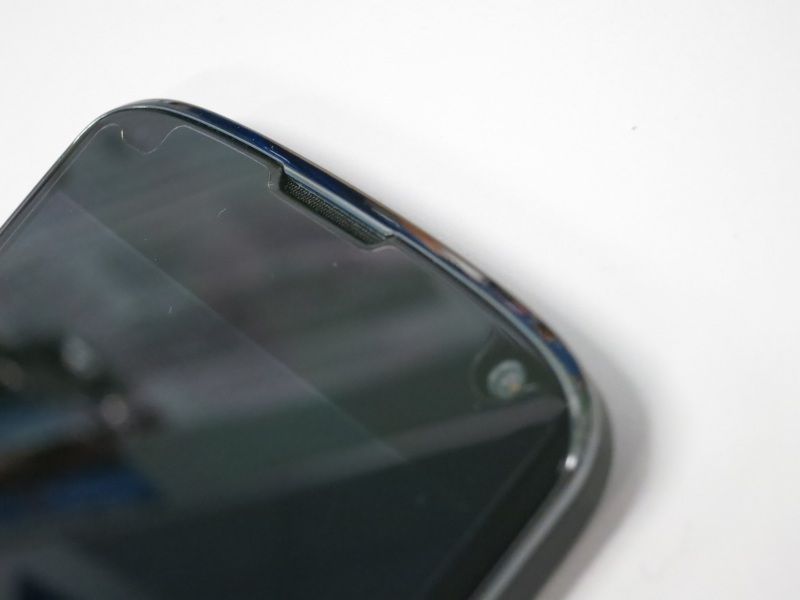 - Nilkin Crystal/Matte (Dry application) > Comes with front-back and front only pack (confirm with seller) » Click to show Spoiler - click again to hide... « Nilkin Crystal  - Best Skins Ever Total Body Skin/Total Body Skin with Case Optimized Screen Skin/Screen Skin/Case Optimized Screen Skin/Body Skin (Wet application)
- Nexus 4 accessories bulk orders/selling thread in Bulk Orders and Garage Sales forum
» Click to show Spoiler - click again to hide... « *These are all gathered through search from Bulk Orders and Garage Sales. I might not have included all of them but you can always do a search for "Nexus 4" for more accessories selling threads. Feel free to PM me your thread link if you are selling accessories for Nexus 4.Disclaimer: Do note that by no means the thread starter is associated with any of the seller below. The link is collected and put up in order to provide conveniences to users in this thread. At any given time that warning of taking down the links are given; they will be removed without any objections.Search Garage SalesSearch Bulk OrdersKeywords: Nexus 4, Nexus 4 accessories, Nexus 4 screen protector, Nexus 4 casing, etc....
|
|
|
|
|
|
TSpolarzbearz
|
Oct 9 2013, 08:31 PM
|
|
|
Nexus 4 Proud Owner ListInstructions:To add yourself to the owner list, fill in the form [CLICK HERE]To view detailed owner list, view the spreadsheet [CLICK HERE]The owner list in this thread will be occasionally updated, based on the speadsheet (Credits to tcmean for the spreadsheet & form)Note: Names added between 19 - 23 January 2013 are mostly lost tracked. Check the spreadsheet here to see if your name is in there. If not, just re-add your name by filling in the form.Note#2: All the duplicated entries in the spreadsheet will be treated as one (e.g. multiply entry for a single LYN username).Note#3:Please only add your name into the list ONCE, even if the side-infos (e.g. Bootloader unlocked? Rooted? ROM? Kernel? CPU binning? Hardware version) are inaccurate, it doesn't matter as long as your entry is there. Duplicated entries will only incur more works to the thread starter. Your cooperation is much appreciated!Total of 348++ proud owners and it's still growing strong.. (last merged: 20130613)WARNING: Extremely looooooooooooooong list. You have been warned!16GB» Click to show Spoiler - click again to hide... « 8GB» Click to show Spoiler - click again to hide... « - BrunoWong
- heLL[tuRt]
- bloodplasm18
- plecil
- vcheam
- RcykZai
- Robottoes
- GreenSamurai
- chokolato
- Fatyao
Proud to be part of the Nexus 4 Club? You may use these userbars in your signature! » Click to show Spoiler - click again to hide... «
|
|
|
|
|
|
TSpolarzbearz
|
Oct 9 2013, 08:32 PM
|
|
|
Homescreen GalleryLove customising your Android experiences? Want to show it to others? You can request to have your homescreen design posted here by using the following format! » Click to show Spoiler - click again to hide... « Instructions: Copy the entire CODE BLOCK below and paste in your new reply; modify the fields according to Note#1 and Note#2.CODE
[@THREAD_STARTER_NAME] [i](e.g. [@polarzbearz])[/i]
[code]
[b][color=purple]Screenshots By YOUR_USERNAME[/color][/b]
[spoiler]
[center][url=LINK_TO_YOUR_POST]Screenshots 1[/url][/center]
[center][url=LINK_TO_YOUR_POST]Screenshots 2[/url][/center]
[/spoiler]
[ /code] << (REMOVE_THE_SPACE_INFRONT)
Note: Fill in THREAD_STARTER_NAME with the current threadstarter's name; YOUR_USERNAME with your forum's name and LINK_TO_YOUR_POST with the direct link to your homescreen's post. To obtain the post direct link, click on the Post #number at your post (see screenshot below)Note#2: Please make sure that you modify the REMOVE_THE_SPACE_INFRONT section, by removing the space infront of the [ /code] closing tag.How to obtain your post link?» Click to show Spoiler - click again to hide... « Note: Please use the above format to make requests of adding your screenshot here. Requests that does not adhere to the template/format will be ignored  Screenshots By polarzbearz Screenshots By polarzbearz» Click to show Spoiler - click again to hide... « Screenshots By TwoJay» Click to show Spoiler - click again to hide... « Screenshots By anarchy2cruo» Click to show Spoiler - click again to hide... « Screenshots By louyea» Click to show Spoiler - click again to hide... « Screenshots By Someonesim» Click to show Spoiler - click again to hide... «
|
|
|
|
|
|
TSpolarzbearz
|
Oct 9 2013, 08:32 PM
|
|
|
Customisation StrategiesWant to customise your device to have unique experiences of Android? Don't know what to use? Here are some recommended applications, tools or basic guides to give you a head start! - Home Launcher Replacements
» Click to show Spoiler - click again to hide... «
- Clock, Date, Time & Weather-related widgets
» Click to show Spoiler - click again to hide... «
- Customisation inspiration & idea generation
» Click to show Spoiler - click again to hide... « Head over to MyColorScreen to have a glimpse at other's work to have inspirations; or directly use their customisations (if they provides tutorial or files required). Alternatively, view the previous post Homescreen Gallery to look at other member's customisation work 
- How to put screenshot inside the frame of Nexus 4?
» Click to show Spoiler - click again to hide... « You can use either one of the methods 1) Use photoshop and embed it manually into sirtagada's LG Nexus 4 PSD Template OR... 2) Use Android Apps such as Screenmaker or Device Frame Generator
- Any nice wallpaper recommendations?
» Click to show Spoiler - click again to hide... «
Need more tools / applications / widgets; appreciated it if anyone can recommend some to be added to the list here 
|
|
|
|
|
|
TSpolarzbearz
|
Oct 9 2013, 08:32 PM
|
|
|
Information Archive & ChangelogsAll the old posts and obsolete information which are no longer applicable / usable but might be useful to be reserved as a reference will be dumped here; alongside with the top 20 latest changes made to the thread shown in the table. Note: Only notable and important highlights will be logged into the changelog. Minor tweaks or fixes will not be mentioned| FORMAT | DESCRIPTION | | VERSION | Thread Version.Post Number.Revision [e.g. 10.8.1 represents changes in V10 of the thread in post #8, first revision.] (note: For overall changes, the format will be Thread Version followed by alphabet to represent Revision) | | DATE | YYYY-MM-DD (e.g. 2013-12-31) | | DESCRIPTION | Summary of changes | | ORDER | oldest on top to newest on bottom |
| VERSION | DATE | DESCRIPTION | | - | n.d. | Lost track of many other revamps or major milestones here and thus will not be revisited. | | 8a | 20130414 | Reorganised overall FAQs structure to have a cleaner structure. | | 9.4.1 | 20130602 | Simplified and entirely rewritten the manual rooting guide to allow easier understanding. [Link] | | 10a | 20130606 | Simplified and merged various sections to eliminate redundant sections (e.g. Tips & Tricks; and Userbars) | | 10.7.1 | 20130611 | Added guide to attach screenshots to Nexus 4 Frame in 'Customisation Strategies' | | 10.8.1 | 20130611 | Added new 'Changelogs' section and merged it into 'Information Archive' | | 10.3.1 | 20130612 | Added a new section 'PART 5: Custom Kernels / Custom ROMs' to the Nexus 4 Unleashing Guide [Link] | | 10.2.1 | 20130624 | Added two new frequently asked questions relating to alternative locking ways (touch control) & ratting noise when shaking | | 11.2.1 | 20130730 | Added new FAQs for the error [RPC:S-5:AEC-0] in Google Play Store |
- DiGi Zero Contract? SKMM Rebate?
» Click to show Spoiler - click again to hide... « DiGi only sells Nexus 4 bundled with plans. You will have to sign up for plans with the phone price at RM1449. Plans available are DG Smart Plan 68 (Zero Contract) and DG Smart Plan 88 (24 months/Zero Contract). You can always visit your nearest DiGi Centre to purchase your phone & DiGi plan outright! Please note that "Zero Contract customers must sign up for DG Smart Plan for at least three (3) months. In the event of termination within the first 3 months of subscription, customers will be charged an administrative fee of RM100." Sharing by nightwalkertzs on his experience in getting Nexus 4 from DiGi store » Click to show Spoiler - click again to hide... « I bought from digi store ALAMANDA already..Device after discount RM200 rebate -RM1299 i Will use digi for 3 months = rm68*3 = Rm204 mean total own cost = RM 1503...i will terminate the plan after 3 months for sure. hehe so now i am eenjoying my Nexus 4...thanks all for acc me all lon g waiting 1 month ^^ auto billing with credit card can rebate rm5 each month^^ so in 3 months = Rm1503 - Rm15 = RM1488 (Link to original post)Want to purchase Nexus 4 with SKMM rebate? Read on below; posted by polarzbearz. » Click to show Spoiler - click again to hide... « For DiGi, if you want to just get the phone; the best and cheapest option is to take DiGi Zero Contract 68 which breaks down to the price table below: | DESCRIPTION | PRICE | | Nexus 4 | RM1499 | | SKMM Rebate | - RM200 | | Advanced Payment | RM68 | | Early Termination Fee* | RM100 | | TOTAL | RM1467 |
*Zero Contract customers must sign up for DG Smart Plan™ for at least three (3) months. In the event of termination within the first 3 months of subscription, customers will be charged an administrative fee of RM100. (Source).
However, some of the DiGi staff does not allow on-the-spot termination so make sure you negotiate hard or go for another DiGi Store.An alternative is to use the plan for 3 months first and then terminate, which will cost: | DESCRIPTION | PRICE | | Nexus 4 | RM1499 | | SKMM Rebate | - RM200 | | Advanced Payment | RM68 | | Second Month Payment | RM68 | | Third Month Payment | RM68 | | TOTAL | RM1503 |
Also, when you terminate, make sure you get proof of termination just in case they did not successfully terminate your account within their system and continues sending you bill. Another post shared by SSY22 regarding his experiences of signing DiGi Zero Contract 48 instead of the usual 68, so you might want to try your luck to save some bucks » Click to show Spoiler - click again to hide... « Nexus 4 User here. Btw , i wan to share something here.
If you want to sign up DG rm48+1499 price for ZERO CONTRACT , go to DEALER store
DG centre only allow you to sign up RM68+1499 for ZERO CONTRACT
BTW no advanced payment needed. I got my nexus 4 today. Been waiting for so long.
This why sometime you see got people able to subscribe 48 plan.
A lot more valuable tips and sharings by forumers here: Search for "digi" in V3 discussion thread or Search for "digi" in this thread
- 4.2.2 Announcement @ 14 February 2013 along with some guidelines / tips
» Click to show Spoiler - click again to hide... « OTA 4.2.2 is out! Didn't receive OTAs (for stock ROM & stock kernel users)? On custom ROM / kernel? Head over this link to D.I.Y! Heads up to XDA Community for the thread. For those on stock ROM and have yet receive OTA notification, try these steps: Go to Settings > Apps > All Apps > Google Framework Services > Force Stop > Disable > Clear Data > Enable > Go back to settings > About Phone > System Updates > Check now > 4.2.2 is available! (credits to stormlcc).
Some members reported that these had to be done repeatedly (more than one time) in order to receive the OTA notification; and some got it work within first try. So do try a few times if it does not work *Do note that it may take some time for the OTA to be rolled out to all users. Some of us (including me) have not received the OTAs yet. If you can't wait, use the link above to do it yourself manually; or try the above trick to receive OTA notification! If you are on custom recovery when you receives OTA notification, please read this post by annoymous1234 on how to proceedCan't download apps from Play Store after updating to 4.2.2 and receives the error message Error retrieving information from server. [RPC:S-5:AEC-0]? Try this solution posted by nightwalkertzs.
- 4.3 OTA announcement & return of DiGi Zero Contract
» Click to show Spoiler - click again to hide... « 4.3 OTA will be rolled out soon!Or grab 4.3 factory image here. For more help and information, read Nexus 4 OTA Helpdesk @ XDADiGi Zero Contract promotion for Nexus 4 is back! Promotion valid from 28 June - 31 July 2013. While stocks last.
More info: http://www.digi.com.my/PhonesDevices/LG_Nexus_4.doInitial calculation seems to show that you can get the phone at RM1357* (RM1157 for SKMM rebate buyers), and can terminate early WITHOUT penalty. Please consult with DiGi's staff before proceeding. | Device Price | RM1299 (1183 + 116) | | Advanced Payment | RM58 |
| TOTAL | RM1357 (or 1157 with SKMM rebate) |
This post has been edited by polarzbearz: Oct 9 2013, 08:33 PM
|
|
|
|
|
|
TSpolarzbearz
|
Oct 9 2013, 08:35 PM
|
|
|
Alright folks~ you may now start posting!  If you want to reply-to / quote some of the posts in the previous thread, you are still able to do so by using the multi-quotes option of the forum (refer to the image below for details) If you want to reply-to / quote some of the posts in the previous thread, you are still able to do so by using the multi-quotes option of the forum (refer to the image below for details)» Click to show Spoiler - click again to hide... « |
|
|
|
|
|
gajahwhite
|
Oct 9 2013, 08:36 PM
|
|
|
first..
|
|
|
|
|
|
shinchan5347
|
Oct 9 2013, 08:39 PM
|
|
|
Welcome to the new version |
|
|
|
|
|
nsg86
|
Oct 9 2013, 08:42 PM
|
|
|
Welcome anybody realise that wireless charging cause wakelock ? |
|
|
|
|
|
ckeong89
|
Oct 9 2013, 09:16 PM
|
|
|
QUOTE(mizynee @ Oct 9 2013, 04:12 PM) just wanna check with you guys, usually which player u guys use to watch video tat supports .rmvb, .avi, . mov etc? am trying on vplayer but 1 thing is the brightness during the video playing was very high.. kinda hurt eye sight but couldnt find any setting to lower it down.. I use MX Player Pro to play video/movie. Very smooth. .avi definitely no problem to play. Mobo is force close on my N4, on other device, mobo player has no problem. Btw, any user here face problem when press power button to unlock? sometime need press 2-3 times to unlock. This post has been edited by ckeong89: Oct 9 2013, 09:17 PM |
|
|
|
|
|
mudkipryan94
|
Oct 9 2013, 09:23 PM
|
|
|
AWW YEAH!... V12 already |
|
|
|
|
|
annoymous1234
|
Oct 9 2013, 09:44 PM
|
|
|
yes! first page |
|
|
|
|
|
anarchy2cruo
|
Oct 9 2013, 09:47 PM
|
|
|
First8 page!!haha..
Ts..why n4 picta still v11? Forgot to edit is it?
|
|
|
|
|
|
Mr.CoMoT
|
Oct 9 2013, 09:52 PM
|
|
|
guys..can u give me link or any shop that selling most cheaper nexus 4 16gb ori lg malaysia..
before this i saw this 1 thread..new set lg malaysia..16gb..rm99x something..
but i lost it..dunno where is that thread..
thx
|
|
|
|
|
|
CrabNian
|
Oct 9 2013, 10:06 PM
|
Getting Started

|
QUOTE(Mr.CoMoT @ Oct 9 2013, 09:52 PM) guys..can u give me link or any shop that selling most cheaper nexus 4 16gb ori lg malaysia.. before this i saw this 1 thread..new set lg malaysia..16gb..rm99x something.. but i lost it..dunno where is that thread.. thx try to look for dannygeni in garage sales |
|
|
|
|
|
shah_allstyle
|
Oct 9 2013, 10:19 PM
|
|
|
QUOTE(CrabNian @ Oct 9 2013, 10:06 PM) try to look for dannygeni in garage sales +1 Done cod with him (staff) today.. |
|
|
|
|
|
Mr.CoMoT
|
Oct 9 2013, 10:22 PM
|
|
|
QUOTE(CrabNian @ Oct 9 2013, 10:06 PM) try to look for dannygeni in garage sales yes!..i mean he..thx brah! |
|
|
|
|
|
TSpolarzbearz
|
Oct 9 2013, 10:35 PM
|
|
|
QUOTE(anarchy2cruo @ Oct 9 2013, 09:47 PM) First8 page!!haha.. Ts..why n4 picta still v11? Forgot to edit is it? The .PSD is in another computer, lazy to open up lol. Anyway, since we're at it:- Anyone got some cool Nexus-related wallpapers (or the latest ones) for me to use in v12? This post has been edited by polarzbearz: Oct 9 2013, 10:35 PM |
|
|
|
|
|
NightFelix
|
Oct 9 2013, 10:46 PM
|
|
|
Reporting in! Hell... is about time for Nexus 5!  |
|
|
|
|



 Quote
Quote








 0.0185sec
 0.37
0.37
 6 queries
 GZIP Disabled