

- Build quality feels better than the Acer W4... it's the ridges.. it makes it feel cooler

- Touchscreen feels crummy, will install the driver once Office finishes installing.
- No USB OTG Cable.. cheap Dell!
New Dell Venue Pro 8" and 11" Windows 8.1 tablets, IPS. Baytrail/Haswell, $299 and $499 up
|
|
 Dec 12 2013, 03:36 PM Dec 12 2013, 03:36 PM
|
 
Senior Member
3,390 posts Joined: Feb 2005  
|
okie, got my Venue 8 Pro. First looks
- Build quality feels better than the Acer W4... it's the ridges.. it makes it feel cooler - Touchscreen feels crummy, will install the driver once Office finishes installing. - No USB OTG Cable.. cheap Dell! |
|
|
|
|
|
Dec 12 2013, 06:12 PM
|

Senior Member
1,725 posts Joined: Jan 2003
|
|
|
|
Dec 12 2013, 08:07 PM
|

All Stars
13,681 posts Joined: Mar 2006
|
QUOTE(marauderz @ Dec 12 2013, 03:36 PM) okie, got my Venue 8 Pro. First looks Can comment the difference among w4 and Dell venue 8 pro!- Build quality feels better than the Acer W4... it's the ridges.. it makes it feel cooler - Touchscreen feels crummy, will install the driver once Office finishes installing. - No USB OTG Cable.. cheap Dell!  |
|
|
Dec 12 2013, 08:17 PM
|
|
Senior Member
3,390 posts Joined: Feb 2005
|
QUOTE(StupidGuyPlayComp @ Dec 12 2013, 08:07 PM) Can comment the difference among w4 and Dell venue 8 pro! wait, wait. Need time to use properly first, feels the same so far.. I think the Dell feels lighter though. |
|
|
Dec 12 2013, 08:38 PM
|
|
All Stars
13,681 posts Joined: Mar 2006
|
QUOTE(marauderz @ Dec 12 2013, 08:17 PM) wait, wait. Need time to use properly first, feels the same so far.. I think the Dell feels lighter though. yup, Dell Venue 8 pro is lighter...........but only single channel RAM, no hdmi |
|
|
Dec 12 2013, 09:19 PM
|
|
Senior Member
3,390 posts Joined: Feb 2005
|
QUOTE(StupidGuyPlayComp @ Dec 12 2013, 08:38 PM) yup, Dell Venue 8 pro is lighter...........but only single channel RAM, no hdmi |
|
|
|
|
|
Dec 12 2013, 10:11 PM
|
|
Senior Member
3,390 posts Joined: Feb 2005
|
Venue 8 is less slippery and less likely to slip out of your hands!
|
|
|
Dec 16 2013, 11:25 AM
|
|
Senior Member
3,390 posts Joined: Feb 2005
|
Just found out that Bitlocker is ENABLED on the C drive on the Dell Venue 8 Pro, that might be what's been screwing up the write speeds on the thing, gonna disable it and check again.
|
|
|
Dec 16 2013, 11:37 AM
|
|
All Stars
13,681 posts Joined: Mar 2006
|
QUOTE(marauderz @ Dec 16 2013, 11:25 AM) Just found out that Bitlocker is ENABLED on the C drive on the Dell Venue 8 Pro, that might be what's been screwing up the write speeds on the thing, gonna disable it and check again.  mind to run crystal mark and share the result? mind to run crystal mark and share the result? |
|
|
Dec 16 2013, 11:40 AM
|
|
Senior Member
3,390 posts Joined: Feb 2005
|
QUOTE(StupidGuyPlayComp @ Dec 16 2013, 11:37 AM) mind to run crystal mark and share the result? |
|
|
Dec 16 2013, 01:48 PM
|
|
Senior Member
3,390 posts Joined: Feb 2005
|
Here's the previous test with Bitlocker on.
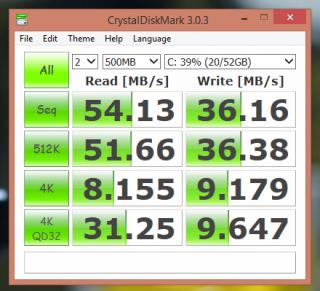
Here's the test once Bitlocker was turned off. 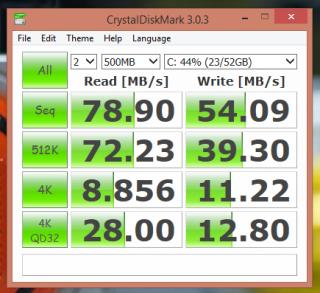
I wonder why did Dell choose to turn it on in the first place? On the net people say Bitlocker is now on by default, but that isn't true since.. my Acer W4 doesn't have Bitlocker on... I think. |
|
|
Dec 16 2013, 01:53 PM
|
|
All Stars
13,681 posts Joined: Mar 2006
|
QUOTE(marauderz @ Dec 16 2013, 01:48 PM) Here's the previous test with Bitlocker on. Go to uefi and activate hs200, the result above is not satisfy
Here's the test once Bitlocker was turned off.
I wonder why did Dell choose to turn it on in the first place? On the net people say Bitlocker is now on by default, but that isn't true since.. my Acer W4 doesn't have Bitlocker on... I think. |
|
|
Dec 16 2013, 03:33 PM
|
|
Senior Member
3,390 posts Joined: Feb 2005
|
QUOTE(StupidGuyPlayComp @ Dec 16 2013, 01:53 PM) Go to uefi and activate hs200, the result above is not satisfy No idea what you're talking about, so you're gonna have to give me a little more help than that I poke through the BIOS I don't see anything that says HS200 |
|
|
|
|
|
Dec 16 2013, 03:36 PM
Show posts by this member only | IPv6 | Post
#114
|
Senior Member
2,455 posts Joined: Feb 2005 From: --Hidden--
|
QUOTE(marauderz @ Dec 16 2013, 01:48 PM) Here's the previous test with Bitlocker on. after disabled the bitlocker, my speed is 80MBps read, 44 MBps write.
Here's the test once Bitlocker was turned off.
I wonder why did Dell choose to turn it on in the first place? On the net people say Bitlocker is now on by default, but that isn't true since.. my Acer W4 doesn't have Bitlocker on... I think. |
|
|
Dec 16 2013, 03:38 PM
|
|
Senior Member
3,390 posts Joined: Feb 2005
|
QUOTE(rkwan67 @ Dec 16 2013, 03:36 PM) after disabled the bitlocker, my speed is 80MBps read, 44 MBps write. Close enough, now we just need to see what is the HS200 thing StupidGuy wants me to toggle and see if that makes any difference. |
|
|
Dec 16 2013, 03:58 PM
Show posts by this member only | IPv6 | Post
#116
|
|
Senior Member
2,455 posts Joined: Feb 2005 From: --Hidden--
|
QUOTE(marauderz @ Dec 16 2013, 03:38 PM) Close enough, now we just need to see what is the HS200 thing StupidGuy wants me to toggle and see if that makes any difference. oh and i utilized 85% of the disk already. i upgraded to 8.1 Pro, although that doesnt make any difference. installed full office pro 2013 with Visio and Project. there goes all my storage. im waiting for my OTG cable, once its here. im going to format this Venue to clear out the recovery partition.  |
|
|
Dec 16 2013, 05:46 PM
|
|
All Stars
13,681 posts Joined: Mar 2006
|
QUOTE(marauderz @ Dec 16 2013, 03:38 PM) Close enough, now we just need to see what is the HS200 thing StupidGuy wants me to toggle and see if that makes any difference. The latest UEFI A04 version has remove hs200 option, what your uefi version now! |
|
|
Dec 16 2013, 06:01 PM
|
|
Senior Member
3,390 posts Joined: Feb 2005
|
QUOTE(StupidGuyPlayComp @ Dec 16 2013, 05:46 PM) The latest UEFI A04 version has remove hs200 option, what your uefi version now! My BIOS Version is A01... hmmm.. update BIOS... dangerous.. |
|
|
Dec 16 2013, 06:37 PM
|
|
All Stars
13,681 posts Joined: Mar 2006
|
QUOTE(marauderz @ Dec 16 2013, 06:01 PM) My BIOS Version is A01... hmmm.. update BIOS... dangerous.. BIOS v A01 and A03 with HS200 support, A04 disable this settingTo Increase eMMC speed to HS200 (including the microSD fix in this as optional) 1) Swipe in from the right for the charms bar 2) Select Settings 3) Change PC Settings 4) Select Update & Recovery 5) Select Recovery (3rd option on the far left) 6) Under Advanced Startup press the button that says restart now 7) Wait for tablet to reboot 8) At blue screen Select 2nd Option, Troubleshoot 9) Select advanced options 10) Select UEFI Firmware Settings 11) Select restart (shows "restart to change UEFI firmware settings) 12) You're in a weird BIOS mode now, begin by pressing the Esc button at the top right 13) Choose Advanced (2nd option) 14) Choose LPSS & SCC Configuration 15) Change SCC emmC 4.5 HS200 Support to 'Enabled' 16) Change SCC eMMC 4.5 DDR50 Support to 'Disabled' **NOTE** if you want to increase your micro SD speeds at this point **16.1) Change DDR50 Support for SDCard to 'Enabled' **16.2) Change SDR25 Support for SDCard to 'Disabled' ************************************************** ************************* 17) Hit Esc at the top right corner twice (you should be at the main menu) 18) Select Save & Exit (Last Option) 19) Select Save Changes & Exit (First Option) 20) It asks you to confirm you want to save and exit, select yes and the tablet will reboot |
|
|
Dec 16 2013, 10:09 PM
|
|
Senior Member
3,390 posts Joined: Feb 2005
|
QUOTE(StupidGuyPlayComp @ Dec 16 2013, 06:37 PM) BIOS v A01 and A03 with HS200 support, A04 disable this setting Oh snap, increase on board mmc AND sd card speed? Looks like have to take the risk then!To Increase eMMC speed to HS200 (including the microSD fix in this as optional) 1) Swipe in from the right for the charms bar 2) Select Settings 3) Change PC Settings 4) Select Update & Recovery 5) Select Recovery (3rd option on the far left) 6) Under Advanced Startup press the button that says restart now 7) Wait for tablet to reboot 8) At blue screen Select 2nd Option, Troubleshoot 9) Select advanced options 10) Select UEFI Firmware Settings 11) Select restart (shows "restart to change UEFI firmware settings) 12) You're in a weird BIOS mode now, begin by pressing the Esc button at the top right 13) Choose Advanced (2nd option) 14) Choose LPSS & SCC Configuration 15) Change SCC emmC 4.5 HS200 Support to 'Enabled' 16) Change SCC eMMC 4.5 DDR50 Support to 'Disabled' **NOTE** if you want to increase your micro SD speeds at this point **16.1) Change DDR50 Support for SDCard to 'Enabled' **16.2) Change SDR25 Support for SDCard to 'Disabled' ************************************************** ************************* 17) Hit Esc at the top right corner twice (you should be at the main menu) 18) Select Save & Exit (Last Option) 19) Select Save Changes & Exit (First Option) 20) It asks you to confirm you want to save and exit, select yes and the tablet will reboot |
| Change to: |  0.1105sec 0.1105sec
 0.44 0.44
 6 queries 6 queries
 GZIP Disabled GZIP Disabled
Time is now: 6th December 2025 - 10:33 AM |
 Quote
Quote