

QUOTE(Daniel Hyuuga @ Jan 3 2017, 01:20 AM)
I have complained about not being able to get IPv6 months ago. All TM say is "Donno"

-.-......Damned TM closed my IPv6 reports 3 times without my knowledge......Unifi TMnet Streamyx/Unifi & IPv6, Now live!
|
|
 Jan 3 2017, 07:25 PM Jan 3 2017, 07:25 PM
Return to original view | Post
#21
|
 
Senior Member
3,669 posts Joined: Apr 2006 
|
QUOTE(Daniel Hyuuga @ Jan 3 2017, 01:20 AM) I have complained about not being able to get IPv6 months ago. All TM say is "Donno" -.-......Damned TM closed my IPv6 reports 3 times without my knowledge...... |
|
|
|
|
|
Apr 4 2017, 07:12 PM
Return to original view | Post
#22
|
|
Senior Member
3,669 posts Joined: Apr 2006
|
QUOTE(TruboXL @ Apr 4 2017, 01:48 AM) lol give up ald Same here.i got the ipv6 address and it can be ping back but not able to ping ipv6 gateway and dns addresses tm definitely block or something checking any of the ipv6 testing page say i have no (public) ipv6 address and because of the dns timeout or ping cannot reach, firefox just seem lagging have to use ipv4 only for now... using streamyx 1m At least I was able to utilize working native IPV6 for several years. |
|
|
Apr 5 2017, 07:47 PM
Return to original view | Post
#23
|
|
Senior Member
3,669 posts Joined: Apr 2006
|
QUOTE(nikaizad @ Apr 5 2017, 02:38 PM) I can get IPv6 only when i don't set DNS within the router to Google. Leaving it to using the stock TM DNS would make a successful connection, but it would limit my "freedom" on the net. Nah, unlikely.For now i've set it to Local Addresses only so no IPv6 connections to TM. Seems like IPv6 is reserved for a specific purpose. https://forum.lowyat.net/topic/4238850 https://forum.lowyat.net/topic/2794929/all Maybe the gov is snooping on us... why else would TM routers come without the custom dns setting intentionally disabled. If you guys know where to look at, take a look on the DIR-850L firmware v2.08TM/v2.07TM and compare it with the global version Right now im the only firmware version that has custom DNS setting available is v2.06sg... Which unfortunately also has a buffer overflow exploit, although it has been patched in v2.07 If anyone can re-evaluate & confirm my findings that would be helpful Probably routing or configuration issue at TM side. In my case and other few forummers, our routers and PCs/devices are assigned (radvd + slaac) with public IPv6 addresses, but no internet connectivity even when configuring router to use/get TM IPv6 DNS automatically. Doubt TM gonna fix it anytime soon. After all, the legendary youtube ipv6 50kb/s throttling for streamyx users has been there since year 2011. |
|
|
Sep 27 2017, 11:16 AM
Return to original view | IPv6 | Post
#24
|
|
Senior Member
3,669 posts Joined: Apr 2006
|
QUOTE(maxwong85 @ Sep 27 2017, 07:08 AM) Weird situation , set my router to google dns for over a year and not having any problem but recently experience slow down on all internet related service For the bolded part....may I ask if the chrome keeps displaying "Downloading proxy script......" for around 30 seconds or so, then continue normally? Chrome won't load profile , origin apps can not connect to service despite able to login , once able to login , Battlefield 1 play at 300-600+ ping (unplayable) , Overwatch constant at 2XX ping But once i switch back to default dns , everything work just as normal , is it tm routing to google dns got problem? or they just targetting me and want to log my activity by wanting me to switch to default tm dns ?  If so...please open windows proxy setting and untick "Automatically detect settings" at LAN Settings. Verify if this fixes the issue. |
|
|
Sep 27 2017, 02:00 PM
Return to original view | IPv6 | Post
#25
|
|
Senior Member
3,669 posts Joined: Apr 2006
|
QUOTE(maxwong85 @ Sep 27 2017, 12:37 PM) weirds , but this does fix the problem , and i have change back the router to google dns and everything works just like before , smooth as silk Hmm....time for a war....Tick back the "Automatically detect settings" at LAN Settings. Then run chrome and immediately paste and run chrome://net-internals/#proxy at chrome urlbar. Wait 60 seconds and screenshot back here. You must find out why default "Automatically detect settings" doesn't work. High probability you are infected with some sort* of malware/virus/trojan/rootkit that change your route via PAC script. This post has been edited by JohnLai: Sep 27 2017, 02:04 PM |
|
|
Sep 27 2017, 03:13 PM
Return to original view | IPv6 | Post
#26
|
|
Senior Member
3,669 posts Joined: Apr 2006
|
QUOTE(maxwong85 @ Sep 27 2017, 02:34 PM) Damn it, this is the 28th PC I encountered today experiencing the same issue since this morning.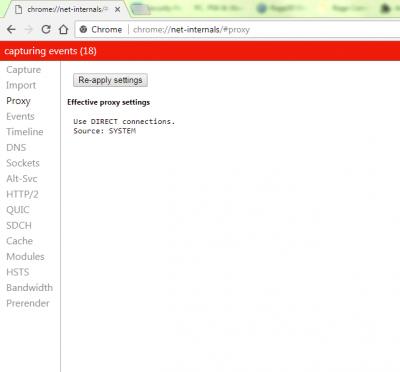
Supposely what we expect 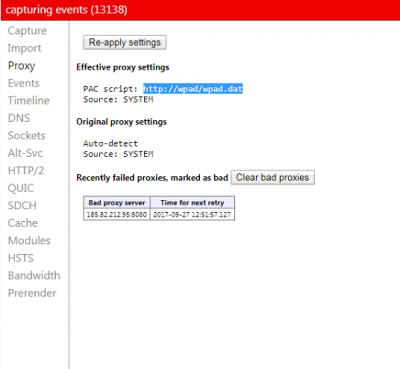
Now, you and the rest are experiencing this Hunting around revealed: function FindProxyForURL(url, host) { return 'PROXY 185.82.212.95:8080; DIRECT'; } Some file at wpad(2).dat at Internet Explorer cache shown above code. I have no idea what goes wrong. Let me guess, the slowdown happened yesterday? edit v4: -.-....Just a question.....apart from my 4 laptops (win7 fully updated), these 4 doesn't experience PAC issue. However....28 PCs....who experience this issue doesn't have its windows update turned on. Corporate PCs lor........... Does your system windows updates....is up-to-date? This post has been edited by JohnLai: Sep 27 2017, 03:20 PM |
|
|
|
|
|
Sep 27 2017, 09:46 PM
Return to original view | IPv6 | Post
#27
|
|
Senior Member
3,669 posts Joined: Apr 2006
|
QUOTE(maxwong85 @ Sep 27 2017, 03:51 PM) i have my windows update automatically , is there any others things to check? I have no idea, people keep asking me about this weird slowdown.i am also running antivirus and deosn't install anything new lately , except for a new game from steam called gang beast What with our same proxy IP address anyway? I tried a lot of stuff including resetting winsock, winhttp etc, still the same problem  |
|
|
Sep 28 2017, 09:24 AM
Return to original view | IPv6 | Post
#28
|
|
Senior Member
3,669 posts Joined: Apr 2006
|
QUOTE(maxwong85 @ Sep 28 2017, 09:11 AM) check my windows 10 pc , auto update and its run into the same problem also From what I can see...it seems to be the adsl router provides 'infected' DHCP Lease Option 252.worst on windows 10 , spotify can't login , teamviewer also can't login , but when i went using my phone as hotspot and connect , everything works fine , must be the router problem When Windows Proxy Settings (LAN Automatically detect setting) was turned off or if you setup Static IP (instead of Obtain IP address and obtain DNS server address automatically)......chrome will load up fast just fine. Android and Linux OS seems to be unaffected as both don't make use of WPAD (Web Proxy Auto-Discovery Protocol). Not sure about IOS.... Changing the router/modem seems to fix the problem. Damn it. Seem like W3410N and W7100 got hijacked by some malware? Or wrong default domain configuration? Both modem are using 'domain.name' as Connection-specific DNS Suffix. What is your result when you run 'nslookup domain.name'? |
|
|
Sep 28 2017, 11:36 AM
Return to original view | IPv6 | Post
#29
|
|
Senior Member
3,669 posts Joined: Apr 2006
|
QUOTE(maxwong85 @ Sep 28 2017, 09:52 AM) server : UNKNOWN Got the same as yours when using TM supplied adsl router.Address : 192.168.1.1 Result from new adsl router: CODE nslookup domain.name Server: google-public-dns-a.google.com Address: 8.8.8.8 Name: domain.name  Guess our TM Innacomm modem/routers have some sort of unknown vulnerabilities being exploited right now EDIT: or being exploited for some time without us knowing. The only reason why we noticed it = the proxy server we "supposed" to connect is down.I simply propose my company IT guys to buy new and modern adsl routers. Give up on the old one.  This post has been edited by JohnLai: Sep 28 2017, 11:39 AM |
|
|
Sep 30 2017, 02:36 PM
Return to original view | IPv6 | Post
#30
|
|
Senior Member
3,669 posts Joined: Apr 2006
|
QUOTE(Xaive @ Sep 30 2017, 09:38 AM) I'd been looking solution for this, so new ADSL modem should be able to solve this problem? Damn, I even had to download Windows update manually. Yes, I can confirm this, replacing the adsl router fixed it.For my PC windows update last checked at 25 September while my dad PC last checked at 26 September, which is kinda weird, I was kinda expecting the same timing since both PC is connected to the same router. A simple reset for Innacomm modem will not solve it.....technically, resetting the Innacomm modem/router and reconfiguring it again will fix it....however, it get "re-infected" within 30 minutes to an hour the moment it connected to Internet.  In case you wanna know, remote management and other unnecessary services inside the modem/router are properly disabled. SPI firewall is enabled. No IPv6 is enabled. Password for both TMAdmin and TMUser are changed. High probability it is either backdoor or some unknown vulnerability.....the fact is.....we have no idea how long our windows pc have been connected to that proxy server. edit: grammar correction  This post has been edited by JohnLai: Sep 30 2017, 02:38 PM |
|
|
Sep 30 2017, 05:43 PM
Return to original view | IPv6 | Post
#31
|
|
Senior Member
3,669 posts Joined: Apr 2006
|
QUOTE(Xaive @ Sep 30 2017, 03:04 PM) I ran the nslookup it shows a non-authoritative server name domain.name.domain.name with ip 202.71.99.194, I typed the IP into the urlbar it opened up Chrome download location asking to save. Does it help? Nope, that file is empty.Previously, that IP was used to redirect user who mistyped URL or domain to TM custom advertisement page. Beside...it should be 'domain.name' , not 'domain.name.domain.name'.  |
|
|
Oct 2 2017, 03:42 PM
Return to original view | IPv6 | Post
#32
|
|
Senior Member
3,669 posts Joined: Apr 2006
|
QUOTE(Xaive @ Oct 2 2017, 02:25 PM) I just found a way to repro the problem, I hope this could help you. There's this program called Cok Auto Mouse Clicker, once you installed this, all the problems occurred; uninstalled it solve everything. Cok Auto Mouse Clicker?Unrelated as company PCs don't have such software installed in first place. So, I used back the innacomm modem/router and installed that clicker on one of the pc, then uninstalled it. Still same slowdown issue after few minutes. EDIT: Maybe you already disabled "automatically detects settings" at LAN Settings or you use Static IP configuration? In any case though....one can run chrome://net-internals/#events at google chrome to check how the connection is made. EDITV2: Look for ID 124......I just saw your edited post on 1 October, maybe the something inside the router redirected the connection to another server since you said you didn't change anything before and the speed suddenly back to fast? Then, filter PROXY_SCRIPT_DECIDER. This post has been edited by JohnLai: Oct 2 2017, 04:02 PM |
|
|
Jan 28 2019, 09:59 PM
Return to original view | IPv6 | Post
#33
|
|
Senior Member
3,669 posts Joined: Apr 2006
|
QUOTE(hayenadeblue @ Jan 28 2019, 09:42 PM) Yes, thanks bro, finally. So....did you enable Ipv6 on your Digi infinite 150 too? The APN setting?Malaysia is ready for ipv6, only the ISP and/or hardware manuf. problem. Poor support and documentation. Anyone wants to setup ipv6 have to dig deeper this thread (and other resources). To those who doesn't, don't bother to come here. Tak pasal2 aku kena baca komen2 mengarut korang. |
|
|
Feb 8 2019, 11:43 PM
Return to original view | IPv6 | Post
#34
|
|
Senior Member
3,669 posts Joined: Apr 2006
|
QUOTE(hayenadeblue @ Feb 8 2019, 11:17 PM) Latest info: -.-........TM IPV6 over PPPoE prefix expiry issue? Just wait few minutes (5 - 10 minutes) after booting up the router and ipv6 will get "connected". Doesn't matter EU or MY firmware.Archer C1200 on UK latest firmware (1.1.3 Build 20180124 rel.52299 (EU)). Even though the router reported that the IPv6 is connected (it returned an IP for me), the test by http://ipv6-test.com/, https://test-ipv6.com/ and https://ipv6test.google.com/ reported otherwise. Tried to change back to Malaysia firmware (release date 16-05-2018), it could connect and the 3 sites reported that I am connected to IPv6. In my first post when I succeeded, I was on the UK latest firmware. The router and the 3 sites reported that I was IPv6 connected. Not sure what happened after that. This could be due to the firmware or maybe some glitch at TM, not sure. I then end up using the UK firmware because I HATE THE @unifi SUFFIX as my wifi SSID. I even tried to flash using TIME firmware but immediately hate it since it block firmware update (you can unblock by going to certain specific link). So, any recent status on this? Can you test your connection at the 3 sites? Anyone? If you change wifi setting or PPPoE settings, you gotta wait even longer for IPv6 connectivity to be back. |
| Change to: |  0.0459sec 0.0459sec
 0.68 0.68
 7 queries 7 queries
 GZIP Disabled GZIP Disabled
Time is now: 6th December 2025 - 12:59 PM |
 Quote
Quote