QUOTE(StupidGuyPlayComp @ Dec 5 2013, 07:29 PM)
add on RM59.90 can extend warranty to 3 years
somemore got instant lucky draw from Acer
then follow by lucky draw from PIkom PC Fair
go back home, login to omgacer.com for another contest participant
Iconia W4 (W3-810 refresh) 8" tablet IPS screen, Baytrail Z3740 - Available Dec 6, 2013
|
|
Dec 5 2013, 09:16 PM
Return to original view | Post
#1
|
![]() ![]() ![]() ![]() ![]() ![]() ![]() ![]()
All Stars
13,469 posts Joined: Jan 2012 |
QUOTE(StupidGuyPlayComp @ Dec 5 2013, 07:29 PM) add on RM59.90 can extend warranty to 3 years somemore got instant lucky draw from Acer then follow by lucky draw from PIkom PC Fair go back home, login to omgacer.com for another contest participant |
|
|
|
|
|
Dec 5 2013, 09:28 PM
Return to original view | Post
#2
|
![]() ![]() ![]() ![]() ![]() ![]() ![]() ![]()
All Stars
13,469 posts Joined: Jan 2012 |
QUOTE(StupidGuyPlayComp @ Nov 8 2013, 05:02 PM) QUOTE(marauderz @ Nov 8 2013, 05:38 PM) Guys,Why you guys said its not IPS? I checked couple of sites and even Acer Malaysia, confirmed its IPS screen. IPS = In Plane Switching... |
|
|
Dec 5 2013, 11:40 PM
Return to original view | Post
#3
|
![]() ![]() ![]() ![]() ![]() ![]() ![]() ![]()
All Stars
13,469 posts Joined: Jan 2012 |
If can get one at RM899, think I will sell my unused NEXUS10. Been dying for a small portable Autocad machine.
|
|
|
Dec 5 2013, 11:43 PM
Return to original view | Post
#4
|
![]() ![]() ![]() ![]() ![]() ![]() ![]() ![]()
All Stars
13,469 posts Joined: Jan 2012 |
|
|
|
Dec 6 2013, 09:02 AM
Return to original view | Post
#5
|
![]() ![]() ![]() ![]() ![]() ![]() ![]() ![]()
All Stars
13,469 posts Joined: Jan 2012 |
Hey... is there any full USB port with this? Curiously Acer Malaysia taken its W4 page down. What a dork.
|
|
|
Dec 6 2013, 12:10 PM
Return to original view | Post
#6
|
![]() ![]() ![]() ![]() ![]() ![]() ![]() ![]()
All Stars
13,469 posts Joined: Jan 2012 |
Wow. You lucky. I only got speaker. Sold out liao. Like I told you. I only saw my name and another guy. But sold out.
|
|
|
|
|
|
Dec 6 2013, 01:58 PM
Return to original view | Post
#7
|
![]() ![]() ![]() ![]() ![]() ![]() ![]() ![]()
All Stars
13,469 posts Joined: Jan 2012 |
|
|
|
Dec 6 2013, 01:59 PM
Return to original view | Post
#8
|
![]() ![]() ![]() ![]() ![]() ![]() ![]() ![]()
All Stars
13,469 posts Joined: Jan 2012 |
BTW, got free bluetooth speaker too, although I doubt is good quality.
Saw the speaker at one of the booth selling for RM129. Oh, side note... If you dont mind old batteries, one booth doing clearance for Philips rechargeable (sized AA). Not sure it works or not but price too cheap to ignore. RM40 for 4x 2000mAH with fast charger plus another 4x 2000mAH free. Bought 2 sets. This post has been edited by andrekua2: Dec 6 2013, 02:01 PM |
|
|
Dec 6 2013, 02:16 PM
Return to original view | Post
#9
|
![]() ![]() ![]() ![]() ![]() ![]() ![]() ![]()
All Stars
13,469 posts Joined: Jan 2012 |
QUOTE(StupidGuyPlayComp @ Dec 6 2013, 02:02 PM) lucky only the 899 sold out, even 999 still worth the price But really cold cold pc fair. This year may be the last of its kind. For the first time, no problem walking around. No need bumping and rubbing shoulders. Saw T100 but meh, really much expensive at 1399 even though it has SSD and 500GB keyboard dock. I thought it had 64GB SSD but only 32GB SSD. I wonder what can you install with 32GB. |
|
|
Dec 6 2013, 02:37 PM
Return to original view | Post
#10
|
![]() ![]() ![]() ![]() ![]() ![]() ![]() ![]()
All Stars
13,469 posts Joined: Jan 2012 |
|
|
|
Dec 6 2013, 07:09 PM
Return to original view | Post
#11
|
![]() ![]() ![]() ![]() ![]() ![]() ![]() ![]()
All Stars
13,469 posts Joined: Jan 2012 |
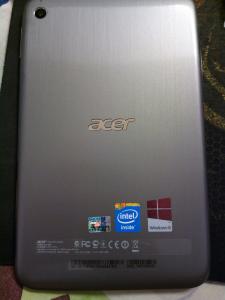
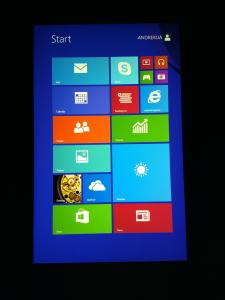
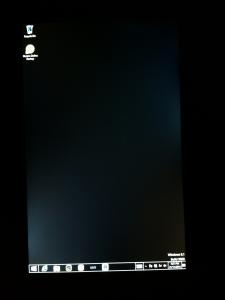
Some pictures regarding W4 unboxing, side by side comparison with iPad4, and some bad news.
At first, I was quite surprised mine simply refused to boot up. I didnt knew what was going on. Once I charge it, it powers up without problem. When I check the battery status, it was a healthy 87%. Whole package RM959 ~ 899 for tablet and 60 for Acer 3 years warranty Whats inside Back cover shot. Although the back cover is quite sturdy, it is still possible to press it and squeak it. Waiting for it to setup takes a minute or two. Finally boot up Side by side with iPad4 The 1 million ringgit question about the display... Backlight leakage and its one of the worse I have ever seen. Can rival my iPad2. Personally I'm ok with backlight leakage. Its quite severe but this is at bootup where its at 100% brightness. At 50% brightness and high contrast desktop color~~ I really have to try installing autocad and try if its okay to just have a mouse or need to buy bluetooth keyboard trackpad combo. Its so hard to click them when using desktop mode due to the small size. Luckily this is not a full hd screen or else, dont know how to use it. How it better utilise the screen estate compared to iPad4, but the extra PPI on iPad make it more readable instead. This post has been edited by andrekua2: Dec 6 2013, 07:39 PM |

|
|
Dec 6 2013, 08:01 PM
Return to original view | Post
#12
|
![]() ![]() ![]() ![]() ![]() ![]() ![]() ![]()
All Stars
13,469 posts Joined: Jan 2012 |
I only used it for short moment and my opinion remains the same as when I installed Win8 into my Acer 1825PTZ tablet. Microsoft ruin the whole experience. It is simple and utterly unusable. You can see why people rush to sell their W700, P3, Surface, for example. I suspect its gonna be worse with 8" models.
Microsoft really need to start deciding to implement two modes, not having it co-exist, especially in smaller form factor tablet. The big Metro UI are only useful for simple stuffs like surfing, playing games, launching apps, checking mails for example. However, when it comes to the need to change simple setting, you still need to go into Control Panel. The control panel that comes with Metro UI is just simple quite useless. Just for example, I cant change the default search provider when launching IE from Metro UI. I need to goto desktop mode where everything is so tiny and hard to click. I need to go into IE settings, and then Manage Addons in order to change it. How do you think this make you feel Windows8 is likeable as a touch device? To adjust to bigger text size, you also need to go into Desktop mode control panel to do so. I think the whole Windows 8.1 as being a huge upgrade is overhyped. It is still a pretty neat device to have, when you are on the go, no doubt about that, especially if you really need X86 compatibility. Other than that, this again proved why Windows is losing ground yet again, given how much Android tablets like Note 10.1 (2014) had advance once again. Microsoft is only saved by our own overly reliant on X86. |
|
|
Dec 6 2013, 08:02 PM
Return to original view | Post
#13
|
![]() ![]() ![]() ![]() ![]() ![]() ![]() ![]()
All Stars
13,469 posts Joined: Jan 2012 |
QUOTE(hkh m43 @ Dec 6 2013, 07:42 PM) Thanks man... will give it a try. |
|
|
|
|
|
Dec 6 2013, 08:16 PM
Return to original view | Post
#14
|
![]() ![]() ![]() ![]() ![]() ![]() ![]() ![]()
All Stars
13,469 posts Joined: Jan 2012 |
Well.. easy
Screen ratio... |
|
|
Dec 6 2013, 08:50 PM
Return to original view | Post
#15
|
![]() ![]() ![]() ![]() ![]() ![]() ![]() ![]()
All Stars
13,469 posts Joined: Jan 2012 |
Well, MPC on 8'' screen. Nice.
It's so annoying when a device so interesting can be so annoying at times. Just pair the free Bluetooth speaker and it works like charm. The dual speaker is still quite soft but the free Bluetooth speaker made up for it. This post has been edited by andrekua2: Dec 6 2013, 09:05 PM |
|
|
Dec 6 2013, 11:21 PM
Return to original view | Post
#16
|
![]() ![]() ![]() ![]() ![]() ![]() ![]() ![]()
All Stars
13,469 posts Joined: Jan 2012 |
QUOTE(marauderz @ Dec 6 2013, 10:24 PM) I guess it depends on what you're going to use it for. 7" is definetly a small size for desktop apps, and I can definetly see why most people would have an issue with it. Perhaps you didn't read properly. I'm complaining because MS forced me to use desktop mode because I can't change the settings in Metro mode. Duh...For me I love the darn thing! It's working perfectly as a Media Player because of the better graphics performance and beefier processing power compared to the Clovertrail, it can now handle high bit rate Hi10P H.264 files with the ease and performance of my desktops and my Surface Pro. As for difficulty in hitting small UI elements on the desktop, I know I can't speak for everyone because I've been using touchscreens since Windows XP so I kind of know how a touch screen would detect my finger tip and know how to tap on something. Of course it probably helps because I don't have big fingers. I guess I can give a few pieces of advice regard using desktop apps with touch - Most desktop apps weren't meant to work with touch, and you shouldn't expect to work with them the same way you do with a mouse when you're trying to control it using touch only. - DON'T hesistate when you tap down on something! hesistating, or trying to aim your tip precisely while holding your finger just slightly above the screen would actually cause more problems. Just picture your finger touching the button and TOUCH it. Yes.. it's very Zen like I understand and sounds ridiculous, but give it a try. QUOTE(marauderz @ Dec 6 2013, 10:36 PM) I guess I have to ask, what is the deal about backlight leakage? I guess it's a bit distracting if I see splotches of light all over the screen, but in normal lighting and unless you're seeing something that's dark on the screen it wouldn't matter right? Please... I'm OKAY WITH IT. Read properly.Granted I pretty much work in darkness for a few hours putting my kids to bed, its not exactly a good thing to do with the backlight at 100% in a dark room! Why can't you just read and forget? I shared what I think others are interested to know. Backlight bleed is a common check for tablets anyway. |
|
|
Dec 6 2013, 11:46 PM
Return to original view | Post
#17
|
![]() ![]() ![]() ![]() ![]() ![]() ![]() ![]()
All Stars
13,469 posts Joined: Jan 2012 |
Not hard to understand why. It's supposed to be perfect, no backlight bleeding. But nowadays, the demand for cheaper panel pushed manufacturers to do the unthinkable, letting these sub standard parts passed their QC.
|
|
|
Dec 7 2013, 11:43 AM
Return to original view | Post
#18
|
![]() ![]() ![]() ![]() ![]() ![]() ![]() ![]()
All Stars
13,469 posts Joined: Jan 2012 |
QUOTE(donmeer @ Dec 7 2013, 09:38 AM) anyone keen to buy acer w4 from me instead of going to pc fair.... You should buy the extra warranty. Only Rm60 instead of RM199. That would add value and attract potential buyer.https://forum.lowyat.net/index.php?act=ST&f...0#entry65017450 |
|
|
Dec 7 2013, 12:15 PM
Return to original view | Post
#19
|
![]() ![]() ![]() ![]() ![]() ![]() ![]() ![]()
All Stars
13,469 posts Joined: Jan 2012 |
QUOTE(donmeer @ Dec 7 2013, 12:12 PM) True bro, but it has been purchased i believe it cannot be added right...but in my opinion i feel the added warranty is value add but then again how many out there would actually keep this device for 3yrs...especially techno freak like me...lol...and the product itself is cheap and not like a high end device where 3 yrs warranty is a must have...jus speaking my mind out.. Hahaha... True...But thats what I like about it, especially when the product cycle is changing fast now. I bought a 19" LCD for my company almost 3 years ago for RM249. Sent in for warranty recently with one month remaining. SC told me spare parts more expensive than new one. Refund me the whole RM249. Bargain? LOL Too bad its my bro who went to RMA instead of me. If I go, I will squeeze more out of them since a new 19" cost more nowadays. LOL... |
|
|
Dec 7 2013, 06:55 PM
Return to original view | Post
#20
|
![]() ![]() ![]() ![]() ![]() ![]() ![]() ![]()
All Stars
13,469 posts Joined: Jan 2012 |
Stupid me, read wrongly...
Wake up please... LOL This post has been edited by andrekua2: Dec 7 2013, 06:58 PM |
| Change to: | 0.0389sec
0.32
7 queries
GZIP Disabled
Time is now: 2nd December 2025 - 05:40 AM |