Outline ·
[ Standard ] ·
Linear+
Maxis Maxis Biz68 Mobile Internet V3, Updates on #1
|
merchant9
|
 Sep 4 2013, 05:31 PM Sep 4 2013, 05:31 PM
|

|
QUOTE(fruitie @ Sep 4 2013, 01:45 PM) That's the answer to your question. Public IP has nothing to do with BT. Modem has nothing to do with BT. I will try to run my BT overnight tonight and see if there's any favorable results. Thank you. |
|
|
|
|
|
TSblacktubi
|
Sep 4 2013, 05:38 PM
|
-

|
QUOTE(merchant9 @ Sep 4 2013, 05:31 PM) I will try to run my BT overnight tonight and see if there's any favorable results. Thank you. I recommend deluge as client, use forced inbound encryption  Anyway, you won't be able to use your connection when torrent, it will be totally jammed 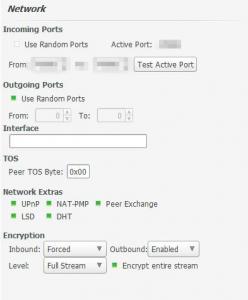
|
|
|
|
|
|
benny0908
|
Sep 4 2013, 06:50 PM
|
Getting Started

|
Maxis ftw
This post has been edited by benny0908: Sep 4 2013, 10:03 PM
|
|
|
|
|
|
unohoo22
|
Sep 4 2013, 06:52 PM
|
Getting Started
|
Hi, is anyone on the new Bis68 apparently "4 Gb" plan? if so, is the speed throttled after 4 Gb?
|
|
|
|
|
|
ddr3
|
Sep 4 2013, 07:04 PM
|
|
|
QUOTE(unohoo22 @ Sep 4 2013, 06:52 PM) Hi, is anyone on the new Bis68 apparently "4 Gb" plan? if so, is the speed throttled after 4 Gb? yes it will. |
|
|
|
|
|
echoesian
|
Sep 4 2013, 08:43 PM
|
|
|
Wow surprising today can get more than 20mbps Maxis LTE is still not very stable I guess. Attached thumbnail(s)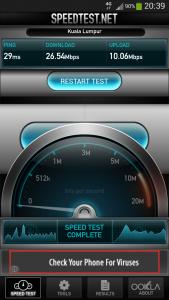
|
|
|
|
|
|
echoesian
|
Sep 4 2013, 08:46 PM
|
|
|
Some forummers here are offering the unlimited plan but most of the ppls here are saying no more this thing since 27 Aug. So who's right who'd wrong?
|
|
|
|
|
|
unohoo22
|
Sep 4 2013, 08:47 PM
|
Getting Started
|
QUOTE(echoesian @ Sep 4 2013, 08:46 PM) Some forummers here are offering the unlimited plan but most of the ppls here are saying no more this thing since 27 Aug. So who's right who'd wrong? I wish i have the answer too.. |
|
|
|
|
|
ddr3
|
Sep 4 2013, 08:48 PM
|
|
|
QUOTE(echoesian @ Sep 4 2013, 08:46 PM) Some forummers here are offering the unlimited plan but most of the ppls here are saying no more this thing since 27 Aug. So who's right who'd wrong? QUOTE(unohoo22 @ Sep 4 2013, 08:47 PM) I wish i have the answer too.. it will be a different reborn plan |
|
|
|
|
|
echoesian
|
Sep 4 2013, 08:53 PM
|
|
|
QUOTE(ddr3 @ Sep 4 2013, 08:48 PM) it will be a different reborn plan That means still available? Can anyone confirm here ? |
|
|
|
|
|
fabianz03
|
Sep 4 2013, 09:11 PM
|
|
|
QUOTE(plateau @ Sep 3 2013, 10:17 PM) I don't think that you're throttled. I think that you're logged into the 1800mhz tower, thus getting the 10mbps speed. Try on 2600mhz and see  I'm on iDevice, only can handle 1800Mhz, but on other areas (if you follow up this thread) I can get 51Mbps |
|
|
|
|
|
TSblacktubi
|
Sep 4 2013, 10:43 PM
|
-
|
QUOTE(echoesian @ Sep 4 2013, 08:46 PM) Some forummers here are offering the unlimited plan but most of the ppls here are saying no more this thing since 27 Aug. So who's right who'd wrong? I updated the first page about this matter Should be clearer now Should have done that earlier |
|
|
|
|
|
chding
|
Sep 5 2013, 04:12 PM
|
|
|
any way to know which band the LTE modem connected to?
|
|
|
|
|
|
TSblacktubi
|
Sep 5 2013, 04:15 PM
|
-
|
QUOTE(chding @ Sep 5 2013, 04:12 PM) any way to know which band the LTE modem connected to? What modem you use |
|
|
|
|
|
chding
|
Sep 5 2013, 04:20 PM
|
|
|
I have both MF820D and K5006
|
|
|
|
|
|
TSblacktubi
|
Sep 5 2013, 04:25 PM
|
-
|
QUOTE(chding @ Sep 5 2013, 04:20 PM) I have both MF820D and K5006 Adoi, both don't allow you to do so Sell both of them and get a Huawei one if you really want to play with frequency |
|
|
|
|
|
thpace
|
Sep 5 2013, 04:35 PM
|
|
|
those who sometimes face slow page loading but good speedtest result
Try changing your dns setting to google dns or opendns. Same case like TM, their dns server is slow..
|
|
|
|
|
|
TSblacktubi
|
Sep 5 2013, 04:37 PM
|
-
|
QUOTE(thpace @ Sep 5 2013, 04:35 PM) those who sometimes face slow page loading but good speedtest result Try changing your dns setting to google dns or opendns. Same case like TM, their dns server is slow.. Everyone should do this For those who want to change DNS on PC, tutorial here |
|
|
|
|
|
thpace
|
Sep 5 2013, 04:50 PM
|
|
|
QUOTE(blacktubi @ Sep 5 2013, 04:37 PM) Everyone should do this For those who want to change DNS on PC, tutorial herea much simpler way.. if anyone using a wireless router like TP-LINK MR3020 Maxis will override any custom dns you put in the wireless router with their own dns server. You can see this in the Status page under DNS Server section The way to bypass this is to go to your DCHP setting and replace the dns with google dns or opendns ip. By doing this, mean all your devices connected to the router will use the custom dns server. You wont have to adjust your laptop or install any software  |
|
|
|
|



 Quote
Quote




 0.0334sec
 0.42
0.42
 6 queries
 GZIP Disabled