

 Sep 13 2013, 09:23 AM


QUOTE(derrickxenon @ Aug 29 2013, 12:11 PM)
Hello, as the topic has already mentioned,
this topic is open to all Peugeot 208 owner, as i'm also one of it.
I'm currently driving a 3 doors 208, red colour.
btw i have a doubt regarding the signal side there,
there is button which you can press on the signal (left side) and wiper side (right ).
when you press the right side button, is to change the screen displayed near the meter gauge as well as the LCD screen,
but, how about the signal side button? is it i'm the only one who found this?
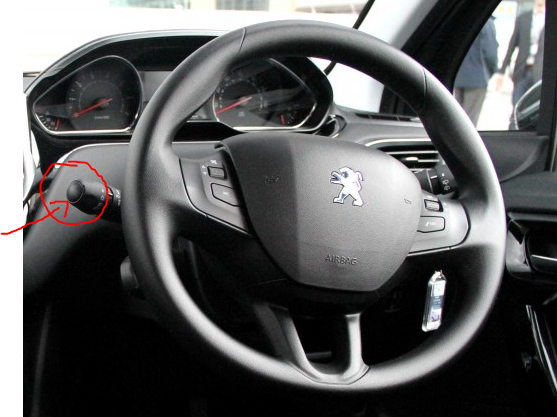
the picture above is just for highlighting purposes, not own by me and it's not the Malaysia version of 208
Well, any other who have questions about 208, please do not hesitate to comment

I don't drive a 208, but a 207. So I'll try to be a busybody here.this topic is open to all Peugeot 208 owner, as i'm also one of it.
I'm currently driving a 3 doors 208, red colour.
btw i have a doubt regarding the signal side there,
there is button which you can press on the signal (left side) and wiper side (right ).
when you press the right side button, is to change the screen displayed near the meter gauge as well as the LCD screen,
but, how about the signal side button? is it i'm the only one who found this?
the picture above is just for highlighting purposes, not own by me and it's not the Malaysia version of 208
Well, any other who have questions about 208, please do not hesitate to comment
In the 207, the left stalk is a toggle switch that activates/deactivates the auto light sensor. To access this function, turn off the ignition. Then turn the key to "ON" (the first click), not "ACCESSORIES". Press and hold the button on the left stalk (maybe about 3 seconds or so). You should hear a "ding". Voila, that should activate/deactivate the auto light sensor!
Hope this helps, and the function's the same in the 208.
 Quote
Quote
 0.0239sec
 0.65
0.65
 7 queries
 GZIP Disabled