Welcome Guest ( Log In | Register )

Bump Topic Topic Closed RSS Feed

Outline · [ Standard ] · Linear+

 RE: CM Elite 431 Plus Cable Management, Newbie need guide :(

views
     
TSgxthelord
post Aug 22 2013, 08:42 PM, updated 13y ago

Tech Enthusiast
*******
Senior Member
2,313 posts

Joined: May 2009


Hi I've been looking around and thinking about how to manage those un-tidy cables T__T
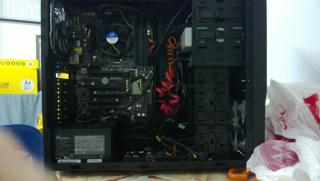
Couldn't find the how to hide those cables that's so untidy shown in the pic below sad.gif
Most of the website or guides recommend me to hide the cable behind the mobo panel I've tried that but it seems to be too thick to fit in all those cable. Any suggestion will do as I really prefer it to be more tidy than the one shown below sad.gif and plus I'm planning to get another 3 more fans to mount (2 on top and 1 infront of PSU below) by then I tink its gonna be even more messy T____T

Casing I'm using is a Cooler Master Elite 431 Plus.
Attached Image Attached Image

This post has been edited by gxthelord: Aug 22 2013, 08:42 PM
meons
post Aug 22 2013, 09:43 PM

noobies
*******
Senior Member
3,489 posts

Joined: Jul 2008
From: BUTTERWORTH pulau pinang


QUOTE(gxthelord @ Aug 22 2013, 08:42 PM)
Hi I've been looking around and thinking about how to manage those un-tidy cables T__T
Couldn't find the how to hide those cables that's so untidy shown in the pic below sad.gif
Most of the website or guides recommend me to hide the cable behind the mobo panel I've tried that but it seems to be too thick to fit in all those cable. Any suggestion will do as I really prefer it to be more tidy than the one shown below sad.gif and plus I'm planning to get another 3 more fans to mount (2 on top and 1 infront of PSU below) by then I tink its gonna be even more messy T____T

Casing I'm using is a Cooler Master Elite 431 Plus.
Attached Image Attached Image
*
from adie82 lowyat member tongue.gif

https://forum.lowyat.net/topic/2235427/all
rav3n82
post Aug 22 2013, 10:50 PM

I find your lack of faith disturbing!
*******
Senior Member
7,084 posts

Joined: Feb 2011
From: Penang


Casing like Elite 431 is a little challenging. Try to refer to the pic below and be creative. It isn't difficult, but there's a certain limit to what you can do, due to the nature of the casing.
» Click to show Spoiler - click again to hide... «

Cable707
post Aug 23 2013, 04:56 AM

I'm On My Journey
*******
Senior Member
5,263 posts

Joined: Sep 2011
From: Putrajaya,Kuala Lumpur
QUOTE(rav3n82 @ Aug 22 2013, 10:50 PM)
Casing like Elite 431 is a little challenging. Try to refer to the pic below and be creative. It isn't difficult, but there's a certain limit to what you can do, due to the nature of the casing.
» Click to show Spoiler - click again to hide... «

*
This is powdekful cabling management notworthy.gif

Inb4,i never think Elite 430/431 can go this tidy..
kherel77
post Aug 23 2013, 09:29 AM

Noobie
******
Senior Member
1,435 posts

Joined: Apr 2011
From: Blank Space


Mod side panel like this...

user posted image

user posted image
TSgxthelord
post Aug 23 2013, 08:50 PM

Tech Enthusiast
*******
Senior Member
2,313 posts

Joined: May 2009


QUOTE(rav3n82 @ Aug 22 2013, 10:50 PM)
Casing like Elite 431 is a little challenging. Try to refer to the pic below and be creative. It isn't difficult, but there's a certain limit to what you can do, due to the nature of the casing.
» Click to show Spoiler - click again to hide... «

*
wahh this really gave me an overview where to hide those cables. biggrin.gif I'll try it and post back later, now downloading movie biggrin.gif

QUOTE(kherel77 @ Aug 23 2013, 09:29 AM)
Mod side panel like this...

user posted image

user posted image
*
wahh pro modding :/ I still new lehh some more this is first time assembling rig ><
Not that pro yet lor.. Btw if that case mod like that all the dust can go in jor lor? since open ventilation o.

QUOTE(rav3n82 @ Aug 22 2013, 10:50 PM)
Casing like Elite 431 is a little challenging. Try to refer to the pic below and be creative. It isn't difficult, but there's a certain limit to what you can do, due to the nature of the casing.
» Click to show Spoiler - click again to hide... «

*
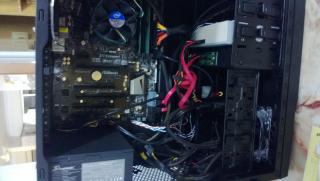
After fiddling around I just managed to get the power buttons cable(wiring to the front to go behind) sad.gif
For the power supply cable it is too thick for me to set up like you.
My Casing just won't let me close even if I route the USB 3 cable/USB cable from behind under the small box near the PSU like how u route the white/red strips.
I tried closing it but its like bumped up on side of the casing. This is the best I can do sad.gif
Any ideas? Attached Image
kherel77
post Aug 23 2013, 11:46 PM

Noobie
******
Senior Member
1,435 posts

Joined: Apr 2011
From: Blank Space


If you can't hide it, beautify it... make it 100% fully individual sleeved cable. PSU cable, front I/O, SATA, fan cable.....search HERE @ HERE for sleeving references.

Easy way is changing casing...Xigmatek Asgard Pro, Bitfenix Shinobi Window, CM Elite 311 is among entry model casing that have good cable management feature...
TSgxthelord
post Aug 24 2013, 01:04 AM

Tech Enthusiast
*******
Senior Member
2,313 posts

Joined: May 2009


QUOTE(kherel77 @ Aug 23 2013, 11:46 PM)
If you can't hide it, beautify it... make it 100% fully individual sleeved cable. PSU cable, front I/O, SATA, fan cable.....search HERE @ HERE for sleeving references.

Easy way is changing casing...Xigmatek Asgard Pro, Bitfenix Shinobi Window, CM Elite 311 is among entry model casing that have good cable management feature...
*
next time would definitely read about more casing before I get one, this one here was just bought sad.gif
Always thought hiding those cable are easy till building it myself ><
Anyway tahnks for the suggestion. Maybe I would find a DIY black box that can cover the side of it so not so visible biggrin.gif
TSgxthelord
post Sep 22 2013, 10:32 PM

Tech Enthusiast
*******
Senior Member
2,313 posts

Joined: May 2009


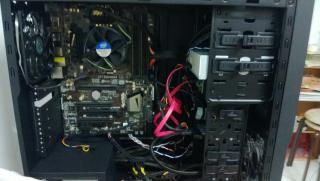
So after countless trial and error still the box method works the best to hide the cable. I haven't painted the cable into black so you can see how the box looks like. Now my question is how to hide those cables in between the mobo and drive bays(sata cable, the big 24pin PSU cord) ._."


Attached thumbnail(s)
Attached Image
kingkingyyk
post Sep 22 2013, 11:36 PM

10k Club
Group Icon
Elite
15,694 posts

Joined: Mar 2008
SATA Cable - Get black coloured 1 as camouflage.
24 pin - this, have seen Viewnet sells it.

This post has been edited by kingkingyyk: Sep 22 2013, 11:36 PM
TSgxthelord
post Sep 23 2013, 01:30 AM

Tech Enthusiast
*******
Senior Member
2,313 posts

Joined: May 2009


QUOTE(kingkingyyk @ Sep 22 2013, 11:36 PM)
SATA Cable - Get black coloured 1 as camouflage.
24 pin - this, have seen Viewnet sells it.
*
silly me never thought of using black sata as camouflage. LoL I've read the link u attached those are extensions? Does viewnet at digital mall sell those?
kingkingyyk
post Sep 23 2013, 08:23 AM

10k Club
Group Icon
Elite
15,694 posts

Joined: Mar 2008
QUOTE(gxthelord @ Sep 23 2013, 01:30 AM)
silly me never thought of using black sata as camouflage. LoL I've read the link u attached those are extensions? Does viewnet at digital mall sell those?
*
No idea but I saw it at LYP. You could try to find them in DM.

This post has been edited by kingkingyyk: Sep 23 2013, 08:23 AM
TSgxthelord
post Sep 24 2013, 03:34 AM

Tech Enthusiast
*******
Senior Member
2,313 posts

Joined: May 2009


Attached Image
So I have switched to Black Sata Cables instead of coloured cable as recommended and it did help alot as no more coloured sata cables flying everywhere.
Bought a new HDD so have to relocate the Sata cables from bottom.
So my idea now is to cover entirely the front of the PSU area with a custom cut box that fits well(yellow coloured) to cover remaining cables.
After that those cables that are enclosed with colours still need help on hiding those.
genjo
post Sep 24 2013, 08:41 AM

⭐⭐⭐⭐⭐⭐
******
Senior Member
1,431 posts

Joined: Mar 2009

How do you make the sata cable roll?
TSgxthelord
post Sep 24 2013, 01:38 PM

Tech Enthusiast
*******
Senior Member
2,313 posts

Joined: May 2009


QUOTE(genjo @ Sep 24 2013, 08:41 AM)
How do  you make the sata cable roll?
*
u mean like roll into cylinder shape? Take a long pen, then start rolling up from bottom the sata cable. Pull it as tight as possible when u roll it, in the end it will become like that. smile.gif Works for PSU Cable and small cables too.
Attached two pic to illustrate how it was done. ^^
Attached Image Attached Image
Freedom1104
post Sep 24 2013, 06:26 PM

Casual
***
Junior Member
429 posts

Joined: Oct 2011


QUOTE(rav3n82 @ Aug 22 2013, 10:50 PM)
Casing like Elite 431 is a little challenging. Try to refer to the pic below and be creative. It isn't difficult, but there's a certain limit to what you can do, due to the nature of the casing.
» Click to show Spoiler - click again to hide... «

*
same as wat i did to my non modular PSU. THats the best option already.... cry.gif cry.gif
TSgxthelord
post Sep 24 2013, 07:57 PM

Tech Enthusiast
*******
Senior Member
2,313 posts

Joined: May 2009


QUOTE(Freedom1104 @ Sep 24 2013, 06:26 PM)
same as wat i did to my non modular PSU. THats the best option already....  cry.gif  cry.gif
*
were u able to close the cover? Cuz I tried that way the casing behind unable to close. sad.gif
Ulysses
post Sep 24 2013, 08:01 PM

尤利西斯
*******
Senior Member
2,822 posts

Joined: Sep 2010
From: Georgetown, Penang


im using 430 which 431 based on.. yea, its the nature of the casing..it has no space behind mobo... u cant hide it, but u can make it more tidy... & use modular psu if u can
Freedom1104
post Sep 24 2013, 08:01 PM

Casual
***
Junior Member
429 posts

Joined: Oct 2011


QUOTE(gxthelord @ Sep 24 2013, 07:57 PM)
were u able to close the cover? Cuz I tried that way the casing behind unable to close. sad.gif
*
no problem. you just need to really place the cable all nicely and do some cable routing. still no where near cable management casing but thats enuf for me tongue.gif
Freedom1104
post Sep 24 2013, 08:17 PM

Casual
***
Junior Member
429 posts

Joined: Oct 2011


not sure whether you can see it clearly or not. the best thing is to hide the cable beside the hdd tray or in best case squeeze it behind the mobo mount.

make sure no cable obstruct airflow between intake fan and exhaust fan summore clear of cable from GPU fan and CPU fan then all should be ok already

Attached Image

This post has been edited by Freedom1104: Sep 24 2013, 08:17 PM

2 Pages  1 2 >Top
Topic ClosedOptions
 

Change to:
| Lo-Fi Version
0.0256sec    0.55    6 queries    GZIP Disabled
Time is now: 5th December 2025 - 09:07 PM