Outline ·
[ Standard ] ·
Linear+
The SSD Thread V4, Solid State Drive
|
WoShiAiZai
|
 Feb 21 2014, 02:37 PM Feb 21 2014, 02:37 PM
|
Getting Started


|
Wondering any sifu can help me with my problem? My laptop is unable to detect the new samsung ssd that i bought just now.. i was told to use the sata to usb cable to connect the ssd but currently i dont have 1 so i decided to try to connect it through the caddy bay.. my question is do i really need a sata to usb cable so that i can detect my ssd? sorry for my 'noob' question as im new in installing ssd  PS for the reflection on the image Attached thumbnail(s)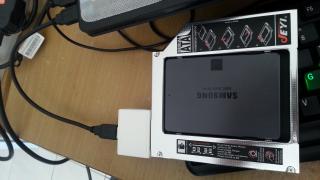

|
|
|
|
|
|
WoShiAiZai
|
Feb 21 2014, 09:00 PM
|
Getting Started
|
QUOTE(1024kbps @ Feb 21 2014, 05:49 PM) have you initialized it on disk manager already? If you can see your SSD under the device manager, that means your SSD is working, only left disk initialization. thanks for replying  im able to see my SSD under device manager already but still cant see it in 'My Computer' good to know my SSD is functioning |
|
|
|
|
|
WoShiAiZai
|
Feb 21 2014, 10:49 PM
|
Getting Started
|
QUOTE(1024kbps @ Feb 21 2014, 10:29 PM) You still have to initialize it under disk management, without it windows unable to use it, take a look on this guide http://forums.crucial.com/t5/Solid-State-D...ows/ta-p/111492Thanks sifu, now i can see it in 'my computer'  so now i'm able to fresh install the OS into it? |
|
|
|
|



 Quote
Quote

 0.0249sec
 0.55
0.55
 7 queries
 GZIP Disabled