Outline ·
[ Standard ] ·
Linear+
The SSD Thread V4, Solid State Drive
|
Uncle Ron
|
 Jan 3 2014, 04:29 PM Jan 3 2014, 04:29 PM
|

|
QUOTE(kimsim @ Jan 3 2014, 03:59 PM) Enjoy as what you have  Are you believe CF card into Sata adaptor can be works like performance? Micro SATA Cables - SD/SDHC Card Reader for Laptop Mini PCI Express http://amzn.com/B00BSRPDT2Thx, i will... LoL...  Heard about it before but not really sure can or not... How about u?  |
|
|
|
|
|
Uncle Ron
|
Jan 3 2014, 05:03 PM
|
|
|
QUOTE(kimsim @ Jan 3 2014, 04:34 PM) I got extra lexar 1000x 32gb cf card, look like smaller, but can try with adaptor from SD card to CF card and follow by CF card to msata and msata to Sata port.. Lol This one much better: SATA to Dual-CF (Compact Flash) / SSD, RAID Adapter http://amzn.com/B005FXHFZKWhoaa so nice why not try now?  Yeah, this one more better no need to buy msata to sata adapter |
|
|
|
|
|
Uncle Ron
|
Jan 4 2014, 09:22 AM
|
|
|
QUOTE(kimsim @ Jan 3 2014, 05:43 PM) Not really need. Lol. If got that adaptor I will try owh i see... lol... but when u already got adaptor dont forget to post review here |
|
|
|
|
|
Uncle Ron
|
Jan 4 2014, 10:20 AM
|
|
|
QUOTE(kimsim @ Jan 4 2014, 09:35 AM) As soon next week will try my OWC MacBook Pro retina late 2012 PCIe flash drive to sata 2.5" case for review and mount on MacBook unibody. http://eshop.macsales.com/shop/SSD/OWC/Air...-Internal-FlashMacbook Pro Mid 2012 retina SSD to 2.5 inch Sata III SSD enclosure http://amzn.com/B00A770ZQKwhooooaaaa.. really??? i also a fan about apple product cant wait to see ur review...  |
|
|
|
|
|
Uncle Ron
|
Jan 4 2014, 05:38 PM
|
|
|
QUOTE(kimsim @ Jan 4 2014, 11:08 AM) Lol you can find here for some SSD review. Later today will try my samsung 840 pro into MacBook Pro 15" mid 2012 just bough yesterday only. https://forum.lowyat.net/topic/3066879Nice!  Thx for the information! btw u so rich bro!  |
|
|
|
|
|
Uncle Ron
|
Feb 14 2014, 10:13 AM
|
|
|
QUOTE(huzzLEE_82 @ Feb 10 2014, 04:23 PM) i'm looking for 2.5" SSD with rm300++ budget... hard to decide lah..so many choices... any recommendation? Intel SSD 520 series 120GB=rm359 Samsung 840 Evo 120GB=rm330 Corsair Force GS 120GB=rm339 etc  QUOTE(wildwestgoh @ Feb 10 2014, 04:46 PM) Samsung 840 Evo FTW!! Most value/performance right now. Agree with u... Get the samsung 840 evo... |
|
|
|
|
|
Uncle Ron
|
Feb 14 2014, 10:14 AM
|
|
|
Want to know any WD Black2 Hybrid user here? |
|
|
|
|
|
Uncle Ron
|
Feb 18 2014, 08:55 AM
|
|
|
QUOTE(ronaldjoe @ Feb 15 2014, 03:27 PM) Hybrid drive are not SSD. They are still from good despite of rave reviews. QUOTE(kenysl @ Feb 15 2014, 04:36 PM) but it's a SSD + a HDD and the Black2 doesn't use the SSD component to cache your frequently accessed files, the SSD component is independent and Windows recognizes it as a partition itself 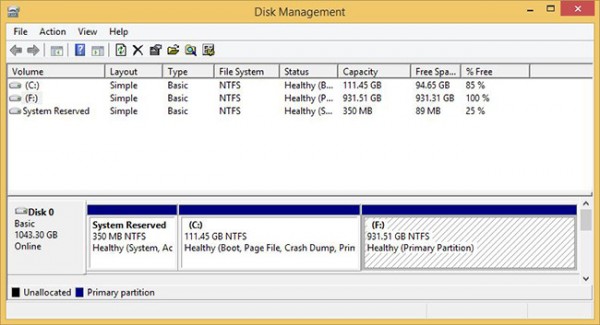 so IMO, it isn't fair to just call the Black2 a 'Hybrid' drive But they have 120GB SSD inside Black2 for cache am i right?  That's mean SSD inside Black2 is not function same like Seagate SSHD? So why the price so Expensive one?  |
|
|
|
|
|
Uncle Ron
|
Feb 18 2014, 11:10 AM
|
|
|
QUOTE(kenysl @ Feb 18 2014, 09:17 AM) the 120gb SSD is not used for caching, it is recognized as a separate drive instead. therefore it is more flexible than SSHDs because you can choose what programs you want on the Black2's SSD while in Seagate's SSHD case, the drive will determine which programs you use the most and cache them instead IIRC QUOTE(wildwestgoh @ Feb 18 2014, 09:30 AM) You get 2 disk in 1 package, means you get the SSD as a start, after you installed your OS, and installed the appropriate driver and you get the extra 1TB partition. Notice that it shares a single SATA interface thus the bandwidth is cut in half if 2 of the disk is operate simultaneously. Reviews also shows that the SSD and the HDD is not up to par of current SSD & HDD performance but the only advantage is you get 2 in a single package, also it's much more expensive than you get a single 120GB SSD and a 1TB HDD, a very-very niche market I would say.  Owh, i see... That's mean this drive performance is not so good for gaming... Btw thanks for ur information sifoo...  |
|
|
|
|
|
Uncle Ron
|
Feb 18 2014, 01:01 PM
|
|
|
QUOTE(wildwestgoh @ Feb 18 2014, 11:29 AM) Gaming?  I'm not sure what performance do you seek in gaming from SSD but I don't think you will be getting higher frames from using SSD aside from faster loading of games or possibly in between chapters load. I mean for cut loading time... Bcoz sometime i have to wait for long time when my game is loading... |
|
|
|
|
|
Uncle Ron
|
Feb 18 2014, 01:17 PM
|
|
|
QUOTE(kenysl @ Feb 18 2014, 01:15 PM) IMO, getting a SSD will improve your overall experience of using your PC. Of course games would load a tad faster but is it a drastic difference? Depends on what kind of HDD you are currently using honestly.. I'm just using WD Scorpio Black 500GB Sata II for gaming... |
|
|
|
|
|
Uncle Ron
|
Feb 18 2014, 01:49 PM
|
|
|
QUOTE(wildwestgoh @ Feb 18 2014, 01:18 PM) If you want pure performance, Samsung 840 EVO seems to be the deal right now, performance/value. Getting a single SSD is always better than the WD Black2. But Samsung 840 EVO 500GB is so expensive... Bcoz my games & software is more than 400GB inside that HDD... |
|
|
|
|
|
Uncle Ron
|
Feb 18 2014, 04:35 PM
|
|
|
QUOTE(wildwestgoh @ Feb 18 2014, 02:22 PM) Organize all your stuff, only put your frequently accessed to the SSD, preferable left around 15% free (according to some users here) to preserve the optimum performance. You can take the 256GB (~RM600?) for instance, or if you can't then squeeze to 128GB (~RM350?), put 1~2 games in the SSD, finish them first, uninstall and install next one, don't think you'll play 3+ games at one time? Unless you are...  (The World God Only Knows, Otaku should know this ) Actually i already have Samsung 840 Evo 128GB But just using for Os only but for games & software i put to WD Scorpio (Got free giving by my friend... ) & I play games more than 10++ even the game i play is already finish if i really like that's games i'll play again & again... That's why i'm not uninstall them... So u know what type i'm right?  That's why i need more space for that's thing... |
|
|
|
|
|
Uncle Ron
|
Feb 20 2014, 10:00 AM
|
|
|
QUOTE(Alexdp21 @ Feb 19 2014, 01:38 PM) 1TB! First time I saw a user using 1TB SSD. No wonder the benchmark is so high. Lol by the way enjoy your Evo. You wont regret it! Can i know do u also turn on ur Rapid Mode on ur Samsung 840 Evo? |
|
|
|
|
|
Uncle Ron
|
Feb 20 2014, 12:41 PM
|
|
|
QUOTE(Alexdp21 @ Feb 20 2014, 12:32 PM) Nope. Rapid Mode disable. Using only AHCI configuration. Why? Owh, juz wanna ask so many ppl got probs when enabling that's Rapid Mode so scared to do... |
|
|
|
|
|
Uncle Ron
|
Feb 20 2014, 03:09 PM
|
|
|
QUOTE(Alexdp21 @ Feb 20 2014, 01:45 PM) Is it?? if thats the case lucky me and you. Lol. The performance already good even Rapid mode disable. Been using for 2 months already and happy with its silky smooth. Yeah, same with me... LoL... But not sure is truth or not... |
|
|
|
|
|
Uncle Ron
|
Feb 20 2014, 03:26 PM
|
|
|
QUOTE(1024kbps @ Feb 20 2014, 03:12 PM) RAPID mode use your RAM to cache the hot data, RAM caching tend to be risky as our system ram are volatile memory, power loss may result in data corruption. Owh, i see... That's why ppl said it's risky to do... |
|
|
|
|
|
Uncle Ron
|
Feb 20 2014, 08:01 PM
|
|
|
QUOTE(1024kbps @ Feb 20 2014, 05:12 PM) Err, firmware cant solve such problem, unless Samsung firmware can predict when your pc going to crash or when TNB gonna cut off your power UPS is the only solution, which will give the SSD limited time to flush it buffer to disk, usually very fast lah, then shutdown pc = problem solved. [U] Yea u also right get ups is the better solution but me still scared to do that's rapid mode thing... |
|
|
|
|
|
Uncle Ron
|
Feb 21 2014, 09:41 AM
|
|
|
QUOTE(1024kbps @ Feb 20 2014, 09:25 PM) If i have the EVO SSD i'd enable it, i mean, why not? extra performance that utilize the excessive system resource, that's smart actually, and they claim otherwise it's safe to use, it wotn be as fragile as RAM disk cache http://www.samsung.com/global/business/sem..._Whitepaper.pdfScared to do bcoz my system crash very often... So if i have ups also cannot help...  |
|
|
|
|
|
Uncle Ron
|
Mar 18 2014, 02:10 PM
|
|
|
QUOTE(1024kbps @ Mar 18 2014, 01:46 PM) There is a thing called hibernation, im pretty sure many people didnt know it, resume from hibernation is actually very fast even with slow machine. There are many reason to use SSD, not just for faster boot time. Agree with u... |
|
|
|
|



 Quote
Quote
 0.1148sec
 0.34
0.34
 7 queries
 GZIP Disabled