

QUOTE(Andrewtst @ Jul 9 2013, 05:22 PM)
At least smaller than SBH50 

Aiya...take the Jabra one that hangs on a chain laaaa...nice and small, probably the battery can be replaced as well with a little skill.Sony XPERIA™ Z Ultra Official Thread, available now- RM2299 (original Sony MY)
|
|
 Jul 9 2013, 05:23 PM Jul 9 2013, 05:23 PM
Return to original view | Post
#21
|
 
All Stars
13,188 posts Joined: Dec 2011 From: 127.0.0.1  
|
QUOTE(Andrewtst @ Jul 9 2013, 05:22 PM) At least smaller than SBH50 Aiya...take the Jabra one that hangs on a chain laaaa...nice and small, probably the battery can be replaced as well with a little skill. |
|
|
|
|
|
Jul 17 2013, 03:09 PM
Return to original view | Post
#22
|
|
All Stars
13,188 posts Joined: Dec 2011 From: 127.0.0.1
|
QUOTE(alfredtwl @ Jul 17 2013, 02:09 PM) alright guys ... here some update for XZU How was palm rejection did u have to write with yr palm above the screen or resting on the screen? The writing does not seem to have caught all strokes.HK got 2 version, for 3G, available end of this month. 4G LTE, available Sept  Price for 3G around RM2550 , for 4G LTE around RM 2650 3G Version NOT SUPPORT X-Reality for temporary, have to wait Software Update on Sept. 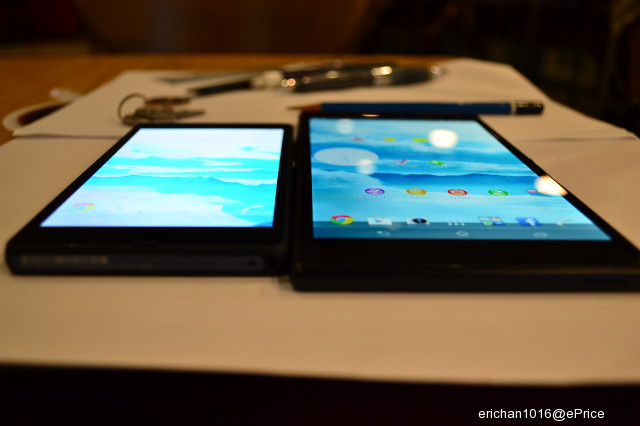 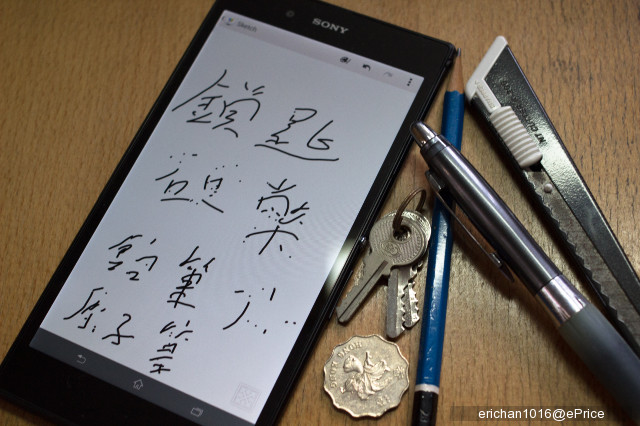 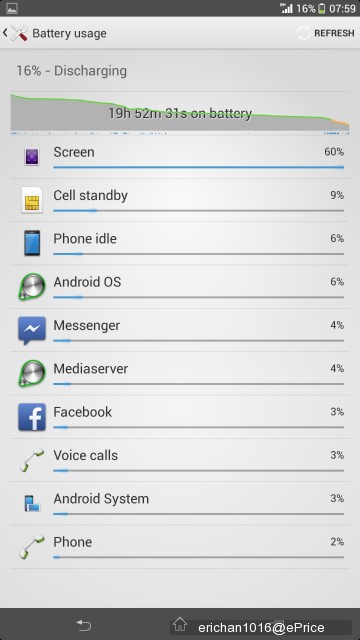 battery life ( Stamina Mode ) can last for 1 day ( 4G LTE Version ) |
|
|
Jul 17 2013, 05:58 PM
Return to original view | Post
#23
|
|
All Stars
13,188 posts Joined: Dec 2011 From: 127.0.0.1
|
QUOTE(Andrewtst @ Jul 17 2013, 03:19 PM) Her the video showing misc. material as input. Looks like only the fully conductive KEY works properly. The others are somewhat hit and miss. » Click to show Spoiler - click again to hide... « And I do observe he seems to keep his palm OFF the screen. |
|
|
Jul 23 2013, 12:11 AM
Return to original view | Post
#24
|
|
All Stars
13,188 posts Joined: Dec 2011 From: 127.0.0.1
|
QUOTE(aruja_69 @ Jul 22 2013, 11:28 PM) Wah lau here will 2399 for Malaysia then....Msia is heaven for phone mah... Note 3 will have serious competition  |
|
|
Jul 23 2013, 12:40 AM
Return to original view | Post
#25
|
|
All Stars
13,188 posts Joined: Dec 2011 From: 127.0.0.1
|
QUOTE(aruja_69 @ Jul 23 2013, 12:35 AM) Of Note 3 launch then Xperia Ultra drop price kaw kaw You are probably right, coz it has been commented, and I have seen that Sony device prices drop quite rapidly. |
|
|
Jul 23 2013, 04:54 PM
Return to original view | Post
#26
|
|
All Stars
13,188 posts Joined: Dec 2011 From: 127.0.0.1
|
Here....Google Translate....
 
|
|
|
|
|
|
Jul 24 2013, 01:34 AM
Return to original view | Post
#27
|
|
All Stars
13,188 posts Joined: Dec 2011 From: 127.0.0.1
|
QUOTE(Andrewtst @ Jul 24 2013, 01:20 AM) More and more leak of honami show they is no more elegance look as Z or the coming up Z Ultra which superb elegance. Maybe they didn't have a passport to inspire their design. Honami is way too thick bezel and bulky, and now showing the bottom part bezel is far more crazy thick. Totally fail in design.  |
|
|
Jul 25 2013, 10:40 PM
Return to original view | Post
#28
|
|
All Stars
13,188 posts Joined: Dec 2011 From: 127.0.0.1
|
QUOTE(deddo @ Jul 25 2013, 10:03 PM) They said limited stock Hi would like to request when u post a review can u specifically test palm rejection ie test writing by resting your palm on the screen. Much appreciated if u consider this thanks. |
|
|
Jul 26 2013, 09:38 AM
Return to original view | Post
#29
|
|
All Stars
13,188 posts Joined: Dec 2011 From: 127.0.0.1
|
QUOTE(deddo @ Jul 26 2013, 03:00 AM) Am I doing it correctly? Bro thank you very much!!!!!!!! This proves that the digitizer cannot handle multi touch when writing. I think you are the first person in the world to confirm this. Would you mind if I reshare the video? |
|
|
Jul 26 2013, 09:45 AM
Return to original view | Post
#30
|
|
All Stars
13,188 posts Joined: Dec 2011 From: 127.0.0.1
|
QUOTE(marquis @ Jul 26 2013, 09:41 AM) So what was the big deal on the palm rejection tech thingy? Doesn't his video disprove that? The new tech doesn't work then? See, consider how you write notes on paper. Your palm/edge of palm is resting on the paper. Or even if you were to hold a notepad, your thumb will grip an edge of the notebook touching the paper while your writing hand rests on the paper. If you have to keep your writing hand OFF the writing surface and your other hand CANNOT touch the screen while writing, tell me how long can you sustain writing? At best, you can only write a short sentence before your forearm starts feeling sore. This post has been edited by joytest: Jul 26 2013, 09:47 AM |
|
|
Jul 26 2013, 10:10 AM
Return to original view | Post
#31
|
|
All Stars
13,188 posts Joined: Dec 2011 From: 127.0.0.1
|
QUOTE(marquis @ Jul 26 2013, 09:55 AM) Erm, I'm aware of how the tech works Since I'm a Note user, I use it for note taking and occasional sketching. The natural way of writing is you rest your palm edge on some surface to write.Allow me to rephrase what I said to avoid any more confusion (apologies for that btw): What's the big deal with the palm rejection technology if it doesn't work? The video clearly shows that it cannot accept stylus input whilst another is alreay present. Or is there a certain way to hold the phone in order to make it work? Or did they not include it in the ZU? I never really took much notice of this particular tech as more oft than not I'll be using the kb for input. Now that you've brought it up though, makes for an interesting discussion...and broadens our collective knowledge  The Note 2, at 5.5", sometimes needs you to place the palm at the bottom edge of the screen to write from the top of the screen. I can do this and still write without any problems. If I had to keep my hand above the screen the whole time, I will not be able to take down notes more than 1 or 2 sentences at most. You can verify this by taking a small piece of paper, say A5, and test writing with palm on paper and hand above paper. Given the humongous size of the ZU, if you want to write notes in a meeting, which can get to be quite a lot, it will be natural to expect that you treat the screen surface as a regular writing surface since you are using a regular writing instrument ie pen/pencil. I am fond of *active* digitizers I had contemplated the ZU as a refresh for my new device, but because I have tried many other styli for my other non-active digitizer device, I am more keenly aware of the need for palm rejection. |
|
|
Jul 26 2013, 12:44 PM
Return to original view | Post
#32
|
|
All Stars
13,188 posts Joined: Dec 2011 From: 127.0.0.1
|
QUOTE(marquis @ Jul 26 2013, 12:20 PM) You could sketch on a phone? Damn. Respect. After the palm pilot era, I don't think I've ever bothered with a stylus-based device. Having to "learn" the alphabet back then was quite a chore. Having tried to hover my whole hand without resting it on anything does make taking notes quite a chore, especially if the phone is held in one hand, whilst trying to write with the other. Like I said if u wanted to scribble a short sentence or 2 it can work but it does not have any app that is the equivalent of the samsung s-note so u cannot actually treat the xz screen as a sheet of paper.So I guess the ZU is out of your list then? It's a shame that the "anything can be your stylus" marketing is just a gimmick though. Does the white band make it look fatter or is it indeed fatter? I just sketch the occasional diagram during discussions. ZU is still useful as a phablet though as it is the largest device in this category |
|
|
Jul 26 2013, 04:13 PM
Return to original view | Post
#33
|
|
All Stars
13,188 posts Joined: Dec 2011 From: 127.0.0.1
|
Wah full speed ahead thread for the next 3-5 days here. I will also be interested in the battery life and overall performance, stylus issues aside.
|
|
|
|
|
|
Jul 26 2013, 04:19 PM
Return to original view | Post
#34
|
|
All Stars
13,188 posts Joined: Dec 2011 From: 127.0.0.1
|
QUOTE(mudkipryan94 @ Jul 26 2013, 04:13 PM) then, how's your note 2, if u wanna intended bought it *intend to buy* I am open, but I will wait for the Note 3 to show up first. I will still keep my Note 2. |
|
|
Jul 26 2013, 05:54 PM
Return to original view | Post
#35
|
|
All Stars
13,188 posts Joined: Dec 2011 From: 127.0.0.1
|
QUOTE(aruja_69 @ Jul 26 2013, 05:52 PM) So meaning only a handful who brought will get the battery bank if they purchase Xperia Z Ultra....find it so stupid marketing by Sony...unless they are keeping it and sell if off to us... There does not seem to be any publicity in the mainstream news, so it will likely be slow. |
|
|
Jul 26 2013, 10:44 PM
Return to original view | Post
#36
|
|
All Stars
13,188 posts Joined: Dec 2011 From: 127.0.0.1
|
QUOTE(h11g @ Jul 26 2013, 10:37 PM) anyone that is into phablet at all should consider this phone. the screen is gorgeous Well bro I am into phablets but prefer having an active digitizer. Otherwise this is still a beast phone. |
|
|
Jul 27 2013, 01:35 PM
Return to original view | Post
#37
|
|
All Stars
13,188 posts Joined: Dec 2011 From: 127.0.0.1
|
QUOTE(rhan @ Jul 27 2013, 01:21 PM) This is one advantage of huge screen.. The drain is more deeper.. I think you need to close your eyes when meditating...not on drains .... 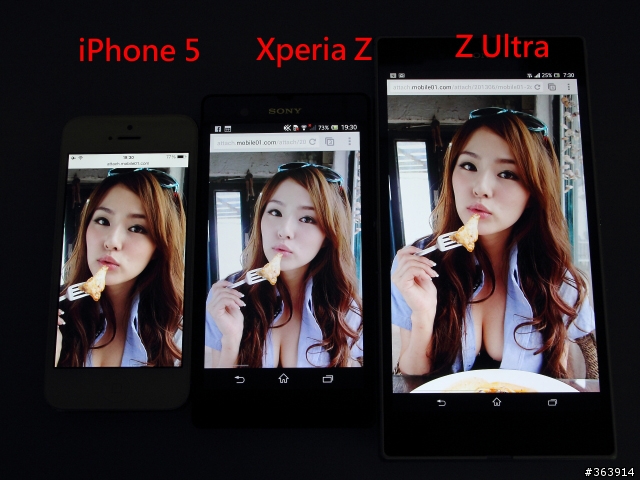 |
|
|
Jul 27 2013, 01:49 PM
Return to original view | Post
#38
|
|
All Stars
13,188 posts Joined: Dec 2011 From: 127.0.0.1
|
QUOTE(bluebeary @ Jul 27 2013, 01:46 PM) went to check out this beast again. Tried its camera. Shot some photos indoor. Lots of noise. However the built quality is top notch. Nothing to complain about. Likely the same problem suffered by the Samsung Mega, or even Huawei Mate...I think no manufacturer is sure how to market these massive phones since not everybody will take to it. Better to spend marketing funds on mainstream phones?Just my observation.....seems like z ultra is not making much impact as no literally no one was checking it out at Ikano or The curve Sony center just now..... |
|
Topic ClosedOptions
|
| Change to: |  0.0405sec 0.0405sec
 0.51 0.51
 7 queries 7 queries
 GZIP Disabled GZIP Disabled
Time is now: 4th December 2025 - 10:49 AM |
 Quote
Quote