
QUOTE(lkk @ Oct 8 2013, 09:51 AM)
Thanks Bro, do let me know if it is available

Sure, thank you bro. Lowyat.NET -> Garage Sales -> Special Interest Garage Sales -> Home Electronics & Wares Garage Sales
[WTS] HIMEDIA Q10 Pro Quad Core Android 7 TV Box, 64 bits high performance Dolby Vision 4K
|
|
 Oct 8 2013, 01:07 PM Oct 8 2013, 01:07 PM
Return to original view | Post
#41
|
 
Junior Member
108 posts Joined: Aug 2011 From: Penang  
|
QUOTE(lkk @ Oct 8 2013, 09:51 AM) Thanks Bro, do let me know if it is available Sure, thank you bro. |
|
|
|
|
|
Oct 9 2013, 09:14 PM
Return to original view | Post
#42
|
|
Junior Member
108 posts Joined: Aug 2011 From: Penang
|
QUOTE(t1231 @ Oct 9 2013, 05:26 PM) Hi, I'm interested in getting either one from you. I went to read the detailed specs of Q5II and Q10 from taobao.com, I have a few questions to ask: Thank you inquiry bro. Please find below my answer :1. For Q10, what size of the hard disk that we can put in? desktop or laptop? 2. Is Q10 single core? 3. Other than 3D, are the system that's installed in Q5II and Q10 the same, and having the same features? 4. I found this feature on Q5II but not from Q10, can you confirm? If Q10 doesn't have it, can we update the OS and get it? or should we wait for Q10II? Thank you. 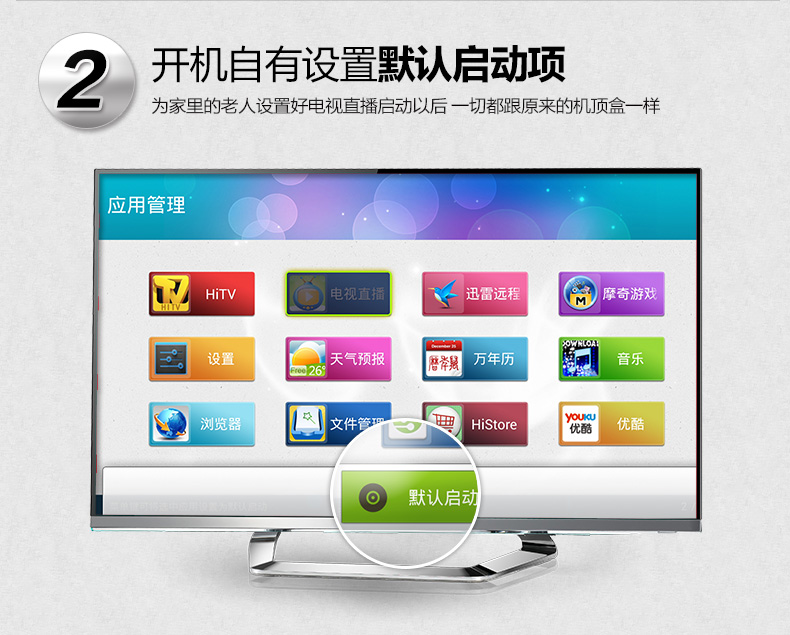 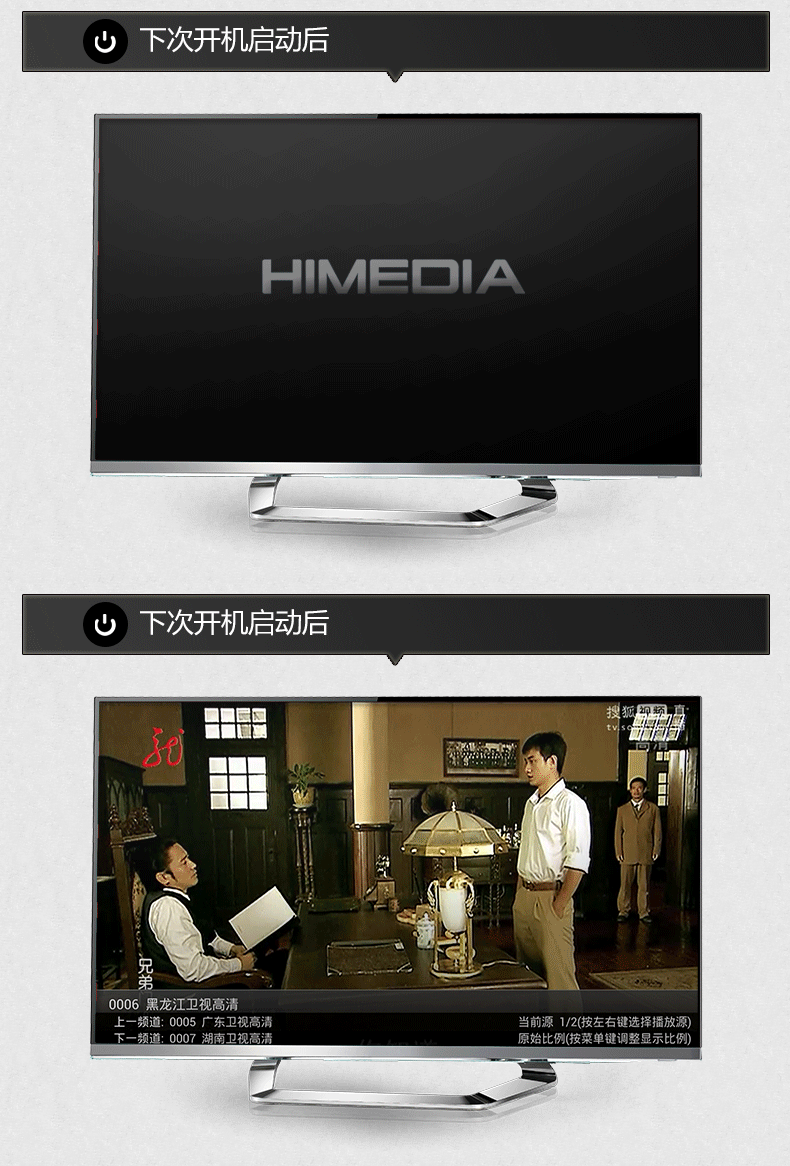 from here. 1. The harddisk size is 3.5" which normally use for desktop. 2. Yes, Q10 is single core. 3. The operating system is not the same, the launcher is not the same, but the media player apps are the same. 4). The default apps auto start only available in new launcher in Q5II but not in Q10. The new launcher could not install in Q10, only for Q5II. I could not confirm when will the Q10II oversea version will be available, maybe 2-3 months time. |
|
|
Oct 10 2013, 12:40 AM
Return to original view | Post
#43
|
|
Junior Member
108 posts Joined: Aug 2011 From: Penang
|
QUOTE(earthloon1998 @ Oct 10 2013, 12:13 AM) Received mine today. Nicely pack. Plugging in my 3.5" HD is a piece of cake. Only setback is on the HiShare app which I think can be further improve as the control is very limited. Thank you bro for the feedback :-) |
|
|
Oct 12 2013, 11:38 AM
Return to original view | Post
#44
|
|
Junior Member
108 posts Joined: Aug 2011 From: Penang
|
QUOTE(earthloon1998 @ Oct 12 2013, 08:57 AM) Hi bro, just to check, I'm trying to watch us series (i.e SHIELD) via XBMC app and find that the HD quality version is lagging very seriously. However if I watch those HK drama in HD, it runs smoothly. I know its a free service and no guarantee on quality, just want to double check with you. I'm on 10Mb Unifi. Don't worry bro, pls always feel free to ask.About the xBMC, the streaming factors depend of the internet line, the content server and the streaming technology. Most of the China content using P2P streaming technology which do not go back to the content server but take the content from the peer who downloaded the movies. With this the traffic do not concentrated in one server but distributed with a few peers. This is same as the Bit-torrent P2P technology. (Just to share with you, you can find US movies in English using China apps as well if you can read mandarin.) If the media source do not use P2P technology then direct stream from content server to your device. Especially if the content from US or Europe, the streaming traffic travel from US to your device which could be lagging. Btw, do you try few different addon? 1Channel, Icefilm, Mash Up? Each addon has few different source for you to choose. Last point I would like to highlight is the 10Mbps provided by TM or any service provider is just last mile bandwidth. Which mean the 10Mbps is just within Malaysia, when the traffic go out Malaysia, your internet speed maybe just 1Mbps. |
|
|
Oct 12 2013, 04:45 PM
Return to original view | Post
#45
|
|
Junior Member
108 posts Joined: Aug 2011 From: Penang
|
QUOTE(earthloon1998 @ Oct 12 2013, 03:52 PM) Thanks bro. I will try more sources. To be honest, I hv no chance to try all addon and all media in xBMC, there are too many. You need some effort to explore the xBMC.Note:I'm banana (english ed) so chinese words is a challenge to me, luckily my wife can translate for me  This post has been edited by nicety: Oct 12 2013, 04:47 PM |
|
|
Oct 12 2013, 05:37 PM
Return to original view | Post
#46
|
|
Junior Member
108 posts Joined: Aug 2011 From: Penang
|
QUOTE(kimyee73 @ Oct 12 2013, 05:16 PM) Hi nicety, There are few icon in the Himedia Launcher in Q10, Is there a manual on how to operate himedia launcher? I ran into several problem and unable to figure it out. I'm trying to connect to my PC shared folders using the File Manager. Two problems 1. I can see the shared folder and connect to it but it did not ask for username and password as my shared folder is protected. How can I make it ask for user and password? 2. I add the folder as shortcut. How do I remove the shorcut? What is the common method other users are using to connect and play media files from pc/server on himedia? Thanks. A). Apps Manager B). Browser C). My Favorite D). File Manager E). Setting Please let me know which above icon you need help. Regarding your two questions, would be appreciated your further clarification to ensure I understand correctly : 1). When you see the shared folder and click the folder, can you access to the content? or open the file from the shared folder? 2). How do you add the short cut? Do you mean in File Manager ? If yes, just click the Menu button from Himedia Remote Control then you see the button "Operation". The operation menu allow you to create or delete files. |
|
|
|
|
|
Oct 12 2013, 07:56 PM
Return to original view | Post
#47
|
|
Junior Member
108 posts Joined: Aug 2011 From: Penang
|
QUOTE(kimyee73 @ Oct 12 2013, 07:41 PM) I select File Manager -> select Globe (LAN). It list all my shares from PC. I select one of the share (let say Media1). It ask if I want to put in shortcut. I select yes. It put in shortcut but did not list files. it should not list any files as my Media1 is password protected but it never ask for password unlike the example from video/youtube. Ok, I got you bro.Thanks. I presumed you are using basic windows authentication protection not the domain base authentication. Himedia File Manager is not that user friendly, please goto ES Explorer which I pre-installed for you and follow the below steps : 1). At the left Panel of ES Explorer, select Network -> LAN. 2). Click "Scan" to auto scan shared folder in your network or click "New" to add the shared folder manually. 3). If you click "New", then ES Explorer will prompt you to enter PC IP address, User Name and Password. |
|
|
Oct 12 2013, 09:05 PM
Return to original view | Post
#48
|
|
Junior Member
108 posts Joined: Aug 2011 From: Penang
|
QUOTE(jobok @ Oct 12 2013, 08:46 PM) is it require a dish? Bro, this is not Satelite TV.This is android same as normal Android phone, just connect to your TV. There is no dish required. |
|
|
Oct 13 2013, 12:17 AM
Return to original view | Post
#49
|
|
Junior Member
108 posts Joined: Aug 2011 From: Penang
|
QUOTE(jobok @ Oct 12 2013, 10:39 PM) my tv is old version....big size.... Yes, you can connect to old TV with Red, white and Yello cable.is the cable can be connect? is it i can get the normal tv channel also? However, we do not recommend to use old TV as new TV channels required higher resolution. The available channels are more from China and US, Malaysia channels only got a few such as TV1, 2 and 3. |
|
|
Oct 13 2013, 12:22 AM
Return to original view | Post
#50
|
|
Junior Member
108 posts Joined: Aug 2011 From: Penang
|
QUOTE(kimyee73 @ Oct 12 2013, 11:56 PM) Hi nicety, I hv preconfigured xBMC for you, you do not need to perform any setup.I heard about xbmc but never use it before. Do I need to setup something? I click on it and the screen just blank. Thanks. There is a bug in xBMC R12, when you start xBMC, please unplug any USB dongle such as wireless mouse or Air Mouse. After xBMC fully loaded then you can plug back the USB. |
|
|
Oct 13 2013, 01:58 PM
Return to original view | Post
#51
|
|
Junior Member
108 posts Joined: Aug 2011 From: Penang
|
QUOTE(earthloon1998 @ Oct 13 2013, 09:24 AM) bro, I have experience twice hang during shutdown (keep showing shutting down but it didn't after I left it for a night). Any advise? I just pmed to you, I need to some info about how do you shutdown the device. |
|
|
Oct 13 2013, 02:05 PM
Return to original view | Post
#52
|
|
Junior Member
108 posts Joined: Aug 2011 From: Penang
|
QUOTE(kimyee73 @ Oct 13 2013, 11:20 AM) OK got it. I have k400r dongle plugged in. It is working now. It is good if have a FAQ in the first page so that all the learning can be compiled there. Thanks. Yes, I agreed with you. Because most of the FAQ in Q5 & Q10 are the same, I will refer Q10 FAQ to Q5. |
|
|
Oct 13 2013, 09:08 PM
Return to original view | Post
#53
|
|
Junior Member
108 posts Joined: Aug 2011 From: Penang
|
QUOTE(jobok @ Oct 13 2013, 08:32 PM) my house dont have new version tv.... Bro, if you don't mind please share your expectation of the Android box such that I could determine the old TV could fulfill your needs.the old one still in great conditon.... just a problem with the ariel.........the reception....a bit rainy...... |
|
|
|
|
|
Oct 13 2013, 10:35 PM
Return to original view | Post
#54
|
|
Junior Member
108 posts Joined: Aug 2011 From: Penang
|
QUOTE(jobok @ Oct 13 2013, 09:13 PM) for me....i just want a decoder that does not need a dish From your expectation, you may source for simple AV decoder in the market.....if can view more channels....it would be better my tv just got three slot for cable...the red...yellow n white slot as long as i get the normal channel from tv1 until tv9 shall be ok...plus added other interesting channel... if the decoder need internet....the decoder must have usb slot....coz i will be using usb portable wifi... i just thinking by using the decoder will help to improve my tv vision....no more rainy issue... coz i will no longer want to use the ariel on the roof.... hope there is a reasonable price decoder....... |
|
|
Oct 23 2013, 08:56 AM
Return to original view | Post
#55
|
|
Junior Member
108 posts Joined: Aug 2011 From: Penang
|
QUOTE(howhow81 @ Oct 23 2013, 07:48 AM) Please PM best price poslaju to KL. thanks. Thank you bro, just pmed to you. |
|
|
Oct 27 2013, 10:03 PM
Return to original view | Post
#56
|
|
Junior Member
108 posts Joined: Aug 2011 From: Penang
|
QUOTE(iseismail @ Oct 27 2013, 08:57 PM) Please PM best price poslaju to Subang Jaya. thanks. Thanks for inquiry bro, just pmed to you. |
|
|
Oct 31 2013, 04:09 PM
Return to original view | Post
#57
|
|
Junior Member
108 posts Joined: Aug 2011 From: Penang
|
QUOTE(kimyee73 @ Oct 31 2013, 09:43 AM) Hi Nicety. I placed the tvlist1.xml into the Diytvlist folder but how do I access the channels in the list since it is not showing up in live tv? Thanks. When you click the live TV menu, and press the right cursor to move to the right. You should see the new channels list at the right end of your menu. |
|
|
Nov 5 2013, 01:46 PM
Return to original view | Post
#58
|
|
Junior Member
108 posts Joined: Aug 2011 From: Penang
|
QUOTE(kimyee73 @ Nov 5 2013, 12:48 PM) Hi nicety. Thanks. Initially I'am not able to figure out how to get to the live tv menu, after some trying, manage to figure out. Just press any arrow button and press OK will call up the menu. Yes, just edit the XML file that I sent to you and compile into single file or multiple files, maximum 9 files. You need some XML knowledge when you edit the file. Just paste the XML file in the Diytvlist folder. The live TV will auto load the new channels during the next restart.I have another question. Is there a way to view or edit the live tv list that built into the device? I might like a built-in channel and would like to compile them into my own diy tv list. Thanks. rgds..kbkoh |
|
|
Nov 5 2013, 03:49 PM
Return to original view | Post
#59
|
|
Junior Member
108 posts Joined: Aug 2011 From: Penang
|
QUOTE(sporic @ Nov 5 2013, 02:01 PM) Hi please pm best price post laju to Kota Damansara, tks. Thank you for inquiry bro, just pmed to you. |
|
|
Nov 10 2013, 10:33 PM
Return to original view | Post
#60
|
|
Junior Member
108 posts Joined: Aug 2011 From: Penang
|
QUOTE(kimyee73 @ Nov 10 2013, 08:38 PM) Hi nicety. I found that I'am unable to resume movie playback when using ES File. When I click on resume play, it just start from beginning again. If I use cursor to click on sliding bar to the time that I want, it just keep continue playing from beginning. If I use remote control right arrow button to move the sliding bar, it will play to the time location that I want but the playback is so lag that it is not watchable. Have any solution to this? Thanks. ES File Explorer is file manager is does not control the movie auto resume. When you file time open the movie file in ES File Explore, it will prompt you list of the video player apps in your device. The video player will determine whether your movies to be auto resumed. If you use Himedia Native video player, it will resume automatically. If you MX Player, just goto setting -> Resume to enable or disable auto resume. If you other player, there must be setting to enable the auto resume. Please let me know your finding. |
|
Topic ClosedOptions
|
| Change to: |  0.0623sec 0.0623sec
 0.45 0.45
 7 queries 7 queries
 GZIP Disabled GZIP Disabled
Time is now: 2nd December 2025 - 06:35 AM |
 Quote
Quote