Welcome Guest ( Log In | Register )

Bump Topic Topic Closed RSS Feed
121 Pages « < 101 102 103 104 105 > » Bottom

Outline · [ Standard ] · Linear+

 [WTS/Bulk] ▲★ CAL-LAB Lightning Isolators ★▲, Authorised Seller@Performance Guarantee

views
     
scoutfai
post Mar 8 2016, 07:43 AM

Casual
***
Junior Member
433 posts

Joined: Dec 2010
QUOTE(gkl83 @ Mar 7 2016, 08:43 AM)
yes, u can have your own customized setup.

1st Layer
Option 1: TRM-NIF-3 BU+PE (Standard Power Module) RM168.00
Option 2: TRM-PLC-3 BU+PE (Supported Homeplug) RM128.00

2nd Layer
TRM-EP-UK2+US1 +PE (Standard Power Module) RM108.00

3rd Layer
Option 1: TRM-EP-2 +2-FTM (2x Power Socket, with 1x DSL and 1x LAN) RM138.00
Option 2: TRM-EP-1 +4-FTM (1x Power Socket, with 1x DSL, 1x LAN and 2x for others) RM188.00

1) It is output to equipment, usually i suggest to use common 3x power socket instead.

2) the US universal socket can use with UK power plug too, so not worry smile.gif
*
Thanks for your reply.

Some questions:

1) What is meant by 3rd layer option 2 "2x for others" ?
2) I check in callab2u for some pictures and coincidentally found that the price quoted for 1st layer option 1 and 2 seems reverse, can you cross check, please.
3) 3rd layer, the "DSL" means ordinary house telephone cable right?
4) Now that I understand the product choice and design concept, I wish to know about warranty info. Does CLLI offers warranty to its own product (i.e. the CLLI itself) and the equipment connected to it? (something like Belkin offers warranty up to certain maximum limit to the electrical appliances connect to it)
5) Is it ok to connect a block socket splitter to the CLLI power output to get more sockets count?
6) I manage to find photos of the 1st and 2nd layer options provided by you from callab2u.com website. But I am unable to find photo of the 3rd layer. Can you provide link or attach photo here? Just curious how the 3rd layer will look like.

This post has been edited by scoutfai: Mar 8 2016, 08:09 AM
TSgkl83
post Mar 9 2016, 09:28 AM

Look at all my stars!!
*******
Senior Member
8,377 posts

Joined: Nov 2004
QUOTE(Yeapy @ Mar 7 2016, 11:56 AM)
Modem and router is located near the phone , I use 20M Lan cable to connect to my gaming pc
*
Where ur phone with modem router?
Is it somewhere beside the setup as below?
1- Gaming PC + Monitor + Speakers
2- Work PC + Monitor + Speakers
3- TV+Amplifier+Subwoofer+Blu Ray Player+Asus Media Player

QUOTE(scoutfai @ Mar 8 2016, 07:43 AM)
Thanks for your reply.

Some questions:

1) What is meant by 3rd layer option 2 "2x for others" ?
2) I check in callab2u for some pictures and coincidentally found that the price quoted for 1st layer option 1 and 2 seems reverse, can you cross check, please.
3) 3rd layer, the "DSL" means ordinary house telephone cable right?
4) Now that I understand the product choice and design concept, I wish to know about warranty info. Does CLLI offers warranty to its own product (i.e. the CLLI itself) and the equipment connected to it? (something like Belkin offers warranty up to certain maximum limit to the electrical appliances connect to it)
5) Is it ok to connect a block socket splitter to the CLLI power output to get more sockets count?
6) I manage to find photos of the 1st and 2nd layer options provided by you from callab2u.com website. But I am unable to find photo of the 3rd layer. Can you provide link or attach photo here? Just curious how the 3rd layer will look like.
*
1) you can have 4x Non Power Module (1 for DSL, 1 for LAN, another 2 can be ANY module)
2) you can mix match any units that u required
https://forum.lowyat.net/index.php?act=Atta...post&id=4184658
3) RJ11 tel cable for ADSL modem ONLY. Shared with analog telephone or fax machine are not recommended
4) No warranty for equipment as it just a "Marketing" gimmick, insurance company never pay for full amount of the original pricing depending on the market price and total year used. Hence, bad installation method will lead the equipment damages even though you used the most expensive protection in the world. However my sales thread wont survive more than 10 years if Cal-Lab is useless.
5) you can use quality extension socket on Cal-Lab as long as the connected equipment MUST side by side with Cal-Lab
6) the design 3rd layer same 100% as 2nd layer but with different non power modules only.
Yeapy
post Mar 10 2016, 12:22 PM

Casual
***
Junior Member
371 posts

Joined: Jan 2003


QUOTE(gkl83 @ Mar 9 2016, 09:28 AM)
Where ur phone with modem router?
Is it somewhere beside the setup as below?
1- Gaming PC + Monitor + Speakers
2- Work PC + Monitor + Speakers
3- TV+Amplifier+Subwoofer+Blu Ray Player+Asus Media Player
1) you can have 4x Non Power Module (1 for DSL, 1 for LAN, another 2 can be ANY module)
2) you can mix match any units that u required
https://forum.lowyat.net/index.php?act=Atta...post&id=4184658
3) RJ11 tel cable for ADSL modem ONLY. Shared with analog telephone or fax machine are not recommended
4) No warranty for equipment as it just a "Marketing" gimmick, insurance company never pay for full amount of the original pricing depending on the market price and total year used. Hence, bad installation method will lead the equipment damages even though you used the most expensive protection in the world. However my sales thread wont survive more than 10 years if Cal-Lab is useless.
5) you can use quality extension socket on Cal-Lab as long as the connected equipment MUST side by side with Cal-Lab
6) the design 3rd layer same 100% as 2nd layer but with different non power modules only.
*
Phone and modem are at the living hall; 1,2,3 are all inside my room, about 10 meters away from living hall. Note that I am currently using Neuropower UPS for my (2) set up.
scoutfai
post Mar 10 2016, 06:05 PM

Casual
***
Junior Member
433 posts

Joined: Dec 2010
» Click to show Spoiler - click again to hide... «


2) Ah no, you misunderstand. I mean you listed TRM-PLC-3 BU+PE (Supported Homeplug) to be RM128 but in the web it is RM168, and you listed TRM-NIF-3 BU+PE (Standard Power Module) to be RM168 but in web it is RM128, so I am just want to inquire you is it accidentally mix up the price already in the previous reply.

3) I do not have ADSL modem to connect to, not using ADSL now. But I do have a telephone in this setup, so there is one normal house telephone cable from the MAXIS router connects to the telephone. Thus according to what you said this normal house telephone cable cannot connect to the RJ11 inlet of the CLLI? Is there other CLLI product that can accept a normal house telephone cable?


TSgkl83
post Mar 11 2016, 09:59 AM

Look at all my stars!!
*******
Senior Member
8,377 posts

Joined: Nov 2004
QUOTE(Yeapy @ Mar 10 2016, 12:22 PM)
Phone and modem are at the living hall; 1,2,3 are all inside my room, about 10 meters away from living hall. Note that I am currently using Neuropower UPS for my (2) set up.
*

Living Hall: MDSC0039, SP9201DAF and SLAN8CG
Gaming PC: MDSC0039 or TRM-NIF-3-BU (3 power socket) or TRM-PLC-3-BU (3 power socket with Homeplug supported) and SLAN8CG
Work: MDSC0039 / SLAR (1 power socket) or TRM-NIF-3-BU (3 power socket) or TRM-PLC-3-BU (3 power socket with Homeplug supported)
TV: MDSC0039 (1 power socket) or TRM-NIF-3-BU (3 power socket) or TRM-PLC-3-BU (3 power socket with Homeplug supported)
smile.gif

QUOTE(scoutfai @ Mar 10 2016, 06:05 PM)
» Click to show Spoiler - click again to hide... «


2) Ah no, you misunderstand. I mean you listed TRM-PLC-3 BU+PE (Supported Homeplug) to be RM128 but in the web it is RM168, and you listed TRM-NIF-3 BU+PE (Standard Power Module) to be RM168 but in web it is RM128, so I am just want to inquire you is it accidentally mix up the price already in the previous reply.

3) I do not have ADSL modem to connect to, not using ADSL now. But I do have a telephone in this setup, so there is one normal house telephone cable from the MAXIS router connects to the telephone. Thus according to what you said this normal house telephone cable cannot connect to the RJ11 inlet of the CLLI? Is there other CLLI product that can accept a normal house telephone cable?
*

sorry for the type.
Yup it should be TRM-PLC-3 BU+PE RM168 and TRM-NIF-3 BU+PE RM128

The Maxis inputs is fiber optics cables?
Can you provide a complete list of equipment for the fast recommendation?

This post has been edited by gkl83: Mar 11 2016, 10:04 AM
scoutfai
post Mar 11 2016, 09:54 PM

Casual
***
Junior Member
433 posts

Joined: Dec 2010
QUOTE(gkl83 @ Mar 11 2016, 09:59 AM)

sorry for the type.
Yup it should be TRM-PLC-3 BU+PE RM168 and TRM-NIF-3 BU+PE RM128

The Maxis inputs is fiber optics cables?
Can you provide a complete list of equipment for the fast recommendation?
*
Pardon for the confusion.
Here some pictorial diagram to better illustrate the items I wish to protect.

» Click to show Spoiler - click again to hide... «


Here are the actual photos of the items.
» Click to show Spoiler - click again to hide... «


Actually I already clear about the options you listed in previous reply, just that now you suddenly mentioned the RJ11 hole in the CLLI trinity module is only for ADSL modem ONLY, so this makes my situation stuck here because I do not need ADSL hole in the CLLI, i need a port for plugging in the telephone cable, just normal, ordinary house hold telephone cable.
But isn't the ADSL modem also need to be plugged in by a telephone cable which is exactly the same type of cable of ordinary telephone, so I am quite puzzled why this RJ11 CLLI trinity module cannot accept a normal telephone cable plug into it.


TSgkl83
post Mar 11 2016, 11:27 PM

Look at all my stars!!
*******
Senior Member
8,377 posts

Joined: Nov 2004
QUOTE(scoutfai @ Mar 11 2016, 09:54 PM)
Pardon for the confusion.
Here some pictorial diagram to better illustrate the items I wish to protect.

» Click to show Spoiler - click again to hide... «


Here are the actual photos of the items.
» Click to show Spoiler - click again to hide... «


Actually I already clear about the options you listed in previous reply, just that now you suddenly mentioned the RJ11 hole in the CLLI trinity module is only for ADSL modem ONLY, so this makes my situation stuck here because I do not need ADSL hole in the CLLI, i need a port for plugging in the telephone cable, just normal, ordinary house hold telephone cable.
But isn't the ADSL modem also need to be plugged in by a telephone cable which is exactly the same type of cable of ordinary telephone, so I am quite puzzled why this RJ11 CLLI trinity module cannot accept a normal telephone cable plug into it.
*
If the DECT phone come from the Maxis gateway only and it not connected to external network directlt, basically DECT not required for protection as the incoming inputs is fiber optics.

But IF the incoming inputs for maxis gateway is copper wires RJ11 as apply for high rise building, it is ADSL connectivity and the inputs required to be protect as it connect direct to external network.

As ur case, if u can consolidate all the power source into single wall socket, TRM-PLC-3 BU+PE or TRM-NIF-3 BU+PE are enough for this requirement if u dont have other LAN cables connected to other rooms or other PCs smile.gif
scoutfai
post Mar 12 2016, 11:15 AM

Casual
***
Junior Member
433 posts

Joined: Dec 2010
QUOTE(gkl83 @ Mar 11 2016, 11:27 PM)
If the DECT phone come from the Maxis gateway only and it not connected to external network directlt, basically DECT not required for protection as the incoming inputs is fiber optics.

But IF the incoming inputs for maxis gateway is copper wires RJ11 as apply for high rise building, it is ADSL connectivity and the inputs required to be protect as it connect direct to external network.

As ur case, if u can consolidate all the power source into single wall socket, TRM-PLC-3 BU+PE or TRM-NIF-3 BU+PE are enough for this requirement if u dont have other LAN cables connected to other rooms or other PCs smile.gif
*
I am not living at high rise building so I think the 1st assumption statement is applicable to me.

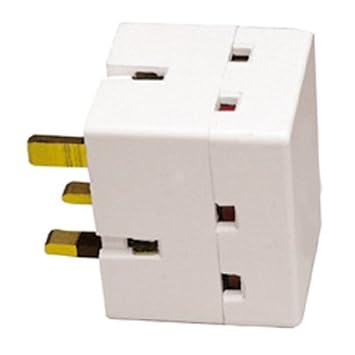
When you said consolidate all power sources into single wall socket, are you mean to use the 3 sides socket splitter like the following on one of the socket at CLLI?

» Click to show Spoiler - click again to hide... «


This post has been edited by scoutfai: Mar 12 2016, 11:17 AM
TSgkl83
post Mar 12 2016, 04:10 PM

Look at all my stars!!
*******
Senior Member
8,377 posts

Joined: Nov 2004
QUOTE(scoutfai @ Mar 12 2016, 11:15 AM)
I am not living at high rise building so I think the 1st assumption statement is applicable to me.

When you said consolidate all power sources into single wall socket, are you mean to use the 3 sides socket splitter like the following on one of the socket at CLLI?

» Click to show Spoiler - click again to hide... «

*
The proposed TRM-NIF and TRM-PLC come with 3x power socket.
Aftermarket 3 sides socket spiltter are optional for you
adreno
post Mar 27 2016, 12:22 PM

New Member
*
Junior Member
11 posts

Joined: Sep 2014
How much the cost for Unifi setup ?
Protect power supply, and from cable RJ11 and RJ45

TSgkl83
post Apr 11 2016, 10:48 AM

Look at all my stars!!
*******
Senior Member
8,377 posts

Joined: Nov 2004
QUOTE(adreno @ Mar 27 2016, 12:22 PM)
How much the cost for Unifi setup ?
Protect power supply, and from cable RJ11 and RJ45
*

Sorry for late reply as busy for past few weeks

The Unifi inputs is fiber optics?
ming0000
post Apr 20 2016, 05:46 PM

Casual
***
Junior Member
450 posts

Joined: Mar 2007


i'm using Gaming PC (500watts) + 2.0 Speaker (124watts) + TM Streamyx

so which one model should i get to protect it? and how much?
TSgkl83
post Apr 21 2016, 05:59 PM

Look at all my stars!!
*******
Senior Member
8,377 posts

Joined: Nov 2004
QUOTE(ming0000 @ Apr 20 2016, 05:46 PM)
i'm using Gaming PC (500watts) + 2.0 Speaker (124watts) + TM Streamyx

so which one model should i get to protect it? and how much?
*

SF9512DSL or SF9812DSL are sufficient...

any PC-PC networking via router for internet sharing?
latjiu
post Apr 26 2016, 12:43 PM

Casual
***
Junior Member
333 posts

Joined: Oct 2011


Read earlier posts but still unsure, can you advise on my setup?

1) Desktop PC - Wireless (preferably 4-6 sockets)
2) Unifi fiber Modem + Router (LAN not in use & prefer one extra socket for future use)
3) TV+astro (NOT connected to antenna, only Astro)

MDSC0039-FC - What is the f-connector for? Didnt notice Astro has f-connector.

Should i just get the MDSC0039? Thanks!
latjiu
post Apr 26 2016, 12:43 PM

Casual
***
Junior Member
333 posts

Joined: Oct 2011


double post

This post has been edited by latjiu: Apr 26 2016, 07:22 PM
TSgkl83
post Apr 26 2016, 07:03 PM

Look at all my stars!!
*******
Senior Member
8,377 posts

Joined: Nov 2004
QUOTE(latjiu @ Apr 26 2016, 12:43 PM)
Read earlier posts but still unsure, can you advise on my setup?

1) Desktop PC - Wireless (preferably 4-6 sockets)
2) Unifi fiber Modem + Router (LAN not in use & prefer one extra socket for future use)
3) TV+astro (NOT connected to antenna, only Astro)

MDSC0039-FC - What is the f-connector for? Didnt notice Astro has f-connector.

Should i just get the MDSC0039? Thanks!
*

Hi Latjiu, is it all the items located at the same place / table?
Or else can you split the equipment list above into island / location based?
latjiu
post Apr 26 2016, 07:24 PM

Casual
***
Junior Member
333 posts

Joined: Oct 2011


1) Room
2) Different Room
3) Living Room
nick_vll
post May 4 2016, 12:17 PM

On my way
****
Senior Member
512 posts

Joined: Oct 2009


hi pls check your pm.
ascension
post May 4 2016, 02:24 PM

Getting Started
**
Junior Member
101 posts

Joined: Nov 2004
UGPM
TSgkl83
post May 5 2016, 09:44 AM

Look at all my stars!!
*******
Senior Member
8,377 posts

Joined: Nov 2004
QUOTE(latjiu @ Apr 26 2016, 07:24 PM)
1) Room
2) Different Room
3) Living Room
*
1) TRM-NIF-3 BU+PE with TRM-EP-UK2+US1 up to 6 socket
2) MDSC0039
3) MDSC0039FC (Do you astro decoder come with Satellite Dish?)

121 Pages « < 101 102 103 104 105 > » Top
Topic ClosedOptions
 

Change to:
| Lo-Fi Version
0.0332sec    1.34    6 queries    GZIP Disabled
Time is now: 4th December 2025 - 10:23 PM