Welcome Guest ( Log In | Register )

Bump Topic Topic Closed RSS Feed
121 Pages « < 100 101 102 103 104 > » Bottom

Outline · [ Standard ] · Linear+

 [WTS/Bulk] ▲★ CAL-LAB Lightning Isolators ★▲, Authorised Seller@Performance Guarantee

views
     
afiqwing
post Jan 28 2016, 04:58 PM

New Member
*
Newbie
3 posts

Joined: Dec 2012
QUOTE(gkl83 @ Jan 28 2016, 10:52 AM)
you means beside of fiber optics from TM, you have another fixed line copper cable from TM too which side by side with ur Unifi equipments?
If yes, highly recommended to protect the copper cable from TM as the surge can create static and enough to kill any sensitive devices around..
*
Yes, So which product do u recommend
icyblanca
post Jan 28 2016, 11:18 PM

Casual
***
Junior Member
368 posts

Joined: Oct 2009
Hi i something for my house modem - streamyx. Struck by lightning a few times already. Can you please pm me the recommended product and price?
Thx
TSgkl83
post Feb 1 2016, 09:52 AM

Look at all my stars!!
*******
Senior Member
8,377 posts

Joined: Nov 2004
QUOTE(icyblanca @ Jan 28 2016, 11:18 PM)
Hi i something for my house modem - streamyx. Struck by lightning a few times already. Can you please pm me the recommended product and price?
Thx
*

can i have the list of the PC equipment you planned to protect? smile.gif
icyblanca
post Feb 16 2016, 04:29 PM

Casual
***
Junior Member
368 posts

Joined: Oct 2009
QUOTE(gkl83 @ Feb 1 2016, 09:52 AM)
can i have the list of the PC equipment you planned to protect? smile.gif
*
just the modem through the phone line. We keep the modem on 24hrs a day. so need protection for it.
The rest we usually unplug when not in use.
thanks for your help ya! smile.gif
TSgkl83
post Feb 17 2016, 11:43 AM

Look at all my stars!!
*******
Senior Member
8,377 posts

Joined: Nov 2004
QUOTE(icyblanca @ Feb 16 2016, 04:29 PM)
just the modem through the phone line. We keep the modem on 24hrs a day. so need protection for it.
The rest we usually unplug when not in use.
thanks for your help ya! smile.gif
*

you can use SF9512DSL or SF9812DSL for modem protection (power and RJ11 only)...
if you have far end IP devices connected via wired LAN cable, so the RJ45 connection of modem must be protect as well...
icyblanca
post Feb 17 2016, 01:26 PM

Casual
***
Junior Member
368 posts

Joined: Oct 2009
QUOTE(gkl83 @ Feb 17 2016, 11:43 AM)
you can use SF9512DSL or SF9812DSL for modem protection (power and RJ11 only)...
if you have far end IP devices connected via wired LAN cable, so the RJ45 connection of modem must be protect as well...
*
Oic. So if i need to connect to the telephone i need following products. Correct?
MDSC0039
SP 9201-DAF

Can you pm we all the price + delivery to kajang?

Many thanks!
TSgkl83
post Feb 17 2016, 02:50 PM

Look at all my stars!!
*******
Senior Member
8,377 posts

Joined: Nov 2004
QUOTE(icyblanca @ Feb 17 2016, 01:26 PM)
Oic. So if i need to connect to the telephone i need following products. Correct?
MDSC0039
SP 9201-DAF

Can you pm we all the price + delivery to kajang?

Many thanks!
*

Yes, you required MDSC0039 and SP9201DAF if the tel cable shared for analog telephone and ADSL modem...
i have ex-stock for all the items as above... smile.gif
icyblanca
post Feb 17 2016, 08:04 PM

Casual
***
Junior Member
368 posts

Joined: Oct 2009
can you pm me the price for :

MDSC0039 x 1
SP 9201-DAF x 1
mauli74
post Feb 21 2016, 08:52 PM

New Member
*
Junior Member
47 posts

Joined: Mar 2011
trade successful smile.gif
icyblanca
post Feb 23 2016, 03:51 PM

Casual
***
Junior Member
368 posts

Joined: Oct 2009
Trade successful too. biggrin.gif

Would like to express many many thanks to Mr Gan for his patience and excellent customer service. Much appreciated! notworthy.gif

Recommended seller! thumbup.gif thumbup.gif

Many thanks for you help and advice!
Yeapy
post Mar 3 2016, 12:45 AM

Casual
***
Junior Member
371 posts

Joined: Jan 2003


My set up:

1- Gaming PC + Monitor + Speakers
2- Work PC + Monitor + Speakers
3- TV+Amplifier+Subwoofer+Blu Ray Player+Asus Media Player


What should I use?
scoutfai
post Mar 3 2016, 09:56 PM

Casual
***
Junior Member
433 posts

Joined: Dec 2010
I need to protect my Maxis Fiber at home. It comes with two devices, one modem and one router.
The only thing that connect to both devices are their respective power plug.
There is one fiber optic connect to the modem but since fiber optic is insulator in nature so I do not think this poses any threat.
There is one normal telephone cable from router to a dect phone. The dect phone has its own power plug. I personally think that if there is a surge coming to the dect phone through its power plug, this surge is unlikely to hit the router through the telephone cable.

So if my understanding is correct then I will just need to protect the two power plugs (one for modem, one for router).
However I also wish to have extra two sockets for future use.

Hence, may I ask, do you have a product that has 4 sockets? preferably in a flat, longitudinal layout.

This post has been edited by scoutfai: Mar 4 2016, 02:43 PM
TSgkl83
post Mar 4 2016, 10:33 AM

Look at all my stars!!
*******
Senior Member
8,377 posts

Joined: Nov 2004
QUOTE(Yeapy @ Mar 3 2016, 12:45 AM)
My set up:

1- Gaming PC + Monitor + Speakers
2- Work PC + Monitor + Speakers
3- TV+Amplifier+Subwoofer+Blu Ray Player+Asus Media Player
What should I use?
*

Any modem router connect to Setup 1 and 2? if dont have modem router, u using homeplug or wired or wirless LAN network for the IP connectivity?

Setup 3, the TV connected any aerial antenna or astro satelite dish? Asus Media player connected with homeplug or wired or wireless LAN network?

QUOTE(scoutfai @ Mar 3 2016, 09:56 PM)
I need to protect my Maxis Fiber at home. It comes with two devices, one modem and one router.
The only thing that connect to both devices are their respective power plug.
There is one fiber optic connect to the modem but since fiber optic is insulator in nature so I do not think this poses any threat.
There is one normal telephone cable from router to a deck phone. The deck phone has its own power plug. I personally think that if there is a surge coming to the deck phone through its power plug, this surge is unlikely to hit the router through the telephone cable.

So if my understanding is correct then I will just need to protect the two power plugs (one for modem, one for router).
However I also wish to have extra two sockets for future use.

Hence, may I ask, do you have a product that has 4 sockets? preferably in a flat, longitudinal layout.
*

As your requirements,
if ur modem, router & DECT phone located side by side and all PC equipment or media player connected via Wireless to your wireless router...
you can use TRM-EP-UK2+US1 +PE which come with 3 Power socket and extendable up to 6 / 9 number of socket...
However Cal-Lab dont have the options for flat and longitudinal as these sort of design are not expandable and occupied more floor space...
user posted image
scoutfai
post Mar 4 2016, 04:28 PM

Casual
***
Junior Member
433 posts

Joined: Dec 2010
QUOTE(gkl83 @ Mar 4 2016, 10:33 AM)
Any modem router connect to Setup 1 and 2? if dont have modem router, u using homeplug or wired or wirless LAN network for the IP connectivity?

Setup 3, the TV connected any aerial antenna or astro satelite dish? Asus Media player connected with homeplug or wired or wireless LAN network?
As your requirements,
if ur modem, router & DECT phone located side by side and all PC equipment or media player connected via Wireless to your wireless router...
you can use TRM-EP-UK2+US1 +PE which come with 3 Power socket and extendable up to 6 / 9 number of socket...
However Cal-Lab dont have the options for flat and longitudinal as these sort of design are not expandable and occupied more floor space...
user posted image
*
From the picture I can see one socket at the left bottom, another socket at the middle right.
May I ask where is the third socket?
For this product type do you have more pictures on different angle?
TSgkl83
post Mar 4 2016, 07:35 PM

Look at all my stars!!
*******
Senior Member
8,377 posts

Joined: Nov 2004
QUOTE(scoutfai @ Mar 4 2016, 04:28 PM)
From the picture I can see one socket at the left bottom, another socket at the middle right.
May I ask where is the third socket?
For this product type do you have more pictures on different angle?
*

it is just a sample only of the design...

if u want power socket only, all the 3 sides also power sockets... nothing more...
if u want 3 power socket only, u only required the bottom part only...
if u want 6 - 9 power socket, then u need to stack up another 2 - 3 expansion unit...
Yeapy
post Mar 6 2016, 12:04 AM

Casual
***
Junior Member
371 posts

Joined: Jan 2003


QUOTE(gkl83 @ Mar 4 2016, 10:33 AM)
Any modem router connect to Setup 1 and 2? if dont have modem router, u using homeplug or wired or wirless LAN network for the IP connectivity?

Setup 3, the TV connected any aerial antenna or astro satelite dish? Asus Media player connected with homeplug or wired or wireless LAN network?
As your requirements,
if ur modem, router & DECT phone located side by side and all PC equipment or media player connected via Wireless to your wireless router...
you can use TRM-EP-UK2+US1 +PE which come with 3 Power socket and extendable up to 6 / 9 number of socket...
However Cal-Lab dont have the options for flat and longitudinal as these sort of design are not expandable and occupied more floor space...
user posted image
*
Gaming PC using wired LAN, work PC using wireless.
Set up 3, TV not connected to aerial or astro, but may be can get aerial protection for future usage. Asus Media Player not connected to internet, just load movie from external HD.
scoutfai
post Mar 7 2016, 07:54 AM

Casual
***
Junior Member
433 posts

Joined: Dec 2010
QUOTE(gkl83 @ Mar 4 2016, 07:35 PM)
it is just a sample only of the design...

if u want power socket only, all the 3 sides also power sockets... nothing more...
if u want 3 power socket only, u only required the bottom part only...
if u want 6 - 9 power socket, then u need to stack up another 2 - 3 expansion unit...
*
Ah I see. Now I understand the product design concept.

Then is it possible to have:

1st layer = 3 sides also power socket.
2nd layer = 3 sides also power socket. (then I already have 6 sockets, more than enough)
3rd layer = 1 side is for telephone cable, 1 side is for LAN cable, the last side can be anything, not really important, maybe another power socket.

Is it possible to have such layout?
If it is available, please provide quotation of such a combination.

-----

Edit:
Just browse the callab2u website, I have a few questions:

1)
user posted image

Is the black color socket at the front (middle position) a power output from CLLI or a power input to the CLLI?

2)
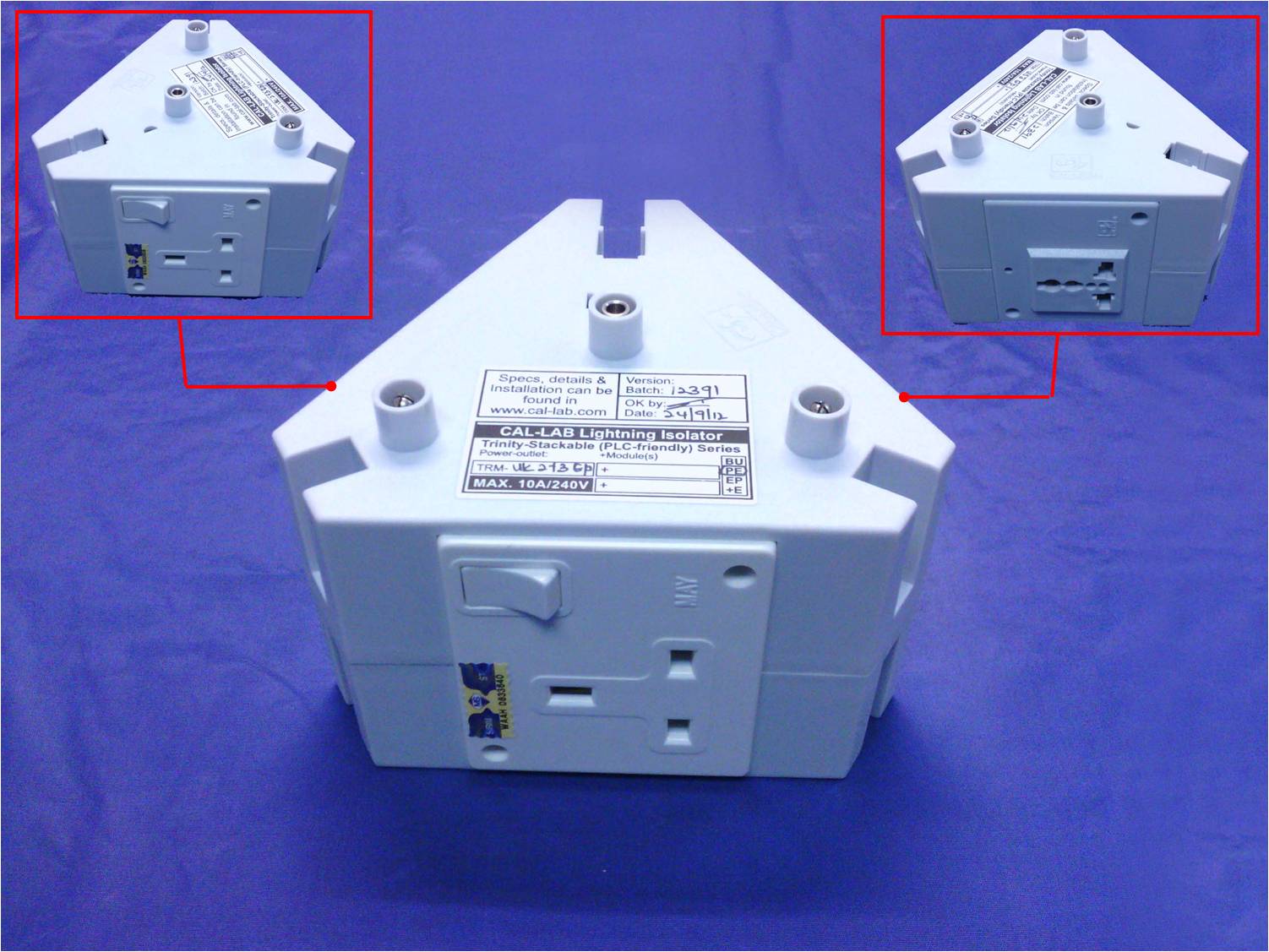
user posted image
I see there is UK socket and US socket.
I only need UK (the one used in Malaysia) with the switch, is it possible to have all 3 sides also UK sockets instead 2 UK+1 US configuration?


Thank you.

This post has been edited by scoutfai: Mar 7 2016, 08:14 AM
TSgkl83
post Mar 7 2016, 08:34 AM

Look at all my stars!!
*******
Senior Member
8,377 posts

Joined: Nov 2004
QUOTE(Yeapy @ Mar 6 2016, 12:04 AM)
Gaming PC using wired LAN, work PC using wireless.
Set up 3, TV not connected to aerial or astro, but may be can get aerial protection for future usage. Asus Media Player not connected to internet, just load movie from external HD.
*
any modem router too?
if yes, it is together with Gaming PC or located at 4th location?
TSgkl83
post Mar 7 2016, 08:43 AM

Look at all my stars!!
*******
Senior Member
8,377 posts

Joined: Nov 2004
QUOTE(scoutfai @ Mar 7 2016, 07:54 AM)
Ah I see. Now I understand the product design concept.

Then is it possible to have:

1st layer = 3 sides also power socket.
2nd layer = 3 sides also power socket. (then I already have 6 sockets, more than enough)
3rd layer = 1 side is for telephone cable, 1 side is for LAN cable, the last side can be anything, not really important, maybe another power socket.

Is it possible to have such layout?
If it is available, please provide quotation of such a combination.

-----

Edit:
Just browse the callab2u website, I have a few questions:

1)
user posted image

Is the black color socket at the front (middle position) a power output from CLLI or a power input to the CLLI?

2)
user posted image
I see there is UK socket and US socket.
I only need UK (the one used in Malaysia) with the switch, is it possible to have all 3 sides also UK sockets instead 2 UK+1 US configuration?
Thank you.
*

yes, u can have your own customized setup.

1st Layer
Option 1: TRM-NIF-3 BU+PE (Standard Power Module) RM168.00
Option 2: TRM-PLC-3 BU+PE (Supported Homeplug) RM128.00

2nd Layer
TRM-EP-UK2+US1 +PE (Standard Power Module) RM108.00

3rd Layer
Option 1: TRM-EP-2 +2-FTM (2x Power Socket, with 1x DSL and 1x LAN) RM138.00
Option 2: TRM-EP-1 +4-FTM (1x Power Socket, with 1x DSL, 1x LAN and 2x for others) RM188.00

1) It is output to equipment, usually i suggest to use common 3x power socket instead.

2) the US universal socket can use with UK power plug too, so not worry smile.gif
Yeapy
post Mar 7 2016, 11:56 AM

Casual
***
Junior Member
371 posts

Joined: Jan 2003


QUOTE(gkl83 @ Mar 7 2016, 08:34 AM)
any modem router too?
if yes, it is together with Gaming PC or located at 4th location?
*
Modem and router is located near the phone , I use 20M Lan cable to connect to my gaming pc

121 Pages « < 100 101 102 103 104 > » Top
Topic ClosedOptions
 

Change to:
| Lo-Fi Version
0.0508sec    0.43    6 queries    GZIP Disabled
Time is now: 6th December 2025 - 05:50 PM
