
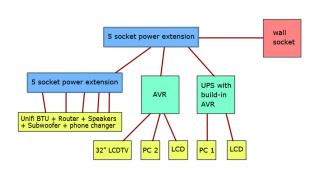
Here’s my situation:
- Everything is in same room.
- Only 1 wall socket available.
- I’m on unifi biz plan – no iptv and I don’t use the phone.
- No astro or TV antenna – I don’t watch TV channel kthx.
- PC 1 is very important.
Thanks.
 Lowyat.NET -> Garage Sales -> Special Interest Garage Sales -> Home Electronics & Wares Garage Sales
[WTS/Bulk] ▲★ CAL-LAB Lightning Isolators ★▲, Authorised Seller@Performance Guarantee
|
|
 Mar 13 2012, 06:10 AM Mar 13 2012, 06:10 AM
|
 
Junior Member
22 posts Joined: Jan 2007 From: PJ  
|
Where should I put the CLLI? Directly after the wall socket? And which model suitable for my setup?
Here’s my situation: - Everything is in same room. - Only 1 wall socket available. - I’m on unifi biz plan – no iptv and I don’t use the phone. - No astro or TV antenna – I don’t watch TV channel kthx. - PC 1 is very important. Thanks. |
|
|
|
|
|
Mar 13 2012, 08:13 AM
|

Senior Member
8,377 posts Joined: Nov 2004
|
QUOTE(OmgBBQ @ Mar 13 2012, 06:10 AM) Where should I put the CLLI? Directly after the wall socket? And which model suitable for my setup? if ur router no connected with other wired lan cable to other room's PC (if any)
Here’s my situation: - Everything is in same room. - Only 1 wall socket available. - I’m on unifi biz plan – no iptv and I don’t use the phone. - No astro or TV antenna – I don’t watch TV channel kthx. - PC 1 is very important. Thanks.  and you UNIFI connection using fiber optic into ur room (no those common copper cable) and all the interconnected equipments is located in your room ONLY... you can use MDSC0039 (2000watt) between wall socket and 5 power socket extension...  |
|
|
Mar 15 2012, 06:06 PM
|

Junior Member
23 posts Joined: Mar 2010
|
which surge protector for my modem router? its connected to a 5 plus extension which is connected directly to a plug point.
also it is connected directly to the phone line? do i need two surge protectors then? one for power and another for telephone line. which model and how much? Thx. Using streamyx 4mb. (will it affect connection speed?) |
|
|
Mar 20 2012, 01:17 PM
|
|
Senior Member
8,377 posts Joined: Nov 2004
|
QUOTE(aaronportnoy @ Mar 15 2012, 06:06 PM) which surge protector for my modem router? its connected to a 5 plus extension which is connected directly to a plug point. also it is connected directly to the phone line? do i need two surge protectors then? one for power and another for telephone line. which model and how much? Thx. Using streamyx 4mb. (will it affect connection speed?) do you have telephone & ADSL splitter filter nearby your PC and modem? have any wired lan cable to another PC which located at other room? |
|
|
Mar 21 2012, 09:07 PM
|
|
Junior Member
17 posts Joined: Oct 2007
|
Hi, looking to buy MDSC0039 + SP9201-DAF
I got a question, what is the max broadband speed supported by SP9201-DAF, And i also need protection for my astro, does MDSC0039-F provide this? What is the poslaju charges to Miri, Sarawak? |
|
|
Mar 21 2012, 10:28 PM
|
|
Senior Member
8,377 posts Joined: Nov 2004
|
QUOTE(QCA5958 @ Mar 21 2012, 09:07 PM) Hi, looking to buy MDSC0039 + SP9201-DAF I got a question, what is the max broadband speed supported by SP9201-DAF, And i also need protection for my astro, does MDSC0039-F provide this? What is the poslaju charges to Miri, Sarawak? all cal-lab model can support up to 4mb... MDSC0039 + SP9201DAF used to protect 1 set of PC, modem and telephone... but if ur modem router connected more than 1 PCs, u need additional cal lab model for additional protection you u can MDSC0039FC for power + astro protection... poslaju courier to Sarawak will add on RM5-RM10 depend on your order list... |
|
|
|
|
|
Mar 22 2012, 08:46 AM
|
|
Junior Member
17 posts Joined: Oct 2007
|
QUOTE(gkl83 @ Mar 21 2012, 10:28 PM) all cal-lab model can support up to 4mb... Ok, then i'm confirming order for MDSC0039FC and SP9201DAF. Can you advise the total price including poslaju? MDSC0039 + SP9201DAF used to protect 1 set of PC, modem and telephone... but if ur modem router connected more than 1 PCs, u need additional cal lab model for additional protection you u can MDSC0039FC for power + astro protection... poslaju courier to Sarawak will add on RM5-RM10 depend on your order list... |
|
|
Apr 6 2012, 11:42 AM
|

Junior Member
30 posts Joined: May 2006 From: Port Swettenham
|
QUOTE(gkl83 @ Mar 13 2012, 08:13 AM) if ur router no connected with other wired lan cable to other room's PC (if any) Hi my setup is exactly this, although I connect my PC and PS3 via wired lan. Should I opt for the same model as well?and you UNIFI connection using fiber optic into ur room (no those common copper cable) and all the interconnected equipments is located in your room ONLY... you can use MDSC0039 (2000watt) between wall socket and 5 power socket extension... |
|
|
Apr 8 2012, 11:15 AM
|
|
Senior Member
8,377 posts Joined: Nov 2004
|
QUOTE(Shinn87 @ Apr 6 2012, 11:42 AM) Hi my setup is exactly this, although I connect my PC and PS3 via wired lan. Should I opt for the same model as well? is ur PC & PS3 and all Unifi equipment (RG,BTU,DECT, STB) side by side with each other? confirm that ur modem no connected to other PC located at other room or Unifi equipments connected to other location? |
|
|
Apr 9 2012, 10:48 AM
|
|
Junior Member
30 posts Joined: May 2006 From: Port Swettenham
|
QUOTE(gkl83 @ Apr 8 2012, 11:15 AM) is ur PC & PS3 and all Unifi equipment (RG,BTU,DECT, STB) side by side with each other? Pretty much everything is in the same room and on the same table: All equipment are side by side sharing a combination of a single power board and 4 wall plugs. confirm that ur modem no connected to other PC located at other room or Unifi equipments connected to other location? Modem/Router is connected to the PC and PS3 via wired LAN. |
|
|
Apr 9 2012, 05:42 PM
|
|
Senior Member
8,377 posts Joined: Nov 2004
|
QUOTE(Shinn87 @ Apr 9 2012, 10:48 AM) Pretty much everything is in the same room and on the same table: All equipment are side by side sharing a combination of a single power board and 4 wall plugs. Modem/Router is connected to the PC and PS3 via wired LAN. if everything side by side without connecting to other PC (other rooms) and UNIFI connected via fiber optic cable... u can use SC0039 / MDSC0039 for power protection only |
|
|
Apr 12 2012, 10:19 AM
|
|
Newbie
3 posts Joined: Nov 2005
|
Hi,
I need protection for my CCTV DVR device, which connected to TM Modem Router (for remote view thru the internet). Previously, it was hit by lightning thru the Phone Line (connect to modem) and go to the DVR from LAN port which make the DVR burn out.. currently all 4 LAN port on the modem cannot use anymore... I already replace the DVR, but need to protect it from hit by lighting again... Please advice which device suitable.. |
|
|
Apr 12 2012, 05:39 PM
|
|
Newbie
3 posts Joined: Apr 2010
|
what's the length of wire for MSDC0039? got stock now?
|
|
|
|
|
|
Apr 12 2012, 06:01 PM
|
|
Senior Member
8,377 posts Joined: Nov 2004
|
QUOTE(zaephaer @ Apr 12 2012, 10:19 AM) Hi, I need protection for my CCTV DVR device, which connected to TM Modem Router (for remote view thru the internet). Previously, it was hit by lightning thru the Phone Line (connect to modem) and go to the DVR from LAN port which make the DVR burn out.. currently all 4 LAN port on the modem cannot use anymore... I already replace the DVR, but need to protect it from hit by lighting again... Please advice which device suitable.. do u have connect other equipments PCs to your TM modem/router? do u have ADSL Splitter Filter & telephone nearby ur modem & CCTV devices? Is it all the equipments u tended to protect are located at the same area? also, recommended to protect each CCTV cable which connected to DVR for in case the surge come from camera itself which it could happen later... QUOTE(simonkys @ Apr 12 2012, 05:39 PM) what's the length of wire for MSDC0039? got stock now? yup... got stock on hand, have 1000 & 2000watt version... about 1 meter long... |
|
|
Apr 13 2012, 09:20 AM
|
|
Newbie
3 posts Joined: Nov 2005
|
do u have connect other equipments PCs to your TM modem/router?
yes, there are other PC, but not connected to the modem, the only equipment connect to the modem is DVR do u have ADSL Splitter Filter & telephone nearby ur modem & CCTV devices? yes, i am using ADSL splitter to split the phone line to telephone and modem Is it all the equipments u tended to protect are located at the same area? yes, splitter, modem, and dvr located in same area also, recommended to protect each CCTV cable which connected to DVR for in case the surge come from camera itself which it could happen later... i also think of that too, please advice more.. here is some sketch of CCTV and DVR configuration on the site... hope it will help... 
|
|
|
Apr 13 2012, 11:50 AM
|
|
Senior Member
8,377 posts Joined: Nov 2004
|
QUOTE(zaephaer @ Apr 13 2012, 09:20 AM) do u have connect other equipments PCs to your TM modem/router? yes, there are other PC, but not connected to the modem, the only equipment connect to the modem is DVR do u have ADSL Splitter Filter & telephone nearby ur modem & CCTV devices? yes, i am using ADSL splitter to split the phone line to telephone and modem Is it all the equipments u tended to protect are located at the same area? yes, splitter, modem, and dvr located in same area also, recommended to protect each CCTV cable which connected to DVR for in case the surge come from camera itself which it could happen later... i also think of that too, please advice more.. here is some sketch of CCTV and DVR configuration on the site... hope it will help...
for your telephone, modem, DVR and ADSL Splitter Filter (located side by side or nearby) u can use MDSC0039 + SP9201DAF to protect surge from Telekom and TNB... for the camera side are no able to protect as it exposed to environment... the best we can prevent the surge come from camera and damage ur DVR via BNC connector... u can use MDBNC for each camera cable which connected to DVR... |
|
|
Apr 13 2012, 01:58 PM
|

All Stars
10,473 posts Joined: Jan 2003 From: Sarawak
|
the short black coaxial cable (for satellite dish) that is bundled inside the CLLI cannot fit in my receiver. i think the central core terminal on the connector of cable is too big.
anyone has this problem plugging the that cable into their astro satellite receiver? |
|
|
Apr 13 2012, 02:38 PM
|
|
Senior Member
8,377 posts Joined: Nov 2004
|
QUOTE(Skylinestar @ Apr 13 2012, 01:58 PM) the short black coaxial cable (for satellite dish) that is bundled inside the CLLI cannot fit in my receiver. i think the central core terminal on the connector of cable is too big. anyone has this problem plugging the that cable into their astro satellite receiver? actually the F type cable provided for FOC with standard quality due to the convenience of end users... but u can try to search for better cable from reputable hardware shop as it have lower signal loss compare to cal-lab's FOC cable... |
|
|
Apr 16 2012, 10:59 PM
|
 
Staff
2,797 posts Joined: Nov 2007 From: On the beach 
|
Hey there, I think lightning strike my house recently this evening and the telephone line lightning isolator has been strike. When connected thru the isolator, internet and phone doesn't connect, but when connect direct then got line.
So I'll need to bring that phone line isolator to cal lab office right? Need to remove the whole thing including the green and blue wires? Or I can remove a part easily? Cause I scare later take out the wires then I don't know how to put it back.  |
|
|
Apr 16 2012, 11:59 PM
|
|
Senior Member
8,377 posts Joined: Nov 2004
|
QUOTE(munkeyflo @ Apr 16 2012, 10:59 PM) Hey there, I think lightning strike my house recently this evening and the telephone line lightning isolator has been strike. When connected thru the isolator, internet and phone doesn't connect, but when connect direct then got line. So I'll need to bring that phone line isolator to cal lab office right? Need to remove the whole thing including the green and blue wires? Or I can remove a part easily? Cause I scare later take out the wires then I don't know how to put it back. yes... just bring the faulty SP9201DAF back to cal-lab office, the replacement cost about Rm15... u can simply open the black tape and untwist the green ground wire away from the blue wire which connected to SLMS4... later u can just twist the grounding wire & retape back again once u got another SP9201DAF unit... |
|
Topic ClosedOptions
|
| Change to: |  0.0283sec 0.0283sec
 0.41 0.41
 6 queries 6 queries
 GZIP Disabled GZIP Disabled
Time is now: 4th December 2025 - 07:01 PM |
 Quote
Quote