Welcome Guest ( Log In | Register )

Outline · [ Standard ] · Linear+

Unifi Sabah-Sarawak UNIFI Thread, Free until Dec 24month contract promo

views
     
AV_2018
post Sep 7 2019, 01:36 PM

Casual
***
Junior Member
451 posts

Joined: Apr 2018
QUOTE(mrgenie @ Sep 7 2019, 12:07 PM)
Would be interesting if we all post where we are located:
mainland MY, Sabah, Sarawak and then tracert for example:

tracert 151.101.1.164   (California)
tracert 157.159.10.207 (Paris)
tracert 72.229.28.185  (New York)
tracert 103.15.170.110 (London)

*
Tried one, here's results from main city of Sarawak (first two IP edited for privacy):
CODE
tracert 157.159.10.207

Tracing route to 157.159.10.207 over a maximum of 30 hops

 1    <1 ms    <1 ms    <1 ms  router.xxxx.com [192.xxx.xxx.xxx]
 2     2 ms     1 ms     2 ms  118.xxx.xxx.xxx
 3    35 ms    32 ms    34 ms  10.55.170.119
 4    31 ms    32 ms    32 ms  10.55.39.160
 5    26 ms    24 ms    24 ms  10.55.100.126
 6    33 ms    33 ms    32 ms  10.55.209.17
 7    32 ms    33 ms    32 ms  100ge10-2.core1.sin1.he.net [74.82.46.49]
 8   170 ms   169 ms   169 ms  100ge11-1.core1.mrs1.he.net [184.105.65.14]
 9   176 ms   186 ms   179 ms  100ge4-2.core1.par2.he.net [184.105.222.21]
10   180 ms   179 ms   179 ms  renater.equinix-ix.fr [195.42.145.38]
11   181 ms   181 ms   182 ms  xe1-0-1-paris1-rtr-131.noc.renater.fr [193.51.177.128]
12   177 ms   178 ms   177 ms  te4-3-orsay-rtr-021.noc.renater.fr [193.51.177.229]
13   179 ms   178 ms   180 ms  te1-1-evry-rtr-021.noc.renater.fr [193.51.177.102]
14   181 ms   182 ms   181 ms  reve-gi8-1-evry-rtr-021.noc.renater.fr [193.51.181.221]
15   181 ms   181 ms   181 ms  195.83.166.162
16   178 ms   178 ms   178 ms  int-50-g.reve.fr [194.57.241.204]
17   179 ms   178 ms   178 ms  157.159.8.2
18   179 ms   178 ms   178 ms  157.159.10.207

Trace complete.

Looks like less hops than yours.

Ok, here's another one:
CODE
tracert 103.15.170.110

Tracing route to ei-web03.ash2.squiz.cloud [103.15.170.110]
over a maximum of 30 hops:

 1    <1 ms    <1 ms    <1 ms  router.xxxx.com [192.xxx.xxx.xxx]
 2     4 ms     1 ms     1 ms  118.xxx.xxx.xxx
 3   217 ms   213 ms   213 ms  10.55.170.119
 4   217 ms   221 ms   215 ms  10.55.39.162
 5    25 ms    27 ms    25 ms  10.55.100.122
 6   212 ms   212 ms   212 ms  10.55.192.125
 7   212 ms   212 ms   212 ms  et-0-0-19-2.cr5-sjc1.ip4.gtt.net [69.174.14.189]
 8   348 ms   348 ms   348 ms  xe-5-3-5.cr1-lon1.ip4.gtt.net [89.149.137.205]
 9   348 ms   347 ms   347 ms  xe2-2-ve-81.thn-pe-2.thn.thebunker.net [46.33.90.22]
10   279 ms   280 ms   279 ms  squiz.1224.cr-1.ash.thebunker.net [93.91.16.189]
11   279 ms   280 ms   279 ms  93.91.16.190
12   282 ms   285 ms   282 ms  10.10.1.10
13   280 ms   280 ms   282 ms  ei-web03.ash2.squiz.cloud [103.15.170.110]

Trace complete.


Local sites for comparison:
» Click to show Spoiler - click again to hide... «

To Cloudflare only few hops.
1: My router
2: TM gateway
3-5: TM network
6: Cloudflare network
7: Cloudflare DNS server

Looks like for local sites only 4 hops in TM network while international sites 5 hops.

Additional info: I do not notice any issues here in the past few days.

An article that may be of interest to some: Cloudflare | The Relative Cost of Bandwidth Around the World

This post has been edited by AV_2018: Sep 7 2019, 02:45 PM
AV_2018
post Sep 19 2019, 06:12 PM

Casual
***
Junior Member
451 posts

Joined: Apr 2018
QUOTE(anon5391 @ Sep 19 2019, 05:52 PM)
Just simple question, my unifi800 can only get about 500-600Mbps @TMspeedtest via wired cat6 lan. Is this normal? My pc is fairly recent, i5, 8gb ram & ssd c drive. I've tried disabling anti-virus also. Ping is about 40ms
*
Normal for Sarawak is this
user posted image
7th gen Core i5, 8GB RAM, SSD, Firefox, Windows Defender, Cat6 throughout, Asus router

If using TM Speedtest, ping 19ms, jitter 1ms

This post has been edited by AV_2018: Sep 19 2019, 06:18 PM
AV_2018
post Sep 20 2019, 07:59 PM

Casual
***
Junior Member
451 posts

Joined: Apr 2018
QUOTE(Candy12 @ Sep 20 2019, 02:56 PM)
What is the point of using TM's own in house speed test server for testing only? This is unless you want a useless LAN network?

For an internet user of course you want good all round speed for everywhere possible including each continent such as USA, Europe, Africa or North Asia.
*
Many big companies have or are using CDNs/mirrors/datacentres located in KL or Singapore. It is possible to get 20ms latency and up to 70MB/s download speeds from these services which means the speedtest results are not useless.

QUOTE(junclj @ Sep 20 2019, 03:52 PM)
Unless lah, TM is setting up a separate optical fiber station in East Malaysia here. So we do not need to change speedtest server to KL. Just straight test with local server will get 0~1ms.
*
Testing latency to another TM user in East Malaysia can get <1ms result.

This post has been edited by AV_2018: Sep 20 2019, 08:01 PM
AV_2018
post Sep 24 2019, 12:33 AM

Casual
***
Junior Member
451 posts

Joined: Apr 2018
QUOTE(Candy12 @ Sep 23 2019, 10:56 PM)
Why not just do the speedtests to these Singapore datacentres or CDNs directly then? See what kind of latency you get? Direct from Kuala Lumpur here my FTTH line can get pings below <10ms to local servers, less than <15ms to SG servers.
*
I mean KL/SG speedtests servers vs some far away country in general. I usually test using any KL or SG server and get almost similar results including TM's server.
AV_2018
post Sep 25 2019, 03:20 PM

Casual
***
Junior Member
451 posts

Joined: Apr 2018
QUOTE(junclj @ Sep 25 2019, 08:22 AM)
Can you tell me which East Malaysia Unifi user can get <1ms? I can guarantee you can't find anyone of them because all of them who can get <1ms are West Malaysians (or East Malaysian who are moved to KL).
*
I mean latency between East Malaysian user and another East Malaysian user. I've tested latency TO ANOTHER user here and got <1ms. It means connecting from TM network to TM network within East Malaysia does not need to go through KL.

This post has been edited by AV_2018: Sep 25 2019, 03:28 PM
AV_2018
post Sep 26 2019, 06:05 PM

Casual
***
Junior Member
451 posts

Joined: Apr 2018
QUOTE(mrgenie @ Sep 26 2019, 05:22 PM)
My other statements of speed to Europe/USA remain valid.

BUT I found out when I do speedtest to i.e. kpn.nl it's poor performance.

1Mbps (Megabits!!!) and it's using routes all over eastern Asia, pacific, USA etc..

very dumb to route the traffic that way.

But I found another server in the Netherlands for instance from the University of Twente:

tracert snt.utwente.nl

Tracing route to snt.utwente.nl [130.89.149.254]
over a maximum of 30 hops:

  1    <1 ms    <1 ms    <1 ms  R-KIANSOM [172.22.64.1]
  2     2 ms     2 ms     1 ms  58.71.245.62
  3     *        *        *     Request timed out.
  4    33 ms    28 ms    28 ms  58.71.243.49
  5     *        *        *     Request timed out.
  6    57 ms    27 ms    27 ms  58.71.241.105
  7     *        *        *     Request timed out.
  8   205 ms   206 ms   206 ms  172.22.134.5
  9     *        *        *     Request timed out.
10   202 ms   202 ms   202 ms  202.151.252.254
11   205 ms   205 ms   205 ms  ae0-1204.cr5-lax2.ip4.gtt.net [208.116.134.145]
12   340 ms   340 ms   340 ms  xe-0-2-0.cr2-ams2.ip4.gtt.net [89.149.143.182]
13   288 ms   277 ms   278 ms  surfnet-gw.ip4.gtt.net [77.67.76.34]
14   274 ms   279 ms   275 ms  ae21.zl001a-jnx-01.surf.net [145.145.176.46]
15   289 ms   288 ms   288 ms  e0-0-3-0.es001b-jnx-01.surf.net [145.145.4.45]
16   271 ms   418 ms   274 ms  utwente-router.customer.surf.net [145.145.4.46]
17   277 ms   278 ms   277 ms  cpanel-prod.snt.utwente.nl [130.89.149.254]

This is thus using the sea cable directly from Kuala Lumpur to Europe

And guess what?

Download speed: 80+ Mbps and Upload speed: 45+ Mbps

( I have a 100, 50 subscription)

So to the same country in Europe, just another company Maxis routes my internet
COMPLETELY different.. Instead going all the way through the pacific and USE using the direct cable Kuala Lumpur to Europe!

And completely different speeds!!!

But a user in KL we found out to KPN also using THIS SAME CONNECTION but to KPN!

But to KPN I am forced going through the pacific and USA.

It doesn't make ANY SENSE!

User A to Server A connection A
User B to Server A connection B
User A to Server B connection A
User B to server B connection A

is this some lottery for us customers?
*
So you're using Maxis right? Did you post to the Maxis thread as well?
Some say Maxis international routing is better than TM while others say it's worse. So from your data it is worse?

So far all my info on traceroute and speedtests of 800Mbps vs 100Mbps users are based on TM Unifi and does not apply to Maxis which has their own routing and speed limit policies.

This post has been edited by AV_2018: Sep 26 2019, 06:21 PM
AV_2018
post Sep 28 2019, 11:06 AM

Casual
***
Junior Member
451 posts

Joined: Apr 2018
QUOTE(doket @ Sep 27 2019, 11:35 PM)
any idea what wrong with my unifi? already been 3 nights, every night around 11pm, my unifi getting disconnect. i have to restart it. so annoying...
*
Check router logs for hints on what's the cause.
AV_2018
post Oct 15 2019, 11:35 PM

Casual
***
Junior Member
451 posts

Joined: Apr 2018
QUOTE(squall0833 @ Oct 15 2019, 11:17 PM)
is it just me or the unifi become higher latency again

from 32ms to 38ms now 46ms

sarawak
*
Still 19ms here in Sarawak.
AV_2018
post Oct 20 2019, 11:04 AM

Casual
***
Junior Member
451 posts

Joined: Apr 2018
QUOTE(filage @ Oct 20 2019, 07:50 AM)
What's the average Ping latency in East Malaysia? My friend from there told me he gets around 22ms on Unifi and 66ms on Streamyx, testing via TM speed test webpage.
Are the above numbers in the normal parameters?
*
For Unifi:

Latency between KG exchange to KL is 18ms - 20ms. This is the latency for TM speedtest and for connecting to TM/Cloudflare/Google DNS servers.

Latency between two TM users in same city 0-2ms. This is the latency for video calling or online gaming with friend in same city.

I don't have Streamyx anymore so can't test. But last time on Streamyx it was higher latency.
AV_2018
post Oct 22 2019, 11:04 AM

Casual
***
Junior Member
451 posts

Joined: Apr 2018
QUOTE(LaminatedButterfly @ Oct 22 2019, 03:14 AM)
Anyone else in Kuching having difficulty connecting to unifi?
*
Still connected here. I left router turned on.
AV_2018
post Oct 30 2019, 04:05 PM

Casual
***
Junior Member
451 posts

Joined: Apr 2018
QUOTE(Vyrnach @ Oct 30 2019, 03:42 PM)
anyone in Sarawak having issues connecting to some websites?
*
Example of website that have issues?
So far I didn't notice any issues here on websites I visit.

This post has been edited by AV_2018: Oct 30 2019, 04:09 PM
AV_2018
post Dec 3 2019, 10:29 PM

Casual
***
Junior Member
451 posts

Joined: Apr 2018
Same in Kuching. Anything outside TM network is below 50Mbps. TM Speedtest of course no problem because the server is in TM network. Netflix (fast.com) still can reach 600Mbps though but upload slower than usual.

This post has been edited by AV_2018: Dec 3 2019, 10:30 PM
AV_2018
post Dec 3 2019, 10:42 PM

Casual
***
Junior Member
451 posts

Joined: Apr 2018
QUOTE(Martha_Fokker @ Dec 3 2019, 08:20 PM)
I have long suspected that http://speedtest.tm.com.my/ is rigged to give better than real world test results and this proves it.

*
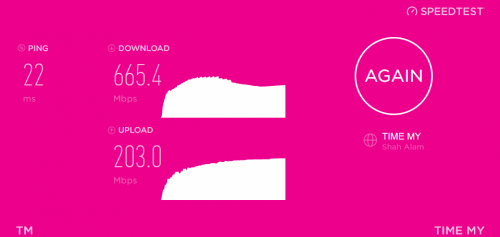
Well, TM Speedtest is using Ookla too and doesn't seem to be rigged. It just happens some connections within Malaysia are still okay. I can get good results with TIME Speedtest and fast.com that matches TM Speedtest now even though other speedtest and downloads are less than 50Mbps.

user posted image

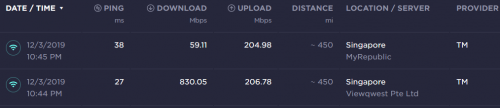
Even two servers in Singapore give way different results

user posted image

Can actually prove that TM Speedtest is accurate/not rigged. It shows 90+Mbps result if I purposely cap the connection between PC and router to 100Mbps. It just only test connection to KL server and does not represent the speed obtainable when connecting to other countries. For that we have to use speedtest servers located in other countries.

This post has been edited by AV_2018: Dec 3 2019, 11:21 PM
AV_2018
post Dec 4 2019, 11:13 AM

Casual
***
Junior Member
451 posts

Joined: Apr 2018
QUOTE(Martha_Fokker @ Dec 4 2019, 11:04 AM)
I did all tests on speedtest.net with local servers located both in K.L. and Sabah and got less than 1 mbps down.
Compared to the TM Speedtest site located in KL, which showed my speed at 757 mbps.

I admit that saying their results are rigged may have been overstating it but at the least, their results do not accurately represent what their customers will experience in actual use even if they just browse local sites. Most internet users will probably access foreign sites as well.

If they wanted to give their customers accurate measurements of service quality, they would make their site included tests from foreign servers as well, seeing as it is powered by ookla anyway. sad.gif
*
The TM Speedtest only can use for testing if Unifi is installed and configured properly in the house. Only shows speed achievable from PC to TM's network. Doesn't test TM's network routing to other places. Same thing with other ISPs speedtest sites such as Time and Maxis. Maybe they can't put a speedtest to other servers on their own sites unless the server is also owned by themselves.

Usually I can achieve same results as TM server when connecting to elsewhere in KL/Kuching/Singapore but not when TM has some routing issues.

This post has been edited by AV_2018: Dec 4 2019, 11:16 AM
AV_2018
post Feb 27 2020, 02:25 PM

Casual
***
Junior Member
451 posts

Joined: Apr 2018
Speedtest of 100Mbps Unifi with TV STB plan from Kuching
Attached Image

This post has been edited by AV_2018: Feb 27 2020, 02:26 PM
AV_2018
post May 1 2020, 12:32 PM

Casual
***
Junior Member
451 posts

Joined: Apr 2018
Location: Kuching
Server: Kuching
user posted image

Looks like Kuching speedtest server now has direct connection to TM's network and doesn't need to go through peninsula.
AV_2018
post Aug 27 2020, 12:15 PM

Casual
***
Junior Member
451 posts

Joined: Apr 2018
QUOTE(Vyrnach @ Aug 27 2020, 01:13 AM)
Internet down again?
*
According to my router logs, Unifi was disconnected two times last night. First time PPP was disconnected at exactly 1 AM. Second time within same hour, the Ethernet link from ONU/BTU was totally down for about 10 minutes. Since it started at exactly 1 AM and the ONU/BTU even seems to have restarted, I'm guessing TM did something.


Change to:
| Lo-Fi Version
0.1004sec    0.43    7 queries    GZIP Disabled
Time is now: 7th December 2025 - 03:04 AM