Outline ·
[ Standard ] ·
Linear+
Google NEXUS 7 Official Thread @V5, V5!!Now with Android 4.3
|
ericlaiys
|
 Feb 2 2013, 10:36 PM Feb 2 2013, 10:36 PM
|

|
QUOTE(~OhIsee~ @ Feb 2 2013, 10:12 PM) me oso new user, add me. btw anyone here using power bank wit nexus 7? what brand u use? I'm using powerbank 12000Amp. But my advise is get bigger than mine. Even with 12000Amp also cannot finish charge n7 if from 0% |
|
|
|
|
|
ericlaiys
|
Feb 3 2013, 12:25 PM
|
|
|
QUOTE(swing123 @ Feb 3 2013, 11:18 AM) hi, have not followed this thread for long. I need advice from kind nexus-ians here and this topic may have been discussed before but too many threads/discussions on Nexus 7 here and i know where to search. I have three Nexus 7 wifi 16gb at home, for my 3 kids. One is US spec the other two are local specs. There was a 4.2.1 firmware update pushed to the US Nexus and I installed it couple of months back. AFter the update, some of my downloaded Apps went haywire and the processing time has gone tremedously slow, including the boot up time. The other two Nexus 7 are still running on 4.2 and the boot up time is very fast and all the apps are running normal. What should I do, re-set the firmware back to 4.2 or was there any patch being released to fix the 4.2.1 that I am not aware of? Hope some kind soul can help here. Thanks in advance. Factory default will fix your issue. I'm using US set -Wifi 16GB as well. After factory default and installed 4.2.1, no more having issue. Some app got issue, just uninstall as they may not compatible with 4.2.1 |
|
|
|
|
|
ericlaiys
|
Feb 3 2013, 12:28 PM
|
|
|
I notice sometimes my N7 love to shutdown each time i unplug USB. Only happen when unplugThink stickmount got bug. anyone experience same issue?
|
|
|
|
|
|
ericlaiys
|
Feb 3 2013, 12:32 PM
|
|
|
QUOTE(swing123 @ Feb 3 2013, 12:29 PM) thanks. Just to clarify, i just "re-set" back to factory default and then re-install 4.2.1? where to download the 4.2.1 update? the last time it was push to me. Strangely, the other two local sets nexus 7 is still on 4.2 and no firmware update was pushed to the sets. You need to clear the cache. 1. Go to Settings -> Apps -> All 2. Find Google Services Framework. 3. Tap on Force Stop. 4. Select Clear Data. 5. Head back to the Nexus 7’s Settings, go to About, and check for a System Update. |
|
|
|
|
|
ericlaiys
|
Feb 3 2013, 06:57 PM
|
|
|
QUOTE(swing123 @ Feb 3 2013, 01:05 PM) not much improvement, and after booting, a pop up said "Process system isn't responding, do you want to close it". After I click OK, i can continue to run the apps. Is there anyway I can revert back to 4.2? My other two Nexus 7 are still running on 4.2, it operates seamlessly so far. You can flash it anytime. You can get Google official ROM from here:- https://developers.google.com/android/nexus/imagesBut before that, you need to use rootkit and backup from here:- http://www.wugfresh.com/dev/nexus-root-toolkit/ |
|
|
|
|
|
ericlaiys
|
Feb 8 2013, 11:07 AM
|
|
|
|
|
|
|
|
|
ericlaiys
|
Feb 8 2013, 11:15 AM
|
|
|
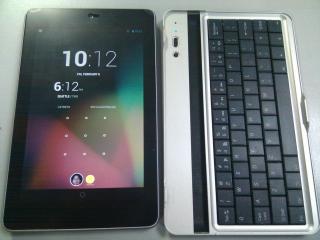
QUOTE(hyunterx @ Feb 8 2013, 11:11 AM) Nice keyboard dock you have there~ How much u bought? USD24 + free shipping. Ship direct from singapore. I check ebay is USD21+ . Mine arrived after a week so no need to wait so long. |
|
|
|
|
|
ericlaiys
|
Feb 12 2013, 12:05 PM
|
|
|
QUOTE(dinraxxx @ Feb 9 2013, 11:57 PM) I bought it and use it. You can refer to http://forum.lowyat.net/topic/2691423/+280Your link is a bit expensive. Ebay sell USD21+ . I bought it from http://dx.com/p/bg-7-rechargeable-wireless...er-black-175448. Just took a week to arrive from Singapore. Make my life easy with typing even though keyboard is small This post has been edited by ericlaiys: Feb 12 2013, 12:05 PM |
|
|
|
|
|
ericlaiys
|
Feb 12 2013, 12:09 PM
|
|
|
QUOTE(briantwj @ Feb 9 2013, 11:28 AM) Guys. Found a game that is quite new...juz release on January. Game name is Royal Revolt!...can dl for free in play store..nice to play using our nexus 7.  Nice game. Thanks |
|
|
|
|
|
ericlaiys
|
Feb 12 2013, 12:36 PM
|
|
|
QUOTE(teckyang97 @ Feb 12 2013, 12:09 PM) Which website you buy from? Bought it from here:- http://dx.com/p/bg-7-rechargeable-wireless...er-black-175448. |
|
|
|
|
|
ericlaiys
|
Feb 13 2013, 10:31 AM
|
|
|
QUOTE(m_chaoz007 @ Feb 13 2013, 12:29 AM) eh bro..this item from spore?i thought it is from US since the currency is in usd..what is the payment method?paypal? Well, i think they got product everywhere. So depend on you nearest location. For me SG is better as if ship from Hong Kong/China would take almost a month I paid using paypal but you can pay by using credit card |
|
|
|
|
|
ericlaiys
|
Feb 13 2013, 10:38 AM
|
|
|
QUOTE(domokun @ Feb 13 2013, 01:28 AM) anyone update this manually? I'm still waiting for the server to push.  |
|
|
|
|
|
ericlaiys
|
Feb 13 2013, 10:42 AM
|
|
|
QUOTE(mmohdnor @ Feb 13 2013, 10:38 AM) i see, i'll try it out then ...  thanks! Set to high, later your speaker blow out. Normally i use my xplode mini speaker :- http://www.groupon.my/deals/national-deal/...onics/715956268 (sample) |
|
|
|
|
|
ericlaiys
|
Feb 13 2013, 02:50 PM
|
|
|
QUOTE(m_chaoz007 @ Feb 13 2013, 02:04 PM) ok so how to select the SG region? No need select. They will send from there |
|
|
|
|
|
ericlaiys
|
Feb 13 2013, 02:55 PM
|
|
|
QUOTE(domokun @ Feb 13 2013, 01:28 AM)  cannot update. Failed on verification. Mine is 16GB Wifi..why failed?. Look like need to wait on official update |
|
|
|
|
|
ericlaiys
|
Feb 14 2013, 01:35 PM
|
|
|
Finally manage updated to 4.2.2. I need to Flash stock to 4.2.1 and unroot. Then force update.
|
|
|
|
|
|
ericlaiys
|
Feb 14 2013, 01:43 PM
|
|
|
But cannot root it.  |
|
|
|
|
|
ericlaiys
|
Feb 14 2013, 02:26 PM
|
|
|
QUOTE(gin&tonic @ Feb 14 2013, 01:58 PM) ok. Rooted. Just follow this steps:- http://www.ibtimes.co.uk/articles/434720/2...llybean-ota.htm |
|
|
|
|
|
ericlaiys
|
Feb 14 2013, 02:50 PM
|
|
|
QUOTE(gin&tonic @ Feb 14 2013, 02:40 PM) Why not root with Nexus 7 Toolkit? I using Nexus wugfresh root tookit but it say cannot. did not try nexus root toolkit v4. thought cannot.  |
|
|
|
|
|
ericlaiys
|
Feb 14 2013, 06:25 PM
|
|
|
QUOTE(CyberKewl @ Feb 14 2013, 06:16 PM) those who came from 4.2.1 rooted to 4.2.2 , does it wipe data after update and then reroot with this method?: http://www.teamandroid.com/2013/02/12/root...cwm-recovery/2/All my data is gone as i need to flash to factory stock and unroot. Previously root on stock rom cannot update. So no choice to do this step. After factory stock. Then apply an update and use the link method. So far so good and without issue. Realise google play is a bit different and toggle stuff. But stickmount still working after root is the most important.  This post has been edited by ericlaiys: Feb 14 2013, 06:25 PM This post has been edited by ericlaiys: Feb 14 2013, 06:25 PM |
|
|
|
|



 Quote
Quote



 0.0179sec
 0.49
0.49
 7 queries
 GZIP Disabled