

Zeppelin easier to use..
Change Your iPhone 5/4/ & iPad’s Carrier to Logo, IOS 6 supported. NO JAILBREAK! with logo
Change Your iPhone 5/4/ & iPad’s Carrier to Logo, IOS 6 supported. NO JAILBREAK! with logo
|
|
 Mar 14 2013, 09:25 AM Mar 14 2013, 09:25 AM
|
 
Senior Member
2,546 posts Joined: Apr 2012 From: I can be anywhere   
|
Zeppelin easier to use..
|
|
|
|
|
|
Mar 14 2013, 11:39 AM
|

Senior Member
7,501 posts Joined: Jun 2007 From: Kuala Lumpur 
|
QUOTE(whereis the love @ Mar 14 2013, 09:25 AM) Zeppelin easier to use.. Yup +1 |
|
|
Mar 14 2013, 12:53 PM
|

Senior Member
2,321 posts Joined: Sep 2008 From: Selangor
|
QUOTE(Xirality @ Feb 6 2013, 04:28 PM) Looks nice! Can send me without the 'case' word? Just learn how to create a transparent background .PNG file today, so here you are... This post has been edited by decavalera: Mar 14 2013, 01:01 PM Attached File(s)  EC.zip ( 1017bytes )
Number of downloads: 23
EC.zip ( 1017bytes )
Number of downloads: 23 |
|
|
Mar 14 2013, 03:09 PM
|
|
Senior Member
7,501 posts Joined: Jun 2007 From: Kuala Lumpur
|
QUOTE(decavalera @ Mar 14 2013, 12:53 PM) Just learn how to create a transparent background .PNG file today, so here you are... Nice design u got there |
|
|
Mar 14 2013, 04:21 PM
|
|
Senior Member
2,321 posts Joined: Sep 2008 From: Selangor
|
QUOTE(INGfusion @ Mar 14 2013, 03:09 PM) Nice design u got there Thanks, if i were you, i'll create the lunatik carrier logo bro... |
|
|
Mar 15 2013, 12:08 AM
|
|
Senior Member
7,501 posts Joined: Jun 2007 From: Kuala Lumpur
|
QUOTE(decavalera @ Mar 14 2013, 04:21 PM) Thanks, if i were you, i'll create the lunatik carrier logo bro... I don't know how to create  |
|
|
|
|
|
Mar 15 2013, 08:27 AM
|

Senior Member
2,296 posts Joined: Feb 2010
|
QUOTE(zul26 @ Mar 14 2013, 09:09 AM) yes it is..so this version does not support it?? I think so. I'm on 6.1.2 also, I couldn't change it.  |
|
|
Mar 15 2013, 09:33 AM
|

Junior Member
21 posts Joined: Apr 2012
|
QUOTE(harryfoo @ Mar 15 2013, 08:27 AM) I think so. I'm on 6.1.2 also, I couldn't change it. aiya..unlucky for us...i was so excited to change the carrier logo the other day.. |
|
|
Mar 15 2013, 12:06 PM
|
|
Senior Member
2,296 posts Joined: Feb 2010
|
QUOTE(zul26 @ Mar 15 2013, 09:33 AM) aiya..unlucky for us...i was so excited to change the carrier logo the other day.. Have you tried zeppelin? |
|
|
Mar 15 2013, 12:33 PM
|
|
Junior Member
21 posts Joined: Apr 2012
|
QUOTE(harryfoo @ Mar 15 2013, 12:06 PM) Have you tried zeppelin? nope..what is that?does it work? |
|
|
Mar 15 2013, 02:39 PM
|
|
Senior Member
2,321 posts Joined: Sep 2008 From: Selangor
|
QUOTE(zul26 @ Mar 15 2013, 12:33 PM) nope..what is that?does it work? That is a free jailbreak apps download from cydia which can easily change the carrier logo... |
|
|
Mar 15 2013, 02:48 PM
|
|
Junior Member
21 posts Joined: Apr 2012
|
QUOTE(decavalera @ Mar 15 2013, 02:39 PM) That is a free jailbreak apps download from cydia which can easily change the carrier logo... i see.. i didn't jailbreak my iphone..sorry i am new in apple's world.. |
|
|
Mar 16 2013, 01:31 AM
|
|
Senior Member
7,501 posts Joined: Jun 2007 From: Kuala Lumpur
|
nice huh ?


This post has been edited by INGfusion: Mar 16 2013, 10:42 AM |
|
|
|
|
|
Mar 16 2013, 12:59 PM
|
|
Senior Member
2,321 posts Joined: Sep 2008 From: Selangor
|
QUOTE(zul26 @ Mar 15 2013, 02:48 PM) i see.. i didn't jailbreak my iphone..sorry i am new in apple's world.. No prob.. I always tell my friends that just venture with the iPhone world to feel the stock iOS 1st. Then when they start to jb they'll know what the stock iOS is missing with lots of customization... |
|
|
Mar 16 2013, 01:49 PM
|

Senior Member
2,013 posts Joined: Sep 2009 From: Kuala Lumpur
|
awesome!!!
|
|
|
Mar 16 2013, 02:31 PM
|
|
Senior Member
7,501 posts Joined: Jun 2007 From: Kuala Lumpur
|
QUOTE(sasuke8678 @ Mar 16 2013, 01:49 PM) awesome!!! What so awesome !!!! |
|
|
Apr 29 2013, 09:56 PM
|

Junior Member
441 posts Joined: Feb 2012 From: @Kuala Lumpur 
|
does the work with ios 6.1.3? :/
|
|
|
May 15 2013, 09:24 AM
|
|
Junior Member
21 posts Joined: Apr 2012
|
QUOTE(sugen @ Jan 15 2013, 03:27 PM) Support Maxis, DIGI, Celcom etc hello..now i am having problem to downgrade to maxis 14.1 back.. i try to use the original or 14.1 carrier..but it says that it has expired..i need help .. please..Here i created some logo on my iphone 5. You can download these files at the bottom & unzip the picture file 1.)iphone5.png. 2.)apple log.png 3.)apple iphone.png 4.)transformers.png 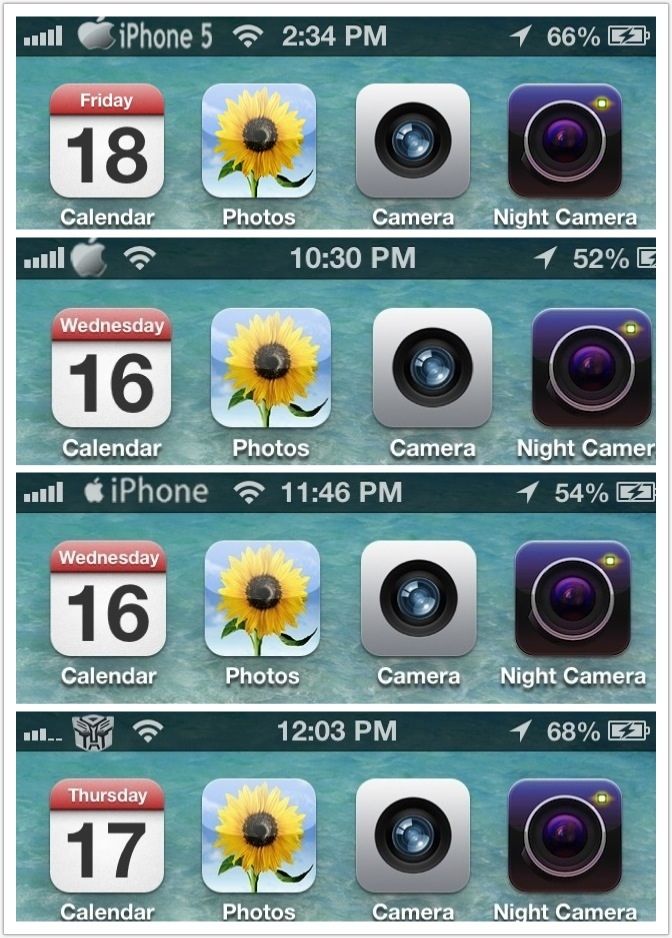 CustomCarrierLogo allows you to customize your iOS device’s carrier logo to something totally different. This is limited to devices that can support data/phone service, so no WiFi-only devices. Some carriers might not be supported because they do not use images for their logos (e.g. Sprint). The good part is that CustomCarrierLogo works WITHOUT a jailbreak on any firmware, so iPhone 5’s and iPad LTE’s work. If you do not see your device/carrier within CarrierEditor in the drop down lists, it means that your device is incompatible. Jump over the break to check out how to use CarrierEditor to change your carrier logo… NOTE: to learn how to enable numeric signal strength on your iPhone, check out this post NOTE: Mac users, check out this post 1. Download CustomCarrierLogo http://api.viglink.com/api/click?format=go..._13582346625853 2. Unzip the file 3. Load CustomCarrierLogo 4. Click ‘Let’s Get Started’  5. On your iOS devices go to Settings > General > About > scroll down until you find ‘Carrier’  6. Go back to CustomCarrierLogo, enter your carrier version, choose your iOS device and carrier and choose what type of logo you want. An image or text.[COLOR=red] (Select Celcom, DIGI, MAXIS etc) 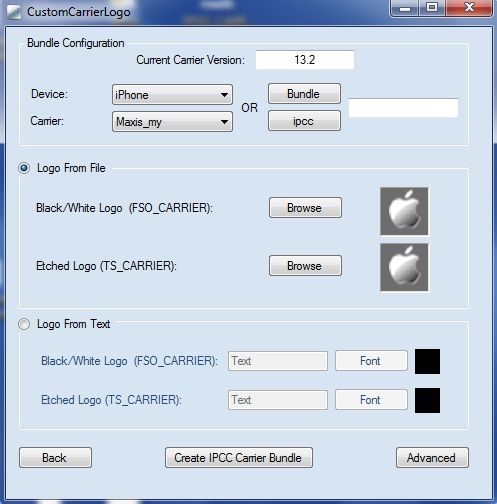 7. Click ‘Create IPCC Carrier Bundle’ 8. You will notice two new files on your desktop. In this case ‘ATT_US_13.3.ipcc’ and ‘ATT_US_original.ipcc’.  9. Plug-in your device to your PC and load iTunes. 10. Hold Shift and click on ‘Restore iPhone’.  11. From the drop-down menu in the bottom right corner, slect ‘iPhone/iPad carrier configuration file ( .ipcc )’ and select the appropriate .ipcc file ( not the original )   12. Reboot your iPhone ( or turn on/off airplane mode ) 13. Enjoy. NOTE: to reverse the process, repeat steps 10-12 but this time choose the ‘ATT_US_original.ipcc’ file |
|
|
May 23 2013, 03:49 PM
|

All Stars
21,308 posts Joined: Jan 2003 From: Kuala Lumpur
|
Will the E/3G/LTE be replaced as well ?
|
|
|
May 23 2013, 04:31 PM
|

Junior Member
286 posts Joined: Nov 2007 From: Digiworld
|
QUOTE(ronnie @ May 23 2013, 03:49 PM) Will the E/3G/LTE be replaced as well ? Nope, i don't think so...only network logo can be replace by thread starter guide. |
| Change to: |  0.0290sec 0.0290sec
 0.32 0.32
 6 queries 6 queries
 GZIP Disabled GZIP Disabled
Time is now: 3rd December 2025 - 09:11 AM |
 Quote
Quote