

why the carrier font so small? so big different compare to the original.. >.<"
Change Your iPhone 5/4/ & iPad’s Carrier to Logo, IOS 6 supported. NO JAILBREAK! with logo
Change Your iPhone 5/4/ & iPad’s Carrier to Logo, IOS 6 supported. NO JAILBREAK! with logo
|
|
 Jan 22 2013, 10:55 PM Jan 22 2013, 10:55 PM
|
 
Junior Member
343 posts Joined: May 2009 
|
why the carrier font so small? so big different compare to the original.. >.<"
|
|
|
|
|
|
Jan 22 2013, 11:19 PM
|

Junior Member
5 posts Joined: Nov 2012 
|
Yup. Why so small? How reset back to the original carrier?
|
|
|
Jan 23 2013, 11:05 AM
|

Junior Member
4 posts Joined: Jun 2012
|
wow,can change operator logo.. how to change it back to normal?
|
|
|
Jan 23 2013, 01:47 PM
|

Senior Member
1,357 posts Joined: Jul 2007
|
u can change the font size rite on the program itself.. how big and how small u like..
QUOTE(MrGrape @ Jan 22 2013, 11:19 PM) Yup. Why so small? How reset back to the original carrier?  |
|
|
Jan 31 2013, 12:07 AM
|

Senior Member
2,171 posts Joined: Oct 2004 From: Selangor
|
does it work for IOS 6.1? I tried but doesn't work.
maxis carrier 14.0 by the way... |
|
|
Feb 3 2013, 12:31 AM
|

Senior Member
2,321 posts Joined: Sep 2008 From: Selangor
|
For those who got prob, not sure this old thread will do any help or not.
|
|
|
|
|
|
Feb 5 2013, 04:56 PM
|
|
Senior Member
2,321 posts Joined: Sep 2008 From: Selangor
|
Since my casing is from element case. I custom made it's logo & use Zeppelin
 |
|
|
Feb 6 2013, 03:39 PM
|
|
Senior Member
1,357 posts Joined: Jul 2007
|
Nice logo..
QUOTE(decavalera @ Feb 5 2013, 04:56 PM) Since my casing is from element case. I custom made it's logo & use Zeppelin |
|
|
Feb 6 2013, 03:49 PM
|

All Stars
10,688 posts Joined: Jan 2005
|
Sorry, wrong thread
  This post has been edited by gengstapo: Feb 6 2013, 03:55 PM |
|
|
Feb 6 2013, 04:28 PM
|
 
Moderator
12,176 posts Joined: Sep 2009 
|
QUOTE(decavalera @ Feb 5 2013, 04:56 PM) Since my casing is from element case. I custom made it's logo & use Zeppelin Looks nice! Can send me without the 'case' word?  |
|
|
Feb 6 2013, 07:42 PM
|
|
Senior Member
2,321 posts Joined: Sep 2008 From: Selangor
|
QUOTE(Xirality @ Feb 6 2013, 04:28 PM) Looks nice! Can send me without the 'case' word? Thanks. How to send, PM me? I only used the windows stock paint software. But bare in mind that the background is black, not transparent. |
|
|
Feb 6 2013, 07:47 PM
|

Senior Member
2,119 posts Joined: Apr 2012
|
Lol if now use jb even easier and less confusing..Zeppelin is the like one of the best tweak from cydia..haha
|
|
|
Feb 8 2013, 03:39 PM
|

Junior Member
123 posts Joined: Jan 2013
|
nice one
 |
|
|
|
|
|
Feb 21 2013, 08:40 AM
|
|
Junior Member
84 posts Joined: Apr 2009
|
i found mine not working, any certified that still working on 6.1.1?
maxis btw. |
|
|
Feb 27 2013, 04:24 PM
|

Junior Member
16 posts Joined: Jan 2013
|
NICE..have to try it!!
 |
|
|
Feb 28 2013, 01:21 AM
|
 
Staff
9,187 posts Joined: Aug 2010 
|
thanks bro for sharing, its good stuff indeed
|
|
|
Mar 13 2013, 09:54 AM
|
|
Junior Member
21 posts Joined: Apr 2012
|
QUOTE(sugen @ Jan 15 2013, 03:27 PM) Support Maxis, DIGI, Celcom etc i dont know why i cannot change my carrier logo..i tried it on my iphone 5 several times..need help from the sifu here..is it because i choose automatic network selection ?Here i created some logo on my iphone 5. You can download these files at the bottom & unzip the picture file 1.)iphone5.png. 2.)apple log.png 3.)apple iphone.png 4.)transformers.png 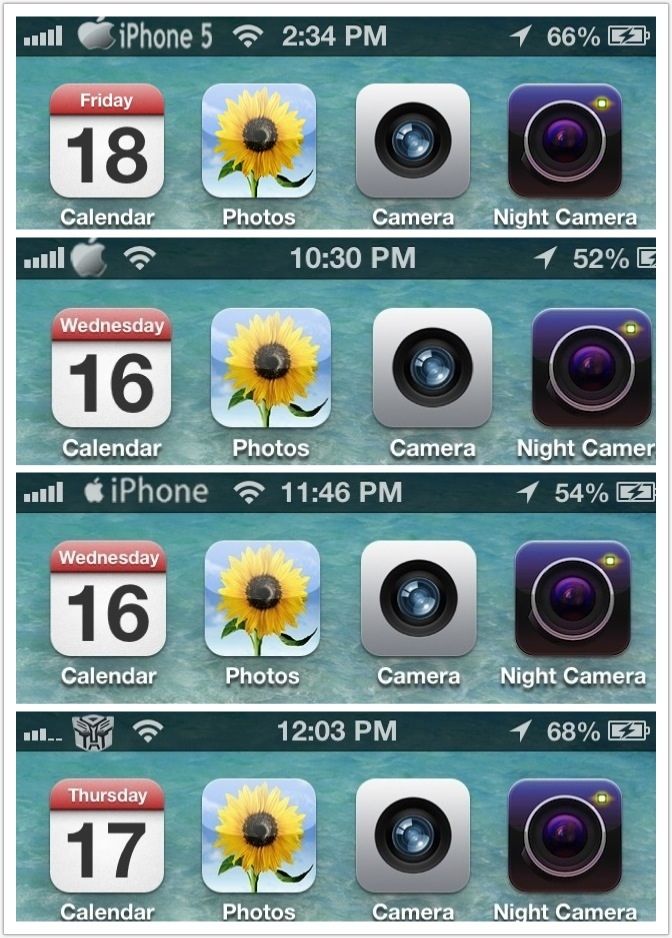 CustomCarrierLogo allows you to customize your iOS device’s carrier logo to something totally different. This is limited to devices that can support data/phone service, so no WiFi-only devices. Some carriers might not be supported because they do not use images for their logos (e.g. Sprint). The good part is that CustomCarrierLogo works WITHOUT a jailbreak on any firmware, so iPhone 5’s and iPad LTE’s work. If you do not see your device/carrier within CarrierEditor in the drop down lists, it means that your device is incompatible. Jump over the break to check out how to use CarrierEditor to change your carrier logo… NOTE: to learn how to enable numeric signal strength on your iPhone, check out this post NOTE: Mac users, check out this post 1. Download CustomCarrierLogo http://api.viglink.com/api/click?format=go..._13582346625853 2. Unzip the file 3. Load CustomCarrierLogo 4. Click ‘Let’s Get Started’  5. On your iOS devices go to Settings > General > About > scroll down until you find ‘Carrier’  6. Go back to CustomCarrierLogo, enter your carrier version, choose your iOS device and carrier and choose what type of logo you want. An image or text.[COLOR=red] (Select Celcom, DIGI, MAXIS etc) 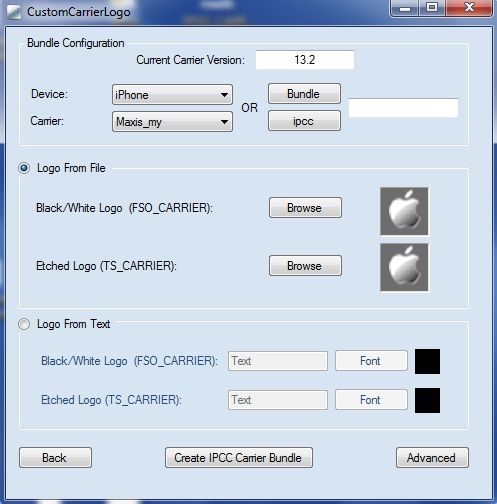 7. Click ‘Create IPCC Carrier Bundle’ 8. You will notice two new files on your desktop. In this case ‘ATT_US_13.3.ipcc’ and ‘ATT_US_original.ipcc’.  9. Plug-in your device to your PC and load iTunes. 10. Hold Shift and click on ‘Restore iPhone’.  11. From the drop-down menu in the bottom right corner, slect ‘iPhone/iPad carrier configuration file ( .ipcc )’ and select the appropriate .ipcc file ( not the original )   12. Reboot your iPhone ( or turn on/off airplane mode ) 13. Enjoy. NOTE: to reverse the process, repeat steps 10-12 but this time choose the ‘ATT_US_original.ipcc’ file |
|
|
Mar 13 2013, 04:46 PM
|

Senior Member
2,296 posts Joined: Feb 2010
|
QUOTE(zul26 @ Mar 13 2013, 09:54 AM) i dont know why i cannot change my carrier logo..i tried it on my iphone 5 several times..need help from the sifu here..is it because i choose automatic network selection ? Is your phone on 6.1.2? |
|
|
Mar 14 2013, 09:09 AM
|
|
Junior Member
21 posts Joined: Apr 2012
|
QUOTE(harryfoo @ Mar 13 2013, 04:46 PM) Is your phone on 6.1.2? yes it is..so this version does not support it?? |
|
|
Mar 14 2013, 09:18 AM
|

Junior Member
84 posts Joined: Oct 2010
|
Amazing works, thank you very much for your sharing...
 |
| Change to: |  0.0232sec 0.0232sec
 0.62 0.62
 6 queries 6 queries
 GZIP Disabled GZIP Disabled
Time is now: 3rd December 2025 - 09:15 AM |
 Quote
Quote