

 Mar 13 2013, 09:54 AM


QUOTE(sugen @ Jan 15 2013, 03:27 PM)
Support Maxis, DIGI, Celcom etc
Here i created some logo on my iphone 5. You can download these files at the bottom & unzip the picture file
1.)iphone5.png.
2.)apple log.png
3.)apple iphone.png
4.)transformers.png
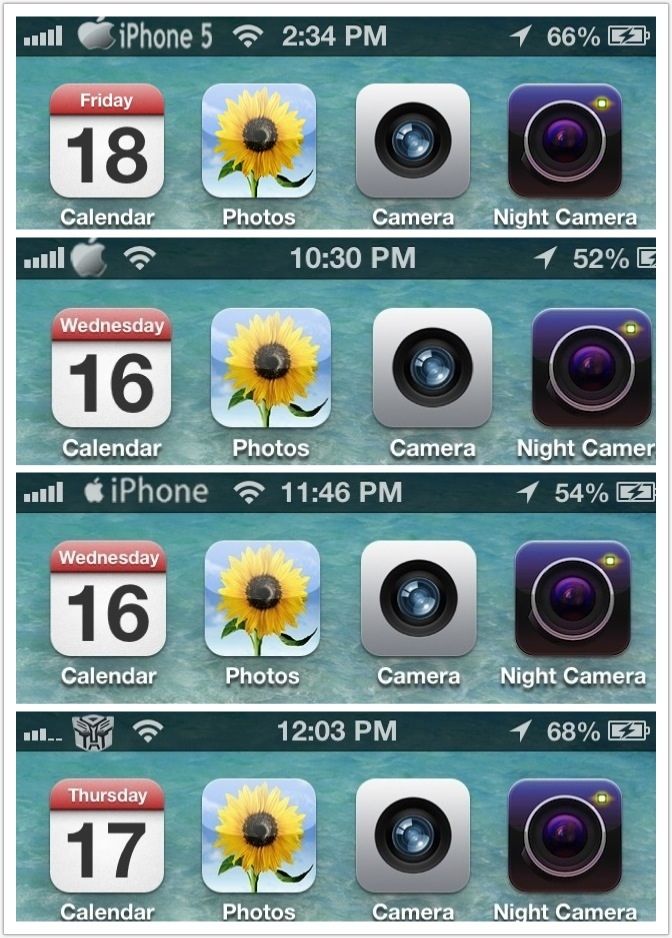
CustomCarrierLogo allows you to customize your iOS device’s carrier logo to something totally different. This is limited to devices that can support data/phone service, so no WiFi-only devices. Some carriers might not be supported because they do not use images for their logos (e.g. Sprint). The good part is that CustomCarrierLogo works WITHOUT a jailbreak on any firmware, so iPhone 5’s and iPad LTE’s work. If you do not see your device/carrier within CarrierEditor in the drop down lists, it means that your device is incompatible.
Jump over the break to check out how to use CarrierEditor to change your carrier logo…
NOTE: to learn how to enable numeric signal strength on your iPhone, check out this post
NOTE: Mac users, check out this post
1. Download CustomCarrierLogo
http://api.viglink.com/api/click?format=go..._13582346625853
2. Unzip the file
3. Load CustomCarrierLogo
4. Click ‘Let’s Get Started’

5. On your iOS devices go to Settings > General > About > scroll down until you find ‘Carrier’

6. Go back to CustomCarrierLogo, enter your carrier version, choose your iOS device and carrier and choose what type of logo you want. An image or text.[COLOR=red]
(Select Celcom, DIGI, MAXIS etc)
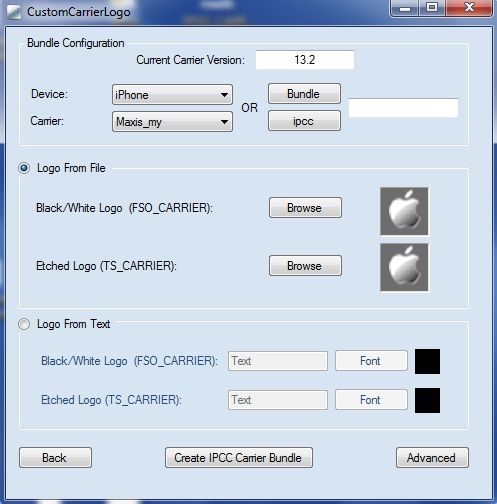
7. Click ‘Create IPCC Carrier Bundle’
8. You will notice two new files on your desktop. In this case ‘ATT_US_13.3.ipcc’ and ‘ATT_US_original.ipcc’.

9. Plug-in your device to your PC and load iTunes.
10. Hold Shift and click on ‘Restore iPhone’.

11. From the drop-down menu in the bottom right corner, slect ‘iPhone/iPad carrier configuration file ( .ipcc )’ and select the appropriate .ipcc file ( not the original )


12. Reboot your iPhone ( or turn on/off airplane mode )
13. Enjoy.
NOTE: to reverse the process, repeat steps 10-12 but this time choose the ‘ATT_US_original.ipcc’ file

i dont know why i cannot change my carrier logo..i tried it on my iphone 5 several times..need help from the sifu here..is it because i choose automatic network selection ?Here i created some logo on my iphone 5. You can download these files at the bottom & unzip the picture file
1.)iphone5.png.
2.)apple log.png
3.)apple iphone.png
4.)transformers.png
CustomCarrierLogo allows you to customize your iOS device’s carrier logo to something totally different. This is limited to devices that can support data/phone service, so no WiFi-only devices. Some carriers might not be supported because they do not use images for their logos (e.g. Sprint). The good part is that CustomCarrierLogo works WITHOUT a jailbreak on any firmware, so iPhone 5’s and iPad LTE’s work. If you do not see your device/carrier within CarrierEditor in the drop down lists, it means that your device is incompatible.
Jump over the break to check out how to use CarrierEditor to change your carrier logo…
NOTE: to learn how to enable numeric signal strength on your iPhone, check out this post
NOTE: Mac users, check out this post
1. Download CustomCarrierLogo
http://api.viglink.com/api/click?format=go..._13582346625853
2. Unzip the file
3. Load CustomCarrierLogo
4. Click ‘Let’s Get Started’
5. On your iOS devices go to Settings > General > About > scroll down until you find ‘Carrier’
6. Go back to CustomCarrierLogo, enter your carrier version, choose your iOS device and carrier and choose what type of logo you want. An image or text.[COLOR=red]
(Select Celcom, DIGI, MAXIS etc)
7. Click ‘Create IPCC Carrier Bundle’
8. You will notice two new files on your desktop. In this case ‘ATT_US_13.3.ipcc’ and ‘ATT_US_original.ipcc’.
9. Plug-in your device to your PC and load iTunes.
10. Hold Shift and click on ‘Restore iPhone’.
11. From the drop-down menu in the bottom right corner, slect ‘iPhone/iPad carrier configuration file ( .ipcc )’ and select the appropriate .ipcc file ( not the original )
12. Reboot your iPhone ( or turn on/off airplane mode )
13. Enjoy.
NOTE: to reverse the process, repeat steps 10-12 but this time choose the ‘ATT_US_original.ipcc’ file
 Quote
Quote

 0.0222sec
 0.62
0.62
 7 queries
 GZIP Disabled