Outline ·
[ Standard ] ·
Linear+
Tp LInk TL-MR3420 Owner CLub V2.5, need a pro here
|
noobandroid
|
 May 11 2013, 08:49 PM May 11 2013, 08:49 PM
|

|
QUOTE(digilife @ May 11 2013, 08:34 PM) Barrier Breaker is good, much better than Factory FW. But if you want the most stable, go for AA, but you dun get to see Network details, like Cell ID , Signal Percentage and Connection Status like HSDPA,HSPA+, DC-HSPA.  i never did check anything on that, wasnt very relative to me, thanks to the snailing speed of TM, anything faster than that is already considered great i was asking bout 30/30 reset thing, dont understand This post has been edited by noobandroid: May 11 2013, 08:50 PM |
|
|
|
|
|
noobandroid
|
May 15 2013, 03:24 PM
|
|
|
why my MF680 cant detect?!! 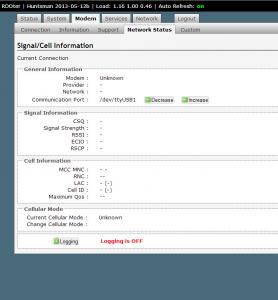
|
|
|
|
|
|
noobandroid
|
May 15 2013, 06:08 PM
|
|
|
QUOTE(digilife @ May 15 2013, 05:24 PM) It actually dun matters as you can get connected, just play around with the Increase/Decrease , you will finally get the infos after a few minutes or each increase/decrease Fyi, E372 is /dev/ttyUSB0FW Default is /dev/ttyUSB1 but i still get connected even if i dun touch the Increase/Decrease button  Those infos to masturbate your mind only can use but the network info not working |
|
|
|
|
|
noobandroid
|
May 15 2013, 08:07 PM
|
|
|
QUOTE(digilife @ May 15 2013, 06:18 PM) I am using MR3420 V1 HM12b now On bootup it shows nothing, Internet is fine, then i decrease to 0 and surf awhile later its shows all the infos........ [attachmentid=3440259] but im mf680 modem |
|
|
|
|
|
noobandroid
|
May 18 2013, 02:34 PM
|
|
|
i use rooter firmware again and again, never once does it satisfy me, now my router load is 4.87 3.35 1.67 with rooter, and modem mf680 couldnt detect properly in the "modem" tab
|
|
|
|
|
|
noobandroid
|
May 18 2013, 02:37 PM
|
|
|
|
|
|
|
|
|
noobandroid
|
May 18 2013, 03:18 PM
|
|
|
QUOTE(digilife @ May 18 2013, 02:50 PM) MF680 , = Communication Port : /dev/ttyUSB1done so, no detect in that tab, giving up on this firmware d. might as well go back to the normal ones |
|
|
|
|
|
noobandroid
|
May 19 2013, 10:25 PM
|
|
|
QUOTE(digilife @ May 19 2013, 07:11 PM) My Barrier Breaker flashed 1043ND is not getting any response via 192.168.1.1 ? what could be the reason/s ? what can i do to overcome/revive it ? Thanks guys  failsafe mode then use putty to access it |
|
|
|
|
|
noobandroid
|
May 20 2013, 05:48 AM
|
|
|
QUOTE(digilife @ May 20 2013, 01:15 AM) any instructions ? thanks |
|
|
|
|
|
noobandroid
|
May 26 2013, 04:49 PM
|
|
|
QUOTE(stevenlee @ May 26 2013, 04:42 PM) guy, how to hard reset openwrt on TL3420??? i do wrong setting on my openwrt nwo cannot connect to modme T__T |
|
|
|
|
|
noobandroid
|
Jun 11 2013, 10:06 PM
|
|
|
yeah mine too, random disconnect, even shuts down my modem
|
|
|
|
|
|
noobandroid
|
Jun 27 2013, 10:35 AM
|
|
|
weirdly that the mf680 on mr3420 V1 has some really terrible speed, direct into PC will get speeds that are usual, does it mean that my router kong d? but occasionally the PC connection will also go weirdo and then recover
|
|
|
|
|
|
noobandroid
|
Jul 2 2013, 04:44 PM
|
|
|
QUOTE(eehtsitna @ Jul 2 2013, 08:33 AM) Wow! Didnt know there is a thread dedicated to MR3420. I am new to the club! Using the router with stock setting at the moment. Can anyone recommend some good tweak for this router? Thanks in advance.  go openwrt 1st |
|
|
|
|
|
noobandroid
|
Jul 8 2013, 02:40 PM
|
|
|
QUOTE(danieltan @ Jul 8 2013, 10:43 AM) any1 still using MR3420 V1? which version should I install huntsman or blackwidow? you can install either 1, they just have different features in it, huntsman is newer and more features in experiments |
|
|
|
|
|
noobandroid
|
Jul 28 2013, 01:33 PM
|
|
|
anyone care to help me, my MF680 got corrupted and couldnt install driver on the PC when i plug into USB
|
|
|
|
|
|
noobandroid
|
Jul 28 2013, 07:07 PM
|
|
|
QUOTE(chuahcs79 @ Jul 28 2013, 06:10 PM) mind to explain more about the corrupted ? failed to install driver, happen suddenly and could not recover back  This post has been edited by noobandroid: Jul 28 2013, 07:56 PM
 |
|
|
|
|
|
noobandroid
|
Jul 29 2013, 10:43 AM
|
|
|
i tried stock, but couldnt distribute DHCP and 3G same time
|
|
|
|
|
|
noobandroid
|
Jul 29 2013, 12:43 PM
|
|
|
QUOTE(xphr3ak @ Jul 29 2013, 12:06 PM) Should i reset the router first before proceed? Thanks. i would recommend it highly, i got disconnected from the router during flash sometimes if not reset router, had to putty to clean it up |
|
|
|
|
|
noobandroid
|
Jul 29 2013, 09:00 PM
|
|
|
QUOTE(chuahcs79 @ Jul 28 2013, 08:11 PM) go here download the zte mf680 driver pack -> http://www.mediafire.com/?k19e6dsk6m8g6o3then guide the driver update by manually search for the driver pack u download,.. driver update manually for all that unrecognize driver then after that u can use MDMA or window mobile broadband to dial your zte mf680 do you happen to have to connect manager too? the content of the drive cant be accessed |
|
|
|
|
|
noobandroid
|
Jul 29 2013, 10:02 PM
|
|
|
QUOTE(chuahcs79 @ Jul 29 2013, 09:10 PM) couldnt detect the modem, oh well, MDMA then :/ |
|
|
|
|



 Quote
Quote

 0.0457sec
 0.88
0.88
 7 queries
 GZIP Disabled