QUOTE(perfect10 @ Nov 14 2013, 11:14 AM)
after you buy tl-mr3420 v2, u can follow step below to flash to rooter» Click to show Spoiler - click again to hide... «
Enjoy
This post has been edited by chuahcs79: Nov 14 2013, 02:58 PM
Tp LInk TL-MR3420 Owner CLub V2.5, need a pro here
|
|
Nov 14 2013, 02:56 PM
Return to original view | Post
#441
|
|
Elite
6,931 posts Joined: Apr 2011 From: Bolehland for sure ^_^ |
QUOTE(perfect10 @ Nov 14 2013, 11:14 AM) after you buy tl-mr3420 v2, u can follow step below to flash to rooter» Click to show Spoiler - click again to hide... « Enjoy This post has been edited by chuahcs79: Nov 14 2013, 02:58 PM |
|
|
|
|
|
Nov 15 2013, 06:44 PM
Return to original view | Post
#442
|
|
Elite
6,931 posts Joined: Apr 2011 From: Bolehland for sure ^_^ |
QUOTE(ikki_ahmad @ Nov 15 2013, 02:30 AM) Sifus, how can i get the speed when connect with the router same as the speed when direct connect modem to laptop? i get lte 30mbps when direct connect but when through router only 16-20mbps. im using latest huntsman red build on my mr3420 v2. default setting, and i connect using an ethernet cable. make sure u are connected to same CELL tower/ID,.. check under huntsman modem tab -> network status,and compare it to the direct plugin laptop CELL ID, check with MDMA if direct plugin, make sure both is same CELL ID and the RSCP/SNR( for 3G ) or RSRP ( for 4G ) is same , these number lowest = better |
|
|
Nov 15 2013, 09:47 PM
Return to original view | Post
#443
|
|
Elite
6,931 posts Joined: Apr 2011 From: Bolehland for sure ^_^ |
QUOTE(Skylinestar @ Nov 15 2013, 09:08 PM) My power adaptor for MR3420 router just failed today. if you claim warranty failed,Bought from CZone LYP from May 2012. Already exceed 1 year warranty from shop. However, TPLink gives 2 year warranty, isn't it? I still have the original receipt. EDIT: http://www.tp-link.com.my/support/service-centers/ Service Center Address: 4-20, 4th floor, Plaza Low Yat, off Jalan Bukit Bintang, 55100 Kuala Lumpur. Service center in LYP? really so convenient? Anyone go for RMA before? How's the customer service? just buy a premium power adapter with 12V / 2A ( which only cost RM30-RM35 in penang here ) ,.. then is will provide enough power to your mr3420 & your usb LTE modem... or just get a power adapter from p1 modem DX-230, that p1 modem model come with 12V / 2A power adapter fit nicely into our mr3420 V1 & V2,.. This is p1 DX-230 output : 12v / 2A power adapter looks like base on the ROOTER have mention the shortages of power and one of the best solution too This post has been edited by chuahcs79: Nov 15 2013, 09:59 PM |
|
|
Nov 15 2013, 11:41 PM
Return to original view | Post
#444
|
|
Elite
6,931 posts Joined: Apr 2011 From: Bolehland for sure ^_^ |
QUOTE(fuelsave @ Nov 15 2013, 11:34 PM) Wondering my mr3420 v2 flashed to huntsmen cant detect my e3276 modem, wondering if flas back to ori firmware will work better?? Yesterday was ok, but today cant connect, but if bring the modem plug direct to pc its ok can connect have u try to reboot your router -> go to modem tab -> custom -> paste this AT COMMAND ( AT^SETPORT="A1,A2;10,12,16,13,A1,A2") -> click submit -> wait for a short while to see your modem connected ? |
|
|
Nov 16 2013, 12:35 AM
Return to original view | Post
#445
|
|
Elite
6,931 posts Joined: Apr 2011 From: Bolehland for sure ^_^ |
QUOTE(fuelsave @ Nov 16 2013, 12:18 AM) owh bro tried already it show huawei, but no details.......type that command, but its nothing come out on the box below that AT command is setting up port and to disable some unnecessary service to improve stability in E3276 according to Mr Blacktubi ,and so the rooter able to recognize your E3276 afterwards,. after enter the commands, your rooter suppose to be able to dial , so your E3276 can dial ? This post has been edited by chuahcs79: Nov 16 2013, 12:36 AM |
|
|
Nov 16 2013, 12:52 AM
Return to original view | Post
#446
|
|
Elite
6,931 posts Joined: Apr 2011 From: Bolehland for sure ^_^ |
QUOTE(fuelsave @ Nov 16 2013, 12:51 AM) bro tried already, its either showing "Waiting for data" have you try to reboot the router again ? or Modem: Unknown It wont recognize the E3276 so it wont dial lo......i cant get it to recognize in the first place I already increase to USB2 where it was detected yesterday and worked well..today cannot already |
|
|
|
|
|
Nov 16 2013, 12:54 AM
Return to original view | Post
#447
|
|
Elite
6,931 posts Joined: Apr 2011 From: Bolehland for sure ^_^ |
|
|
|
Nov 16 2013, 01:06 AM
Return to original view | Post
#448
|
|
Elite
6,931 posts Joined: Apr 2011 From: Bolehland for sure ^_^ |
QUOTE(gastacopz @ Nov 16 2013, 12:57 AM) Quite long...only 12am disconnect.. Noticed it today as I recall last note also same time did you run any CMD command prompt ping -t command in your computer/ connected device to the rooter ?Already enabled that setting.. i did normally run CMD ping 8.8.8.8 -t in my computer,.. then guess the firewall in rooter take that as SYN-flood attack, LOL,. so i disable that option under network -> firewall -> untick the syn-flood protection -> save and apply and finally my rooter is no longer Disconnected everytime after running 18~24hour anymore,. This post has been edited by chuahcs79: Nov 16 2013, 01:10 AM |
|
|
Nov 16 2013, 01:08 AM
Return to original view | Post
#449
|
|
Elite
6,931 posts Joined: Apr 2011 From: Bolehland for sure ^_^ |
QUOTE(fuelsave @ Nov 16 2013, 01:02 AM) So sad, bro rebooted many times, reset the device n reentry the setting.but same same so far i know that only certain batch E3276 can work with the original stock firmware,..for futher detail on that. i guess u better contact your modem seller for futher confirm information my E3276 cannot work at all with all the stock firmware including the latest beta version mr3420v2_en_3_13_30_up_boot(130314)Beta.bin This post has been edited by chuahcs79: Nov 16 2013, 01:08 AM |
|
|
Nov 16 2013, 01:43 AM
Return to original view | Post
#450
|
|
Elite
6,931 posts Joined: Apr 2011 From: Bolehland for sure ^_^ |
|
|
|
Nov 16 2013, 05:32 PM
Return to original view | Post
#451
|
|
Elite
6,931 posts Joined: Apr 2011 From: Bolehland for sure ^_^ |
QUOTE(blacktubi @ Nov 16 2013, 12:00 PM) Here is the huntsman for TL-MR3420 V2 : it contain huntsman from 2013-06-03 until now,. the whole huntsman packages This post has been edited by chuahcs79: Nov 16 2013, 05:33 PM |
|
|
Nov 16 2013, 05:36 PM
Return to original view | Post
#452
|
|
Elite
6,931 posts Joined: Apr 2011 From: Bolehland for sure ^_^ |
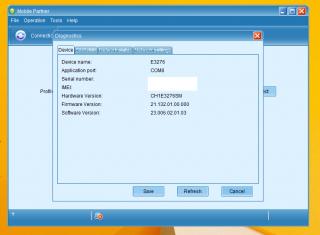
QUOTE(lpc26 @ Nov 16 2013, 01:49 PM) I'm running 10-16 red with MR3420v2, modem can detect but can't dial i am using the latest red version of huntman 2013-11-10red use that AT command result ERROR. my e3276 firmware is 21.132.01.00.000 / software ver. 23.006.02.01.03 as well so far it is working fine now, This post has been edited by chuahcs79: Nov 16 2013, 05:36 PM |
|
|
Nov 16 2013, 05:42 PM
Return to original view | Post
#453
|
|
Elite
6,931 posts Joined: Apr 2011 From: Bolehland for sure ^_^ |
|
|
|
|
|
|
Nov 16 2013, 05:48 PM
Return to original view | Post
#454
|
|
Elite
6,931 posts Joined: Apr 2011 From: Bolehland for sure ^_^ |
QUOTE(lpc26 @ Nov 16 2013, 05:45 PM) no facing disconnect, only when power off the router, need to take out the modem, then on back wait til the router finished boot up then only plug in the modem. how long your connection will last before it disconnected ? so u have to wait for router boot up fully first before plugin the E3276 |
|
|
Nov 16 2013, 05:54 PM
Return to original view | Post
#455
|
|
Elite
6,931 posts Joined: Apr 2011 From: Bolehland for sure ^_^ |
QUOTE(lpc26 @ Nov 16 2013, 05:52 PM) not sure, not yet fully tested. i am just curious to know whether after it disconnected will the blackwidow firmware able to auto reconnect the connecttion,ya if the modem plug with the router when bootup, unable to log in into router interface and unable to detect the modem also. so far the latest huntsman not able to do so for my E3276 |
|
|
Nov 16 2013, 06:04 PM
Return to original view | Post
#456
|
|
Elite
6,931 posts Joined: Apr 2011 From: Bolehland for sure ^_^ |
|
|
|
Nov 16 2013, 06:09 PM
Return to original view | Post
#457
|
|
Elite
6,931 posts Joined: Apr 2011 From: Bolehland for sure ^_^ |
|
|
|
Nov 16 2013, 06:14 PM
Return to original view | Post
#458
|
|
Elite
6,931 posts Joined: Apr 2011 From: Bolehland for sure ^_^ |
QUOTE(lpc26 @ Nov 16 2013, 06:11 PM) which version huntsman yo are using with that AT COMMAND ?for me, i am using the latest red version, after i finish flashed i reboot the router, and as soon as router is ready, i direct login LuCI and input that AT COMMAND first,. and after 10~20 second the E3276 will be dial in my case, |
|
|
Nov 16 2013, 06:19 PM
Return to original view | Post
#459
|
|
Elite
6,931 posts Joined: Apr 2011 From: Bolehland for sure ^_^ |
QUOTE(lpc26 @ Nov 16 2013, 06:15 PM) I had done your step, but at the end its either GATEWAY ERROR at the web or ERROR output at the AT command dialog. it is quite weird, since both same router, same modem and yet same firmware,let me try out the blackwidow and see whether it will give me stable connection with auto reconnect once it DC |
|
|
Nov 16 2013, 07:11 PM
Return to original view | Post
#460
|
|
Elite
6,931 posts Joined: Apr 2011 From: Bolehland for sure ^_^ |
|
|
Topic ClosedOptions
|
| Change to: | 0.0479sec
0.73
7 queries
GZIP Disabled
Time is now: 13th December 2025 - 01:24 PM |