Welcome Guest ( Log In | Register )

Bump Topic Topic Closed RSS Feed
7 Pages < 1 2 3 4 5 > » Bottom

Outline · [ Standard ] · Linear+

 ○ Galaxy Nexus V21 ○, The Nexus Lineage | with Jelly Bean 4.2

views
     
djlah
post Jan 17 2013, 09:32 AM

Look at all my stars!!
*******
Senior Member
7,723 posts

Joined: Jan 2005
QUOTE(FoxSeaTiger @ Jan 17 2013, 08:55 AM)
Nokia is so stubborn to use android.

If they use it, I think samsung can't be like this day.
*
no choice, nokia choose microsoft executive as their ceo (must be benefit provide offer from MSFT to nokia). so no surprise when nokia kill Symbian and other platform n only 1 WP smartphone OS. CEO is most influence of company business direction. If nokia want to lead in mobile phone, first thing is fired the current CEO first sweat.gif sweat.gif

if nokia heavily focus on android and only 1 (no WP), samsung might smell no smoke. I'm sure there is still a lot of royal nokia fan but might using htc, samsung or others now.

This post has been edited by djlah: Jan 17 2013, 09:34 AM
djlah
post Jan 17 2013, 01:53 PM

Look at all my stars!!
*******
Senior Member
7,723 posts

Joined: Jan 2005
QUOTE(fallout @ Jan 17 2013, 12:57 PM)
I'm one of the loyal Nokia fan... haha
2 of my previous phone: Nokia (3310, N70)
3rd phone: Nexus
Ouch, don't wanna use MiUI... damn, I've been searching around and really no other apps that only offers this feature. Strange huh?
*
give me 5, I'm also 3310 user here drool.gif

QUOTE(Scavia @ Jan 17 2013, 01:29 PM)
Where you got the info about ubuntu os in feb. Link please? I want to read.
*
the announcement is about 2 weeks go. no download link yet, I believe. just wait for the official website n see.
source
djlah
post Jan 17 2013, 04:02 PM

Look at all my stars!!
*******
Senior Member
7,723 posts

Joined: Jan 2005
QUOTE(fallout @ Jan 17 2013, 03:46 PM)
thumbup.gif yeah!Too bad I've passed it to my mom and she dump it after keyboard problem
Still have my 6 years old N70 without a single problem... camera a bit dusty.

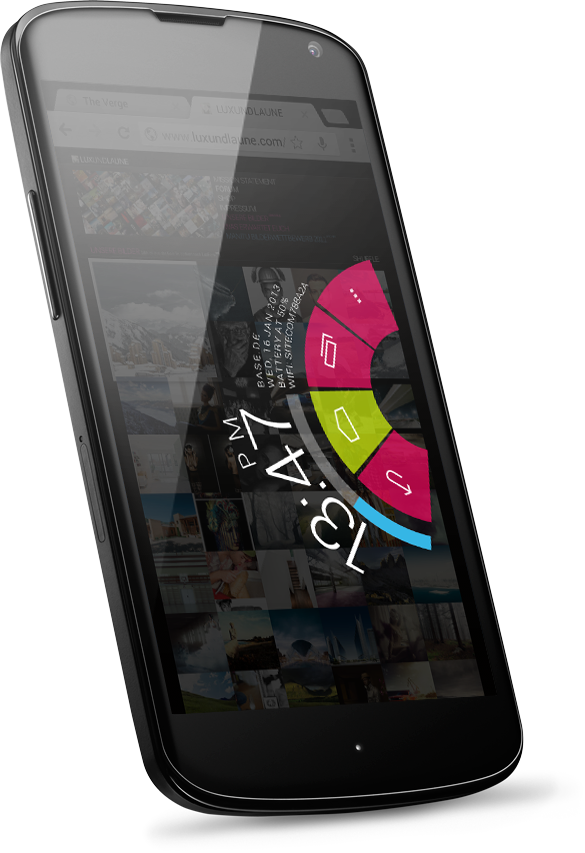
Btw, I'm waiting for Paranoid Android with their pie like navigation (with status)
*
haha.. brows.gif mine already in drawer many many years ago, mom also dun want in many years ago. biggrin.gif

same same here, waiting for PA update. as the video show, seem much faster response than lmt launcher app. n swipe up from bottom of screen are more practical than side screen.
djlah
post Jan 17 2013, 04:09 PM

Look at all my stars!!
*******
Senior Member
7,723 posts

Joined: Jan 2005
QUOTE(IwanAGP @ Jan 17 2013, 04:06 PM)
But I'm wondering... Whether that LMT Alike thingy works outside of expanded desktop mode. Because in expanded desktop mode, we can't pull down quick setting or notification bar.
*
maybe they will included 2fingers swipe down for notification bar?
djlah
post Jan 17 2013, 04:19 PM

Look at all my stars!!
*******
Senior Member
7,723 posts

Joined: Jan 2005
QUOTE(IwanAGP @ Jan 17 2013, 04:10 PM)
In expanded desktop mode, it's like the top bar is completely disabled. Can't get access to it with Nova Launcher gesture which I set to show notification when swyped down and quick setting when swyped up.
*
you're right. even add shortcut button, the notification center and quick settings also won't appear.
let's see, what's the alternative idea implement.
djlah
post Jan 17 2013, 05:43 PM

Look at all my stars!!
*******
Senior Member
7,723 posts

Joined: Jan 2005
QUOTE(mikeeeee @ Jan 17 2013, 05:19 PM)
bro, whats the name of that full month calendar widget u using ??

thanks
*
jorte calender


This post has been edited by djlah: Jan 17 2013, 05:49 PM
djlah
post Jan 17 2013, 05:58 PM

Look at all my stars!!
*******
Senior Member
7,723 posts

Joined: Jan 2005
QUOTE(Norameen @ Jan 17 2013, 05:56 PM)
thanks a lot djlah...yes i use jorte calender...any othet good calender?
*
Pure Grid calendar widget
djlah
post Jan 18 2013, 10:01 AM

Look at all my stars!!
*******
Senior Member
7,723 posts

Joined: Jan 2005
QUOTE(springfall @ Jan 17 2013, 10:06 PM)
i leave nfc off all the time, unless i balik uni
*
same here. always off it all the time. hardly use it.... din buy nfc tag cry.gif cry.gif

djlah
post Jan 18 2013, 06:24 PM

Look at all my stars!!
*******
Senior Member
7,723 posts

Joined: Jan 2005


waiting waiting.... drool.gif

user posted image


djlah
post Jan 18 2013, 06:50 PM

Look at all my stars!!
*******
Senior Member
7,723 posts

Joined: Jan 2005
QUOTE(mizynee @ Jan 18 2013, 06:43 PM)
this under PA rom? blush.gif
*
yes, PA rock thumbup.gif
djlah
post Jan 18 2013, 10:09 PM

Look at all my stars!!
*******
Senior Member
7,723 posts

Joined: Jan 2005
QUOTE(Norameen @ Jan 18 2013, 08:47 PM)
1499..minus 200 rebate..so 1299..with digi..
*
wah good, got rebate smile.gif
djlah
post Jan 19 2013, 10:55 AM

Look at all my stars!!
*******
Senior Member
7,723 posts

Joined: Jan 2005
saw some tips from xda...........

QUOTE(IwanAGP @ Jan 19 2013, 10:42 AM)
Ya... Swipe up to the top then it shows notification. How about quick setting?

Discover more then tell me  laugh.gif
*
Smart Status is saver.

QUOTE(Eugene91 @ Jan 19 2013, 10:42 AM)
ok wait, I just installed. I don't even know how to activate the pie???
*
Pie will only work with expanded desktop enabled. And you need to activate Pie controls under Settings > Toolbar
djlah
post Jan 19 2013, 11:02 AM

Look at all my stars!!
*******
Senior Member
7,723 posts

Joined: Jan 2005
QUOTE(phantomash @ Jan 19 2013, 10:59 AM)
isn't the quick setting in the notification bar?
*
in expand desktop enabled. both notification bar n quick setting won't appear.

This post has been edited by djlah: Jan 19 2013, 11:02 AM
djlah
post Jan 19 2013, 11:05 AM

Look at all my stars!!
*******
Senior Member
7,723 posts

Joined: Jan 2005
QUOTE(IwanAGP @ Jan 19 2013, 10:59 AM)
I won't give an eye on non-native Notification/Quick Settings  laugh.gif

Thanks for the suggestion anyway. I think I'll just stick to LMT. Used to slide up in homescreen for quick settings and slide down for notification with Nova Launcher gesture.
*
you might get it wrong biggrin.gif . still leverage native notification bar.
djlah
post Jan 19 2013, 11:14 AM

Look at all my stars!!
*******
Senior Member
7,723 posts

Joined: Jan 2005
QUOTE(Bugeca @ Jan 19 2013, 11:09 AM)
Thanks for the tip.... Now I can use the CM10 expanded desktop + LMT + Nova  thumbup.gif
*
yes, I only know this app just today. good alternative for me as well in full screen mode without sacrificed our android useful notification.
djlah
post Jan 19 2013, 11:37 AM

Look at all my stars!!
*******
Senior Member
7,723 posts

Joined: Jan 2005
QUOTE(kuance @ Jan 19 2013, 11:27 AM)
My new screen of the month : )

Vertical scroll. Stock notification work best...

Window 8 app drawer.

and also the best Notification bar Ring shortcut smile.gif FAST!!!
» Click to show Spoiler - click again to hide... «

*
WP OS lover spotted blush.gif
djlah
post Jan 19 2013, 11:49 AM

Look at all my stars!!
*******
Senior Member
7,723 posts

Joined: Jan 2005
QUOTE(IwanAGP @ Jan 19 2013, 11:41 AM)
Icons too big, not space efficient for me.

And... Why you put your analog clock at the bottom  laugh.gif
*
he said vertical scrolling bro, problem? funny?
djlah
post Jan 19 2013, 03:30 PM

Look at all my stars!!
*******
Senior Member
7,723 posts

Joined: Jan 2005
QUOTE(kuance @ Jan 19 2013, 12:56 PM)
why u need many icon at ur screen while u can access it with a single gesture with navigation bar?? only place important thing on the screen... minimalistic is my target... i hate icon scattering around while u dont use it that much...

analog clock put at bottom is for my alarm setting purpose... ... since u have the status bar with time there.. why u still need a clock taking out ur main screen???
*
yes, me too. I don't have any single icon place at any home screens too.
instead of placing frequent used apps at any home screens, I create first tab for all these apps in app draw.
instead of swiping left or right or default home screens, I assign swipe up to access my favorites app from draw.

too many icons, folders is create; just add more burden to launcher, specially if using HD or high resolution icons pack.
djlah
post Jan 19 2013, 03:52 PM

Look at all my stars!!
*******
Senior Member
7,723 posts

Joined: Jan 2005
QUOTE(springfall @ Jan 19 2013, 03:42 PM)
wonders have u tried slotting 8 apps into 1 widget then place it at ur home screen, itz very manageable. (small but accessible)
gives the tablet feeling with the 320dp interface whistling.gif
*
that's good idea thumbup.gif
but I have many frequent used apps too sweat.gif

djlah
post Jan 19 2013, 04:57 PM

Look at all my stars!!
*******
Senior Member
7,723 posts

Joined: Jan 2005
QUOTE(fallout @ Jan 19 2013, 02:58 PM)
PIE !!! thumbup.gif
many positive comment in g+, such as:"I would never use buttons again"
rclxm9.gif rclxm9.gif rclxm9.gif


7 Pages < 1 2 3 4 5 > » Top
Topic ClosedOptions
 

Change to:
| Lo-Fi Version
0.0251sec    0.99    7 queries    GZIP Disabled
Time is now: 18th December 2025 - 11:10 AM