Welcome Guest ( Log In | Register )

Outline · [ Standard ] · Linear+

Home Networking ASUS Malaysia Networking User & Technical Support, Managed by ASUS Malaysia Representative

views
     
joeyrm
post Jun 22 2021, 09:55 AM

Getting Started
**
Junior Member
116 posts

Joined: Jul 2005


Hi AsusMy and others,

I have recently acquired a GT-AX11000 router and have been using it for the past 1 week. I would like to check whether the speedtest app is already built-into the firmware. My other asus routers such as (RT-AX55 and AX56U) has that app under adaptive QoS, unfortunately, i'm unable to find it in the new router.

I'm currently using firmware version 3.0.0.4.386_43129. Appreciate your feedback on this.
joeyrm
post Aug 30 2021, 02:06 PM

Getting Started
**
Junior Member
116 posts

Joined: Jul 2005


QUOTE(karhoe @ Aug 29 2021, 12:08 AM)
I'm thinking of getting an AC86U to use with my Digi Fibre.

It seems like Digi Fibre supports IPv6. How do I enable it on Asus router? Do I set it to 'passthrough' or 'native' mode in the Asus menu

user posted image
*
Just set it to native. I've already done this on Maxis and Digi fiber broadband before this.
joeyrm
post Sep 10 2021, 03:06 PM

Getting Started
**
Junior Member
116 posts

Joined: Jul 2005


QUOTE(RJdio @ Sep 6 2021, 05:33 PM)
I'm using Maxis Fiber with Archer C5v (As provided by Maxis)  as router and VOIP. I am planning to get the Asus XT-8 Mesh wifi. Some sites say the XT-8 needs to be set in AP mode for it to work with maxis router. Is this correct ?

Ideally, I want to keep the VOIP but make the XT-8 the main router so I can take advantage of Wifi6. Can someone recommend the best setup ?

Thank you Sifu's.
*
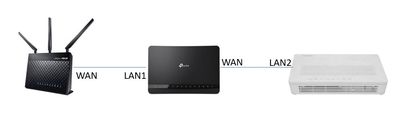
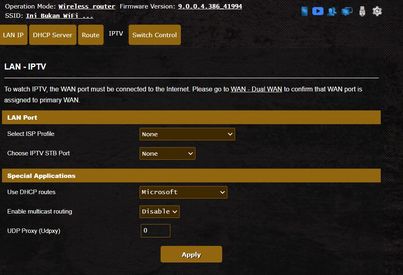
Just to share, below is the setup i used for maxis service. I configured the Archer C5v to bridge mode for internet, and do PPPoE form the Asus router itself. I also changed the VLAN profile to none The setup has been running for more than a year.


user posted image
user posted image
user posted image
joeyrm
post Sep 24 2021, 07:19 PM

Getting Started
**
Junior Member
116 posts

Joined: Jul 2005


QUOTE(RJdio @ Sep 24 2021, 01:38 PM)
Thanks for sharing. I ended up getting the RT-AX86u and connected WAN from TMrouter to it and configured it using ppoe. The archer c5v is connected to one of the lan port of the asus router so the dect phone works like normal. So far so good. I’m on maxis 300Mb plan  and get 305 on speed tests.

I now want to get another Aimesh router for upstairs- is AX3000 still way to go ? (make use of 5ghz 160hz)
*
I doubt AX3000 is the way to go if you want to get high Wifi speed, unless you use ethernet backhaul. i ended up switching to GT-AX11000 + XT8 setup recently to utilize dedicated 5GHz band for backhaul setup. So far, i manage to get above 400Mbps on the mesh node.


joeyrm
post Sep 26 2021, 02:07 PM

Getting Started
**
Junior Member
116 posts

Joined: Jul 2005


QUOTE(kkm @ Sep 24 2021, 07:42 PM)
Big bucks setup...
*
Yes.. too big cry.gif , but so far so good and enough to cover my double-storey semi-D house with high speed wifi.

This post has been edited by joeyrm: Sep 27 2021, 01:56 PM
joeyrm
post Oct 13 2021, 06:21 PM

Getting Started
**
Junior Member
116 posts

Joined: Jul 2005


QUOTE(tng55 @ Oct 10 2021, 12:24 PM)
lol Digi Provide a very good package look very bad package due no give public IP so you loss access public ip

good luck for Private IP for very bad Digi Package very bad
*
FYI, Unifi has started migrating those with 100Mbps plan and below to private IPv4. Only those with 300Mbps and above will remain on Public IPv4.
joeyrm
post Oct 14 2021, 02:32 PM

Getting Started
**
Junior Member
116 posts

Joined: Jul 2005


Hi AsusMy,

Just asking, is there a way to stop allocating IPv6 addresses for selected devices through the router? I notice some devices such as Apple devices & Android-based SmartTVs do not have option to enable or disable IPv6 addresses at all.

Appreciate your feedback on this.
joeyrm
post Aug 1 2022, 01:08 PM

Getting Started
**
Junior Member
116 posts

Joined: Jul 2005


QUOTE(0300078 @ Jul 29 2022, 10:25 AM)
Dear sifu here, I have a question that i cant figure out and cant seem to find enough information.

The situation:
I house is 3 storey high, i have a maxis 300mbps plan with the maxis wifi6 router, but it cant cover my hold house so i am looking to buy an Asus router (2 or 3 units) to serve as Mesh network.

So my question is on how to connect the router are a better choices?
case1:
Fiber -> Maxis router -> Asus router (Mesh)
For me this is simple just plug in the asus router and use them as mesh.

case2
Fiber -> Asus router (and other mesh) -> Maxis Router (for VOIP only)
this more work but will the connection be smoother and faster?

Will case 2 make connection faster since it doenst loop through another router?
But i seem to recall reading before case 1, usually the Local Network and other more smooth, becoz the maxis will just be handling only internet without and local traffic to bother it? while Asus will handle all the local network traffic?

Seriously need some advice
*
My setup is almost like case 1, except I enabled bridge mode on Maxis router. The PPPoE request comes from Asus router instead.

Fiber -> Maxis router (bridge mode + VoIP only) ->Asus router (WAN/Mesh).

I've been running on this setup for more than 2 years, and so far, so good.

joeyrm
post Sep 24 2022, 09:27 PM

Getting Started
**
Junior Member
116 posts

Joined: Jul 2005


Hi to all,

I'd like to check if any of you have a list of Asus routers that supports DDNS IPv6? I notice my XT8 have that option, but not RT-AX56U.

@asusmy, any plan to support DDNS IPv6 on RT-AX56U?
joeyrm
post Sep 29 2022, 07:31 AM

Getting Started
**
Junior Member
116 posts

Joined: Jul 2005


QUOTE(ASUSmy @ Sep 27 2022, 02:42 PM)
Hi joeyrm,

May I know what is the firmware version of the RT-AX56U you are using now?

Thank you
*
Hi Asusmy,

This is the firmware version i'm using right now : 3.0.0.4.386.49380

Rgds
joeyrm
post Sep 29 2022, 09:12 PM

Getting Started
**
Junior Member
116 posts

Joined: Jul 2005


QUOTE(ASUSmy @ Sep 29 2022, 01:53 PM)
Hi joeyrm,

After you have enable IPv6 and successfully created DDNS, may I know what is the IP address you are getting when you ping the DDNS using command prompt?

Will it show IPv4 or IPv6 WAN IP?

Thank you
*
Hi Asusmy,

In my case, I'm getting IPv4 address when i ping DDNS address using this router. I do however, get IPv6 address on an XD4 which i used in another house.
joeyrm
post Sep 30 2022, 03:35 PM

Getting Started
**
Junior Member
116 posts

Joined: Jul 2005


QUOTE(ASUSmy @ Sep 30 2022, 11:05 AM)
Hi joeyrm,

May I know are you getting IPv6 WAN IP address for your router? You can check it at System Log->IPv6.

If yes, can you try access the router using the IPv6?

Example:
https://[2001:xxxx:95f3]:8443/

Thank you
*
Hi Asusmy,

Yes. I'm getting WAN IPv6 on my router.. I can also access the router using the said IP. But on thing for sure, i don't have the option to do "IPv6 Update" in DDNS tab for the AX56U router, unlike in XD4.

Rgds

joeyrm
post Dec 4 2022, 09:58 PM

Getting Started
**
Junior Member
116 posts

Joined: Jul 2005


Hi all,

I need to find a replacement power adapter for an RT-AX88U at my parents house. I,’ve been searching onlne but not sure what is wattage (45w or 65W) and connector size (4.0mm*1.3mm or 5.5mm*2.5mm) comparible with the router. I’ve been getting different information from different websites and currently unsure which one to choose.

Appreciate if someone can help me on this. TQ
joeyrm
post Dec 9 2022, 04:54 PM

Getting Started
**
Junior Member
116 posts

Joined: Jul 2005


QUOTE(prokiller1199 @ Dec 9 2022, 03:47 PM)
My one is ADP-45BW 19V 2.37A don't know which barrel size
*
Thanks bro.
joeyrm
post Feb 23 2023, 09:04 AM

Getting Started
**
Junior Member
116 posts

Joined: Jul 2005


@asusmy,

Any idea on when asus will release the 388 firmware for XD4 and AX1800 routers? Seems most of their Wifi 6 routers have already supported the latest firmware..
joeyrm
post Sep 12 2023, 05:03 PM

Getting Started
**
Junior Member
116 posts

Joined: Jul 2005


Hi @ASUSmy,

Hi have a PPPoE account that comes with 5 public IPs (/29) from local telco. Is it possible to use Asus router to assign those IPs via DHCP to my clients and use WAN IP as it's gateway. I have not found any guide only to do this. Appreciate your feedback on such setup.

Thanks

This post has been edited by joeyrm: Sep 12 2023, 05:03 PM
joeyrm
post Sep 22 2023, 09:47 AM

Getting Started
**
Junior Member
116 posts

Joined: Jul 2005


QUOTE(neuromancerx @ Sep 13 2023, 10:28 AM)
1. Not sure why you want to assign public ip directly to your dhcp client
2. Theoretically, you can set 1 of the public ip as asus router LAN IP
3. Under DHCP range, define the 2nd to 5th (same subnet with router LAN IP)
*
It didn't work at all on Asus or any other consumer grade router. The enterprise grade routers that i have used, on the other hand, does not support PPPoE.
joeyrm
post Jun 14 2024, 04:24 PM

Getting Started
**
Junior Member
116 posts

Joined: Jul 2005


Hi @asusMy

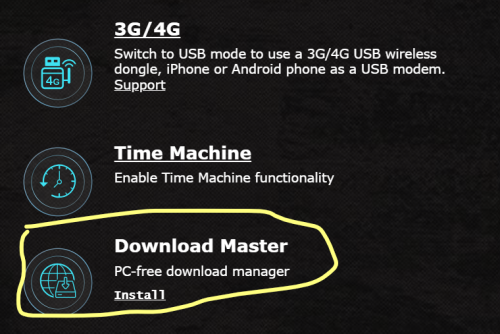
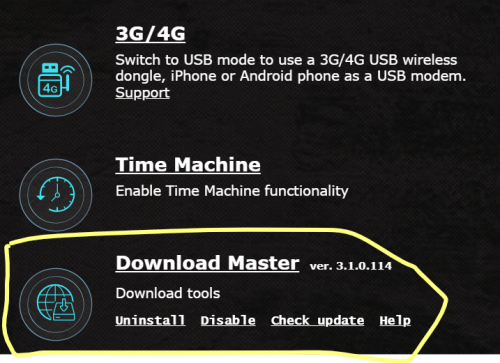
I've been having weird issue with the Download Master function on my GT-AX11000 router. Everytime i enable the function, it will automatically disabled after few hours. To enable ot, i have to reboot the router again. Currently, i'm using the latest firmware : 3.0.0.4.388_24328-g1e6e634.

Before reboot
user posted image

After reboot
user posted image

I do not have the same issue with an RT-AX88U router used in another place. Please raise this issue with your R&D team. It is quite annoying to continue rebooting the router almost on daily basis.

TQ

joeyrm
post Jun 19 2024, 10:22 AM

Getting Started
**
Junior Member
116 posts

Joined: Jul 2005


QUOTE(ASUSmy @ Jun 14 2024, 05:21 PM)
Hi joeyrm,

May I know does this problem happen after firmware update or it happen ever since you have the router?

Have you try to use other USB storage device or plug in to another USB port to test?

If it still happen, can you help to send a feedback using the router GUI at Administrator->Feedback.

PM me the email address used for the feedback.

Thank you
*
Hi,

thanks for the reply.. The issue happen even on the previous firmware. I have enabled to function for about a year already. I have also tried using other SSD and USB drive, yet the problem persist.

I have already sent feedback using router GUI. PM my email later.
joeyrm
post Nov 20 2024, 08:50 AM

Getting Started
**
Junior Member
116 posts

Joined: Jul 2005


QUOTE(Dozz @ Nov 16 2024, 11:39 AM)
Hi

Just got ASUS RT BE88U router yesterday, successfully setup it up running but i encounter an issue!

Here my setup:

TM modem to Maxis router to do the PPPoE login, from Maxis router to RT BE88U for wireless router. I have been using this setup for years with my previous ASUS router without issue, with RT BE88U
whenever i reboot the router, it wont connect to internet and the internet light is red in BE88U. I have to unplug the Ethernet cable from maxis router (port 1) to another port (port 2) then the light will turn green and connected to internet. I have to do it all over again every time BE88U reboot.

Can anyone here suggest a fix for this annoying issue please?
*
Suggest you set bridge mode on maxis router and let your asus to do the PPPoE login. That's what i've done to my home setup.. Backup 4G dongle works as well for the internet connection.

3 Pages < 1 2 3 >Top
 

Change to:
| Lo-Fi Version
0.0538sec    0.47    7 queries    GZIP Disabled
Time is now: 14th December 2025 - 10:43 AM