Outline ·
[ Standard ] ·
Linear+
Home Networking ASUS Malaysia Networking User & Technical Support, Managed by ASUS Malaysia Representative
|
andrekua2
|
 Sep 22 2014, 12:09 AM Sep 22 2014, 12:09 AM
|

|
QUOTE(Diademz @ Sep 21 2014, 08:55 AM) Ya bro, one thing I don't get is why ASUS charges so much for their routers here compared to EU/US. Maybe @ASUSmy can let us know  (sorry, putting him/her on the table keke). Eg in Japan your AC68U router costs <RM500. Heck for the price of a high-end router, you can buy a very decent phone with much better specs (similar class CPU, 1GB RAM) Usually IT stuffs gets cheaper over time. However, do you notice that Asus routers price going up lately? Very strange. When I first bought N14UHP, it was RM249 and I used Lazada RM30 coupon to bring it down to RM219. Now they are listing RM289~300'ish. What's going on? |
|
|
|
|
|
andrekua2
|
Nov 8 2014, 09:54 AM
|
|
|
QUOTE(Wayne_DareDevil @ Nov 5 2014, 02:51 PM) @Asusmy I have tried to download the latest firmware from Asus Website then use the Lan Cable and turn off wifi connection to upgrade. but it still prompt failure to update. my router is : RT-N12HPproduct id : RT-N12 current version : 3.0.0.4.374_430-g3a6d879 latest version : ASUS RT-N12HP B1Firmware version 3.0.0.4.376.2048Do you know how to solve it? I also want to know the status for RT-N12HP support as well. I went to Asus support page for the original RT-N12HP and it gave me missing page error each time. Even for Malaysia site, it display the firmware for the newer revision B1. Has Asus officially discontinue support for the old RT-N12HP? |
|
|
|
|
|
andrekua2
|
Nov 13 2014, 01:15 PM
|
|
|
QUOTE(ASUSmy @ Nov 10 2014, 06:24 PM) Hi Wayne_DareDevil, This is maybe due to the different H/W version. Try the one from the link below. http://www.asus.com/Networking/RTN12HP/HelpDesk_Download/Thank you So what about my older version 12HP? I downloaded all from website, OLD and B1 and both also cannot flash. What is the current status for OLD 12HP? EOL'ed? No more support? |
|
|
|
|
|
andrekua2
|
Nov 14 2014, 01:25 AM
|
|
|
QUOTE(ezpoir @ Nov 13 2014, 04:51 PM) Anyone can help out with my problem? Did you try out to change the setting in the iPhone/iPad instead? Starting iOS 7, there is this Background App Refresh in Settings>General. Just double check the Whatsapp background app refresh is on and in the Background App Refresh that Whatsapp is included. |
|
|
|
|
|
andrekua2
|
Nov 14 2014, 01:46 AM
|
|
|
QUOTE(ezpoir @ Nov 14 2014, 01:38 AM) My Background App Refresh has been off since the first day I got iOS 7 :/ Then you shall on it. Turn it on and turn it on for Whatsapp and any other messaging app that needed internet connection This post has been edited by andrekua2: Nov 14 2014, 01:47 AM |
|
|
|
|
|
andrekua2
|
Nov 17 2014, 10:26 AM
|
|
|
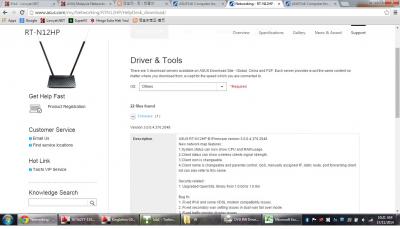
QUOTE(ASUSmy @ Nov 17 2014, 09:10 AM) Hi andrekua2, We will still support the RT-N12HP. If you are still unable to flash the firmware of the RT-N12HP, do pm me your serial number of the router and the current firmware you are using. Thank you My current Firmware Version:3.0.0.4.374_430 As you can see from my screenshot, I selected the original 12HP without the B1, but the firmware being available for download from Asus site is the B1 version which gave me an error everytime I tried to flash it. Even the international site show Page not found when I tried to click on the search result for RT-N12HP support page This post has been edited by andrekua2: Nov 17 2014, 10:31 AM Attached thumbnail(s)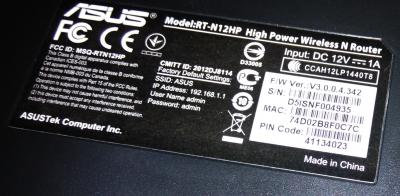
|
|
|
|
|
|
andrekua2
|
Nov 21 2014, 12:34 AM
|
|
|
@AsusMY
Hi. I just came across a report that say Maxis FTTH speed was halved when using Asus router. I doubled check with mine and was surprised to find the same thing. I never really had this problem before but now I have confirmed it myself that it is happening.
Will Asus do some test and come back with an answer for this?
Found the culprit. Apparently the Smart QOS crippled half of the available bandwidth when doing speedtest. This didnt happen with previous firmware. I wonder what changed. I disabled it for the time being.
This post has been edited by andrekua2: Nov 21 2014, 01:40 AM
|
|
|
|
|
|
andrekua2
|
Nov 25 2014, 10:59 PM
|
|
|
@AsusMY
I want to ask if its better to use 14UHP as base with another 14UHP/12HP as wifi repeater or 14UHP with wifi extender such as RPN53?
|
|
|
|
|
|
andrekua2
|
Nov 28 2014, 11:10 PM
|
|
|
AsusMY,
Let me help you update on RT-N12HP firmware update issue that I raised not too long ago. Asus has finally fired the incompetent webmaster and fix the whole problem of mistaken identity.
On another note, Lazada offering 10% off Asus router today with LAZ10 code. Bought another 2 N14UHP to help my parents cover their double storey house. Tried with mine and it has some problem covering the whole bottom floor with the router on 1st floor. Both floor were separated which make it tad much harder. RM232 after discount not too bad, even though my first one only cost RM219 after RM30 rebate.
|
|
|
|
|
|
andrekua2
|
Dec 1 2014, 06:02 PM
|
|
|
QUOTE(gofey @ Nov 29 2014, 03:41 PM) Hi AsusMy, I'm not sure you can help me solve this problem or not, I'm using Asus RT-N14UHP model as so called 9dbi antenna which suppose can cover two storey house meanwhile my setup for WiFi signal is not satisfy as normal each double storey house got 3 room on top floor which i put my unifi and the router on the room of right and when i test downstair at my front door using laptop test Inssider software to capture the RSSI for wifi signal using laptop getting -70+ which proved the signal is not very strong to cover. i have attach a sample of my house design which you can refer Actually the location of the router matters more. By placing the router at one end of the corner, you risking losing about half of the coverage, even before you minus the wall penetration etc. Just imagine the coverage as a sphere and where is the ideal placement in order to get the best penetration to all the floors. Im using this router too, and were trying them out for my parents' new house which has two separated floors. I cant get the ideal router placement, therefore I was forced to buy another one to extend the coverage. |
|
|
|
|
|
andrekua2
|
Dec 10 2014, 02:59 PM
|
|
|
@AsusMY Just received 2 unit of RT-N14UHP from Lazada. I'm surprised that now they have antenna holder bracket that were lacking in first batch. Possible to get those? This post has been edited by andrekua2: Dec 10 2014, 03:10 PM Attached thumbnail(s)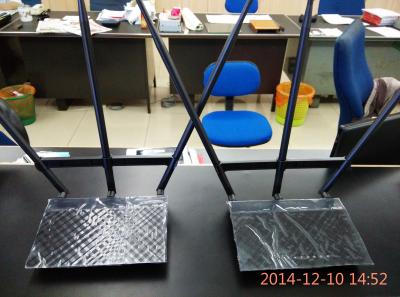
|
|
|
|
|
|
andrekua2
|
Dec 10 2014, 09:35 PM
|
|
|
Just a little update on using 2 RT-N14UHP to cover two storey house.
I had Unifi setup on my brother upper floor, close to the front of the house. The repeater unit was placed in the middle of the lower floor (after some trials). I tried placing the repeater directly below my brother's unit but it was not satisfactory. Im guessing clients having difficulty choosing which one to connect since signal strength was so-so even for both. Once I moved the repeater to the middle of the house, now clients were able to connect to the repeater which boost much stronger signal and result was pretty good. Speedtest confirmed that I was able to get 12~14Mbps out of my VIP20 even when piercing through few walls on lower floor.
|
|
|
|
|
|
andrekua2
|
Dec 15 2014, 01:54 AM
|
|
|
QUOTE(skyfusion @ Dec 14 2014, 09:25 PM) Hi, I would like to set my rt-n66u to allow internet connection to certain device only eg my ipad, my pc, my samsung phone etc. other device outside i dont want them to connect to my network. pls help if i can do this. tq I believe you can use Wireless MAC Filter to accept only devices listed in your list and reject all others. |
|
|
|
|
|
andrekua2
|
Dec 22 2014, 12:04 PM
|
|
|
QUOTE(ASUSmy @ Dec 17 2014, 06:07 PM) Hi Lineage, Will let our RD know your feedback. And as for the speed, you can set the Wireless->Control Bandwidth to 40MHz and test the speed again. Do make sure your device able to go up until 300Mbps or not. Thank you Is it recommended to set at 40MHz? If Im not mistaken, iOS devices are limited to 20MHz only. Setting to 40MHz will cause them unable to connect. |
|
|
|
|
|
andrekua2
|
Dec 22 2014, 12:15 PM
|
|
|
Just to update on another Asus wifi product that I bought recently from Lazada. It is the USB WiFi adapter USB-N14. Got it cheap since I used some coupon code and end up only paying RM40 for it.
The device is really slim, with a micro usb cable and two 5dBi antenna. I think maybe Asus should include a piece of double sided tape to secure the base station since it is a little light and without rubber feet. I would prefer a longer USB cable so that I can tape the station on my table instead of having it on the CPU casing.
Back to the performance, it was able to detect much more routers than before. On my phone, ipad or Dlink DWA-140, I was only able to detect 3-4 of my closest neighbours routers, but now it can detect about 15 routers. Pretty impressive. Not to mention one of them was a petrol station which is about 200m away from my home.
Did some speed test with my FTTH 10Mbps. Downloads were max but I find it surprising the upload is a bit slower than expected. It was fluctuating a lot around 5-8Mbps and the wifi adapter is basically just beside the router. I even tried streaming movies from my Nexus 10 and it is indeed very not stable. It would stream fine for few minutes and then stuck forever.
I thought this would be a 2T2R but I could be wrong here.
This post has been edited by andrekua2: Dec 22 2014, 12:17 PM
|
|
|
|
|
|
andrekua2
|
Dec 27 2014, 10:31 AM
|
|
|
QUOTE(Sean J @ Dec 27 2014, 12:55 AM) Hi Asusmy, I have just bought rt-n12d1 wifi router from a subang parage IT store based on the salesman's confirmation that it can replaced the dlink dir-615 router. But after trying so many times with the confirmation from TM on the pppoe username and password, it just won't connect to the internet. The modem I'm using now is a ZTE white standing straight up. Is this the correct model for the unifi router replacement? if so, is there a userguide that i can follow? hope you can help guide me if this is the right model. Thanks! I believe you forget to Tick the Special ISP Requirement at the bottom of the page where you select PPPOE. It will pop a selection box where you can select Unifi-Home. Its a VLAN tagging feature that must be used in order to utilize Unifi/FTTH. |
|
|
|
|
|
andrekua2
|
Dec 27 2014, 05:10 PM
|
|
|
QUOTE(Sean J @ Dec 27 2014, 04:46 PM) Thanks andrekua2, you are right. Now the Internet is working. However, I still have one issue with the asus router. I couldn't find the NAT loopback anywhere. Do you have if NAT loopback is built in this router? any other ways that I can go around to emulate the NAT loopback? Sorry, I dont really get what is NAT Loopback? Is it port forwarding to open specific port for torrent? |
|
|
|
|



 Quote
Quote
 0.0580sec
 0.45
0.45
 7 queries
 GZIP Disabled