Outline ·
[ Standard ] ·
Linear+
Home Networking ASUS Malaysia Networking User & Technical Support, Managed by ASUS Malaysia Representative
|
yed
|
 Apr 11 2020, 05:06 PM Apr 11 2020, 05:06 PM
|

|
QUOTE(blacktubi @ Apr 10 2020, 08:45 PM) I believe the RT-AX3000 have some issue regarding VLAN currently. Just spoken to an ASUS engineer, they are definitely working on this. The interim solution would be to unplug your C5V from LAN3 while a fix is being developed. Even LAN4 for unifi tv have the same issue |
|
|
|
|
|
yed
|
Apr 13 2020, 08:28 AM
|
|
|
QUOTE(sHawTY @ Apr 12 2020, 01:22 AM) Sometime (very rarely) there's a bug in a certain firmware that prevents firmware download to be completed Download the latest firmware from ASUS RT-AX88U website in the link below, extract it & update the firmware manually https://www.asus.com/Networking/RT-AX88U/HelpDesk_BIOS/Once you've extracted the firmware, do the manual firmware update by going through: Administration > Firmware Upgrade > Manual firmware update > Upload Use a computer that's connected directly to the router using Ethernet cable to do the firmware update 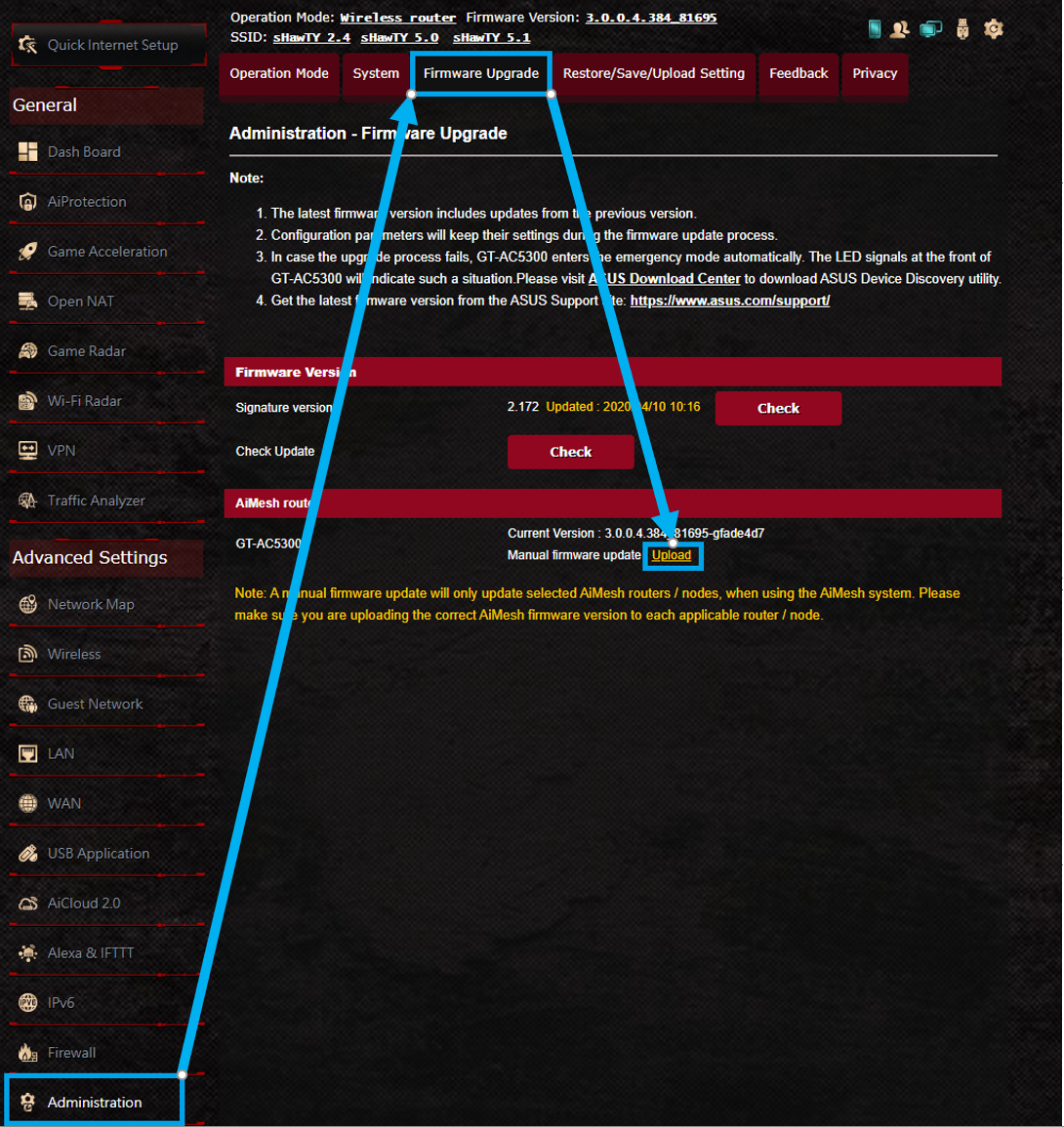 Tried to update manually but unsuccessful AX3000 (this router not connected to network)..is it because of that? 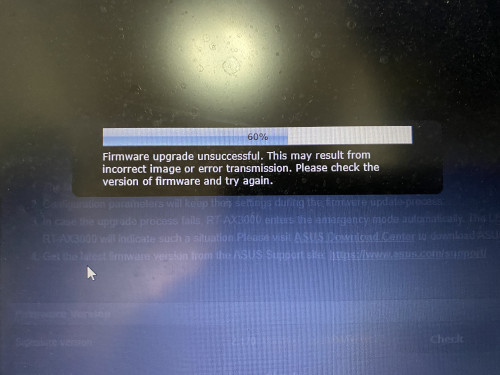 This post has been edited by yed: Apr 13 2020, 08:49 AM This post has been edited by yed: Apr 13 2020, 08:49 AM |
|
|
|
|
|
yed
|
Apr 13 2020, 10:18 AM
|
|
|
QUOTE(sHawTY @ Apr 13 2020, 09:34 AM) i did not connect it to the unifi network. Just tried to manually update the firmware |
|
|
|
|
|
yed
|
Apr 13 2020, 12:01 PM
|
|
|
QUOTE(ASUSmy @ Apr 13 2020, 10:50 AM) Hi yed, If you still have problem updating the firmware, try download the firmware again. Factory reset the router and do the firmware update. Thank you I have download twice..i tried to update twice |
|
|
|
|
|
yed
|
Apr 13 2020, 01:13 PM
|
|
|
QUOTE(ASUSmy @ Apr 13 2020, 10:50 AM) Hi yed, If you still have problem updating the firmware, try download the firmware again. Factory reset the router and do the firmware update. Thank you Manage to upgrade to latest firmware..unfortunately the problem still persists |
|
|
|
|
|
yed
|
Apr 14 2020, 03:13 PM
|
|
|
QUOTE(joeyrm @ Apr 10 2020, 08:15 PM) I'm using the latest one which i updated few hours ago. Problem still persist. Hi asus Have asus come out with solution? This post has been edited by yed: Apr 14 2020, 03:35 PM |
|
|
|
|
|
yed
|
Apr 14 2020, 05:49 PM
|
|
|
QUOTE(ASUSmy @ Apr 14 2020, 04:15 PM) Hi yed, We are still checking the problem, we still need more feedback to find out what is the cause of the problem. So those who has the problem with the RT-AX3000 with HyppTV or Maxis VOIP please send a feedback using the router GUI and PM me your email. Thank you I have prob with HyppTV ..cannot send feedback using router GUI due to router keep rebooting .. |
|
|
|
|
|
yed
|
Apr 15 2020, 01:36 PM
|
|
|
QUOTE(blacktubi @ Apr 14 2020, 06:27 PM) Unplug HyppTV then your router will work as usual. Send your feedback and don't use HyppTV for now. Do you happen to enable AiProtection or AdaptiveQoS? It’s already put back in the box after twice opened & tried. After mco will bring to asus sc.. |
|
|
|
|
|
yed
|
Apr 19 2020, 07:55 AM
|
|
|
QUOTE(ASUSmy @ Apr 14 2020, 04:15 PM) Hi yed, We are still checking the problem, we still need more feedback to find out what is the cause of the problem. So those who has the problem with the RT-AX3000 with HyppTV or Maxis VOIP please send a feedback using the router GUI and PM me your email. Thank you Hi asus Failed..twice attempt. Already emailed to asus_feedback@asus.com 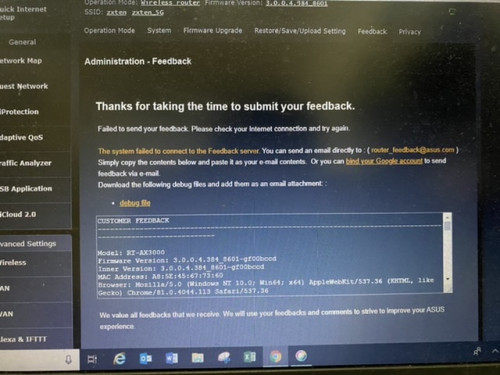 This post has been edited by yed: Apr 19 2020, 08:03 AM This post has been edited by yed: Apr 19 2020, 08:03 AM |
|
|
|
|
|
yed
|
Apr 19 2020, 02:39 PM
|
|
|
QUOTE(blacktubi @ Apr 14 2020, 06:27 PM) Unplug HyppTV then your router will work as usual. Send your feedback and don't use HyppTV for now. Do you happen to enable AiProtection or AdaptiveQoS? Tried twice this morning but failed. Sent email to asus support instead. Disabled adaptive Qos but enable Ai protection if I’m not mistaken. Router back into box again..as the problem still persist 😔 |
|
|
|
|
|
yed
|
Apr 20 2020, 01:25 PM
|
|
|
QUOTE(ASUSmy @ Apr 20 2020, 09:53 AM) Hi All, To all user that has problem with the RT-AX3000, try updating the beta firmware below. The model name might not the same but it is usable on RT-AX3000. https://drive.google.com/open?id=1MZXHOxMW7...dIzaPIiZPnQwvKMDo let us know if you still have any problem after the update. Thank you Hi asus It’s working. However need to change the time zone manually if use parental ctrl on time schedule |
|
|
|
|
|
yed
|
Apr 21 2020, 08:17 AM
|
|
|
QUOTE(ASUSmy @ Apr 20 2020, 01:30 PM) Hi yed, Thanks you for your feedback, do let us know if you still facing any other problem on the router. Thank you Hi asus I noticed it takes time to connect to hyyptv |
|
|
|
|
|
yed
|
Apr 29 2020, 06:45 PM
|
|
|
QUOTE(ASUSmy @ Apr 29 2020, 03:45 PM) Hi joeyrm, The final firmware be available for download once it is ready, HQ still need more time to make the firmware is properly tested before uploading it. RT-AX3000 is not categorize as gaming router, so the Game Boost feature wont be available. https://www.asus.com/Gaming-Networking/Gami...uters-Products/Thank you Hi Asus Are you saying that AC86U is better than AX3000? |
|
|
|
|
|
yed
|
Apr 30 2020, 10:06 AM
|
|
|
Hi asus
If I’m using aimesh, can i connect my vlan unifi hyptv to aimesh node vlan4?
|
|
|
|
|
|
yed
|
May 1 2020, 10:20 PM
|
|
|
Hi asus
I noticed after aimesh my main router speed is half from actual speed. Main AX3000..node AC86U..
|
|
|
|
|
|
yed
|
May 1 2020, 10:20 PM
|
|
|
Hi asus
I noticed after aimesh my main router speed is half from actual speed. Main AX3000..node AC86U..
|
|
|
|
|
|
yed
|
Jun 12 2020, 11:22 AM
|
|
|
Hi asus
I’m using ax3000 as main router & AC86U as node. Is there any way that i can manually assign where my device to be connected?
Let’s say i want my device A to connect to node not the main router
|
|
|
|
|
|
yed
|
Nov 10 2020, 12:20 AM
|
|
|
How to set up vpn into AX3000? What is udp or tcp configuration? Which is for unifi? I’m using nordvpn..follow exactly as per youtube but not avail
|
|
|
|
|



 Quote
Quote
 0.0413sec
 0.90
0.90
 7 queries
 GZIP Disabled