Welcome Guest ( Log In | Register )

Outline · [ Standard ] · Linear+

Home Networking ASUS Malaysia Networking User & Technical Support, Managed by ASUS Malaysia Representative

views
     
vez
post Jan 29 2020, 02:50 PM

Look at all my stars!!
*******
Senior Member
4,622 posts

Joined: Mar 2007


QUOTE(blacktubi @ Jan 29 2020, 02:38 PM)
RT-AC68U is capable of 800Mbps++ on Ethernet with CTF NAT acceleration enabled on stock ASUSWRT.

The WiFi speed peaks at around 500Mbps++ as per ASUS claims.

Note: NAT acceleration will be disabled when some features  are enabled.

user posted image
My RT-AC68U purchased over 5 years ago still going strong.
*
QUOTE(ASUSmy @ Jan 29 2020, 02:42 PM)
Hi vez,

The speedtest are based on WiFi, may I know what is your LAN speedtest?

Thank you
*
i am not on 800Mbps package, unable to test, but without NAT acceleration enable, my 500Mbps unable to achieve 500Mbps smile.gif
and some forumer teach me to apply NAT acceleration more than once, previously the latest firmware also buggy, if i enabled NAT Acceleration once, eventhough can achieve peak 500Mbps, after few days the speed will drop, and drop until become 20Mbps++ (i resolved this by apply few times NAT Acceleration enable, just save the settings multiple time it resolved laugh.gif)
btw, i have retired the Asus 68U, cannot try to test anymore
vez
post Jan 29 2020, 03:23 PM

Look at all my stars!!
*******
Senior Member
4,622 posts

Joined: Mar 2007


QUOTE(blacktubi @ Jan 29 2020, 02:59 PM)
Yes, NAT acceleration is required to achieve Gigabit speed for 90% of the consumer routers in the market.

You probably enabled some features that break hardware NAT. QoS Speed limiter is known to be one of them.
*
unlikely laugh.gif i even try reset router and configure only unifi profile with LAN only and without on wifi to test for 1-2 weeks, with NAT acceleration on, the speed drop after days over days... with the only solution tested worked is apply more than once the settings sweat.gif (someone here teach me)

» Click to show Spoiler - click again to hide... «

vez
post Nov 11 2020, 07:26 AM

Look at all my stars!!
*******
Senior Member
4,622 posts

Joined: Mar 2007


just bought AX86U biggrin.gif I remember for ASUS router someone mentioned here we can use UniFi-Business profile so the UnifiTV LAN port can be use as normal LAN... any sifus here can confirm AX86U can use UniFi-Business profile so can free up the UnifiTV LAN for normal use? Thanks.
vez
post Nov 11 2020, 09:03 AM

Look at all my stars!!
*******
Senior Member
4,622 posts

Joined: Mar 2007


QUOTE(wailing81 @ Nov 11 2020, 07:59 AM)
i think i am the one said so..

I got the answer from the seller (OOKAS) when i have this issue.
But i haven't tried out..
just bought 2 VLAN enable switch today and trunk the signal to another switch.
*
QUOTE(yongtjunkit @ Nov 11 2020, 08:50 AM)
yup, it will free up the lan port for normal internet use

using that profile on my AX92U
*
great, thanks...
vez
post Nov 11 2020, 12:19 PM

Look at all my stars!!
*******
Senior Member
4,622 posts

Joined: Mar 2007


QUOTE(XeactorZ @ Nov 11 2020, 10:24 AM)
From ookas?
I bought tuf ax3000 laugh.gif
Wow nice, will try once I got my TUF AX 3000 biggrin.gif
*
i bought from mono
their shipping use to be slow, like not very want do business lol
previously using -ac68 for 4 years then switch to tplink ax50 beginning of this year, bad experience
vez
post Nov 11 2020, 01:44 PM

Look at all my stars!!
*******
Senior Member
4,622 posts

Joined: Mar 2007


QUOTE(XeactorZ @ Nov 11 2020, 12:38 PM)
I bought from Ookas for a few times , so far ok
This time also bought from ookas as mono digital and ookas price different around RM 60 laugh.gif
As for shipping, as long as it reach my doorstep within I'm ok already

btw a lot people recommend to get ax20 instead ax50, maybe due to different cpu? laugh.gif
*
that time dont have ax20 sweat.gif
vez
post Nov 11 2020, 02:16 PM

Look at all my stars!!
*******
Senior Member
4,622 posts

Joined: Mar 2007


QUOTE(XeactorZ @ Nov 11 2020, 01:54 PM)
No wonder laugh.gif
*
hopefully ax86 wont let me down like tplink ax50 laugh.gif
vez
post Nov 14 2020, 06:40 PM

Look at all my stars!!
*******
Senior Member
4,622 posts

Joined: Mar 2007


just to confirm, AX86U is it come with standard 3 years warranty?
vez
post Nov 16 2020, 11:00 AM

Look at all my stars!!
*******
Senior Member
4,622 posts

Joined: Mar 2007


QUOTE(hongli.11.hongli @ Nov 16 2020, 10:53 AM)
all local units is come with 3 years warranty.
*
thumbsup.gif thanks
vez
post Nov 16 2020, 11:37 AM

Look at all my stars!!
*******
Senior Member
4,622 posts

Joined: Mar 2007


QUOTE(wailing81 @ Nov 16 2020, 11:27 AM)
i have one question regarding WPA3..

when i tried to change to WPA3, there is a pop up message giving suggestion that i stick to WPA2. Stating that some device not supporting it and will cause trouble.

is that the case? and i should still using WPA2 instead of the latest WPA3?
*
your client devices have to support it, otherwise cannot connect
e.g.: your laptop, if is few years ago, it might not support, if you set to WPA3 in your router, your laptop unable to connect to wifi, similarly your phone...
vez
post Dec 22 2020, 08:03 PM

Look at all my stars!!
*******
Senior Member
4,622 posts

Joined: Mar 2007


hi blacktubi sifu,

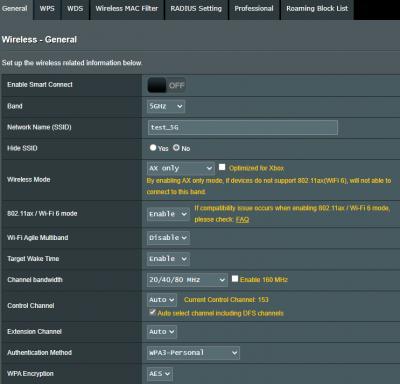
I have recently using Asus AX86U, my wifi 5Ghz settings as below:-
Attached Image

i tested my iPhone 12 pro and 11 pro, and only able to get 250-300Mbps in speed test (just right beside router), i read your post able to get higher speed https://www.blacktubi.com/review/asus-rt-ax86u/

my UniFi is 500Mbps plan, I am able to get 500Mbps in speed test with two other computers through LAN

any settings I miss out or have to do some extra configuration? I am using firmware 3.0.0.4.384_9318
I tired with different channel / auto, still wandering ~250-300Mbps only from my iPhone 12 pro (iOS 14.3) and 11 pro (iOS 14.2), also tried reset the router once to start fresh, seems same

anyone with solution greatly appreciated. thanks. notworthy.gif

This post has been edited by vez: Dec 22 2020, 08:05 PM
vez
post Dec 23 2020, 07:27 PM

Look at all my stars!!
*******
Senior Member
4,622 posts

Joined: Mar 2007


QUOTE(JohnLai @ Dec 22 2020, 08:30 PM)
First thing, I don't know if iphone 12 wifi6 2x2 chips support 160mhz or not.....but your router screenshot indicates it is up to 80Mhz. Perhaps you want to tick that 160mhz? At the "professional" tab, I think there is a thing called "HE" something, maybe you want to make sure it is enabled too?

I mean 2x2 at 80MHz means raw physical data rate of 1.2 Gbps (Note the wording physical). There are data link, network and transport layers etc......let just say lotta overhead.....
*
i did tried with 160Mhz previously, same result sweat.gif
the professional settings as below:-
Attached Image

QUOTE(cyrobytes @ Dec 22 2020, 08:35 PM)
May be try turn off the Game Gear Accelerator and test again. At least it works on my AX3000.
*
not on by default sweat.gif double checked and is off

QUOTE(blacktubi @ Dec 22 2020, 08:55 PM)
China model or Malaysia model? They are not the same.

Uncheck DFS channels, don't use 160Mhz.
- DFS channels or 160Mhz comes with worst interference.

Other quality of life suggestion.
- Uncheck AX only, using that option prevent older devices from connecting.
- Use WPA2 unless you are 100% confident it does not cause issues with your other devices. WPA2 is still secure.
*
Malaysia model smile.gif

did try again unchecked AX, unchecked DFS / 160Mhz and use WPA2, the result same ~250-300Mbps

i also tried reset my iphone network settings, wondering problem with phone because i tested with 12 pro and 11 pro both yield almost same result... i did use my 12 pro phone to tried at my friend house Time Fibre 1Gbps, can reach 600-700Mbps with 5Ghz band (probably is due to the stock router provided by time)

my phone is without case sweat.gif previously i thought case will affect but seems not

latest update i tried with latest iPad Air, due to no speedtest app i tried with web version sweat.gif, can achieve 500Mbps
Attached Image
then i quickly tried with web version in my iphone 12 pro, able to achieve 500Mbps as well
Attached Image

i also monitor the traffic monitor in router web through out the speed test, it doest peak at >500Mbps
Attached Image

now is how come the speedtest app and web version gave different result consistently 😂

This post has been edited by vez: Dec 23 2020, 08:22 PM
vez
post Dec 23 2020, 08:16 PM

Look at all my stars!!
*******
Senior Member
4,622 posts

Joined: Mar 2007


QUOTE(ryansxs @ Dec 23 2020, 08:12 PM)
Through WiFi can you get close to 500Mbps at your PC or other devices (except your iphone)?
You settings are all seem legit.
*
i dont have other wifi client at home except iphone and ipad, my PC only with LAN (able to achieve 500Mbps)

whole family using iPhone, got 2x 12 pro, 11 pro, Xs... and latest iPad Air

i updated previous post, now i tried with speedtest web version, can achieve 500Mbps (but still ~250-300Mbps using speedtest app)

i did monitor traffic monitor from asus web, it does go up to 500Mbps download through out the test using web version (speedtest.net)

now makes me wonder how come app and web version yields different result consistently.. sweat.gif

This post has been edited by vez: Dec 23 2020, 08:16 PM


Change to:
| Lo-Fi Version
0.0501sec    0.48    7 queries    GZIP Disabled
Time is now: 12th December 2025 - 11:05 PM