Welcome Guest ( Log In | Register )

Outline · [ Standard ] · Linear+

Home Networking ASUS Malaysia Networking User & Technical Support, Managed by ASUS Malaysia Representative

views
     
rjflyguy
post Feb 22 2017, 11:06 PM

Casual
***
Junior Member
324 posts

Joined: Jan 2006


I am using RT-AC55UHP router for my Unifi 30MB. So far when I used speedtest, I always get 30Mb DL and 10Mb upload... Wired or wireless....
rjflyguy
post Jul 21 2017, 03:57 PM

Casual
***
Junior Member
324 posts

Joined: Jan 2006


Is the fan really necessary? I am using RT-AC55UHP for almost 2 years now and it is running 24x7, sometimes without aircond or fan if nobody is at home. I never really feel the router getting hot...


rjflyguy
post Aug 3 2017, 06:56 AM

Casual
***
Junior Member
324 posts

Joined: Jan 2006


QUOTE(narutokun83 @ Aug 2 2017, 10:09 PM)
Thanks! for the recommendation.

AC55UHP is a new recommendation but i keep seeing C7 for the other brand.
*
I have experienced using Archer C7 before but then quickly changed to Asus RT-AC55UHP due to my needs of having strong and reliable wireless connections in my house.

I found that 55UHP has a stronger signal and wider coverage compared to C7. The other thing that I like about 55UHP is the router management interface, very easy to understand, pleasing to the eyes and have much more features compared to C7. That is my personal opinion on both router since I used them before.


rjflyguy
post Oct 29 2017, 08:26 AM

Casual
***
Junior Member
324 posts

Joined: Jan 2006


Wrong post... Deleted

This post has been edited by rjflyguy: Oct 29 2017, 08:27 AM
rjflyguy
post Nov 17 2017, 05:47 PM

Casual
***
Junior Member
324 posts

Joined: Jan 2006


QUOTE(chulk @ Nov 17 2017, 05:28 PM)
thanks i have update the firmware, but not working.


[attachmentid=9347393]
*
I am using the same router too... Let me test it tonight and see whether the same problem happens or not on my router... Will update later.
rjflyguy
post Mar 21 2019, 06:49 PM

Casual
***
Junior Member
324 posts

Joined: Jan 2006


QUOTE(pakji @ Mar 16 2019, 10:42 PM)
help me

i did do https://www.asus.com/support/FAQ/1013636/

i did set White list but all computer cannot access internet

i looking one computer block internet

other computer access internet just one computer no internet

i did set Network Service Filter one pc ip address source IP i fill 192.168.1.243 and Destination IP 192.168.1.243 and i set protocol TCP ALL and submit done

but all pc cannot access internet  sad.gif
*
Hi Pakji...

I saw your posts and the replies... rclxub.gif biggrin.gif

Let me try to help you. Now I understand that you want to block 1 IP address (192.168.1.243) to go to Internet while other IP addresses are okay. Correct? If that is the case, you can use the following steps:

1. Use your PC browser and open http://192.168.1.1 or access setting page via https://192.168.1.1:8443 (if you set to use only https)
2. If DHCP is enabled on your router, you must go to LAN (on left Menu under Advance Settings). You must choose the PC that you want to block and manually assign the IP address.
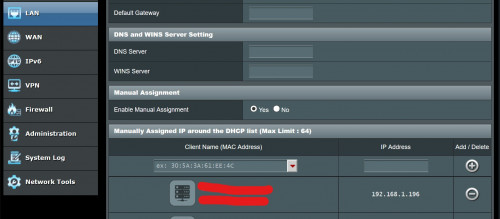
user posted image

3. Go to Parental Control and enable it.
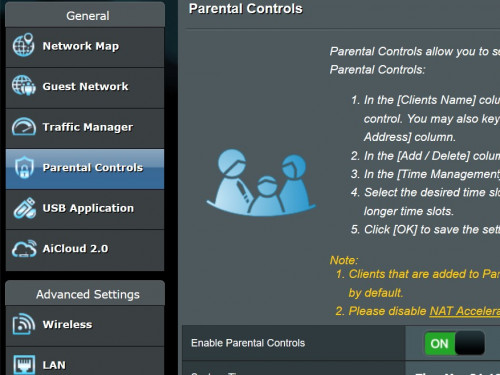
user posted image

4. Choose the PC you wanted to block (192.168.1.243) or whatever IP address that you have assigned in Step 2. Click on the Add or plus sign + on the right (number 2). The PC you selected will appear in the column below. Then click on the Time Management (number 3)
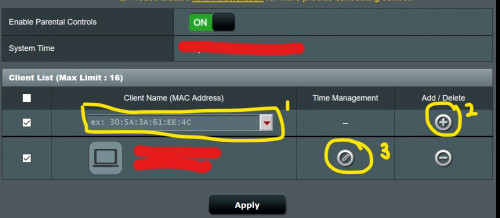
user posted image

5. Select the time that you allow/disallow that PC from connecting to the router.

OR

You can use Network Service Filter by choosing Firewall menu on the left. And then choose option "BlackList". At the "Network Services Filter Table", key in the IP address of the PC you wanted to block in the Source IP and do it for TCP and UDP. Please follow the picture below.
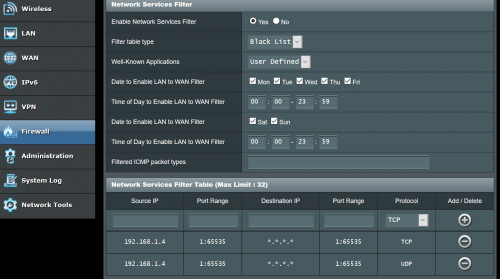
user posted image


Hope that helps....


rjflyguy
post May 28 2019, 05:02 PM

Casual
***
Junior Member
324 posts

Joined: Jan 2006


Guys,

I need some idea from experts here on my 'downloading' issue. My family noticed that when they are connected to the house Wi-Fi, updating the applications (downloading the update files) was very slow. When they switched to using mobile data, the download was very fast.

I didn't noticed the problem until my son highlighted this to me and I started to test. I noticed that updating apps from the playstore was very slow. Torrent was okay, 5Mb to 7Mb per second. Tried to download audio files and were horribly slow but when switched to mobile data, the downloads were quite fast.

Browsing the internet, watching YouTube, emails and other stuff were okay, only downloading updates from PlayStore or several other files have problem.

I am using Unifi and Asus RT-AC55UHP with the beta firmware suggested by Blacktubi. Any idea why? Thanks....
rjflyguy
post May 28 2019, 08:07 PM

Casual
***
Junior Member
324 posts

Joined: Jan 2006


QUOTE(SilentVampire @ May 28 2019, 07:49 PM)
What is your speed? It could be related to the router too. Tagging Blacktubi to assist you.
*
Using speedtest, the download using wifi 2.4Ghz is around 200Mbps and upload is around that too... Speed is not the issue here but there are some downloads that are very slow even in comparison to mobile data...


rjflyguy
post May 29 2019, 10:55 AM

Casual
***
Junior Member
324 posts

Joined: Jan 2006


QUOTE(voncrane @ May 28 2019, 09:41 PM)
Could be your ISP.. Sometimes the servers being connected to, are located outside Malaysia or Asia. If you are trying to update when your ISP has a slow connection to the region? It'll affect download speeds too for that particular download. Browsing locally based sites or watching YouTube videos off local CDNs will still be fast.
*
QUOTE(blacktubi @ May 28 2019, 09:56 PM)
TM routing to some servers aren't that good. You have to live with it.

But it should be fine for Play Store and App Store. I do not have a PS4 so I can't comment on that/
*
Thank you guys.... Maybe i just have to accept that connection to some sites or servers will be slow... heheh...

Cheers...

rjflyguy
post Jun 20 2019, 09:53 PM

Casual
***
Junior Member
324 posts

Joined: Jan 2006


QUOTE(jpong1 @ Jun 13 2019, 02:18 PM)
Hi, is your beta f/w ver : RT-AC55UHP_9.0.0.4_382_51085-gcf7cbc8.trx ?
*
Yes... why?


Change to:
| Lo-Fi Version
0.0318sec    0.49    7 queries    GZIP Disabled
Time is now: 3rd December 2025 - 09:53 AM
