

This post has been edited by Reyz: Aug 7 2021, 05:55 PM
Home Networking ASUS Malaysia Networking User & Technical Support, Managed by ASUS Malaysia Representative
|
|
 Aug 7 2021, 05:52 PM Aug 7 2021, 05:52 PM
Return to original view | Post
#21
|
 
Junior Member
321 posts Joined: Aug 2008 
|
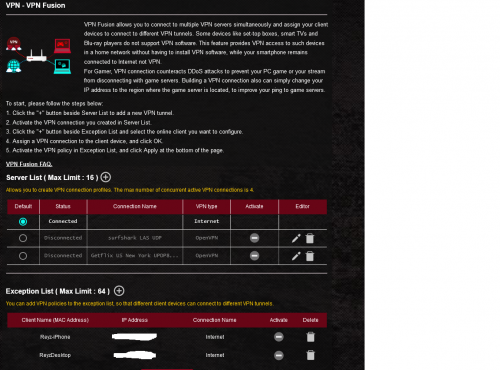
anyone know how exactly to use the vpn fusion?let say i want to use surfshark vpn on my iphone then i need to add all my connnected device into exception list even 30 device connected and just left my iphone not into list?
This post has been edited by Reyz: Aug 7 2021, 05:55 PM |
|
|
|
|
|
Aug 8 2021, 05:34 PM
Return to original view | Post
#22
|
|
Junior Member
321 posts Joined: Aug 2008
|
QUOTE(XeactorZ @ Aug 7 2021, 10:10 PM) 1st download the config, then add into router Thanks mate.missing the connection part need to change to vpn✌️After added into router then activate it Then on bottom there, exception list, find your iphone mac address, then on connection there change to VPN But I not recommend to do so as with this way VPN speed very slow, better use surfshark app directly connect Although connect using router count as 1 user   |
|
|
Aug 20 2021, 10:42 PM
Return to original view | Post
#23
|
|
Junior Member
321 posts Joined: Aug 2008
|
QUOTE(blacktubi @ Aug 20 2021, 08:52 PM) Upgraded my RT-AX92U to ASUS ZenWiFi XT8 recently. i dont know why others especially Dong Know from Dong Know site suggest ax92u than xt8 nfor wireless triband backhaul.glad i make good choice choosing xt8.the x8 firmware maybe kinda buggy but it still serve me wellThe ZenWiFi XT8 is much better than it used to be. ASUS always launch their product first and improve it in the future. I would say it's around 20% faster, similar coverage but it is super smooth. Probably the fastest mesh WiFi system under RM2K right now. The RT-AX92U is still a great underrated product. It's actually a better choice if you have a ton smart home or older devices at home since the fronthaul network is WiFi 5 which makes it more reliable . |
|
|
Sep 11 2021, 10:30 AM
Return to original view | Post
#24
|
|
Junior Member
321 posts Joined: Aug 2008
|
Hi @ASUSmy and guys..im usinh asus zenwifi xt8 as a mesh node.one quick question.may i use wan/2.5Gbps port as a lan port?fyi the unit only got 3 lan port and i just need another one to connect to my device.that wan/2.5Gb port left unassigned since i only use as node
This post has been edited by Reyz: Sep 11 2021, 10:31 AM |
|
|
Sep 13 2021, 11:48 PM
Return to original view | Post
#25
|
|
Junior Member
321 posts Joined: Aug 2008
|
QUOTE(ASUSmy @ Sep 13 2021, 02:02 PM) Hi Reyz, do i need to open up the setting or can straight away connect the lan cable?Yes, you can use it as normal LAN port. Thank you |
|
|
Sep 16 2021, 09:55 AM
Return to original view | Post
#26
|
|
Junior Member
321 posts Joined: Aug 2008
|
QUOTE(ASUSmy @ Sep 15 2021, 10:13 AM) Hi Lineage, hi @ASUSmy is it true on wifi radar the xt8 and ax11000 shown an ac in 802.11 column?im using ax11000 as a main router and xt8 3 pck as nodes.why it not shown AX?I have tested the RT-AX82U and ZenWiFi XT8 on the UNIFI line in my office, the tracert does seen like it is blocked. Tested the XT8 with TIME and it didn't have this problem. And it can be area base also, I tested the RT-AX82U at colleague UNIFI and it is ok. maxguy seen okay also with TM. Can you try go to the WAN->Special Requirement from ISP->Spoof LAN TTL value, enabled this and test again. Something to share for blocked traceroute. https://forum.lowyat.net/topic/1921393 Thank you Attached thumbnail(s) 
|
|
|
|
|
|
Sep 17 2021, 01:07 AM
Return to original view | Post
#27
|
|
Junior Member
321 posts Joined: Aug 2008
|
QUOTE(maxguy @ Sep 16 2021, 11:04 PM) 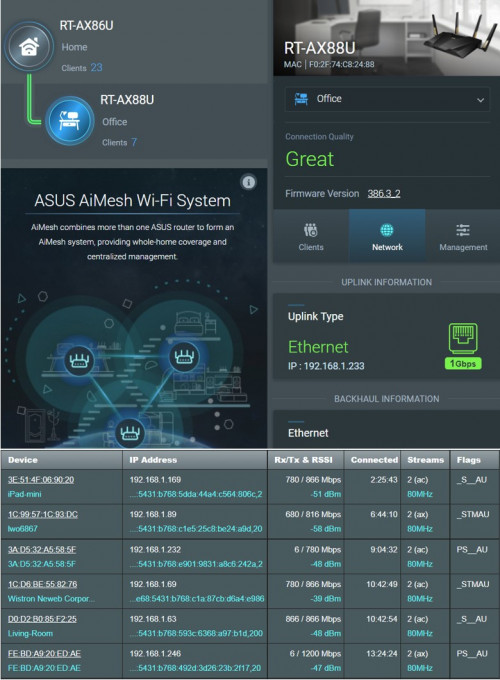 |
|
|
Sep 17 2021, 12:23 PM
Return to original view | Post
#28
|
|
Junior Member
321 posts Joined: Aug 2008
|
QUOTE(afif92 @ Sep 17 2021, 02:32 AM) yes.. only in Merlin version can show like that. AX11000 now is also supported by Merlin. Will ori fw backup file worked if change to merlin?banyak sgt iot device ni jenuh nak link n setup semula😅 |
|
|
Sep 18 2021, 03:44 AM
Return to original view | Post
#29
|
|
Junior Member
321 posts Joined: Aug 2008
|
QUOTE(blacktubi @ Sep 17 2021, 08:09 PM) 50/50 might have issue and might be fine. im just want to know my client connect to wat connection.either ax,acJust stick to stock firmware will do la Stock firmware can show you the client signal condition on the ASUS router app too |
|
|
Sep 19 2021, 03:50 AM
Return to original view | Post
#30
|
|
Junior Member
321 posts Joined: Aug 2008
|
QUOTE(Jjuggler @ Sep 18 2021, 02:31 PM) Nape nak revert balik ke stock firmware? Bagi aku, merlin fw jauh lebih bagus dari stock fw. ax11000 aku as main router takde detail mcm ni even xde connected client.kat 2.4ghz dgn 5ghz-2 ada je.iphone 11 pro max aku tgh connect kat 5ghz kat wreless log takde punSystem Log > Wireless Log [attachmentid=10980033] Attached thumbnail(s) 
|
|
|
Sep 19 2021, 07:30 PM
Return to original view | Post
#31
|
|
Junior Member
321 posts Joined: Aug 2008
|
QUOTE(Jjuggler @ Sep 19 2021, 05:13 PM) Cha, aku pakai GT-AX11000 jugak. Flash je ke firmware merlin. Nanti dapat stream type tu. Gambar dibawah sebagai rujukan. Aku x suka sangat dengan stock fw ni. Prefer merlin sebab lagi flexible dan boleh main script tuk fully utilize perantara/penhala (router) tu. agaknye kalo aku flash merlin backup file ori fw bleh gune balik tak masuk merlin?malas betul nak link semula ioT.[attachmentid=10980733] |
| Change to: |  0.1520sec 0.1520sec
 0.42 0.42
 7 queries 7 queries
 GZIP Disabled GZIP Disabled
Time is now: 13th December 2025 - 08:05 AM |
 Quote
Quote