Welcome Guest ( Log In | Register )

9 Pages « < 5 6 7 8 9 >Bottom

Outline · [ Standard ] · Linear+

Home Networking ASUS Malaysia Networking User & Technical Support, Managed by ASUS Malaysia Representative

views
     
yongtjunkit
post Dec 24 2020, 07:09 AM

Look at all my stars!!
*******
Senior Member
2,516 posts

Joined: Mar 2016
QUOTE(eclectice @ Dec 22 2020, 03:20 AM)
If it is not the issue with the Let's Encrypt transition from V2 to V3 cert protocol (since Asus has updated the firmware to support this transition quite a while already for its AC routers): I think either your current Let's Encrypt cert has expired or its DDNS cache needs a flush. Just reboot your router to get a new cert or recache the DDNS. It happens to me every time the cert expires or the DDNS cache not working. The usual symptom, I will face difficulty to access my router using DDNS remotely with its ASUS Router app or website the next time if I don't properly log out.
*
hmm.gif my AX92U is having the same issue, rebooting doesn’t seem to fix the issue as it’s stuck at authorizing
yongtjunkit
post Dec 24 2020, 11:56 AM

Look at all my stars!!
*******
Senior Member
2,516 posts

Joined: Mar 2016
QUOTE(eclectice @ Dec 24 2020, 10:41 AM)
It is pretty hard to say; maybe same symptom but a different issue as you are using a AX router, mine and that guy are using a AC router (RT-AC88U and RT-AC86U). I assume you have installed the latest RT-AX92 firmware 3.0.0.4.386.40451
*
Yup, already running the latest firmware


As far as I recall, my AC68U(latest firmware) was having the same issue as well ( before upgrade to AX92U) a few days ago

This post has been edited by yongtjunkit: Dec 24 2020, 11:56 AM
yongtjunkit
post Dec 24 2020, 01:43 PM

Look at all my stars!!
*******
Senior Member
2,516 posts

Joined: Mar 2016
QUOTE(eclectice @ Dec 24 2020, 01:01 PM)
Have you recently changed the domain name you put for asuscomm.com? It could be an issue with the ASUS DDNS service which ties your last used domain name to your router and it is unable to update the latest info. Try to contact Asus support to release your last used domain.
*
Yup, had to change the domain name on the ac68u to transfer the DDNS name to a new router(AX92U)
yongtjunkit
post Jan 1 2021, 11:38 AM

Look at all my stars!!
*******
Senior Member
2,516 posts

Joined: Mar 2016
Anyone here have tried Version 3.0.0.4.386.41535 on their AX92U?

Seems like it’s the same build for their beta version 9.0.0.4.386.41535

Am I beta testing on my router by updating(scare unstable)?
QUOTE
Change log
- Fixed Let's encrypt register issue.
- Fixed packet loop problem in ethernet backhaul.
- To improve security, RT-AC68U starts to encrypt the NVRAM from this version.
Known issue: RT-AC68U needs to be reset to default to resolve the login problem after upgrading to this beta version.
If you want to downgrade to the previous version, you need to do it with rescue mode.
We are looking for a solution to this problem if you worry about this known issue, please wait for a further version and not update to this version.
This post has been edited by yongtjunkit: Jan 1 2021, 11:43 AM
yongtjunkit
post Jan 3 2021, 03:20 PM

Look at all my stars!!
*******
Senior Member
2,516 posts

Joined: Mar 2016
Anyone here having slow upload speed on the AX92U?
tested with ethernet connection(on the node)
user posted image

on the main router(ethernet)
user posted image

when I run speedtest on the asus router web ui, I got the correct speed

user posted image

Currently running 3.0.0.4.386_41535 on both the node and the main router

My laptop isn't the only one facing this issue, my iphone 7 is also facing the same issue as well

already reboot my router and the node before taking the speedtest

This post has been edited by yongtjunkit: Jan 3 2021, 03:30 PM
yongtjunkit
post Jan 5 2021, 11:44 AM

Look at all my stars!!
*******
Senior Member
2,516 posts

Joined: Mar 2016
QUOTE(ASUSmy @ Jan 5 2021, 09:53 AM)
Hi yongtjunkit,

Can you try turn off the AiProtection, QoS and test again?

Thank you
*
Hi, I’ve actually downgraded the firmware and then perform a factory reset which appears to fix the issue
yongtjunkit
post Jan 16 2021, 12:26 PM

Look at all my stars!!
*******
Senior Member
2,516 posts

Joined: Mar 2016
QUOTE(highbury1913 @ Jan 16 2021, 11:53 AM)
Hi,

Need some help. The Asus Router App is not detecting my WAN connection when running the setup. Tried resetting the router but no improvement. I switched back to my Maxis Fibre router and no issue.

Router: Zenwifi Ax XT8
ISP: Maxis Fibre 500mbps (modem from TM)
*
Do you have internet when you are connected to the asus router?

Have you enter your pppoe username and password and set the profile to maxis fiber during setup?

Try following this guide


This post has been edited by yongtjunkit: Jan 16 2021, 12:27 PM
yongtjunkit
post Jan 20 2021, 08:41 AM

Look at all my stars!!
*******
Senior Member
2,516 posts

Joined: Mar 2016
QUOTE(Teddysaur @ Jan 20 2021, 02:10 AM)
Hi,

Please help to guide me to register for Asus Warranty.

I bought my Asus TUF AX3000 a month ago on 21 Dec 2020.
I realised I have yet to register the product and the warranty!

The router was bought from ALL IT Hypermarket. According to the cashier I just need to register the product online on Asus website and there is no need for them to do anything.

So I proceed to account.asus.com as instructed by the so called pamplet that came with the box named VIP Member Warranty Notice.

I filled in all my personal details and I clicked on 'Product Registration'.

Once done I proceed to click Service Package Activation, which I'm guessing IS the warranty?

But it asked me for 'CONTRACT CODE FROM VIP CARD' and 'PASSWORD FROM VIP CARD'

How can I get that and am I already registered for the warranty or what?

thanks

user posted image
*
Service package activation is extend warranty

Product registration is register for warranty

You still need to keep the receipt for warranty claim(sometimes the registered date is wrong in their system)

This post has been edited by yongtjunkit: Jan 20 2021, 08:44 AM
yongtjunkit
post Jan 20 2021, 01:10 PM

Look at all my stars!!
*******
Senior Member
2,516 posts

Joined: Mar 2016
QUOTE(Teddysaur @ Jan 20 2021, 09:17 AM)
do we need to extend warranty?
and the VIP all doing it?? also how to get VIP? Necessary?

last year in December when I tried to click register product
it prompted me to the VIP and warranty extension page
but it was in Chinese language which I do not understand
so I'm not so sure about that

the thing macam offers me for extension??
but not gone already cant seem to find it anymore
thanks blacktubi
*
I don’t think asus offer the option to extend the warranty for their router

Just register and keep the receipt will do

The service center may look at the receipt for warranty claim
yongtjunkit
post Feb 19 2021, 01:17 PM

Look at all my stars!!
*******
Senior Member
2,516 posts

Joined: Mar 2016
QUOTE(cHiLdHo0drEaMz @ Feb 19 2021, 01:07 AM)
Hi

May I know which of ASUS router supports Maxis VOIP ? Thnak you in advance
*


Pretty much all asus router sold in Malaysia supports it, you’ll need the maxis router for VOIP (refer to the video )

As far as I know, there’s no asus router that have RJ 11 ports, maybe asusMY can confirm this

This post has been edited by yongtjunkit: Feb 19 2021, 01:17 PM
yongtjunkit
post Feb 19 2021, 02:45 PM

Look at all my stars!!
*******
Senior Member
2,516 posts

Joined: Mar 2016
QUOTE(cHiLdHo0drEaMz @ Feb 19 2021, 01:30 PM)
Hi. Thank you very much for the update. i was wondering is it possible without Maxis Router instead
*
Nope, not possible, as far as I know there’s no RJ 11 port on asus router

You’ll still need the maxis router for VOIP


Modem -> asus router -> maxis router for VoIP ( lan 3 on most asus router)

This post has been edited by yongtjunkit: Feb 19 2021, 02:46 PM
yongtjunkit
post Mar 15 2021, 04:18 PM

Look at all my stars!!
*******
Senior Member
2,516 posts

Joined: Mar 2016
QUOTE(karazure @ Mar 15 2021, 03:58 PM)
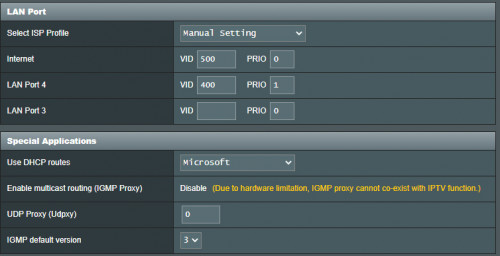
Hi, can anyone share AX3000 VOIP setting for UNIFI? how to set port 4 to 400?
*
Usually VOIP for unifi comes from the modem instead of the router

You can go to Lan> IPTV> custom and set the vlans manually

This post has been edited by yongtjunkit: Mar 15 2021, 04:19 PM
yongtjunkit
post Mar 15 2021, 06:51 PM

Look at all my stars!!
*******
Senior Member
2,516 posts

Joined: Mar 2016
QUOTE(karazure @ Mar 15 2021, 04:39 PM)
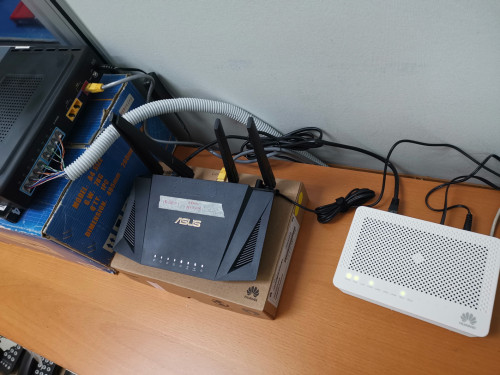
I think It usually does, but my office got 8 lines using the VOIP, so unifi provided a hub. The setting and connection are as shown. The voip line activation is in progress but I want to make sure that my setting is correct.

The technician from TM do not know how to set the router to port 4 400.

user posted image

user posted image
*
That looks about right to me, try applying changes and see if it works
yongtjunkit
post Apr 12 2021, 02:54 PM

Look at all my stars!!
*******
Senior Member
2,516 posts

Joined: Mar 2016
deleted

This post has been edited by yongtjunkit: Apr 12 2021, 03:14 PM
yongtjunkit
post Apr 20 2021, 12:02 PM

Look at all my stars!!
*******
Senior Member
2,516 posts

Joined: Mar 2016
QUOTE(10071985 @ Apr 20 2021, 09:52 AM)
I just bought a ax82u router from China. I tried setting it up to work as a modem router for Unifi but failed. I confirm username and password is correct. Anytime have any idea?
*
You’ll need to set up vlan tagging

Go to Lan > IPTV to set it up

Internet for unifi is vlan 500

This post has been edited by yongtjunkit: Apr 20 2021, 12:04 PM
yongtjunkit
post May 2 2021, 10:33 AM

Look at all my stars!!
*******
Senior Member
2,516 posts

Joined: Mar 2016
Is there anyway to enable bandwidth cap on a particular device(ultra box) without affecting NAT acceleration?

I’m using the ASUS RT AX92U
yongtjunkit
post May 3 2021, 12:53 PM

Look at all my stars!!
*******
Senior Member
2,516 posts

Joined: Mar 2016
QUOTE(tharmaraj @ May 3 2021, 12:09 PM)
Hi, need a quick answer; I already have ASUS RT-AX56U as my main router for my double storey house. I plan to buy another Asus RT-AX55 and make it as mesh network. After making this router as mesh, can I still use the LAN ports to connect my devices directly example laptops and computers?
*
Based on my experience with 2x AX92U mesh set up, yes you can

This post has been edited by yongtjunkit: May 3 2021, 12:53 PM
yongtjunkit
post May 8 2021, 04:52 PM

Look at all my stars!!
*******
Senior Member
2,516 posts

Joined: Mar 2016
Is this speed normal for devices connected to AX92U node?
speed sometimes fluctuates too( sometimes get full speed, sometimes would dip down) - using unifi 100 mbps
Already performed a reboot on all the network equipment
user posted image
yongtjunkit
post May 9 2021, 02:08 PM

Look at all my stars!!
*******
Senior Member
2,516 posts

Joined: Mar 2016
QUOTE(yongtjunkit @ May 8 2021, 04:52 PM)
Is this speed normal for devices connected to AX92U node?
speed sometimes fluctuates too( sometimes get full speed, sometimes would dip down) - using unifi 100 mbps
Already performed a reboot on all the network equipment
user posted image
*
Ran a 20 m Ethernet cable and the fluctuation went away

Only happens on wireless connection(5G-2)

Any idea what’s going on/ how to resolve it?


yongtjunkit
post May 18 2021, 02:42 AM

Look at all my stars!!
*******
Senior Member
2,516 posts

Joined: Mar 2016
QUOTE(kkm @ May 18 2021, 12:57 AM)
If I do not select the customised unifi config on my router and just use ppoe id/pw to connect, can I connect to unifi?
Reason I ask is that I don't plan to use the hypptv box, so would rather free up the lan port on the router.
*
No you must select a unifi profile to connect to the internet

To free up the lan port for internet you may select unifi-business

This post has been edited by yongtjunkit: May 18 2021, 02:43 AM

9 Pages « < 5 6 7 8 9 >Top
 

Change to:
| Lo-Fi Version
0.0499sec    0.93    7 queries    GZIP Disabled
Time is now: 14th December 2025 - 04:57 AM