Outline ·
[ Standard ] ·
Linear+
iPad Mini V2, Every inch an iPad
|
calvin_ng
|
 Jan 13 2013, 05:13 PM Jan 13 2013, 05:13 PM
|

|
QUOTE(Ramen @ Jan 13 2013, 12:58 PM) Just wondering, If the feature is with I device, why charging it with iPhone charger is able to charge till 100%? no idea but this is my experience so far... I do a full cycle and puff my battery is now 100% full charged... |
|
|
|
|
|
Rao94
|
Jan 13 2013, 05:24 PM
|
|
|
I tested when i put my Ipad Charge at Laptop...It will charge very slow but it wont show the ipad charging icon.
|
|
|
|
|
|
fliq50
|
Jan 13 2013, 07:28 PM
|
New Member

|
iPad mini 32G wifi+cellular black reporting in.. yeayyyy...  This post has been edited by fliq50: Jan 13 2013, 07:28 PM This post has been edited by fliq50: Jan 13 2013, 07:28 PM |
|
|
|
|
|
kb24
|
Jan 13 2013, 07:46 PM
|
Getting Started
|
yup, i just getting my 1st apple product.. Ipad mini 32gb black.. love it but i still quite new to itunes and icloud. will take some time to learn it.. hehe.. do ipad mini have some tricks like what samsung s3 or note 2? for example slide ur side palm across the screen to print screen
|
|
|
|
|
|
iVW
|
Jan 13 2013, 09:06 PM
|
|
|
anyone found the iPad Mini has scuffgate issue like iPhone 5?
|
|
|
|
|
|
Zelmel
|
Jan 13 2013, 09:48 PM
|
|
|
» Click to show Spoiler - click again to hide... « QUOTE(calvin_ng @ Jan 13 2013, 10:22 AM) It's not the charger faulty just the device is build that way or should I say all lithium polymer cell is like that let your ipad drain to 0 or dead and re-charge to full approx 12hrs to calibrate the battery QUOTE(adiyon84 @ Jan 13 2013, 01:04 PM) Mine terbalik. I have to use my iPad Mini charger then can charge till 100%. Before this I use my iPhone 5 charger it stuck at 91%. huhu... I dunno about which is which faulty. anyway i send to apple service center today in One U, they agreed for a replacement for the charger. so i am getting a new charger in one week time. i saw in apple community also got people send back to apple and get a replacement charger. so i believe it is the charger fault |
|
|
|
|
|
Rao94
|
Jan 13 2013, 10:07 PM
|
|
|
what is scuffgate ???
|
|
|
|
|
|
calvin_ng
|
Jan 13 2013, 10:11 PM
|
|
|
Scuff on the aluminium skin
|
|
|
|
|
|
ychwang
|
Jan 14 2013, 04:32 AM
|
|
|
can u all ipad mini share the photo of the case/cover u using?
has anyone is using apple original/pirated smart cover? please tell ur review
|
|
|
|
|
|
anarchy2cruo
|
Jan 14 2013, 07:24 AM
|
|
|
QUOTE(Rao94 @ Jan 13 2013, 05:24 PM) I tested when i put my Ipad Charge at Laptop...It will charge very slow but it wont show the ipad charging icon. u can refer to first page regarding how to charge your ipad faster on laptop/pc.  QUOTE(ychwang @ Jan 14 2013, 04:32 AM) can u all ipad mini share the photo of the case/cover u using? has anyone is using apple original/pirated smart cover? please tell ur review im using rock defense series case  

|
|
|
|
|
|
IamMrX
|
Jan 14 2013, 12:21 PM
|
New Member
|
QUOTE(ychwang @ Jan 14 2013, 04:32 AM) can u all ipad mini share the photo of the case/cover u using? has anyone is using apple original/pirated smart cover? please tell ur review Apple Original Smart Cover with Gear4 ThinIce Clear Case    Both serve it's purpose while maintaining the 'thin' feel, lightweight dan minimal.. |
|
|
|
|
|
trent666
|
Jan 14 2013, 02:37 PM
|
|
|
QUOTE(kb24 @ Jan 13 2013, 07:46 PM) yup, i just getting my 1st apple product.. Ipad mini 32gb black.. love it but i still quite new to itunes and icloud. will take some time to learn it.. hehe.. do ipad mini have some tricks like what samsung s3 or note 2? for example slide ur side palm across the screen to print screen Screenshot - Two ways. 1. Press home + power button simultaneously. 2. Use the "assistive touch" function. Tricks: Multi-touch gestures. 1. 5 finger pinch - close app 2. 5 finger swipe up - expose multi-tasking bar 3. 5 finger swipe left - switch to last opened app Shake to Undo |
|
|
|
|
|
Aquariusdenz
|
Jan 14 2013, 03:20 PM
|
|
|
QUOTE(trent666 @ Jan 14 2013, 02:37 PM) Screenshot - Two ways. 1. Press home + power button simultaneously. 2. Use the "assistive touch" function. Tricks: Multi-touch gestures. 1. 5 finger pinch - close app 2. 5 finger swipe up - expose multi-tasking bar 3. 5 finger swipe left - switch to last opened app Shake to Undo Nice guide.. But i always do 3 of those with 4 fingers instead of 5..  |
|
|
|
|
|
huiqing88
|
Jan 14 2013, 05:39 PM
|
|
|
QUOTE(Aquariusdenz @ Jan 14 2013, 03:20 PM) Nice guide.. But i always do 3 of those with 4 fingers instead of 5.. To exit an app must use 5 fingers.. the other 2 can use 4 fingers  |
|
|
|
|
|
IceBlade97
|
Jan 14 2013, 05:52 PM
|
|
|
QUOTE(IamMrX @ Jan 14 2013, 12:21 PM) Anyone use sketch case before, any comment on this case .tq |
|
|
|
|
|
KoYuKii
|
Jan 14 2013, 06:15 PM
|
|
|
belk case. have on/off function front 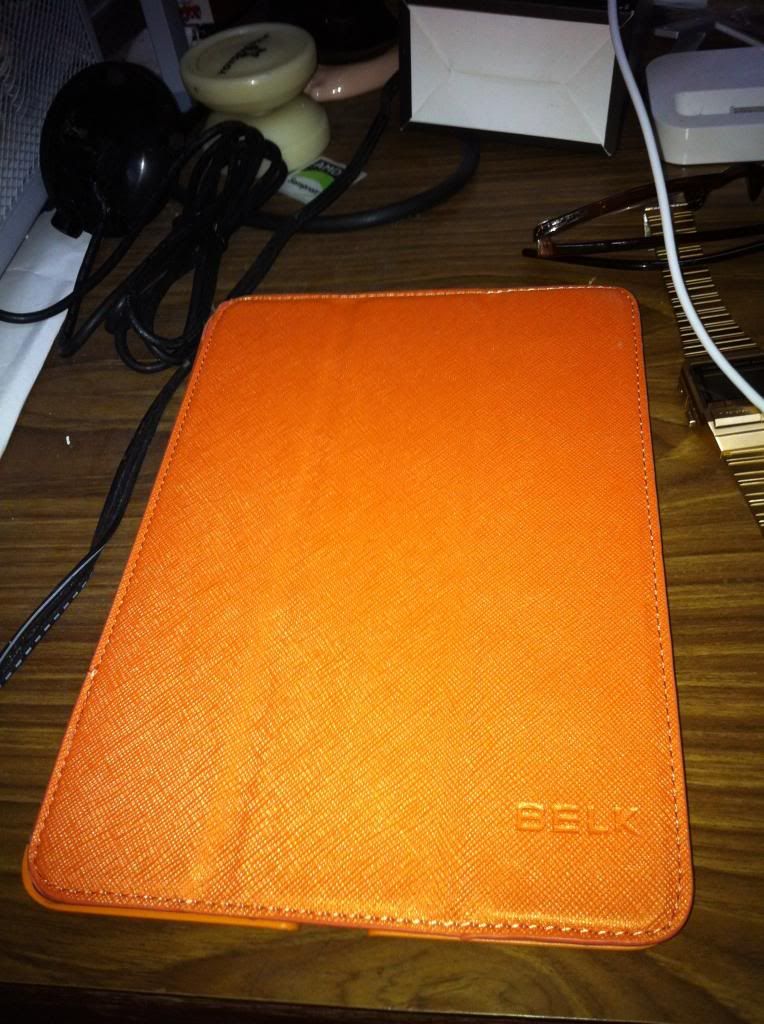 back 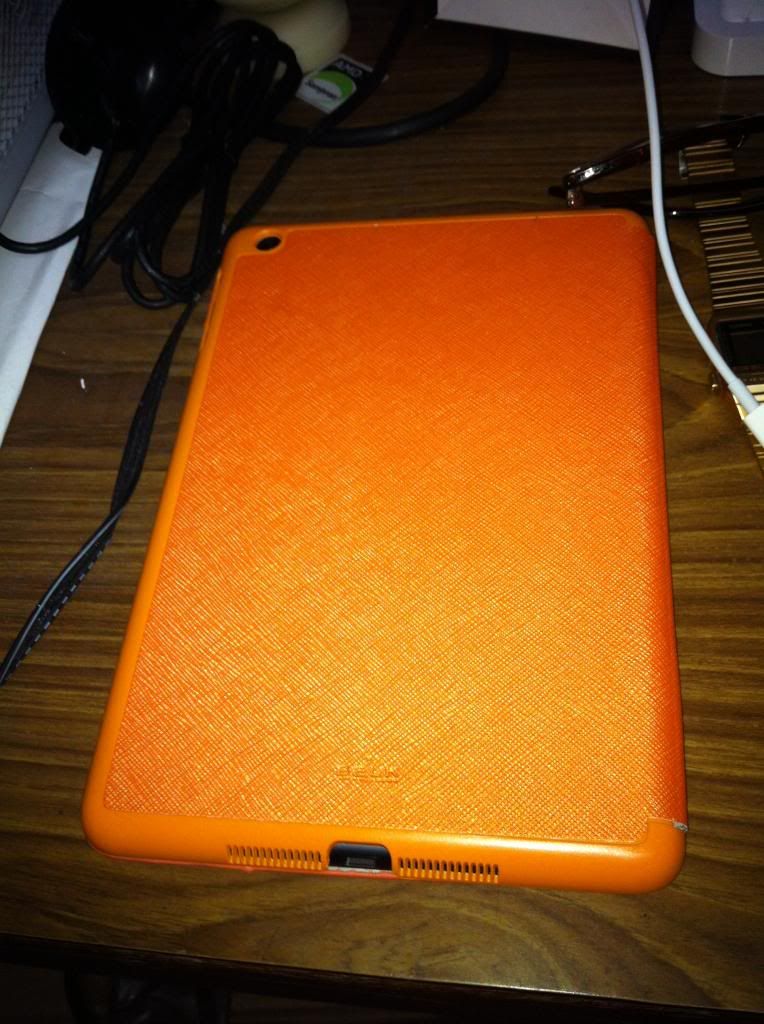 |
|
|
|
|
|
NeoCPS
|
Jan 14 2013, 07:40 PM
|
Getting Started
|
i need you guys help, anyone of you know in which outlet still selling Ipad Mini white 16GB WiFi? I don't want to buy it online because i want to buy this as the gift for my mother by tomorrow.
Appreciate your response guys!!
|
|
|
|
|
|
lee82gx
|
Jan 14 2013, 09:41 PM
|
|
|
from the above 2 cases, Belk and Rock, what happens when the front cover is opened? Does it fold back flat or is there some crease / bulge on the hinge?
As you may know the original design smart cover can open 180degrees and fold back flat...
|
|
|
|
|
|
funnyTONE
|
Jan 14 2013, 10:17 PM
|
|
|
QUOTE(NeoCPS @ Jan 14 2013, 07:40 PM) i need you guys help, anyone of you know in which outlet still selling Ipad Mini white 16GB WiFi? I don't want to buy it online because i want to buy this as the gift for my mother by tomorrow. Appreciate your response guys!! Would be much easier if you could first tell your location. btw TS, I own an iPad Mini !!!  |
|
|
|
|
|
gonzalo20
|
Jan 14 2013, 10:48 PM
|
|
|
anyone knows what is the price for ipad mini at sen heng?
|
|
|
|
|



 Quote
Quote


 0.0301sec
 0.55
0.55
 6 queries
 GZIP Disabled