QUOTE(benzene88 @ Oct 26 2006, 06:36 PM)
yetie.. i still dunno how to do the seem edit.. how to find 0032_0001 65 actually?
Woah, what are you looking for 65 for?
Instructions for setting custom startup and shutdown animations:
QUOTE
a. Create Custom startup/shutdown (custwakeup.gif & custgoodbye.gif) animation (176 x 220) and store them in /a/ folder.
b. Deactivate Moto startup animation - SEEM 0032_0001 > offset 1D > bit 3 [Uncheck]
c. Deactivate Moto shutdown animation - SEEM 0032_0001 > offset 31 > bit 0 [Uncheck]
d. Activate Custom startup (custwakeup.gif) animation - SEEM 004a_0001 > offset 23 [Set 01]
e. Activate Custom shutdown (custgoodbye.gif) animation - SEEM 0032_0001 > offset 46 > bit 0 [Check]
f. Splash screen (not an animated GIF):
For Blue (Purple) Flower Hellomoto Splash screen - SEEM 004a_0001 > offset 1C0 [Set 01]
For Hellomoto Splash screen - SEEM 004a_0001 > offset 1C0 [Set 00]
* Splash screen can not be turned off. As of now, this SEEM has not been discovered.
Use P2K Man (part of the
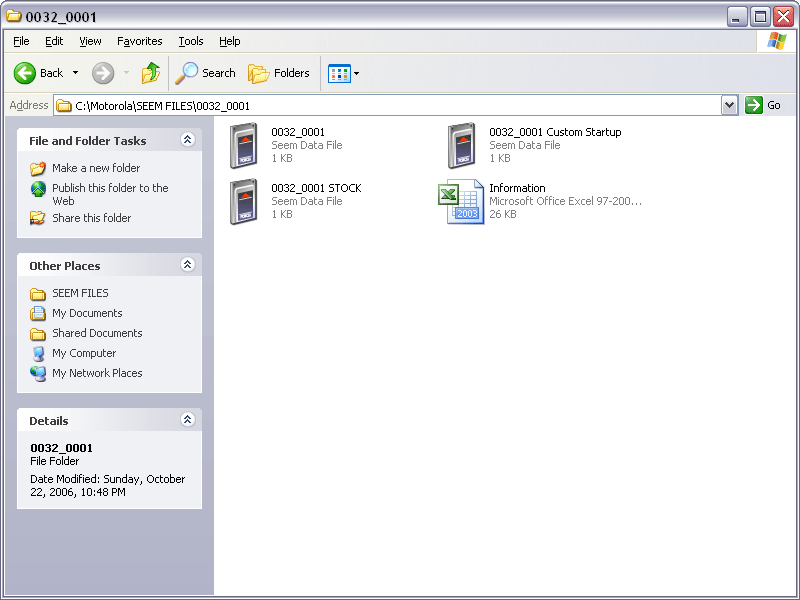
Motorola iMega Pack) or P2KTools to get seem 004a_0001 and seem 0032_0001 from your V3i. Save these seems to your harddrive. Keep one original copy for backup purposes and use another one for modding.
Open seem 0032_0001 using XVI32. Pay attention to the bottom left field labeled
Adr. hex - this will tell you where you are in the seem file. Using this, find your way to offset 1D. From the Tools menu, choose Bit Manipulation and uncheck bit 3.
Follow the rest of the directions, making sure to save your modifications. Use P2K Man or P2KTools to upload your newly modified seem files. Provided that your custom startup and shutdown animations are in the right folders, they should work now. Restart your phone and take a look to see if it works

Pictures if you need them:
Collect your startup and shutdown animations Collect your seem files (seem 0032_0001 pictured)
 Find offset 1D, paying attention to the Adr. hex
 Use Bit Manipulation and uncheck bit 3
 Move on to offset 31 and continue following the directions


 Oct 25 2006, 03:01 PM


 but then if i charge time only the 3 lights play around...




 Quote
Quote


 0.0232sec
 0.79
0.79
 6 queries
 GZIP Disabled