Outline ·
[ Standard ] ·
Linear+
[WTS] HIMEDIA Q5 Pro Quad Core 4K Smart Android TV, preload with Android 7 Nougat
|
TSnicety
|
 Jul 14 2014, 08:57 PM Jul 14 2014, 08:57 PM
|
Getting Started


|
QUOTE(988sun @ Jul 14 2014, 03:59 PM) I will be interested to get this from Nicety as it can play h265 encoded movies. Thank you bro, will alert you as soon as stock available. China firmware could be next two weeks, English firmware will be available mid or end of September. |
|
|
|
|
|
jj_c
|
Jul 15 2014, 10:00 PM
|
New Member
|
Hi, nicety
your post is really helpful. May I ask help to access your skydrive to know more about how to backup the Q5II and get those apk to install?
You are really strongly recommended seller of Himedia.
Thank you so much!
|
|
|
|
|
|
jutamind
|
Jul 16 2014, 11:07 PM
|
|
|
Hi nicety,
I'm using Q5 with firmware 1.0.5 and today when i open HiTV apps, I was prompted to upgrade. However, after downloading i tried to install the apps but i got the error "an existing package by the same name with a conflicting signature is already installed".
any idea why i cant upgrade HiTV? I think existing version is 4.0.2
|
|
|
|
|
|
TSnicety
|
Jul 16 2014, 11:43 PM
|
Getting Started
|
QUOTE(jutamind @ Jul 16 2014, 11:07 PM) Hi nicety, I'm using Q5 with firmware 1.0.5 and today when i open HiTV apps, I was prompted to upgrade. However, after downloading i tried to install the apps but i got the error "an existing package by the same name with a conflicting signature is already installed". any idea why i cant upgrade HiTV? I think existing version is 4.0.2 The error shown the signature of the apps installed is different from the current signature. You may uninstall the HITV before install the later version. Do you have the APK file? It should store some where in the local memory when it prompt for upgrade. |
|
|
|
|
|
jutamind
|
Jul 16 2014, 11:59 PM
|
|
|
Can HiTV be uninstalled? Do you have the ask of the latest and v4.0.2 of HiTV? Just in case something screw up.... QUOTE(nicety @ Jul 16 2014, 11:43 PM) The error shown the signature of the apps installed is different from the current signature. You may uninstall the HITV before install the later version. Do you have the APK file? It should store some where in the local memory when it prompt for upgrade. |
|
|
|
|
|
TSnicety
|
Jul 17 2014, 12:10 AM
|
Getting Started
|
QUOTE(jutamind @ Jul 16 2014, 11:59 PM) Can HiTV be uninstalled? Do you have the ask of the latest and v4.0.2 of HiTV? Just in case something screw up.... Yes, my Skydrive has the HiTV 402 APK file, just download from there. If you lost my Skydrive link, just pmed me your email. |
|
|
|
|
|
jutamind
|
Jul 17 2014, 06:54 AM
|
|
|
In which folder that the latest HiTV apk file stored when we do online upgrade/download new version? QUOTE(nicety @ Jul 17 2014, 12:10 AM) Yes, my Skydrive has the HiTV 402 APK file, just download from there. If you lost my Skydrive link, just pmed me your email. |
|
|
|
|
|
TSnicety
|
Jul 17 2014, 02:03 PM
|
Getting Started
|
QUOTE(jutamind @ Jul 17 2014, 06:54 AM) In which folder that the latest HiTV apk file stored when we do online upgrade/download new version? I need to simulate this before give you precise answer, typically it store at /sdcard/download or /sdcard/Download. |
|
|
|
|
|
TSnicety
|
Jul 19 2014, 03:11 AM
|
Getting Started
|
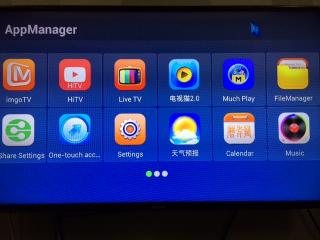
Dear Customers, Sorry for the late as it took me some time to test the new firmware, the firmware is available in Skydrive now.: Q5 First Generation - firmware 1.1.7New UI but no GooglePlay, it is advisable to retain at 1.1.6 which come with GooglePlay. Q5II None EMMC - firmware 1.0.7 + Google Patch New UI for launcher and App Manager Come with Google Play Patch Able to add new apps in Himedia Launcher One Key Access - configure the numeric key to start app   Q5II EMMC - firmware 1.0.7 Q5II EMMC - firmware 1.0.7Same UI, no change Support latest Youtube Minor fixes P/S: to have clean upgrade, pls do not use online upgrade or upgrade from Settings -> Upgrade. Always upgrade from Restore button and remember to backup your apps and xBMC before upgrade. This post has been edited by nicety: Jul 20 2014, 03:07 AM Attached thumbnail(s)
|
|
|
|
|
|
jutamind
|
Jul 19 2014, 07:17 AM
|
|
|
How to download firmware 1.0.7 for Q5 II non emmc? Is it using online upgrade? Any backup to be done before upgrade? QUOTE(nicety @ Jul 19 2014, 03:11 AM) Dear Customers, Sorry for the late as it took me some time to test the new firmware, the firmware is available in Skydrive now.: Q5 First Generation - firmware 1.1.7New UI but no GooglePlay, it is advisable to retain at 1.1.6 which come with GooglePlay. Q5II None EMMC - firmware 1.0.7 + Google Patch New UI Come with Google Play Patch Able to add new apps in Himedia Launcher One Key Access - configure the numeric key to start app Q5II EMMC - firmware 1.0.7Same UI, no change Support latest Youtube Minor fixes |
|
|
|
|
|
TSnicety
|
Jul 19 2014, 11:09 AM
|
Getting Started
|
QUOTE(jutamind @ Jul 19 2014, 07:17 AM) How to download firmware 1.0.7 for Q5 II non emmc? Is it using online upgrade? Any backup to be done before upgrade? Bro, always download the firmware from my skydrive and perform the upgrade from Restore button. My skydrive included the step by step guide for the firmware as well as Google Patch. Backup is required before upgrade. P/S: to have clean upgrade, pls do not use online upgrade or upgrade from Settings -> Upgrade. Always upgrade from Restore button and remember to backup your apps and xBMC before upgrade. |
|
|
|
|
|
bdcyl
|
Jul 19 2014, 11:26 AM
|
|
|
new model alrd come out?
|
|
|
|
|
|
TSnicety
|
Jul 19 2014, 12:06 PM
|
Getting Started
|
QUOTE(bdcyl @ Jul 19 2014, 11:26 AM) As usual, HiMedia will test the new model in China Market for the first two months. If no issue, the Oversea version will be available end of September, if found major issue then will delay until October. We do not advise to buy the China version at this moment. Either wait until October or get the current stable model with better promo price. |
|
|
|
|
|
jutamind
|
Jul 20 2014, 02:45 PM
|
|
|
just downloaded firmware 1.0.7 non EMMC for my Q5II + google play patch. should i install the new firmware first before google play patch? QUOTE(nicety @ Jul 19 2014, 11:09 AM) Bro, always download the firmware from my skydrive and perform the upgrade from Restore button. My skydrive included the step by step guide for the firmware as well as Google Patch. Backup is required before upgrade. P/S: to have clean upgrade, pls do not use online upgrade or upgrade from Settings -> Upgrade. Always upgrade from Restore button and remember to backup your apps and xBMC before upgrade. |
|
|
|
|
|
TSnicety
|
Jul 20 2014, 04:07 PM
|
Getting Started
|
QUOTE(jutamind @ Jul 20 2014, 02:45 PM) just downloaded firmware 1.0.7 non EMMC for my Q5II + google play patch. should i install the new firmware first before google play patch? Yes, pls fresh install 1.0.7 from the Restore button, then follow the GooglePlay patch step by step guide. |
|
|
|
|
|
jutamind
|
Jul 20 2014, 04:13 PM
|
|
|
where's your doc on how to backup apps? Cant find it in your live drive QUOTE(nicety @ Jul 20 2014, 04:07 PM) Yes, pls fresh install 1.0.7 from the Restore button, then follow the GooglePlay patch step by step guide. |
|
|
|
|
|
TSnicety
|
Jul 20 2014, 04:30 PM
|
Getting Started
|
QUOTE(jutamind @ Jul 20 2014, 04:13 PM) where's your doc on how to backup apps? Cant find it in your live drive To backup the apps, it is very straight forward, just run the ppreinstalled backup App in your box, copy the entire folder App_Backup_Restore to external drive. For xbmc, copy the sub folder as mentioned in the "5 steps quick restore xbmc.pdf". |
|
|
|
|
|
AVFAN
|
Jul 21 2014, 11:21 PM
|
|
|
QUOTE(nicety @ Jul 20 2014, 04:30 PM) To backup the apps, it is very straight forward, just run the ppreinstalled backup App in your box, copy the entire folder App_Backup_Restore to external drive. For xbmc, copy the sub folder as mentioned in the "5 steps quick restore xbmc.pdf". i just tried this appbackuprestore app. simple but very useful and quick. much easier now with this than the many steps directly using esfile explorer. |
|
|
|
|
|
jutamind
|
Jul 22 2014, 08:33 PM
|
|
|
Hi nicety,
I tried to go to Setting > System Upgrade and select D drive where the upgrade_dualcore_Q5.zip is available but i get the error "No upgrade package". Any idea why?
|
|
|
|
|
|
TSnicety
|
Jul 22 2014, 08:46 PM
|
Getting Started
|
QUOTE(jutamind @ Jul 22 2014, 08:33 PM) Hi nicety, I tried to go to Setting > System Upgrade and select D drive where the upgrade_dualcore_Q5.zip is available but i get the error "No upgrade package". Any idea why? I presumed you mean GooglePlay patch, pls double check the file size -> around 50MB. If still the same please PM me your whatsapp number, I will remote to your box to have a look. |
|
|
|
|



 Quote
Quote


 0.0317sec
 0.54
0.54
 6 queries
 GZIP Disabled