Welcome Guest ( Log In | Register )

Bump Topic Topic Closed RSS Feed
4 Pages < 1 2 3 4 >Bottom

Outline · [ Standard ] · Linear+

 Tp LInk TL-MR3420 Owner CLub V2

views
     
digilife
post Nov 24 2012, 08:00 AM

The MNP guy, its me yeah.
*******
Senior Member
8,025 posts

Joined: Feb 2005
From: Planet Boleland


QUOTE(chuahcs79 @ Nov 24 2012, 02:57 AM)
laugh.gif
u get poison too from dual router setup ?  biggrin.gif
yea it works great and prety convenien when second router is openwrt support, can add packages addon on what u need,..  thumbup.gif
*
i tot you dial-in using OpenWRT while you have been hammering me that i dun dial in using a DDWRT router ? doh.gif

Chuah, you knew all the while that DDWRT have issues with 3G and yet you get butthurt that i dun dial in using it laugh.gif

Same as my setup, you used Mr3420 V2 to dial in , then u used a Mr3420 with OpenWRT to rout out....... icon_idea.gif

My difference is now i used a HW550 to dial in then LAN out to a DDWRT to do routing,

This is my second DDWRT flashed router, an older version with less memory and a slower CPU but the connection is stable as a rock, called, Linksys WRT54G/GL/GS.

This is my speedtest b4 a test download ( bull one la, not accurate at all, so dun trust Speedtest results icon_idea.gif )

The tower/base stn is > 2km from my place ( Blacktubi checked it for me ady ) RSSI=93dBm.

user posted image

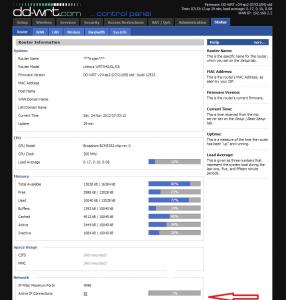
And this is the real download data/stats.

Attached Image


I need some sifu help ( bottom pics), pls scroll to the bottom part where i Red Arrow the part " Active IP Connections = 50"

What does it mean, as i noticed that the figure change every now and then sometimes the value go as high as 130.

Does it mean that there are 50 users using Maxis on that tower to go online? hmm.gif

Attached Image


digilife
post Nov 24 2012, 09:04 AM

The MNP guy, its me yeah.
*******
Senior Member
8,025 posts

Joined: Feb 2005
From: Planet Boleland


the Active Connections increased so much after 9am

Attached Image

now 10.27am, lagi banyak

Attached Image

sweat.gif

This post has been edited by digilife: Nov 24 2012, 10:27 AM
digilife
post Nov 24 2012, 07:35 PM

The MNP guy, its me yeah.
*******
Senior Member
8,025 posts

Joined: Feb 2005
From: Planet Boleland


QUOTE(stevenlee @ Nov 24 2012, 07:18 PM)
not sure what it is...
last time i use this DDWRT on my 3020 i did not even pay attention on this  laugh.gif
it look like it can detect how many connection connected to a tower ohmy.gif
but i not sure it is detect total connection to the tower...

by the way..DDWRT is more user friendly compare to open wrt..
i still looking for DDWRT support for my TL 3420  tongue.gif
*
i hearsay that DDWRT have issues with 3G on "direct dial-in usage" meaning any 3G router , if flashed into DDWRT have some issues........and thats why i use a Default FW MR3420 to dial-in than LAN out to my DDWRT flashed router.

Yes, DDWRT have more options to play play.... thumbup.gif thumbup.gif
digilife
post Nov 25 2012, 02:49 PM

The MNP guy, its me yeah.
*******
Senior Member
8,025 posts

Joined: Feb 2005
From: Planet Boleland


QUOTE(blacktubi @ Nov 25 2012, 02:33 PM)
Just force it from your Windows in mdma and the settings will be saved
*
Bro, still using UM?

I have some kangtau , PM me if interested brows.gif
digilife
post Nov 26 2012, 08:24 AM

The MNP guy, its me yeah.
*******
Senior Member
8,025 posts

Joined: Feb 2005
From: Planet Boleland


QUOTE(stevenlee @ Nov 26 2012, 07:36 AM)
have u try move away the 3g modem from the router?
use usb extension and move away the 3g from the router..
dont too long the usb extension, roughly 1 meter is enough..and test it out smile.gif
i face same problem like you, after i use usb extension move away the 3g modem..my speed went up to 5mbps stable  tongue.gif
*
thumbup.gif thumbup.gif

notworthy.gif notworthy.gif
digilife
post Nov 26 2012, 08:37 AM

The MNP guy, its me yeah.
*******
Senior Member
8,025 posts

Joined: Feb 2005
From: Planet Boleland


QUOTE(hairul @ Nov 26 2012, 08:31 AM)
Mine, if using USB extension, sometime the MODEM turn off about 15minute use. Sometimes after 30 minute. Router(V2) is still on. Need to on/off modem..

Now direct plug MF680 > V2
*
It turned off because the power supplied to the modem is weak, a USB3.0 cable should rectify it

V2 have better power distribution and thats why the V2 mobo is not hot as the required power is channel onto the usb connector and not "wasted" on the mobo to generate unwanted heat

V2 users, pls dun upgrade your Factory Shipped FW icon_idea.gif


digilife
post Nov 26 2012, 07:02 PM

The MNP guy, its me yeah.
*******
Senior Member
8,025 posts

Joined: Feb 2005
From: Planet Boleland


QUOTE(chulk @ Nov 26 2012, 06:20 PM)
no idea~~~~~the antenna still in one piece, homeplug still alive i guess, and E372 still working well in my pc usb port now....

how to claim? just tell them " hello, lightning just strike my router, please exchange a new one for me " ?
*
Your Panel got struck by Lightning?

How come the Huawei dun get fried but instead your Router gets it?

Can your panel still be able to use anymore?

I guess Chuah is lololuen now as he too have his Panel facing outside and higher than yours too. sweat.gif sweat.gif


digilife
post Nov 26 2012, 07:18 PM

The MNP guy, its me yeah.
*******
Senior Member
8,025 posts

Joined: Feb 2005
From: Planet Boleland


QUOTE(chuahcs79 @ Nov 26 2012, 07:11 PM)
your  statement is wrong    biggrin.gif

my new Setup, antenna is indoor  rclxms.gif
since my area RSSI superb whether indoor or outdoor  rclxm9.gif

[attachmentid=3175326]

[attachmentid=3175328]


Added on November 26, 2012, 7:13 pm

the panel antenna inside zero electronic component

refer blacktubi thread photo

user posted image
*
You already hammer the bracket outside of your Window, how come the change of mind?

Btw, the antenna have some sort of capacitor rite?

Thanks
digilife
post Nov 28 2012, 09:33 AM

The MNP guy, its me yeah.
*******
Senior Member
8,025 posts

Joined: Feb 2005
From: Planet Boleland


OpenWRT and DDWRT wont give you Higher Speed.

These 2 enhanced FW for Routers will only give you WiFi Freedom and Stability, hence a speedtest showing Highspeed does not necessary Guarantee High Speed for everyone. Chuah's case is different cause he live in an area that can Max out on his QoS of 16000/8640 due to several reasons, namely

1) His proximity to a FEW MAXIS TOWERS there

2) The density of users there, maybe those pipu there dun use M3G internet, hence he sapu all the Bandwidth.

3) The height of his Unit in his Apartment

4) Clear line of sight of the Towers.

5) I believe the area around Maxis Flagship Building, KLCC area have excellent signal but users there complained they dun get good speed even the QoS is 42000/8640 , Why ? simple, Users Density so is HIGH, everyone is fighting for Bandwidth, hench they got sucky speed.

If you guys wan Stronger WiFi and Better Stability on your connection, try the 2 routers trick which i mooted. Even Chuah is using it now. Like one of you guys mentioned before, using 2 Routers is like running a Dual Core processor compared to a Single Router. It does helps on the power distribution of the routers. One router to do the job of dialing of the modem and connection and another router to do the channeling of the signal for usage, LAN or WiFi.

I believe a third factor which might help to get the best out of the setup, that is to utilise Gigabit LAN ports or Switches.
Best combo is Router A( Gigabit LAN port present) dial in > Router B ( also Gigabit LAN port present ) > LAN out to Gigabit Switch ~ mutiple pcs /WiFi out . The dial in router should be OpenWRT and router B should be DDWRT.
It was said that DDWRT have issues with dial into 3G USB modems, so we have to use a OpenWRT router to do the dial job. DDWRT have better management, so we will use it to manage the second router.

Chuah, the ball is at your feet now. Prove to us that you a C7 or Messi now. biggrin.gif

notworthy.gif notworthy.gif notworthy.gif


digilife
post Dec 14 2012, 09:19 AM

The MNP guy, its me yeah.
*******
Senior Member
8,025 posts

Joined: Feb 2005
From: Planet Boleland


Now MR3420 V2 is widely available at LYP stores at rm83.00 before haggling, maybe rm79 after discount.

And MikroTik is also available at some stores shelves already.

I was there yesterday. sweat.gif


digilife
post Dec 14 2012, 09:26 AM

The MNP guy, its me yeah.
*******
Senior Member
8,025 posts

Joined: Feb 2005
From: Planet Boleland


QUOTE(LcBoy135z @ Dec 14 2012, 01:09 AM)
Okay..after find out..i got the solution for V2 working with E398

Here File must be download first :

1) DOWNLOAD THIS FIRMWARE<<Latest firmware

2) BIN FILE<< bin file

3) TUTO FOR UPLOAD BIN << tuto for install bin

Step 1 :

Please go to TP LINK HERE 192.168.0.1
Login : admin
Pass : admin

Step 2 :

After successed login,navigate to SYSTEM TOOLS and choose FIRMWARE UPGRADE

Step 3 :


Choose the No 1 file(must be extract after download it) and click upgrade.
Wait until finish and router reboot first

Step 4 :


Right now,upload the bin file No 2.Please follow the step given in file No 3

Step 5 :

After finished please unplugged your modem.Then plug in back to the router.Wait a minute and taraaaa brows.gif

***Monitor your connection status
Hope this can help you guys.

thank you  notworthy.gif  notworthy.gif

*
If we dun upgrade any FW on V2 and use only stock FW that came with the V2, will the signal percentage shows 0% on E398?
digilife
post Dec 14 2012, 01:39 PM

The MNP guy, its me yeah.
*******
Senior Member
8,025 posts

Joined: Feb 2005
From: Planet Boleland


QUOTE(LcBoy135z @ Dec 14 2012, 10:44 AM)
on stock it will show the 38%, after i update the firmware it become 0% until now

so my advice who want buy new mr3420 v2, please stay with current stock and dont upgrade yet..becoz what i can says, the default stock very easy to connect with e398...and the signal shows 38%..only after do upgrading the firmware it not show the actual signal and take too long to connect with net nod.gif

my speed with e398 + panel + mr3420 v2
user posted image
*
Morale of the story

Use the V2 on Default FW that was shipped from China, until some Guinea Khinzir tested alrite icon_idea.gif

If you panai panai Upgrade to the latest ( when you hands are itchy itchy ) you will connect slower and the fooking signal will shows 0%

My V2 is still virgin from the Factory, hence my MF680/E372 can connect in less than 59secs icon_idea.gif
digilife
post Dec 14 2012, 02:28 PM

The MNP guy, its me yeah.
*******
Senior Member
8,025 posts

Joined: Feb 2005
From: Planet Boleland


QUOTE(LcBoy135z @ Dec 14 2012, 01:51 PM)
yup..that the moral..but nothing need to be worry becoz we not brick it...the problem right now is compability the firmware from tp link.
dont upgrade after u buy it until the stable firmware come  out..this only happen to e398 only which is LTE 3g modem..for e372 can connect easily with the latest firmware.
*
but signal still shows 0% for E372 rite ?


digilife
post Dec 14 2012, 03:16 PM

The MNP guy, its me yeah.
*******
Senior Member
8,025 posts

Joined: Feb 2005
From: Planet Boleland


MF680 shows 0% also ?

I mean after upgraded to latest FW.

BTW, UM is selling V2 for rm89 and LYP is selling between rm79~rm83

http://u.com.my/phone-deals/wifirouter
digilife
post Dec 16 2012, 01:33 PM

The MNP guy, its me yeah.
*******
Senior Member
8,025 posts

Joined: Feb 2005
From: Planet Boleland


I been using this on my router, i duno yours supports it

My surfing experience is much smoother using it.

Attached Image
digilife
post Dec 16 2012, 02:42 PM

The MNP guy, its me yeah.
*******
Senior Member
8,025 posts

Joined: Feb 2005
From: Planet Boleland


QUOTE(BladeRider88 @ Dec 16 2012, 02:26 PM)
What is your router setup?
*
Attached Image
digilife
post Dec 16 2012, 03:49 PM

The MNP guy, its me yeah.
*******
Senior Member
8,025 posts

Joined: Feb 2005
From: Planet Boleland


QUOTE(BladeRider88 @ Dec 16 2012, 03:41 PM)
My Asus rt-n13U seems having issues with Repeater mode...
I bet it is a firmware issue as my Unifi setup, using D-Link DIR-825 running DD-WRT and act as Client Bridge, no such issue like auto DC
*
Yes, my setup is E372+MR3420 (disable WiFi ) LAN > Dlink (DDWRT) ( use WiFi only )

Try Tomato FW bro, its better than DDWRT, not to mention OpenWRT icon_idea.gif
digilife
post Dec 16 2012, 05:38 PM

The MNP guy, its me yeah.
*******
Senior Member
8,025 posts

Joined: Feb 2005
From: Planet Boleland


QUOTE(BladeRider88 @ Dec 16 2012, 04:33 PM)
Haha...thanks for the explanation..
Inside ur D-Link, how do setup your WAN connection setup?
*
a pic tells a thousand words

Attached Image
digilife
post Dec 16 2012, 06:52 PM

The MNP guy, its me yeah.
*******
Senior Member
8,025 posts

Joined: Feb 2005
From: Planet Boleland


QUOTE(chuahcs79 @ Dec 16 2012, 06:30 PM)
just so u know, u buy a  ready flashed DDwrt router, he didnt flash it himself,.  tongue.gif
*
Its because you doesn't knoe how to flash a DDWRT router, so i have to buy one ~ i actually bought 3# DDWRT flashed router for usage at different locations 2 on Maxis and one on YES Zoom. I dun like OpenWRT as its not as user friendly as a DDWRT router...........Once you try a DDWRT, you would divorce the OpenWRT. But now i am aiming for TomatoUSB FW brows.gif brows.gif
digilife
post Dec 16 2012, 07:04 PM

The MNP guy, its me yeah.
*******
Senior Member
8,025 posts

Joined: Feb 2005
From: Planet Boleland


QUOTE(BladeRider88 @ Dec 16 2012, 06:54 PM)
Haha.. laugh.gif
Doesn't matter, like what Digilife said..A pic tells everything.
Btw, i just get a RT-N16 and going to load Tomato USB to it  laugh.gif
Yeah, DD-WRT is damn easy to flash. OpenWRT is tricky but i like it.. I can feel the desire to flash OpenWRT after watching chuah's tutorial.
*
Which version of the TomatoUSB are you using?

I read this is good ~ TomatoUSB K26 AIO. File size = 8MB .. It is full version . RT-N16 flash memory is 32MB .. It include QOS, USB, VPN and others ~ pls share, thanks

4 Pages < 1 2 3 4 >Top
Topic ClosedOptions
 

Change to:
| Lo-Fi Version
0.0230sec    0.21    7 queries    GZIP Disabled
Time is now: 6th December 2025 - 11:57 AM