


This post has been edited by opteron82: Nov 17 2012, 01:01 AM
Maxis Maxis 3G/HS 3G Thread V7 (Not WBB), Don't Envy at Our Super Fast Speed! :D
|
|
 Nov 17 2012, 12:57 AM Nov 17 2012, 12:57 AM
|
 
Junior Member
52 posts Joined: Aug 2006 
|
This is LTE speed???
This post has been edited by opteron82: Nov 17 2012, 01:01 AM |
|
|
|
|
|
Nov 17 2012, 01:04 AM
|
 
Staff
72,824 posts Joined: Sep 2005 From: KUL 
|
Siao. I also want to move to Penang la like this.
|
|
|
Nov 17 2012, 01:05 AM
|
|
Junior Member
90 posts Joined: Oct 2010
|
QUOTE(blacktubi @ Nov 16 2012, 04:12 PM) PM me if you want Huawei E398. I am using it to reply you right now bro blacktubi got good stuff must share la pls pm me the E398 tqtq  320U = Unknown compatibility with Malaysia LTE. But should be compatible since frequency supported. K5005 = Rebranded vodafone junk. Tons of limitation and tons of firmware issue. Avoid this. E398 =  The only known working LTE modem currently, Celcom and Maxis already testing with this. The only known working LTE modem currently, Celcom and Maxis already testing with this.    |
|
|
Nov 17 2012, 01:06 AM
|
 
Elite
8,415 posts Joined: Jul 2008 
|
QUOTE(opteron82 @ Nov 17 2012, 12:57 AM) This is LTE speed??? May I know which modem are you using  |
|
|
Nov 17 2012, 01:34 AM
|

Elite
6,931 posts Joined: Apr 2011 From: Bolehland for sure ^_^ 
|
Just do a 1min video screenshot of your idm speed. Easier this way. Speedtest is not via accurate 100%. Impossible to beyond 42Mbps because you are not using lte enable sim.
 Added on November 17, 2012, 5:59 am QUOTE(opteron82 @ Nov 17 2012, 12:57 AM) This is LTE speed??? that speedtest is pointless if without any video screenshot to support your "high speed" » Click to show Spoiler - click again to hide... « test @ speedtest you need to test with different server like penang, cyberja & KL,.. testing @ same server in continue time will only show that is browser Cache speed  and also sorry, i am not jealous at all at your "LTE high speed" as i am very satisfy my area speed is stable @ 99%  QUOTE this is my humble speed » Click to show Spoiler - click again to hide... « Added on November 17, 2012, 6:17 amoh just a suggestion, for user who wanted to share their speed, best is attach Video screenshot of your IDM speed along with your speedtest result to avoid confusing user inserting false info u can use -> hypercam video screenshot software This post has been edited by chuahcs79: Nov 17 2012, 06:17 AM |
|
|
Nov 17 2012, 06:25 AM
|

Senior Member
1,016 posts Joined: Dec 2006
|
Breaking the 16000 QoS @ this time with TPL3420 V2+ E372 TX27+ Standard CAT5 Cable+ Router @ the windows with good Feng Shui makes my signal strength 87%.
 Currently it's the fastest speed for my own record. (Kesian @ myself  ) ) 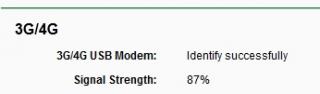
IDM direct download not stable Hovering around 1.8Mbps~2.4Mbps. I need the Panel Antenna badly now.....  
This post has been edited by rifle_m16: Nov 17 2012, 06:43 AM |
|
|
|
|
|
Nov 17 2012, 07:18 AM
|
|
Junior Member
28 posts Joined: Apr 2012
|
i'm using maxis turtle package with superchared mf680 from blackie , average dl speed of 4-6mbps only , sometime go down to 1-3mbps , rare time go to 6mbps and above
from the connect manager there , the signal strength is full , is that adding antenna will improve my ping & dl speed ? or just a little tiny & small improvement only ? i wish i can get 10mbps speed every second  and my ping normally at around 100 , anyway to get around 40-50-60 ping ? and my modem , while online+ing , purple colour when afk while viewing website/forum , led colour change to blue and keep blinking & blinking , turn back purple when i load sometime and it takes some second to load when blue turn to purple when totally afk , led = no power , small blinking blue colour is tat my modem faulty ? or just normal ? This post has been edited by WongYongLin: Nov 17 2012, 07:22 AM |
|
|
Nov 17 2012, 07:48 AM
|

Senior Member
8,025 posts Joined: Feb 2005 From: Planet Boleland
|
QUOTE(fruitie @ Nov 17 2012, 01:04 AM) Siao. I also want to move to Penang la like this. You dun wan to move to Beijing ?Added on November 17, 2012, 7:53 am QUOTE(opteron82 @ Nov 17 2012, 12:57 AM) This is LTE speed??? ah ha, you are a Maxis Tester, bro any insider info abt when Maxis gonna launch LTE ? I know that Penang, KLCC and JB are LTE enabled now........  This post has been edited by digilife: Nov 17 2012, 07:53 AM |
|
|
Nov 17 2012, 10:34 AM
|
|
Elite
8,415 posts Joined: Jul 2008
|
QUOTE(WongYongLin @ Nov 17 2012, 07:18 AM) i'm using maxis turtle package with superchared mf680 from blackie , average dl speed of 4-6mbps only , sometime go down to 1-3mbps , rare time go to 6mbps and above Yes, antenna is for stability boosting. Itdoes boost speed if signal is your limitting factor.from the connect manager there , the signal strength is full , is that adding antenna will improve my ping & dl speed ? or just a little tiny & small improvement only ? i wish i can get 10mbps speed every second and my ping normally at around 100 , anyway to get around 40-50-60 ping ? and my modem , while online+ing , purple colour when afk while viewing website/forum , led colour change to blue and keep blinking & blinking , turn back purple when i load sometime and it takes some second to load when blue turn to purple when totally afk , led = no power , small blinking blue colour is tat my modem faulty ? or just normal ? But first of all what is your specific signal in mdma. That is the power saving feature. When under load the modem will turn to high speed DC-HSPA+ which is purple color. When not using the connection on less usage it will turn back to the slower HSPA+ to save power. No, there is no way to force the modem constantly in Purple LED |
|
|
Nov 17 2012, 10:45 AM
|

All Stars
11,836 posts Joined: Mar 2011 From: Kota Kinabalu, Sabah
|
QUOTE(blacktubi @ Nov 17 2012, 10:34 AM) Yes, antenna is for stability boosting. Itdoes boost speed if signal is your limitting factor. on a router, you can still force it to ping a site every second, to keep the connection activeBut first of all what is your specific signal in mdma. That is the power saving feature. When under load the modem will turn to high speed DC-HSPA+ which is purple color. When not using the connection on less usage it will turn back to the slower HSPA+ to save power. No, there is no way to force the modem constantly in Purple LED |
|
|
Nov 17 2012, 10:47 AM
|
|
Elite
8,415 posts Joined: Jul 2008
|
QUOTE(noobandroid @ Nov 17 2012, 10:45 AM) on a router, you can still force it to ping a site every second, to keep the connection active Yes only keep the connection active but not force it purple |
|
|
Nov 17 2012, 10:57 AM
|

Senior Member
944 posts Joined: Jan 2003 From: SHAH ALAM 
|
QUOTE(noobandroid @ Nov 17 2012, 10:45 AM) on a router, you can still force it to ping a site every second, to keep the connection active Standard firmware can do autoping? Cant find which section... |
|
|
Nov 17 2012, 12:48 PM
|
|
Senior Member
1,016 posts Joined: Dec 2006
|
QUOTE(hairul @ Nov 17 2012, 10:57 AM) Standard firmware can do autoping? Cant find which section... I think cannot.Ping -t google.com using CMD, bro. Or easier if you open New Text Document.txt, type "ping 8.8.8.8 -t", and save it as Ping Google! or whatever.bat Anytime you need it just click it. Sorry if this is not answer that you need, I'm just sharing and assuming you never heard of the .bat thingy |
|
|
|
|
|
Nov 17 2012, 01:32 PM
|
|
Senior Member
944 posts Joined: Jan 2003 From: SHAH ALAM
|
QUOTE(rifle_m16 @ Nov 17 2012, 12:48 PM) I think cannot. If using CMD , need to use PC. Openwrt can do autoping. Need autoping to avoid skybx scrambled Ping -t google.com using CMD, bro. Or easier if you open New Text Document.txt, type "ping 8.8.8.8 -t", and save it as Ping Google! or whatever.bat Anytime you need it just click it. Sorry if this is not answer that you need, I'm just sharing and assuming you never heard of the .bat thingy |
|
|
Nov 17 2012, 01:36 PM
|
|
Junior Member
28 posts Joined: Apr 2012
|
all sifu can provide link to dl mdma ? i found 2 on google but it was detected as malware by my av .... i'm not a sifu of this kind of stuff ==
|
|
|
Nov 17 2012, 02:11 PM
|
|
Elite
6,931 posts Joined: Apr 2011 From: Bolehland for sure ^_^
|
QUOTE(digilife @ Nov 17 2012, 07:48 AM) You dun wan to move to Beijing ? lol, without LTE enable sim how to get LTE speed ? Added on November 17, 2012, 7:53 am ah ha, you are a Maxis Tester, bro any insider info abt when Maxis gonna launch LTE ? I know that Penang, KLCC and JB are LTE enabled now........  Added on November 17, 2012, 2:12 pm QUOTE(WongYongLin @ Nov 17 2012, 01:36 PM) all sifu can provide link to dl mdma ? i found 2 on google but it was detected as malware by my av .... i'm not a sifu of this kind of stuff == MDMA 1.0.0.31 Beta 10 This post has been edited by chuahcs79: Nov 17 2012, 02:12 PM |
|
|
Nov 17 2012, 02:16 PM
|
|
Senior Member
8,025 posts Joined: Feb 2005 From: Planet Boleland
|
QUOTE(chuahcs79 @ Nov 17 2012, 02:11 PM) lol, without LTE enable sim how to get LTE speed ? wat makes you think that he is using Multisim or DDR3 type of sim?Added on November 17, 2012, 2:12 pm MDMA 1.0.0.31 Beta 10 he could be using a LTE device ( its simless man ) btw, initial LTE rollover is solely for DATA only, Maxis will bundle the device together with new signup , like YES , Dongle + ID |
|
|
Nov 17 2012, 02:20 PM
|
|
Elite
6,931 posts Joined: Apr 2011 From: Bolehland for sure ^_^
|
QUOTE(digilife @ Nov 17 2012, 02:16 PM) wat makes you think that he is using Multisim or DDR3 type of sim? sorry i think is more like a "cache speed" or hack speedtest speed,he could be using a LTE device ( its simless man ) btw, initial LTE rollover is solely for DATA only, Maxis will bundle the device together with new signup , like YES , Dongle + ID only posting speedtest result alone = doesn't mean anything,.. looks like a fake result to me,. like some others in last version maxis thread, can't provide video screenshot 1 min length but keep saying their area high speed if real speed why cannot post Real Video screenshot of IDM speed ? sorry i am not even 1% jealous,.. i am super happy with my real 16000/8640 Max out speed,..  This post has been edited by chuahcs79: Nov 17 2012, 02:22 PM |
|
|
Nov 17 2012, 02:21 PM
|

Senior Member
1,459 posts Joined: Oct 2009 From: BOLEHLAND
|
QUOTE(digilife @ Nov 17 2012, 02:16 PM) wat makes you think that he is using Multisim or DDR3 type of sim? he is using 68 plan he could be using a LTE device ( its simless man ) btw, initial LTE rollover is solely for DATA only, Maxis will bundle the device together with new signup , like YES , Dongle + ID just search adn will know, not LTE |
|
|
Nov 17 2012, 02:22 PM
|

Junior Member
394 posts Joined: Jun 2012
|
already LTE? WOW, so fast
|
|
Topic ClosedOptions
|
| Change to: |  0.0324sec 0.0324sec
 0.48 0.48
 6 queries 6 queries
 GZIP Disabled GZIP Disabled
Time is now: 11th December 2025 - 10:29 PM |
 Quote
Quote


