Welcome Guest ( Log In | Register )

Bump Topic Topic Closed RSS Feed
5 Pages < 1 2 3 4 > » Bottom

Outline · [ Standard ] · Linear+

 Samsung Galaxy Note II LYN's Official Thread V3, RM2299 ETA 19/10. 3 more days!

views
     
benny888
post Oct 15 2012, 09:37 PM

Gadget Freak
Group Icon
Elite
27,801 posts

Joined: Jun 2007
From: Johor


QUOTE(joytest @ Oct 15 2012, 09:26 PM)
Personally, I don't think that sounds right. Nandroids I've done for Note1 weigh in at least 500mb.
Other sifus, please advise.

What are you using for making the nandroid?
*
CWM ver 6 n above will create data in blobs folder under clockworkmod . This is where bulk of your backup will be located. The backup folder file has minimum data about the rom
benny888
post Oct 15 2012, 10:09 PM

Gadget Freak
Group Icon
Elite
27,801 posts

Joined: Jun 2007
From: Johor


QUOTE(kembar4 @ Oct 15 2012, 07:52 PM)
Do it, and claim the title of the first person to mod his phone using this mod.

You will definately be a legend in this thread.

My vote is with you. God will bless you and your device.

Reading from the posts, if anything happens, a nandroid would restore everything back smile.gif
*
I tested it now my 64gb external sdcard is internal sd while internal sd is external sd
No issues managing files
Flashing just take few seconds only
benny888
post Oct 15 2012, 10:15 PM

Gadget Freak
Group Icon
Elite
27,801 posts

Joined: Jun 2007
From: Johor


QUOTE(thpace @ Oct 15 2012, 10:12 PM)
everything feel snappy or slower?
*
Dont see any difference yet
benny888
post Oct 15 2012, 10:35 PM

Gadget Freak
Group Icon
Elite
27,801 posts

Joined: Jun 2007
From: Johor


QUOTE(crazyissac @ Oct 15 2012, 10:16 PM)
how how uncle ><???  icon_question.gif  icon_question.gif
do i need to flash custom kernel with init.d support first ?
*
It will not work if you are using stock rom as its kernel do not have init.d support
Flash say wannamlite rom first as its kernel support init.d


Added on October 15, 2012, 10:36 pm
QUOTE(waveweaver @ Oct 15 2012, 10:15 PM)
God bless you..Uncle Benny thumbup.gif
Any problem on the apps that been transfered to the new 64GB internal storage. Any FC..?
Thanks
*
No fc issues yet

This post has been edited by benny888: Oct 15 2012, 10:36 PM
benny888
post Oct 15 2012, 10:55 PM

Gadget Freak
Group Icon
Elite
27,801 posts

Joined: Jun 2007
From: Johor


QUOTE(crazyissac @ Oct 15 2012, 10:38 PM)
ohoh
then flash the mod for exfat Sd Card for custom kernel in cwm ?
*
Or easier n faster way flash perseus kernel n select custom kernel
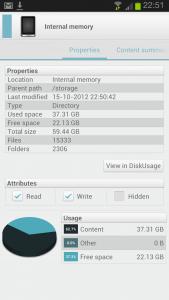
Example showing internal memory now is 60gb

Attached Image

You need to remap your paths eg your usual external sdcard paths you need to remap it to internal sd so that the apps can detect it
So far i remap my titanium backup folder and SMS backup folders to internal sdcard from external sdcard previously


This post has been edited by benny888: Oct 15 2012, 11:06 PM
benny888
post Oct 15 2012, 11:23 PM

Gadget Freak
Group Icon
Elite
27,801 posts

Joined: Jun 2007
From: Johor


QUOTE(crazyissac @ Oct 15 2012, 11:19 PM)
WAAAAA~~~ drool.gif  rclxms.gif  rclxms.gif  nice ~~
oh~~ok the i flash kernel only bah~ TQ uncle !! ;D
need to transfer all internal files to sd card ?
*
Of course - this is understood. Just copy all your internal sdcard stuffs over to the external sdcard and remaps those apps that need to access external sdcard
benny888
post Oct 15 2012, 11:37 PM

Gadget Freak
Group Icon
Elite
27,801 posts

Joined: Jun 2007
From: Johor


QUOTE(h11g @ Oct 15 2012, 11:32 PM)
i just flashed perseus kernel as well, someone in xda reported with omega and perseus kernel on screen time can reach 9 hours. 9 freaking hours~!~!~!
*
Even on stock rom and stock kernel i can also easily achieved 9 hours on screen time
benny888
post Oct 15 2012, 11:51 PM

Gadget Freak
Group Icon
Elite
27,801 posts

Joined: Jun 2007
From: Johor


Actually with the hack - now one can easily use external 64 GB sdcard as internal memory
So far so good - everything is working well
benny888
post Oct 16 2012, 01:32 AM

Gadget Freak
Group Icon
Elite
27,801 posts

Joined: Jun 2007
From: Johor


QUOTE(gouken @ Oct 16 2012, 12:19 AM)
I think the fastest SD card on earth now is still much slower than raw internal memory. Like how you cant do burst mode camera saved direct to sd card. Correct?
*
Burst mode working but now saved on external sdcard only
But no best shot selected
Camera sometimes freeze while in use
This issue resolved after I clear its data in settings

This post has been edited by benny888: Oct 16 2012, 07:58 AM
benny888
post Oct 16 2012, 05:57 AM

Gadget Freak
Group Icon
Elite
27,801 posts

Joined: Jun 2007
From: Johor


QUOTE(pcboy @ Oct 16 2012, 02:02 AM)
For those who have successfully modded the extsdcard swap, what happens when you pull out the microsd while phone still ON? Got FC? I ask because I like to transfer files from microsd to Pc using adapter
*
No. None at all


Added on October 16, 2012, 6:23 am
QUOTE(crazyissac @ Oct 16 2012, 01:10 AM)
I flash to perseus kernel first as Uncle benny told me
then flash the mod

-format extsdcard (not necessary)
-copy all ur internal files to pc then transfer to extsd
-put both kernel and mod file to internal
-boot recovery
-wipe cache partition>wipe
-advanced wipe dalvik cache
-install zip frm sdcard>choose zip frm sd>kernel's file
-install zip frm sdcard>choose zip frm sd>mod's file
-Go back>Reboot System Now
-Done, remove all files in "new" internal and remap links
mod for extfat extsdcard
mod for fat32 extsdcard
Perseus Kernel
*
You can directly copy internal sd files into external sd while inside phone using any file explorer app
No need to wipe any caches at all. This is superfluous step as reboot will take longer


This post has been edited by benny888: Oct 16 2012, 06:23 AM
benny888
post Oct 16 2012, 08:13 AM

Gadget Freak
Group Icon
Elite
27,801 posts

Joined: Jun 2007
From: Johor


QUOTE(munky @ Oct 16 2012, 07:57 AM)
what advantage do we get if we use malaysian firmware?
*
None if is same firmware base
Previously you will have bahasa n chinese language but now these also in European firmware
Infact first time msian firmware is based on Europe firmware
benny888
post Oct 16 2012, 08:30 AM

Gadget Freak
Group Icon
Elite
27,801 posts

Joined: Jun 2007
From: Johor


QUOTE(Crusader @ Oct 16 2012, 08:29 AM)
Strange.. now I can't connect with my Kies after the reset.
*
Reinstall kies in pc

benny888
post Oct 16 2012, 09:14 AM

Gadget Freak
Group Icon
Elite
27,801 posts

Joined: Jun 2007
From: Johor


Removing the swap of external sdcard to be internal sd is very easy
Just use root explorer, find the folder /etc/init.d and just delete the entry
11extsd2internalsd , restart phone and you are back to default


benny888
post Oct 16 2012, 09:37 AM

Gadget Freak
Group Icon
Elite
27,801 posts

Joined: Jun 2007
From: Johor


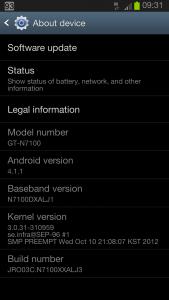
Just installed the latest Msian rom XXALJ3
Again fail to use Mobile Odin to install it - phone keep rebooting with the blue android logo
Used Odin in PC and reinstall root/cwm ( chenglu)
Sorry folks, no screen recording yet
Immediately did not notice any substantial difference - will update if found any
Also , if you have swapped your ext sdcard to be internal SD - it is better to swap back before flashing. Mine got stuck /freeze at Odin window midway.

Attached Image
benny888
post Oct 16 2012, 09:48 AM

Gadget Freak
Group Icon
Elite
27,801 posts

Joined: Jun 2007
From: Johor


QUOTE(crazyissac @ Oct 16 2012, 09:30 AM)
uncle...i found a prob  sweat.gif
althought the memory is swap...but why i install game
it still deduct frm my new "sd-card" not internal ? cry.gif  cry.gif
*
Last night i just tested reinstall Sygic and Asphalt 6 - it goes into the external SDcard ( now internal SD) without any problems. These 2 apps traditionally install all their data into internal sdcard. Programs works well
What game app did you try. Let me try on mine
benny888
post Oct 16 2012, 09:53 AM

Gadget Freak
Group Icon
Elite
27,801 posts

Joined: Jun 2007
From: Johor


QUOTE(crazyissac @ Oct 16 2012, 09:50 AM)
arh...why mine cant work ><""" i download any app frm playstore...it's still deduct frm sdcard not internal ><""
*
What app - let me try first
benny888
post Oct 16 2012, 10:06 AM

Gadget Freak
Group Icon
Elite
27,801 posts

Joined: Jun 2007
From: Johor


QUOTE(crazyissac @ Oct 16 2012, 10:04 AM)
REALLY ? i try install another and see ><
*
Try Gameloft games which always install into internal SDcard


Added on October 16, 2012, 10:07 am
QUOTE(mydragoon @ Oct 16 2012, 10:00 AM)
actually, if i'm not mistaken, some games will automatically install into external SD if it can detect it...

could that be the case?
*
Yes you are probably 99.99% right on this

This post has been edited by benny888: Oct 16 2012, 10:07 AM
benny888
post Oct 16 2012, 10:13 AM

Gadget Freak
Group Icon
Elite
27,801 posts

Joined: Jun 2007
From: Johor


QUOTE(crazyissac @ Oct 16 2012, 10:12 AM)
ok Uncle i try install asphalt 7
*
That is a 1.5 GB data download !!!! Try something smaller
benny888
post Oct 16 2012, 10:16 AM

Gadget Freak
Group Icon
Elite
27,801 posts

Joined: Jun 2007
From: Johor


QUOTE(ccgenius @ Oct 16 2012, 10:13 AM)
u all can play asphalt 7?

i bought my asphalt 7 then i play for bout 10 mins, the game crashed..

then i go press for refund...
*
It works very well on my NOTE , no reason why it cannot on the Note2
Anyway if i have the time later today, will test it out. I bought this game cheap only 99 cent during one of the special offer campaign. But downloading again the 1.5 GB data is horrible. It will be fast on my phone 3G but will waste my 3.5GB monthly allocation. Will use home Streamyx horrible wifi ( max 1000kbps ) only to download
benny888
post Oct 16 2012, 10:31 AM

Gadget Freak
Group Icon
Elite
27,801 posts

Joined: Jun 2007
From: Johor


QUOTE(crazyissac @ Oct 16 2012, 10:26 AM)
i dun hv smaller gameloft gameĀ  ady ~~ cry.gif
i want to instal but the titanium folder block me~~i cant move files to titaniumbackup folder
it said write protected ?=.=
i unintall titanium but still i cant delete the titaniumbackup folder cuz write protected =.=
*
Where was your TB folder located previously ?? You just need to remap the location to it
Do it at Preferences/backup folder - search whole device till you see the folder and choose it
First time i hear such issues of blocking


Added on October 16, 2012, 10:33 am
QUOTE(nicregi @ Oct 16 2012, 10:31 AM)
Guys, ask you all something.

If I use Tb to move all my apps from internal to external sd, will that cause FC to some apps?

Just wondering as I never try this before...
*
NEVER> just change your location at preferences/backup folder search whole device
before that create a folder titaniumbackup in external sdcard. Than manually copy all your backup stuffs to this new folder on ext sdcard
But i do know many users using the cracked version always faced such issues

This post has been edited by benny888: Oct 16 2012, 10:34 AM

5 Pages < 1 2 3 4 > » Top
Topic ClosedOptions
 

Change to:
| Lo-Fi Version
0.0200sec    0.33    7 queries    GZIP Disabled
Time is now: 7th December 2025 - 01:10 AM