Welcome Guest ( Log In | Register )

Bump Topic Topic Closed RSS Feed
13 Pages « < 10 11 12 13 >Bottom

Outline · [ Standard ] · Linear+

Maxis Maxis 3G/HS 3G Thread V6 (Not WBB), Don't Envy at Our Super Fast Speed! :D

views
     
digilife
post Oct 31 2012, 07:25 PM

The MNP guy, its me yeah.
*******
Senior Member
8,025 posts

Joined: Feb 2005
From: Planet Boleland


QUOTE(rifle_m16 @ Oct 31 2012, 07:16 PM)
Poisonous review.  icon_question.gif
*
he just put the damn antenna facing the wall without even extending it towards the air space for better exposure to pull in the signal doh.gif

guys, i have a very strong feeling that this Antenna will be sold off in no time............
digilife
post Oct 31 2012, 08:11 PM

The MNP guy, its me yeah.
*******
Senior Member
8,025 posts

Joined: Feb 2005
From: Planet Boleland


QUOTE(chuahcs79 @ Oct 31 2012, 07:54 PM)
wow fruitie stand by alone and watching closely liao ,  brows.gif

it will help when fruitie in this poor congested situation  drool.gif
*
I already have this Antenna abt a year ago, ie, if you guys remembered back then. biggrin.gif

Sincerely, mine sucks, maybe the inside is made of different material, i bought it from Coolstore.

I only tested it with E1762, not even E367 or UMG1831 then.

I subsequently, bought a Yagi and the damn Yagi cable broke my E1762 connector too doh.gif

Its covered with dust now........


Anyway, i will go to my store room to find it and do a test with my E372 tomorrow morning and see how good is it.


biggrin.gif
digilife
post Oct 31 2012, 08:17 PM

The MNP guy, its me yeah.
*******
Senior Member
8,025 posts

Joined: Feb 2005
From: Planet Boleland


Anyone using this

http://routerboard.com/RB751G-2HnD

i am thinking of buying the one without the gigabit ports ( cheaper by rm110 ) as the WiFi is so strong that it can be detected within 6 floors thumbup.gif thumbup.gif

forget about the MR3420 V2 for now sweat.gif
digilife
post Oct 31 2012, 08:20 PM

The MNP guy, its me yeah.
*******
Senior Member
8,025 posts

Joined: Feb 2005
From: Planet Boleland


QUOTE(chuahcs79 @ Oct 31 2012, 08:19 PM)
router wise tl-mr3420 is enough,

just need amazing antenna like panel antenna which coming soon

with a perfect antenna, whole combination will complete  brows.gif
*
Chuah, your area signal already damn strong, no need that Antenna

icon_idea.gif
digilife
post Oct 31 2012, 08:39 PM

The MNP guy, its me yeah.
*******
Senior Member
8,025 posts

Joined: Feb 2005
From: Planet Boleland


QUOTE(wavezard @ Oct 31 2012, 08:21 PM)
wow, so cool..........what the price? it is easy to get this in market
*
http://forum.lowyat.net/topic/2103847
digilife
post Oct 31 2012, 08:43 PM

The MNP guy, its me yeah.
*******
Senior Member
8,025 posts

Joined: Feb 2005
From: Planet Boleland


QUOTE(chuahcs79 @ Oct 31 2012, 08:33 PM)
i need the antenna to test a few thing,

like possible to break barrier of speed, Lantency,  brows.gif

never try = never know,. biggrin.gif


Added on October 31, 2012, 8:37 pm

i am sure this : ASUS RT-N12HP model

will beat that RB751G-2HnD in wireless anytime  biggrin.gif
*
How much is that?

The one without the gigabit ports is only rm240, moreover one is Commercial/Industrial brand while Asus is Consumer brand, how to compared? rclxub.gif
digilife
post Oct 31 2012, 09:12 PM

The MNP guy, its me yeah.
*******
Senior Member
8,025 posts

Joined: Feb 2005
From: Planet Boleland


QUOTE(chuahcs79 @ Oct 31 2012, 08:45 PM)
u mention wireless signal/coverages ma,

have external antenna one confirm better than no external antenna

this concept i am sure u know very well  hmm.gif
*
I ady said this one beast is a Commercial/Industrial unit, even without external antenna performs superbly and there is an extension slot to fix the antenna which the seller also carry too icon_idea.gif

I guess if you flash Open or DD WRT into it, sure kawkaw your connection Chuah biggrin.gif
digilife
post Nov 1 2012, 11:56 AM

The MNP guy, its me yeah.
*******
Senior Member
8,025 posts

Joined: Feb 2005
From: Planet Boleland


QUOTE(wavezard @ Nov 1 2012, 11:42 AM)
what kind of fan u buy....is there a link?
*
Go to Jln Pasar (KL) look for this

user posted image

http://www.kaku-taiwan.com.tw/en/index-2-av-808038.html

price = lebih kurang rm35, depending on size
digilife
post Nov 4 2012, 07:56 AM

The MNP guy, its me yeah.
*******
Senior Member
8,025 posts

Joined: Feb 2005
From: Planet Boleland


my speed here as usual sucks, MDMA RSSI = 97dBm

but i am using 2 MR3420 (V1 and V2 ) as explained in the MR3420 thread biggrin.gif

user posted image

connection damn stable and responsive

Attached Image

Attached Image


digilife
post Nov 4 2012, 09:57 AM

The MNP guy, its me yeah.
*******
Senior Member
8,025 posts

Joined: Feb 2005
From: Planet Boleland


QUOTE(hairul @ Nov 4 2012, 09:54 AM)
because others people shut off the modem to avoid lightning, so the network
not so crowded.. hehehehe
*
++

exactly, all scare kena pawn by Thor


digilife
post Nov 4 2012, 03:14 PM

The MNP guy, its me yeah.
*******
Senior Member
8,025 posts

Joined: Feb 2005
From: Planet Boleland


QUOTE(chuahcs79 @ Nov 4 2012, 03:03 PM)
yea this panel is gooding when u install it outdoor  thumbup.gif

my panel facing that maxis tower in straight line clear view

so love this fibre like connection in loading websites ,

this is my temporary setup unti; TS-9 convertor arrive  icon_rolleyes.gif
*
wat is the use of the TS-9 convertor ?
digilife
post Nov 5 2012, 03:18 AM

The MNP guy, its me yeah.
*******
Senior Member
8,025 posts

Joined: Feb 2005
From: Planet Boleland


Double MR3420 setup

user posted image

Ping

Attached Image
digilife
post Nov 7 2012, 08:00 AM

The MNP guy, its me yeah.
*******
Senior Member
8,025 posts

Joined: Feb 2005
From: Planet Boleland


QUOTE(wavezard @ Nov 7 2012, 07:45 AM)
i think gonna wait until MR3420 V2 has openwrt.........if i buy MR3420 V1, didnt it dont support 4g, didnt maxis will use 4g?
*
Exactly, 4G will be introduced come 2013, now in final phase of test run, speed between 20~50Mbps,

V2 is 4G ready, but we must also have the modem bin file ready for any new modem to be upgraded into the V2.

I tried to use my YES dongle and V2 asked for the Dongle bin file, i still cant find it yet.

V1 when plug in YES Dongle, takde rasa at all, at least V2 when plugged in YES Dongle, asked to upload the bin file icon_idea.gif meaning it support 4G

This post has been edited by digilife: Nov 7 2012, 08:00 AM
digilife
post Nov 7 2012, 05:15 PM

The MNP guy, its me yeah.
*******
Senior Member
8,025 posts

Joined: Feb 2005
From: Planet Boleland


QUOTE(chuahcs79 @ Nov 7 2012, 02:10 PM)
Result tell everything  tongue.gif
ZTE MF680 + TL-MR3420 V1 ( openwrt )

[attachmentid=3143168]
*
You are lucky you live in a place whereby, the tower is just outside your window literally, meaning if you use a E220 without any Antenna, you would still get good signal, no matter the router is OpenWrt/DDWrt/StockFW, all types of router , you still get good speed.

If you dun believe, you come to my place or any signal sucky place with your MR3420 V1 OpenWRT router, you too 4-9-9. Its your signal that gives you Fibre-Like speed as you term it. Even if you direct plug in, you would get FL speed.

Just that sometimes the network sucks as its cellular not wire/Fibreoptic.


QUOTE(fireballs @ Nov 7 2012, 04:24 PM)
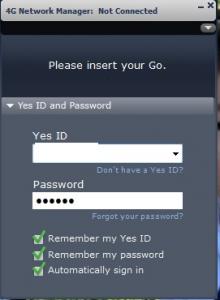
trouble with yes is that it need a place to key in the username and password.
*
I tried the YES dongle with MR3420 V1, light blinks on the Dongle, but there is no indication that the Dongle will be support on its V1 FW. However when i slot in the Dongle into V2, it indicates that YES Dongle Bin file is not available, I believe that if we can upload the Bin file into the V2, we will be able to use it on the router. About User id and PW, we can input via the Telco/Carrier settings where we input Maxis as ID and WAP as PW column.

For YES user that have Zoom, its simple, just LAN out from Zoom into WAN of V2, you are on air and LAN out to 4 users thumbup.gif
digilife
post Nov 7 2012, 05:36 PM

The MNP guy, its me yeah.
*******
Senior Member
8,025 posts

Joined: Feb 2005
From: Planet Boleland


QUOTE(noobandroid @ Nov 7 2012, 05:19 PM)
i have not enter the username and pass for maxis also can use, LOL
*
Maxis is different from YES

My Maxis i also dun input anything, its 3G/3.75G and YES is different, they dun issue simcard, just ID and PW

Attached Image
digilife
post Nov 7 2012, 05:55 PM

The MNP guy, its me yeah.
*******
Senior Member
8,025 posts

Joined: Feb 2005
From: Planet Boleland


QUOTE(maxcheam @ Nov 7 2012, 05:47 PM)
Wimax uses different type of dialer. Even if it can be detected, you need a proper dialer. I doubt the Yes 4G dongle will work on V2 on the factory firmware. 4G compatibility on the V2 is more for LTE.

Anyhow, until someone gets it to work, we can only speculate. tongue.gif
*
Have you tried LAN-ing out your Zoom to your TP Link ?

biggrin.gif
digilife
post Nov 7 2012, 06:29 PM

The MNP guy, its me yeah.
*******
Senior Member
8,025 posts

Joined: Feb 2005
From: Planet Boleland


QUOTE(maxcheam @ Nov 7 2012, 06:08 PM)
yup, it will definitely work 'cause it's what the TP Link is meant to be - a router. We can plug-in any other devices with active internet connection to the WAN port to share the internet connection. For example, a streamyx modem or Unifi (this one a little complicated as it requires VLAN which you'll need to flash the TP-Link with OpenWRT) or a hotel room's LAN cable.

there is no point to use Zoom to share the connection since we can already do it via Zoom's WiFi. Unless, you need to share via LAN cables. Alternatively, you share via LAN cables by just plugging Zoom to a network switch which other users are connected to as well.

I hope it's not too confusing.  whistling.gif
*
Not confusing at all, The purpose to LAN out is to prevent unwanted hacking of YES's high speed network. tongue.gif

I even disable WiFi from the Zoom.

Can you elaborate on this

VLAN which you'll need to flash the TP-Link with OpenWRT

Btw, which model of the TP Link you are using, OpenWRT flashed too?

Sorry to all for the OT here notworthy.gif
digilife
post Nov 7 2012, 07:06 PM

The MNP guy, its me yeah.
*******
Senior Member
8,025 posts

Joined: Feb 2005
From: Planet Boleland


@ Chuah, Only cooper wire or fibre optics can give you true stability.

Others, just some pockets of stability and during peak time all also 4-9-9.

A good router can sometimes provide some stability but it still depends on the Signal over airwaves.

Even YES too sucks sometimes, i knoe as i am using YES too. icon_idea.gif

Btw, i guess all would be much better if its naked , including you ................ laugh.gif laugh.gif laugh.gif

digilife
post Nov 7 2012, 08:56 PM

The MNP guy, its me yeah.
*******
Senior Member
8,025 posts

Joined: Feb 2005
From: Planet Boleland


QUOTE(wavezard @ Nov 7 2012, 08:41 PM)
usually i get -91 -> -103 dbm....if use antenna, can reach -70dbm+?
*
konon-nya Boleh, ie, if you follow instruction well by SiFu Blacktubi
digilife
post Nov 7 2012, 09:07 PM

The MNP guy, its me yeah.
*******
Senior Member
8,025 posts

Joined: Feb 2005
From: Planet Boleland


QUOTE(wavezard @ Nov 7 2012, 09:02 PM)
i think u dont need the antenna.............-65....i get -93, hope will get better with the panel.........wow so long to wait 24.10
*
nvm, Chuah is RICH thumbup.gif

Staying in a Highrise Condo , even Maxis specially built the tower for him to test their network.

thumbup.gif

13 Pages « < 10 11 12 13 >Top
Topic ClosedOptions
 

Change to:
| Lo-Fi Version
0.0746sec    0.45    7 queries    GZIP Disabled
Time is now: 11th December 2025 - 03:15 AM