


Maxis Maxis 3G/HS 3G Thread V6 (Not WBB), Don't Envy at Our Super Fast Speed! :D
Maxis Maxis 3G/HS 3G Thread V6 (Not WBB), Don't Envy at Our Super Fast Speed! :D
|
|
 Nov 9 2012, 02:03 AM Nov 9 2012, 02:03 AM
Return to original view | Post
#241
|
 
Senior Member
8,025 posts Joined: Feb 2005 From: Planet Boleland  
|
Taiwan Server
|
|
|
|
|
|
Nov 9 2012, 09:41 AM
Return to original view | Post
#242
|
|
Senior Member
8,025 posts Joined: Feb 2005 From: Planet Boleland
|
I believe gone are the days where we get very good speed even we are far away from the Base Stn/Tower.
I guess Maxis have really control the QoS , but one thing i noticed is that the speed may not be high but the latency is much faster, meaning the speed is not high but when you click on a page, it load faster. Its happening in my area. I can easily get abt 7Mbps before, but not now  However, pages seems to feel like an instant when i click them. Not only on Chrome, on Safari,IE and Firefox browsers too. 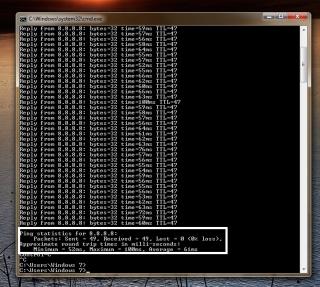
This post has been edited by digilife: Nov 9 2012, 09:49 AM |
|
|
Nov 9 2012, 12:39 PM
Return to original view | Post
#243
|
|
Senior Member
8,025 posts Joined: Feb 2005 From: Planet Boleland
|
QUOTE(cruxidex @ Nov 9 2012, 11:49 AM) same here... RSSI = 95dBmon non supercharge e372 notice since 2 days ago... instead of fluctuating 8-12mbps on non supercharge e372.... since 2days ago, i can only get 4.1mbps-4.4mbps flat out stable at my office (TNB Bangi) and at home (jalan bukit kajang) and yesterday at MRCB Shah Alam level 9 getting flat out 6mbps at least.. we have better ping n stable speeds im still satisfied   Very responsive browsing, speedtest result crappy, i actually prefer this kind of situation. Feels like YES network now on browsing.  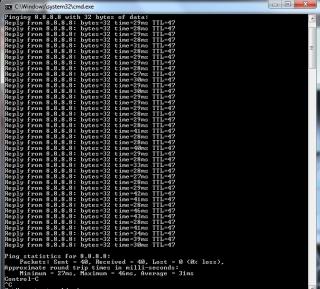
|
|
|
Nov 9 2012, 01:03 PM
Return to original view | Post
#244
|
|
Senior Member
8,025 posts Joined: Feb 2005 From: Planet Boleland
|
QUOTE(rifle_m16 @ Nov 9 2012, 12:53 PM) Wow! Ping average 31ms. Mf680 plug into HW550 ( disable WiFi ) , using LAN cable (Cat6e) Only.You using what network cable? If i wan to use WiFi i will LAN out from HW550 into MR3420 WAN port. ( MR3420 . enable WiFi ) , this way my WiFi will have enough power as the MR3420 wont have to power the USB modem as it receive signal via Cat6e which is very efficient and it will have the full power to WiFi out the signal. Morale of my story is use 2 routers, one to solely power the USB modem, another to solely power WiFi. Mind you these Router output is only 1A  |
|
|
Nov 9 2012, 01:59 PM
Return to original view | Post
#245
|
|
Senior Member
8,025 posts Joined: Feb 2005 From: Planet Boleland
|
QUOTE(chuahcs79 @ Nov 9 2012, 01:20 PM) V2 router power = 1.58A this is my MR3420 V2 adaptor 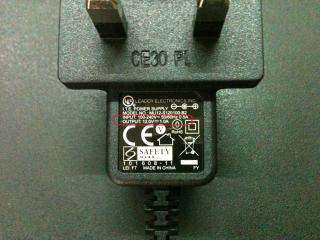
btw, your place sure get Top Notch reception , including Radiation too, i advice to borrow Blacktubi's Radiation meter to do a test.  |
|
|
Nov 9 2012, 02:17 PM
Return to original view | Post
#246
|
|
Senior Member
8,025 posts Joined: Feb 2005 From: Planet Boleland
|
QUOTE(chuahcs79 @ Nov 9 2012, 02:06 PM) using nokia phone is what u called Radiation,.. usb modem, wifi router not really Radiation from the Tower.the websites mention it come with 1.58A power adapter,..  and u only get 1.0A adapter ? My MR3420 V2 is bought new and sealed. No tampering before i open it. Btw, 1A is sufficient and its not hot at all. However V1 is hot after 2hrs of usage. |
|
|
|
|
|
Nov 9 2012, 02:30 PM
Return to original view | Post
#247
|
|
Senior Member
8,025 posts Joined: Feb 2005 From: Planet Boleland
|
QUOTE(fruitie @ Nov 9 2012, 02:19 PM) I need WiFi for my Note 2, previously iPad... When you dun Note2-ing, turn WiFi off , or use your HW550 + mR3420. like me, to supply enough POWER to USB modem and WiFi  |
|
|
Nov 9 2012, 02:41 PM
Return to original view | Post
#248
|
|
Senior Member
8,025 posts Joined: Feb 2005 From: Planet Boleland
|
QUOTE(chuahcs79 @ Nov 9 2012, 02:33 PM) oh one more thing, No need la, just click disable je........turn on/off wifi in TP LINK Stock firmware need to reboot ( after reboot u might lost the good IP ) turn on/off wifi in Openwrt dont need any reboot ( just on or off how many times also dont need reboot to keep your good IP )Same thing in HW550 too  |
|
|
Nov 9 2012, 05:05 PM
Return to original view | Post
#249
|
|
Senior Member
8,025 posts Joined: Feb 2005 From: Planet Boleland
|
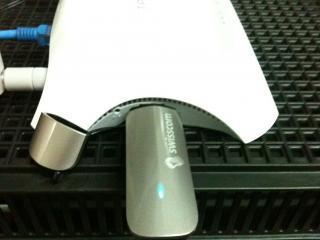
MR3420 V2 can be purchased from ALL IT Hypermarket for rm85, Creditcard no extra charge too



|
|
|
Nov 9 2012, 05:13 PM
Return to original view | Post
#250
|
|
Senior Member
8,025 posts Joined: Feb 2005 From: Planet Boleland
|
QUOTE(akping_1 @ Nov 9 2012, 05:07 PM) b4 that i saw them sell for RM80 only, mayb they know high demand so raise the price... That was V1, if got rm80, i would buy another one as spare. This Router can mod some kind of server |
|
|
Nov 9 2012, 05:50 PM
Return to original view | Post
#251
|
|
Senior Member
8,025 posts Joined: Feb 2005 From: Planet Boleland
|
QUOTE(blacktubi @ Nov 9 2012, 05:42 PM) Announced almost 2 weeks already Fruitie place is Over Congested now. http://www.soyacincau.com/2012/10/29/maxis...dband-packages/ Maxis got lots of bandwidth now. But depends on location, if unlucky like fruitie then Maxis will reply, Best Speed Effort and UP TO 42Mbps You wan 42Mbps, go to Chuah's place and speedtest @ 5am, as those pipu there dun use Maxis as they hate Maxis for erecting the Tower there. You sure can get gooding speedo wei.......... But then again now latency have improved This post has been edited by digilife: Nov 9 2012, 05:51 PM |
|
|
Nov 10 2012, 09:19 AM
Return to original view | Post
#252
|
|
Senior Member
8,025 posts Joined: Feb 2005 From: Planet Boleland
|
QUOTE(fruitie @ Nov 10 2012, 01:27 AM) Someone can take over to be the TS. I guess you should continue as you did a fine job.I give up already due to job commitment. I'll edit the first page if there is any obvious grammatical errors. My English is not good either.  Just do it in your spare time.  Btw, i have find a very constant connection after trying various combo. MF680/E372 direct plug into Router, MR3420 V2, ( no need fan as its not hot at all ) Disable WiFi and use LAN Cat6e ( dun use default TP Link LAN (Cat5) ) to connect to PC via LAN. If i need WiFi, i will LAN out from MR3420 V2 > MR3420 V1 , then enable V1's WiFi . Both V! and V2 dun need Fan as they are not that hot (esp V2 ) Why i do this setup? 1) Fans are noisy. Disturb the serenity of my room.  2) The magnetic fields generated from the fan did interfere with the signal, thus making it inconsistent. 3) Using Fan, after one week makes the setup dusty, worst if you stripped the modem or router as dust accumulates and thereby, "choking" the capacitor/ic making it lagi HOT and slow down the connection. 4) If the router only power the modem on LAN it will give you very good connection ( dun compare with commercial router la ) Likewise, if the Router gets the connection LAN only ( no usb modem ) it also deliver VERY strong WiFi. The makers have a reason why they used a 1A adaptor, to minimise heat. But we are too "clever" use a Power Hungry Modem and yet we wan strong WiFi 5) So using 2 Consumer (home user) Router will give you Optimum Connection with direct plug-in (modem) and if you need WiFi, LAN out from Router 1 > Router 2 and enable Router's 2 WiFi. Setup cost 2# Mr3420 = rm170.00 No need to sweat/headache over OpenWRT/DDWRT ( for a noob like me , if your are Expert/Pro like Chua, go ahead ) My next Project is try a Commercial Router. |
|
|
Nov 10 2012, 02:57 PM
Return to original view | Post
#253
|
|
Senior Member
8,025 posts Joined: Feb 2005 From: Planet Boleland
|
@Chuah, its just personal preference.
I wont argue with you.  btw, i am routed to Kiasuland now which infact i am in Central Boleland, you guys how? 
|
|
|
|
|
|
Nov 10 2012, 03:24 PM
Return to original view | Post
#254
|
|
Senior Member
8,025 posts Joined: Feb 2005 From: Planet Boleland
|
QUOTE(noobandroid @ Nov 10 2012, 03:15 PM) i am in sabah but routed to KL any change on your IP, the 3rd set113.210.ABC.XYZ i mean the ABC set , mine maintains. |
|
|
Nov 10 2012, 08:25 PM
Return to original view | Post
#255
|
|
Senior Member
8,025 posts Joined: Feb 2005 From: Planet Boleland
|
QUOTE(blacktubi @ Nov 10 2012, 08:22 PM) Yagi is for long range shooting only Bro, When will my Panel be send out?Consistency still goes to Panel |
|
|
Nov 10 2012, 08:52 PM
Return to original view | Post
#256
|
|
Senior Member
8,025 posts Joined: Feb 2005 From: Planet Boleland
|
QUOTE(blacktubi @ Nov 10 2012, 08:49 PM) Already sent, still outside on mobile so can't update tracking code Thanks bro, i gonna do a review with my Twin Router setup once I received it.Sorry for that |
|
|
Nov 11 2012, 04:29 PM
Return to original view | Post
#257
|
|
Senior Member
8,025 posts Joined: Feb 2005 From: Planet Boleland
|
QUOTE(ddr3 @ Nov 11 2012, 04:07 PM) just saw ur review. dunno why mine so degil dowan to switch to panel antenna..... Bang DDRthree, Chuah's place @ Farlim, any modem , no Patch Antenna also kawkaw speed cause there is very Little Maxis users there, moreover the Tower is just outside his Window  |
|
|
Nov 11 2012, 04:47 PM
Return to original view | Post
#258
|
|
Senior Member
8,025 posts Joined: Feb 2005 From: Planet Boleland
|
@Chuah,
How is the Population Density in your Area ? Meaning lots of pipu live there? |
|
|
Nov 11 2012, 05:17 PM
Return to original view | Post
#259
|
|
Senior Member
8,025 posts Joined: Feb 2005 From: Planet Boleland
|
QUOTE(chuahcs79 @ Nov 11 2012, 05:05 PM) farlim is one of the most flat area in penang, so what do you say ? No wonder telcos are damn smart, just built Tower instead of Base Stn on top of Triple Storey Shoplots.And you get damn good speed because of the expected population increase in future. On the other hand, Fruitie's place is getting more and more congested, and as such she is getting sulky speed now. My area , there is still no major upgrade, although there is a new Business Center coming up. Lets hope Maxis will put up a Base Stn there once the area open for Business, not waiting for CF. Expected to start business 2013 Jan. And hope Maxis just setup a LTE Stn there  |
|
Topic ClosedOptions
|
| Change to: |  0.0655sec 0.0655sec
 0.38 0.38
 7 queries 7 queries
 GZIP Disabled GZIP Disabled
Time is now: 9th December 2025 - 08:54 AM |
 Quote
Quote